Stop Error - IRQL_not_less_or_equal ntoskrnl.exe


ArthurDent

Well-known member
Member
VIP
Local time
11:26 PM
Posts
72
OS
Windows 11 Pro 23H2 Build 22631
Okay so here's the situation.

Laptop slow so ran CCleaner. Upgraded so that I could automatically run driver updates (THAT was the mistake)

After identifying several drivers to update, ran the updates & restarted the pc.

BSOD with error: Stop Error - IRQL_not_less_or_equal in ntoskrnl.exe

Ran recovery (which worked) and I got back to a working pc again.

I stupidly ran it again from within CCleaner - but this time, after the BSOD, the pc would't recover (I tried several recovery dates).

So, jump into Safe Mode to delete the drivers I had udated & restarted the pc. No joy.

Safe Mode again - rip everything out (sound adapters, network adapters, display adapters) that O'd changed.

pc still won't boot normally.

So, two questions.

1) Is there anything else apart from the drivers that CCleaner may have altered that is causing this problem in ntoskrnl.exe??

2) Is there a quicker way to get the pc to boot into Safe Mode - other than M$ost's convoluted "force power off 3 times" (it is damned annoying).

Art
 
Windows Build/Version
Win 11 Pro 22H2 OS Build 22631.6060

My Computers My Computers

  • At a glance

    Windows 11 Pro 23H2 Build 22631AMD Ryzen 7Pro 3700U16GbRadion Vega 10 Mobile 2Gb
    OS
    Windows 11 Pro 23H2 Build 22631
    Computer type
    Laptop
    Manufacturer/Model
    Lenovo ThinkPad T495s
    CPU
    AMD Ryzen 7Pro 3700U
    Memory
    16Gb
    Graphics Card(s)
    Radion Vega 10 Mobile 2Gb
    Screen Resolution
    1920 x 1080
    Hard Drives
    SK Hynix 2280 m.2 SSD, 512Gb or Crucial T500 m.2 SSD, 1Tb
    Internet Speed
    380 Mbps Fibre
  • Computer type
    PC/Desktop
One or more of these links may be useful:


My Computer My Computer

At a glance

Windows 10Intel(R) Core(TM) i7-4800MQ CPU @ 2.70GHz16 GB Total: Manufacturer : Samsung MemoryTyp...NVIDIA Quadro K3100M; Intel(R) HD Graphics 4600
OS
Windows 10
Computer type
Laptop
Manufacturer/Model
HP
CPU
Intel(R) Core(TM) i7-4800MQ CPU @ 2.70GHz
Motherboard
Product : 190A Version : KBC Version 94.56
Memory
16 GB Total: Manufacturer : Samsung MemoryType : DDR3 FormFactor : SODIMM Capacity : 8GB Speed : 1600
Graphics Card(s)
NVIDIA Quadro K3100M; Intel(R) HD Graphics 4600
Sound Card
IDT High Definition Audio CODEC; PNP Device ID HDAUDIO\FUNC_01&VEN_111D&DEV_76E0
Hard Drives
Model Hitachi HTS727575A9E364
Antivirus
Microsoft Defender
Other Info
Mobile Workstation
Whilst you were replying zbook, I have tried the following:

I booted into Safe Mode, went to msconfig > Services tab, hid all Micro$oft Services and disabled the rest.

On the Startup tab, opened Task Manager and disabled wveything in there.

Tried a normal boot - still the BSOD stop error.

There is a log file (i'm typing it here more for my reference): C:\Windows\System32\Logfiles\srt\SrtTrail.txt
(C:\Windows\minidump is empty)

Will take a dekko at that to see what (if anything) I can find as to the culprit.

Getting into Safe Mode is a right Royal PITA when it used to be so simple. God bless you Micro$oft!

Art

UPDATE:

Contents of logfile SrtTrail.txt (above)

Startup Repair diagnosis and repair log
---------------------------
Last successful boot time: ‎30/‎07/‎2026 10:40:00 (GMT)
Number of repair attempts: 1

Session details
---------------------------
System Disk = \Device\Harddisk0
Windows directory = C:\Windows
AutoChk Run = 0
Number of root causes = 1

Test Performed:
---------------------------
Name:
Result: Completed successfully. Error code = 0x0
Time taken = 0 ms

Test Performed:
---------------------------
Name:
Result: Completed successfully. Error code = 0x0
Time taken = 0 ms

Test Performed:
---------------------------
Name:
Result: Completed successfully. Error code = 0x0
Time taken = 0 ms

Test Performed:
---------------------------
Name:
Result: Completed successfully. Error code = 0x0
Time taken = 0 ms

Test Performed:
---------------------------
Name:
Result: Completed successfully. Error code = 0x0
Time taken = 0 ms

Test Performed:
---------------------------
Name: Check for updates
Result: Completed successfully. Error code = 0x0
Time taken = 0 ms

Test Performed:
---------------------------
Name: System disk test
Result: Completed successfully. Error code = 0x0
Time taken = 0 ms

Test Performed:
---------------------------
Name: Disk failure diagnosis
Result: Completed successfully. Error code = 0x0
Time taken = 0 ms

Test Performed:
---------------------------
Name: Disk metadata test
Result: Completed successfully. Error code = 0x0
Time taken = 156 ms

Test Performed:
---------------------------
Name: Disk metadata test
Result: Completed successfully. Error code = 0x0
Time taken = 16 ms

Test Performed:
---------------------------
Name: Target OS test
Result: Completed successfully. Error code = 0x0
Time taken = 47 ms

Test Performed:
---------------------------
Name: Volume content check
Result: Completed successfully. Error code = 0x0
Time taken = 47 ms

Test Performed:
---------------------------
Name: Boot manager diagnosis
Result: Completed successfully. Error code = 0x0
Time taken = 0 ms

Test Performed:
---------------------------
Name: System boot log diagnosis
Result: Completed successfully. Error code = 0x0
Time taken = 0 ms

Test Performed:
---------------------------
Name: Event log diagnosis
Result: Completed successfully. Error code = 0x0
Time taken = 15 ms

Test Performed:
---------------------------
Name: Internal state check
Result: Completed successfully. Error code = 0x0
Time taken = 0 ms

Test Performed:
---------------------------
Name: Check for installed LCU
Result: Completed successfully. Error code = 0x0
Time taken = 3078 ms

Test Performed:
---------------------------
Name: Check for installed driver updates
Result: Completed successfully. Error code = 0x0
Time taken = 1032 ms

Test Performed:
---------------------------
Name: Check for pending package install
Result: Completed successfully. Error code = 0x0
Time taken = 2265 ms

Test Performed:
---------------------------
Name:
Result: Completed successfully. Error code = 0x0
Time taken = 0 ms

Test Performed:
---------------------------
Name: Boot status test
Result: Completed successfully. Error code = 0x0
Time taken = 0 ms

Test Performed:
---------------------------
Name: Setup state check
Result: Completed successfully. Error code = 0x0
Time taken = 78 ms

Test Performed:
---------------------------
Name: Registry hives test
Result: Completed successfully. Error code = 0x0
Time taken = 610 ms

Test Performed:
---------------------------
Name: Windows boot log diagnosis
Result: Completed successfully. Error code = 0x0
Time taken = 0 ms

Test Performed:
---------------------------
Name: Bugcheck analysis
Result: Completed successfully. Error code = 0x0
Time taken = 140 ms

Root cause found:
---------------------------
Unknown Bugcheck: Bugcheck a. Parameters = 0xb50, 0x2, 0x1, 0xfffff80259e539d9.

Repair action: System Restore
Result: Cancelled

---------------------------
---------------------------


Currently running sfc then to run DISM - both in Safe Mode

Will update the tread in due course

Art

UPDATE 2

sfc found some corrupt files and was unable to fix them. Details in the CBS log file which I am attempting to look at now.

Okay - so that file is HUGE - far too big to be of any constructive use unless folks can tell me what search terms I can use in the log file.

Must be over 1000+ lines

Running DISM now . . .

Result: Failed with an error: 0x800f081f "The source files could not be found. Use the "Source" option to specify the location of the files that are required to restore the feature. For more information on specifying a source location, see Configure a Windows Repair Source."

There is a DISM logfile at C:\Windows\Logs\DISM\DISM.log

Looking at that now . . .

Okay, that logfile is also quite large - less so than the CBS logfile.

It stopped because it couldn't find the source files yet in the logfile it says things like "DISM Manager: PID=3208 TID=1168 Successfully loaded the ImageSession at C:\Windows\System32\DISM" - CDISMManager :: LoadRemoteImageSession??


Swimming through treacle here . . .

Art
 
Last edited:

My Computers My Computers

  • At a glance

    Windows 11 Pro 23H2 Build 22631AMD Ryzen 7Pro 3700U16GbRadion Vega 10 Mobile 2Gb
    OS
    Windows 11 Pro 23H2 Build 22631
    Computer type
    Laptop
    Manufacturer/Model
    Lenovo ThinkPad T495s
    CPU
    AMD Ryzen 7Pro 3700U
    Memory
    16Gb
    Graphics Card(s)
    Radion Vega 10 Mobile 2Gb
    Screen Resolution
    1920 x 1080
    Hard Drives
    SK Hynix 2280 m.2 SSD, 512Gb or Crucial T500 m.2 SSD, 1Tb
    Internet Speed
    380 Mbps Fibre
  • Computer type
    PC/Desktop
Looks like my only option is to run an In-Place Upgrade (keeping all of my personal files, settings, and installed apps intact)??

Any thoughts before I try this?

Art
 

My Computers My Computers

  • At a glance

    Windows 11 Pro 23H2 Build 22631AMD Ryzen 7Pro 3700U16GbRadion Vega 10 Mobile 2Gb
    OS
    Windows 11 Pro 23H2 Build 22631
    Computer type
    Laptop
    Manufacturer/Model
    Lenovo ThinkPad T495s
    CPU
    AMD Ryzen 7Pro 3700U
    Memory
    16Gb
    Graphics Card(s)
    Radion Vega 10 Mobile 2Gb
    Screen Resolution
    1920 x 1080
    Hard Drives
    SK Hynix 2280 m.2 SSD, 512Gb or Crucial T500 m.2 SSD, 1Tb
    Internet Speed
    380 Mbps Fibre
  • Computer type
    PC/Desktop
Last edited:

My Computer My Computer

At a glance

Windows 11 Home x64 Version 25H2 Build 26200....
OS
Windows 11 Home x64 Version 25H2 Build 26200.9168
Thanks Denis,

Copies of those would be useful.

Your post mentions Windows 10, the problem is with a Windows 11 laptop but I guess they still work?

Will DM you my email address.

Many thanks

Art
 

My Computers My Computers

  • At a glance

    Windows 11 Pro 23H2 Build 22631AMD Ryzen 7Pro 3700U16GbRadion Vega 10 Mobile 2Gb
    OS
    Windows 11 Pro 23H2 Build 22631
    Computer type
    Laptop
    Manufacturer/Model
    Lenovo ThinkPad T495s
    CPU
    AMD Ryzen 7Pro 3700U
    Memory
    16Gb
    Graphics Card(s)
    Radion Vega 10 Mobile 2Gb
    Screen Resolution
    1920 x 1080
    Hard Drives
    SK Hynix 2280 m.2 SSD, 512Gb or Crucial T500 m.2 SSD, 1Tb
    Internet Speed
    380 Mbps Fibre
  • Computer type
    PC/Desktop
It's OK, I'll just post them here.

I'm still searching around to find out who I got them from. It feels so rude to have lost that.


Denis
 

My Computer My Computer

At a glance

Windows 11 Home x64 Version 25H2 Build 26200....
OS
Windows 11 Home x64 Version 25H2 Build 26200.9168
The zip file includes the scripts & my own shortcuts to them but I'm not telling you where to stick them.
I'm convinced that somebody else gave me these scripts last year & I'm quite embarrassed by not being able to give them the credit they deserve.

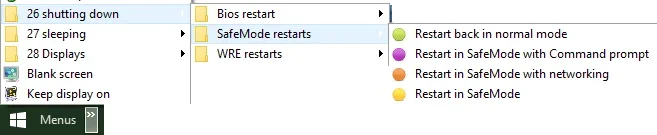
SafeMode.vbs - Restart in Safe mode
If WScript.Arguments.length = 0 Then
Set objShell = CreateObject("Shell.Application")
objShell.ShellExecute "wscript.exe", Chr(34) & WScript.ScriptFullName & Chr(34) & " Run", , "runas", 1
Else
Set objShell2 = WScript.CreateObject("WScript.Shell")
objShell2.Run "bcdedit /set {current} safeboot minimal",0,True
objShell2.Run "shutdown -r -t 0 -f", 0, True
End If

SafeModeCommandPrompt.vbs - Restart in Safe mode with command prompt
If WScript.Arguments.length = 0 Then
Set objShell = CreateObject("Shell.Application")
objShell.ShellExecute "wscript.exe", Chr(34) & WScript.ScriptFullName & Chr(34) & " Run", , "runas", 1
Else
Set objShell2 = WScript.CreateObject("WScript.Shell")
objShell2.Run "bcdedit /set {current} safeboot minimal",0,True
objShell2.Run "bcdedit /set {current} safebootalternateshell yes",0,True
objShell2.Run "shutdown -r -t 0 -f", 0, True
End If

SafeModeNetworking.vbs - Restart in Safe mode with networking
If WScript.Arguments.length = 0 Then
Set objShell = CreateObject("Shell.Application")
objShell.ShellExecute "wscript.exe", Chr(34) & WScript.ScriptFullName & Chr(34) & " Run", , "runas", 1
Else
Set objShell2 = WScript.CreateObject("WScript.Shell")
objShell2.Run "bcdedit /set {current} safeboot network",0,True
objShell2.Run "shutdown -r -t 0 -f", 0, True
End If

NormalMode.vbs - Restart back in normal mode
If WScript.Arguments.length = 0 Then
Set objShell = CreateObject("Shell.Application")
objShell.ShellExecute "wscript.exe", Chr(34) & WScript.ScriptFullName & Chr(34) & " Run", , "runas", 1
Else
Set objShell2 = WScript.CreateObject("WScript.Shell")
objShell2.Run "bcdedit /deletevalue {current} safeboot",0,True
objShell2.Run "shutdown -r -t 0 -f", 0, True
End If


Denis
 

Attachments

My Computer My Computer

At a glance

Windows 11 Home x64 Version 25H2 Build 26200....
OS
Windows 11 Home x64 Version 25H2 Build 26200.9168
In Windows Recovery Environment (RE) run: > post a share link

bcdedit /enum all
bcdedit | find "osdevice" (use the partition drive letter later as needed)
fltmc


See if you can post share links for any of these files: (select the above drive letter and modify C: as needed)

Code:
%systemroot%\Minidump
%systemroot%\memory.dmp
%systemroot%\LiveKernelReports
%windir%\Logs\CBS\CBS.log


C:\WINDOWS\Logs\CBS\CBS.log
C:\Windows\memory.dmp
C:\Windows\Minidump
C:\Windows\LiveKernelReports


Last edited:

My Computer My Computer

At a glance

Windows 10Intel(R) Core(TM) i7-4800MQ CPU @ 2.70GHz16 GB Total: Manufacturer : Samsung MemoryTyp...NVIDIA Quadro K3100M; Intel(R) HD Graphics 4600
OS
Windows 10
Computer type
Laptop
Manufacturer/Model
HP
CPU
Intel(R) Core(TM) i7-4800MQ CPU @ 2.70GHz
Motherboard
Product : 190A Version : KBC Version 94.56
Memory
16 GB Total: Manufacturer : Samsung MemoryType : DDR3 FormFactor : SODIMM Capacity : 8GB Speed : 1600
Graphics Card(s)
NVIDIA Quadro K3100M; Intel(R) HD Graphics 4600
Sound Card
IDT High Definition Audio CODEC; PNP Device ID HDAUDIO\FUNC_01&VEN_111D&DEV_76E0
Hard Drives
Model Hitachi HTS727575A9E364
Antivirus
Microsoft Defender
Other Info
Mobile Workstation
Thank you Denis - extremely helpful as always and much appreciated!

Forgive my ignorance, but could I put these .vbs scripts on the desktop for a "one-click" solution??

@zbook

The minidump folder is completely empty.

The CBS log file is HUGE and incomprehensible

For the moment, I've pulled the SSD from the machine whilst searching for the original - which I cloned on receipt of the machine - but so far, no luck on that front.

I've put a SSD with Linux Zorin 18.1 on it into the machine and copied all documents from the Win 11 SSD onto the Zorin SSD.

Currently busy updating the software on the Zorin SSD.

I have another SSD with Linux Mint 22.3 on it, so that'll go into the machine next for updating and document transfer, then I'll swap the Win 11 SSD back in and have another go at sorting it out.

I can then have a look for the other logfiles: memory.dmp and LiveKernelReport.

I'll then put the HUGE CBS log on Google Drive and provide a link.

I tried five (or possibly six) Restore Points but each generated a failure notification and didn't complete.

Art
 

My Computers My Computers

  • At a glance

    Windows 11 Pro 23H2 Build 22631AMD Ryzen 7Pro 3700U16GbRadion Vega 10 Mobile 2Gb
    OS
    Windows 11 Pro 23H2 Build 22631
    Computer type
    Laptop
    Manufacturer/Model
    Lenovo ThinkPad T495s
    CPU
    AMD Ryzen 7Pro 3700U
    Memory
    16Gb
    Graphics Card(s)
    Radion Vega 10 Mobile 2Gb
    Screen Resolution
    1920 x 1080
    Hard Drives
    SK Hynix 2280 m.2 SSD, 512Gb or Crucial T500 m.2 SSD, 1Tb
    Internet Speed
    380 Mbps Fibre
  • Computer type
    PC/Desktop
could I put these .vbs scripts on the desktop for a "one-click" solution
Yes.
I choose to put shortcuts to things like in this in a Taskbar Toolbar [as shown in my diagram earlier on].
- My scripts are within a folder called C:\Tools to which I have applied restricted editing rights as a security precaution - Set up my Tools folder ditty - TenForums - this all applies equally to Windows 11.
- You could put the scripts on your Desktop or you could put the scripts all in the same folder on your Desktop to keep things tidy. I just like limiting the ability of a potential hacker to edit / replace my scripts and so trick me into running a subverted script.
I have to install ExplorerPatcher in order to have Taskbar Toolbars in Windows 11 - My ExplorerPatcher guide to Windows 11 Taskbar Toolbars [post #2225] - ElevenForum


Denis
 

My Computer My Computer

At a glance

Windows 11 Home x64 Version 25H2 Build 26200....
OS
Windows 11 Home x64 Version 25H2 Build 26200.9168

My Computer My Computer

At a glance

Windows 11 Home x64 Version 25H2 Build 26200....
OS
Windows 11 Home x64 Version 25H2 Build 26200.9168
Sadly no.

I tend to clone a HDD/SSD rather than image them.

I can't find the SSD the machine was shipped with (after I had put Office on it) otherwise I would clone that back onto the borked Windows OS SSD.

Art
 

My Computers My Computers

  • At a glance

    Windows 11 Pro 23H2 Build 22631AMD Ryzen 7Pro 3700U16GbRadion Vega 10 Mobile 2Gb
    OS
    Windows 11 Pro 23H2 Build 22631
    Computer type
    Laptop
    Manufacturer/Model
    Lenovo ThinkPad T495s
    CPU
    AMD Ryzen 7Pro 3700U
    Memory
    16Gb
    Graphics Card(s)
    Radion Vega 10 Mobile 2Gb
    Screen Resolution
    1920 x 1080
    Hard Drives
    SK Hynix 2280 m.2 SSD, 512Gb or Crucial T500 m.2 SSD, 1Tb
    Internet Speed
    380 Mbps Fibre
  • Computer type
    PC/Desktop
Did scripts run in windows RE, safe mode, clean boot, normal boot?

Indicate whether the computer can boot only into Windows RE or whether you were able to boot into safe mode.
 

My Computer My Computer

At a glance

Windows 10Intel(R) Core(TM) i7-4800MQ CPU @ 2.70GHz16 GB Total: Manufacturer : Samsung MemoryTyp...NVIDIA Quadro K3100M; Intel(R) HD Graphics 4600
OS
Windows 10
Computer type
Laptop
Manufacturer/Model
HP
CPU
Intel(R) Core(TM) i7-4800MQ CPU @ 2.70GHz
Motherboard
Product : 190A Version : KBC Version 94.56
Memory
16 GB Total: Manufacturer : Samsung MemoryType : DDR3 FormFactor : SODIMM Capacity : 8GB Speed : 1600
Graphics Card(s)
NVIDIA Quadro K3100M; Intel(R) HD Graphics 4600
Sound Card
IDT High Definition Audio CODEC; PNP Device ID HDAUDIO\FUNC_01&VEN_111D&DEV_76E0
Hard Drives
Model Hitachi HTS727575A9E364
Antivirus
Microsoft Defender
Other Info
Mobile Workstation
@zbrook

I don't understand the question.

I haven't run any scripts

Currently using the laptop with a Linux Mint 22.3 OS on it

The Windows 11 Pro SSD is borked.

Art
 

My Computers My Computers

  • At a glance

    Windows 11 Pro 23H2 Build 22631AMD Ryzen 7Pro 3700U16GbRadion Vega 10 Mobile 2Gb
    OS
    Windows 11 Pro 23H2 Build 22631
    Computer type
    Laptop
    Manufacturer/Model
    Lenovo ThinkPad T495s
    CPU
    AMD Ryzen 7Pro 3700U
    Memory
    16Gb
    Graphics Card(s)
    Radion Vega 10 Mobile 2Gb
    Screen Resolution
    1920 x 1080
    Hard Drives
    SK Hynix 2280 m.2 SSD, 512Gb or Crucial T500 m.2 SSD, 1Tb
    Internet Speed
    380 Mbps Fibre
  • Computer type
    PC/Desktop

My Computer My Computer

At a glance

Windows 10Intel(R) Core(TM) i7-4800MQ CPU @ 2.70GHz16 GB Total: Manufacturer : Samsung MemoryTyp...NVIDIA Quadro K3100M; Intel(R) HD Graphics 4600
OS
Windows 10
Computer type
Laptop
Manufacturer/Model
HP
CPU
Intel(R) Core(TM) i7-4800MQ CPU @ 2.70GHz
Motherboard
Product : 190A Version : KBC Version 94.56
Memory
16 GB Total: Manufacturer : Samsung MemoryType : DDR3 FormFactor : SODIMM Capacity : 8GB Speed : 1600
Graphics Card(s)
NVIDIA Quadro K3100M; Intel(R) HD Graphics 4600
Sound Card
IDT High Definition Audio CODEC; PNP Device ID HDAUDIO\FUNC_01&VEN_111D&DEV_76E0
Hard Drives
Model Hitachi HTS727575A9E364
Antivirus
Microsoft Defender
Other Info
Mobile Workstation
With respect, that is Denis' post (Try3) , not mine.

Also, I reported that mini dump folder was empty and the CBS logfile was HUGE. There mus be 1000+ lines of incomprehensible guff.

I haven't looked at memory.dmp or LiveKernelReports yet.

I've concentrated on getting the laptop working so that I can access email and the internet rather than sorting out the absolute s**tshow that is Windows 11

Plus I've been to a jousting tournament today which was much more enjoyable than sorting out a borked pc.

Art
 

My Computers My Computers

  • At a glance

    Windows 11 Pro 23H2 Build 22631AMD Ryzen 7Pro 3700U16GbRadion Vega 10 Mobile 2Gb
    OS
    Windows 11 Pro 23H2 Build 22631
    Computer type
    Laptop
    Manufacturer/Model
    Lenovo ThinkPad T495s
    CPU
    AMD Ryzen 7Pro 3700U
    Memory
    16Gb
    Graphics Card(s)
    Radion Vega 10 Mobile 2Gb
    Screen Resolution
    1920 x 1080
    Hard Drives
    SK Hynix 2280 m.2 SSD, 512Gb or Crucial T500 m.2 SSD, 1Tb
    Internet Speed
    380 Mbps Fibre
  • Computer type
    PC/Desktop
Use Terminal[admin] and run dism FIRST followed by sfc.
In the Search box,type in---reliability---and check for red flags.
 

My Computer My Computer

At a glance

win 10amd ryzen 5-2600ng skill sniper x 16gbnvidea gtx 1050
OS
win 10
Computer type
PC/Desktop
Manufacturer/Model
home built
CPU
amd ryzen 5-2600
Motherboard
gigabyte b450m-ds3h
Memory
ng skill sniper x 16gb
Graphics Card(s)
nvidea gtx 1050
Monitor(s) Displays
benq fp 92
Hard Drives
samsung 860 evo 500gb m2 ssd
PSU
antec ea550g
Case
nzxt noctis 450
Browser
edge

Latest Support Threads

Back
Top Bottom