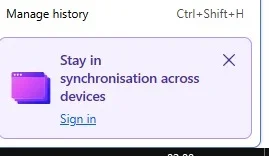
Since updating to Firefox 155, in the history side panel window at the base, I am now getting the attached message which I have never seen before. If I close the box my Firefox screen goes completely blank. Anyone experienced similar ? Apparently hovering on the link supposedly goes to chrome://browser/content/browser.xhtml#, but apparently it goes to accounts,firefox.com. uploaded the image to AI and got no viable answer. I never want to setup sync. I also notice a similar message at the base of the bookmarks side panel.
I don't see such a message in the Side Panel, so I don't know if this will help or not, but try setting the following about:config pref. to false (at least it helps to get rid of such sign-in/sync items in the AppMenu & Bookmarksmenu). identity.fxaccounts.enabled
(Latest Firefox released for Windows)
If that doesn't get rid of it, the other place I would check is about:studies (just in case your installation of FF has been selected for some kind of experimental feature).
just as an aside: the hover link you see in the message, normally opens a kind of blank replica of your current browser (although trying to interact with it nowadays, just seems to crash FF), so I can't understand its purpose in that message.
chrome://browser/content/browser.xhtml#