Solved Stuck In 'Restart Required' After Installing KB5070311 (26200.7309)


Raj_

Member
Local time
9:08 PM
Posts
23
OS
Windows 11
Hey Eleven Forum Community,

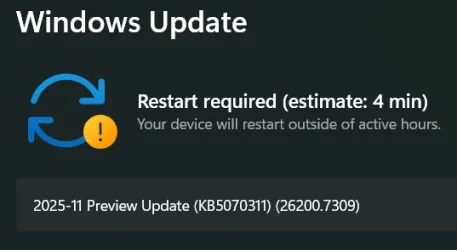
I Recently Installed The Preview Build (25H2 KB5070311 26200.7309) From The Microsoft
It Was Done Just Before I Was Going Offline, So I Selected Update And Shutdown
Just For The Detail, I Installed The Update From Windows Settings Application Along With BIOS Update

I Opened The OS Next Day, Ran CTT's WinUtil Along With O&O ShutUp10++ Which I Do As Usual After Any Windows Update
I Restarted After The Configuration
Couple Minutes Later, I See An Icon Near The System Tray Indicating A Pending Update
I Restarted The Device Thinking That It Must Be A Fix Or Something Else Of A Major Error In The Preview Build
After The Restart And Couple Of Minutes Later, I See The Same Indication Again
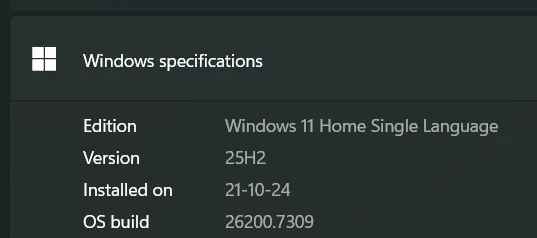
I Checked It Out, Reference The OS Build/Version From The Current Installed, Both From The Windows Settings Application
It Matches As It Can Be Seen In The Attached Files

I Have Restarted (Via Shutdown) The OS Thrice (Or Maybe More)
Haven't Tried Any Troubleshoots Till Now
Made A Post In A Subreddit - reddit.com/r/WindowsHelp/comments/1pdv8q9/

Hope I Was In Detail
Thanks For Reading This
 
Windows Build/Version
25H2 26200.7309

Attachments

  • Screenshot 2025-12-04 141933.webp
    Screenshot 2025-12-04 141933.webp
    12.7 KB · Views: 2
  • Screenshot 2025-12-04 141913.webp
    Screenshot 2025-12-04 141913.webp
    6.9 KB · Views: 1

My Computer

System One

  • OS
    Windows 11
    Computer type
    Laptop
    Manufacturer/Model
    Lenovo LOQ 15IRH8
    CPU
    i512450H
    Memory
    8+8GB DDR4
    Graphics Card(s)
    RTX 4060 Mobile 8GB VRAM
    Screen Resolution
    1920*1080
    Hard Drives
    512+512GB PCIe 4.0 NVMe M.2 SSD

WINDOWS UPDATE PROBLEMS things to try

1. Run troubleshooter-settings-system-troubleshoot-other troubleshooters-windows update-RUN.

2. Reset Windows update using Brink's tutorial Reset Windows Update in Windows 11 Tutorial

3. Open command prompt as administrator. Enter this command.
dism /online /cleanup-image /restorehealth
When complete, Restart computer

Then open command prompt as admin again and run sfc /scannow
Pay attention to the scan results to see if SFC found anything it could not repair

4. CLEAN UP COMPONENT STORE - dism /online /cleanup-image /startcomponentcleanup
Analyze and Clean Up Component Store (WinSxS folder) in Windows 11 Tutorial

5. Do a repair install. This usually works when nothing else will. Repair Install Windows 11 with an In-place Upgrade Tutorial
 

My Computers

System One System Two

  • OS
    Windows 11 Pro 25H2
    Computer type
    PC/Desktop
    Manufacturer/Model
    Dell Optiplex 7080
    CPU
    i9-10900 10 core 20 threads
    Motherboard
    DELL 0J37VM
    Memory
    32 gb
    Graphics Card(s)
    none-Intel UHD Graphics 630
    Sound Card
    Integrated Realtek
    Monitor(s) Displays
    Benq 27
    Screen Resolution
    2560x1440
    Hard Drives
    2x1tb Solidigm m.2 nvme /External drives 512gb Samsung m.2 sata+2tb Kingston m2.nvme
    PSU
    500w
    Case
    MT
    Cooling
    Dell Premium
    Keyboard
    Logitech wired
    Mouse
    Logitech wireless
    Internet Speed
    so slow I'm too embarrassed to tell
    Browser
    #1 Edge #2 Firefox
    Antivirus
    Defender+MWB Premium
  • Operating System
    Windows 11 Pro 24H2 26200.8457
    Computer type
    PC/Desktop
    Manufacturer/Model
    Beelink Mini PC SER5
    CPU
    AMD Ryzen 7 6800U
    Memory
    32 gb
    Graphics card(s)
    integrated
    Sound Card
    integrated
    Monitor(s) Displays
    Benq 27
    Screen Resolution
    2560x1440
    Hard Drives
    1TB Crucial nvme
    Keyboard
    Logitech wired
    Mouse
    Logitech wireless
    Internet Speed
    still too embarrassed to tell
    Browser
    Firefox
    Antivirus
    Defender
    Other Info
    System 3 is non compliant Dell 9020 i7-4770/24gb ram Win11 PRO 26200.8457
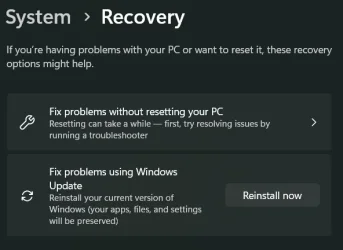
I Reinstalled The Windows Via 'Fix Problems Using Windows Update' In System>Recovery
@glasskuter Thanks For Hearing Me Out
It Was Kinda Fun Tho
 

Attachments

  • Screenshot 2025-12-07 165113.webp
    Screenshot 2025-12-07 165113.webp
    19.9 KB · Views: 1

My Computer

System One

  • OS
    Windows 11
    Computer type
    Laptop
    Manufacturer/Model
    Lenovo LOQ 15IRH8
    CPU
    i512450H
    Memory
    8+8GB DDR4
    Graphics Card(s)
    RTX 4060 Mobile 8GB VRAM
    Screen Resolution
    1920*1080
    Hard Drives
    512+512GB PCIe 4.0 NVMe M.2 SSD

Same problem on my W11 but to be sure I've solved in 32" restoring a previous image of it and to avoid leaving garbage in the OS.
The solution proposed is similar that I use to cleanup my OS after a cumulative update, but in two steps:
First: Dism.exe /Online /Cleanup-Image /AnalyzeComponentStore
Then, (only if recommended): Dism.exe /online /Cleanup-Image /StartComponentCleanup /ResetBase
and at the end (if you want): cleanmgr
The best for me
 

My Computer

System One

  • OS
    windows 11 Pro
    Computer type
    PC/Desktop
... oooops, not exactly similar but the same as point 4 ... sorry
 

My Computer

System One

  • OS
    windows 11 Pro
    Computer type
    PC/Desktop
Instal build 26200.7462 ... end of issues


My Computer

System One

  • OS
    windows 11 Pro
    Computer type
    PC/Desktop

Latest Support Threads

Back
Top Bottom