Stumped - geting Install driver to show hardware, 3 different hard drives


There's still plenty of life left in the old gal!

When October rolls around, I feel like I should put a post in my local neighborhood app and just ask anyone with older PCs they plan to dump to donate them to me. I wonder how many machines I could get running and rescue from destruction. That would be a fun project :-) It would be funny if I ended up with a garage full of machines.
 

My Computers

System One System Two

  • OS
    Win11 Pro 25H2 (RTM+)
    Computer type
    PC/Desktop
    Manufacturer/Model
    Acemagic
    CPU
    Intel i7-14650HX
    Memory
    32 GB
    Graphics Card(s)
    No GPU - Built-in Intel Graphics
    Sound Card
    Integrated
    Monitor(s) Displays
    Varies as machine will often be moved to locations with different monitors
    Screen Resolution
    Varies
    Hard Drives
    1 x 1TB Gen 4 NVMe SSD
    PSU
    120W Power Brick
    Keyboard
    Corsair K70 Max RGB Magnetic Keyboard
    Mouse
    Logitech MX Master 3
    Internet Speed
    1Gb Up / 1 Gb Down
    Browser
    Edge
    Antivirus
    Windows Defender
  • Operating System
    Win11 Pro 25H2 (RTM+)
    Computer type
    Laptop
    Manufacturer/Model
    Lenovo ThinkBook 13x Gen 2
    CPU
    Intel i7-1255U
    Memory
    16 GB
    Graphics card(s)
    Intel Iris Xe Graphics
    Sound Card
    Realtek® ALC3306-CG codec
    Monitor(s) Displays
    13.3-inch IPS Display
    Screen Resolution
    WQXGA (2560 x 1600)
    Hard Drives
    2 TB 4 x 4 NVMe SSD
    PSU
    USB-C / Thunderbolt 4 Power / Charging
    Keyboard
    Backlit, spill resistant keyboard
    Mouse
    Buttonless Glass Precision Touchpad
    Internet Speed
    1Gb Up / 1Gb Down
    Browser
    Edge
    Antivirus
    Windows Defender
    Other Info
    WiFi 6e / Bluetooth 5.1 / Facial Recognition / Fingerprint Sensor / ToF (Time of Flight) Human Presence Sensor
When October rolls around, I feel like I should put a post in my local neighborhood app and just ask anyone with older PCs they plan to dump to donate them to me. I wonder how many machines I could get running and rescue from destruction. That would be a fun project :-) It would be funny if I ended up with a garage full of machines.
This is entirely possible. Perhaps even probable. The missuz knows I would be buried neck deep in PCs if I pulled that stunt here so es ist verboten! It really is a shame so many people will toss a PC for some of the most minor issues when it is likely capable of still adequately performing tasks they used it for. I already have a dozen PCs like this and have donated another dozen to people after I got them up and running. Believe it or not I used to do this for fun!

Sure, I have PCs I've built with brand new components but I find ways to keep them running. More often than not the problem is something simple: a loose connection, a badly needed BIOS update, a bad drive, a clogged cooler, a burnt power switch etc.

I'm choked to see people tossing in the towel on Gen 7 intel chips never mind 12th. Gen. Admittedly, sometimes stuff does go really bad but this is so rare compared to the usual reasons people abandon their PCs.
 

My Computer

System One

  • OS
    WIN 11, WIN 10, WIN 8.1, WIN 7 U, WIN 7 PRO, WIN 7 HOME (32 Bit), LINUX MINT
    Computer type
    PC/Desktop
    Manufacturer/Model
    DIY, ASUS, and DELL
    CPU
    Intel i7 6900K and i9-7960X / AMD 3800X (8 core)
    Motherboard
    ASUS X99E-WS USB 3.1 and ASUS X299 SAGE
    Memory
    128 GB CORSAIR DOMINATOR PLATINUM (B DIE)
    Graphics Card(s)
    NVIDIA 1070 and RTX 3070
    Sound Card
    Crystal Sound (onboard)
    Monitor(s) Displays
    single Samsung 30" 4K and 8" aux monitor
    Screen Resolution
    4K and something equally attrocious. I'll be working on this.
    Hard Drives
    A, B, C, D, E, F, G, H, I, J, K, L, M, N, O, P, Q, R, S, T, U, V, W

    Ports X, Y, and Z are reserved for USB access and removable drives.

    Drive types consist of the following: Various mechanical hard drives bearing the brand names, Seagate, Toshiba, and Western Digital. Various NVMe drives bearing the brand names Kingston, Intel, Silicon Power, Crucial, Western Digital, and Team Group. Various SATA SSDs bearing various different brand names.

    RAID arrays included:

    LSI RAID 10 (WD Velociraptors) 1115.72 GB
    LSI RAID 10 (WD SSDS) 463.80 GB

    INTEL RAID 0 (KINGSTON HYPER X) System 447.14 GB
    INTEL RAID 1 TOSHIBA ENTERPRIZE class Data 2794.52 GB
    INTEL RAID 1 SEAGATE HYBRID 931.51 GB
    PSU
    SEVERAL. I prefer my Corsair Platinum HX1000i but I also like EVGA power supplies
    Case
    ThermalTake Level 10 GT (among others)
    Cooling
    Noctua is my favorite and I use it in my main. I also own various other coolers.
    Keyboard
    all kinds.
    Mouse
    all kinds
    Internet Speed
    360 mbps - 1 gbps (depending)
    Browser
    FIREFOX
    Antivirus
    KASPERSKY (no apologies)
    Other Info
    Gave Dell touch screen with Windows 11 to daughter and got me an OTVOC. Being a PC builder I own many desktop PCs as well. I am a father of five providing PCs, laptops, and tablets for all my family, most of which I have modified, rebuilt, or simply built from scratch. I do not own a cell phone, never have, never will.
:oops:What happened? Did you go at it with a crow bar??
Sorry, by finished, I mean installed, tested and ready to use.

I clean installed Windows 10 Pro then upgraded to Windows 11 without any problems (after making these registry changes (Shift F10 and run Bypass11.bat), of which only the CPU check was necessary I believe since it has a Intel i5 7th gen processor).

reg add HKLM\System\Setup\LabConfig /v BypassTPMCheck /t reg_dword /d 0x00000001 /f > NUL
reg add HKLM\System\Setup\LabConfig /v BypassSecureBootCheck /t reg_dword /d 0x00000001 /f > NUL
reg add HKLM\System\Setup\LabConfig /v BypassRAMCheck /t reg_dword /d 0x00000001 /f > NUL
reg add HKLM\System\Setup\LabConfig /v BypassStorageCheck /t reg_dword /d 0x00000001 /f > NUL
reg add HKLM\System\Setup\LabConfig /v BypassCPUCheck /t reg_dword /d 0x00000001 /f > NUL
 

My Computer

System One

  • OS
    Windows 11 Pro X64 25H2 Build 26200.7019
    Computer type
    PC/Desktop
    Manufacturer/Model
    Dell Vostro 3910
    CPU
    12th Gen Intel Core i7-12700, 2.1Ghz
    Memory
    32.0GB PC3-12800 DDR3 SDRAM
    Graphics Card(s)
    EVGA GeForce GTX 780
    Sound Card
    Realtek HD Audio
    Monitor(s) Displays
    Visio 32" TV
    Screen Resolution
    1920x1080
    Hard Drives
    2TB Samsung NVME SSD 990 PRO with Heatsink
    4TB Fanxiang 2.5" SATA III SSD S101Q
    PSU
    ?
    Keyboard
    Dell USB SK-8115
    Mouse
    Microsoft Sculpt Mobile Mouse 1569
    Internet Speed
    374.10MB Down, 11.75MB Up
    Browser
    Edge - eM Client Pro for E-Mail
    Antivirus
    Windows Security
    Other Info
    Purchased December 2013, many upgrades since then
Oh, *whew* :woozy:

That's good news. I have an old HP of the same vintage that still runs surprisingly snappy. One thing I can say for Win 11 is that they sure cut out a lot of the bloat ware. This is one reason why older PCs run so well on it once the hurdles are removed.

In your description you listed a Dell Vostro 3910. I'm guessing we aren't talking about the same PC here as that one (according to your description) is clearly a 12th Gen i7 unit. Many PCs over a decade old still run fine today. My personal rule of thumb is to give the thing a couple of decades before you give it up. Even then it can be a great learning tool for children. Think of the children! 😎
 

My Computer

System One

  • OS
    WIN 11, WIN 10, WIN 8.1, WIN 7 U, WIN 7 PRO, WIN 7 HOME (32 Bit), LINUX MINT
    Computer type
    PC/Desktop
    Manufacturer/Model
    DIY, ASUS, and DELL
    CPU
    Intel i7 6900K and i9-7960X / AMD 3800X (8 core)
    Motherboard
    ASUS X99E-WS USB 3.1 and ASUS X299 SAGE
    Memory
    128 GB CORSAIR DOMINATOR PLATINUM (B DIE)
    Graphics Card(s)
    NVIDIA 1070 and RTX 3070
    Sound Card
    Crystal Sound (onboard)
    Monitor(s) Displays
    single Samsung 30" 4K and 8" aux monitor
    Screen Resolution
    4K and something equally attrocious. I'll be working on this.
    Hard Drives
    A, B, C, D, E, F, G, H, I, J, K, L, M, N, O, P, Q, R, S, T, U, V, W

    Ports X, Y, and Z are reserved for USB access and removable drives.

    Drive types consist of the following: Various mechanical hard drives bearing the brand names, Seagate, Toshiba, and Western Digital. Various NVMe drives bearing the brand names Kingston, Intel, Silicon Power, Crucial, Western Digital, and Team Group. Various SATA SSDs bearing various different brand names.

    RAID arrays included:

    LSI RAID 10 (WD Velociraptors) 1115.72 GB
    LSI RAID 10 (WD SSDS) 463.80 GB

    INTEL RAID 0 (KINGSTON HYPER X) System 447.14 GB
    INTEL RAID 1 TOSHIBA ENTERPRIZE class Data 2794.52 GB
    INTEL RAID 1 SEAGATE HYBRID 931.51 GB
    PSU
    SEVERAL. I prefer my Corsair Platinum HX1000i but I also like EVGA power supplies
    Case
    ThermalTake Level 10 GT (among others)
    Cooling
    Noctua is my favorite and I use it in my main. I also own various other coolers.
    Keyboard
    all kinds.
    Mouse
    all kinds
    Internet Speed
    360 mbps - 1 gbps (depending)
    Browser
    FIREFOX
    Antivirus
    KASPERSKY (no apologies)
    Other Info
    Gave Dell touch screen with Windows 11 to daughter and got me an OTVOC. Being a PC builder I own many desktop PCs as well. I am a father of five providing PCs, laptops, and tablets for all my family, most of which I have modified, rebuilt, or simply built from scratch. I do not own a cell phone, never have, never will.
reg add HKLM\System\Setup\LabConfig /v BypassTPMCheck /t reg_dword /d 0x00000001 /f > NUL
reg add HKLM\System\Setup\LabConfig /v BypassSecureBootCheck /t reg_dword /d 0x00000001 /f > NUL
reg add HKLM\System\Setup\LabConfig /v BypassRAMCheck /t reg_dword /d 0x00000001 /f > NUL
reg add HKLM\System\Setup\LabConfig /v BypassStorageCheck /t reg_dword /d 0x00000001 /f > NUL
reg add HKLM\System\Setup\LabConfig /v BypassCPUCheck /t reg_dword /d 0x00000001 /f > NUL

To simplify, you can omit the last two in the above list. They are fictitious entries and do absolutely nothing. You will get the same exact results without those entries.
 

My Computers

System One System Two

  • OS
    Win11 Pro 25H2 (RTM+)
    Computer type
    PC/Desktop
    Manufacturer/Model
    Acemagic
    CPU
    Intel i7-14650HX
    Memory
    32 GB
    Graphics Card(s)
    No GPU - Built-in Intel Graphics
    Sound Card
    Integrated
    Monitor(s) Displays
    Varies as machine will often be moved to locations with different monitors
    Screen Resolution
    Varies
    Hard Drives
    1 x 1TB Gen 4 NVMe SSD
    PSU
    120W Power Brick
    Keyboard
    Corsair K70 Max RGB Magnetic Keyboard
    Mouse
    Logitech MX Master 3
    Internet Speed
    1Gb Up / 1 Gb Down
    Browser
    Edge
    Antivirus
    Windows Defender
  • Operating System
    Win11 Pro 25H2 (RTM+)
    Computer type
    Laptop
    Manufacturer/Model
    Lenovo ThinkBook 13x Gen 2
    CPU
    Intel i7-1255U
    Memory
    16 GB
    Graphics card(s)
    Intel Iris Xe Graphics
    Sound Card
    Realtek® ALC3306-CG codec
    Monitor(s) Displays
    13.3-inch IPS Display
    Screen Resolution
    WQXGA (2560 x 1600)
    Hard Drives
    2 TB 4 x 4 NVMe SSD
    PSU
    USB-C / Thunderbolt 4 Power / Charging
    Keyboard
    Backlit, spill resistant keyboard
    Mouse
    Buttonless Glass Precision Touchpad
    Internet Speed
    1Gb Up / 1Gb Down
    Browser
    Edge
    Antivirus
    Windows Defender
    Other Info
    WiFi 6e / Bluetooth 5.1 / Facial Recognition / Fingerprint Sensor / ToF (Time of Flight) Human Presence Sensor
To simplify, you can omit the last two in the above list. They are fictitious entries and do absolutely nothing. You will get the same exact results without those entries.
Thanks, I'll try that next time and see what happens.
 

My Computer

System One

  • OS
    Windows 11 Pro X64 25H2 Build 26200.7019
    Computer type
    PC/Desktop
    Manufacturer/Model
    Dell Vostro 3910
    CPU
    12th Gen Intel Core i7-12700, 2.1Ghz
    Memory
    32.0GB PC3-12800 DDR3 SDRAM
    Graphics Card(s)
    EVGA GeForce GTX 780
    Sound Card
    Realtek HD Audio
    Monitor(s) Displays
    Visio 32" TV
    Screen Resolution
    1920x1080
    Hard Drives
    2TB Samsung NVME SSD 990 PRO with Heatsink
    4TB Fanxiang 2.5" SATA III SSD S101Q
    PSU
    ?
    Keyboard
    Dell USB SK-8115
    Mouse
    Microsoft Sculpt Mobile Mouse 1569
    Internet Speed
    374.10MB Down, 11.75MB Up
    Browser
    Edge - eM Client Pro for E-Mail
    Antivirus
    Windows Security
    Other Info
    Purchased December 2013, many upgrades since then
:oops:What happened? Did you go at it with a crow bar??
Sorry, should have replied before. I installed Windows 10 then did an upgrade install to Windows 11 and it worked.
 

My Computer

System One

  • OS
    Windows 11 Pro X64 25H2 Build 26200.7019
    Computer type
    PC/Desktop
    Manufacturer/Model
    Dell Vostro 3910
    CPU
    12th Gen Intel Core i7-12700, 2.1Ghz
    Memory
    32.0GB PC3-12800 DDR3 SDRAM
    Graphics Card(s)
    EVGA GeForce GTX 780
    Sound Card
    Realtek HD Audio
    Monitor(s) Displays
    Visio 32" TV
    Screen Resolution
    1920x1080
    Hard Drives
    2TB Samsung NVME SSD 990 PRO with Heatsink
    4TB Fanxiang 2.5" SATA III SSD S101Q
    PSU
    ?
    Keyboard
    Dell USB SK-8115
    Mouse
    Microsoft Sculpt Mobile Mouse 1569
    Internet Speed
    374.10MB Down, 11.75MB Up
    Browser
    Edge - eM Client Pro for E-Mail
    Antivirus
    Windows Security
    Other Info
    Purchased December 2013, many upgrades since then
Windows 11 Pro X64 23H2 Build 26100.3194 Computer type PC/Desktop Manufacturer/Model Dell Vostro 3910 CPU 12th Gen Intel Core i7-12700, 2.1Ghz Memory 32.0GB PC3-12800 DDR3 SDRAM Graphics Card(s) EVGA GeForce GTX 780 Sound Card Realtek HD Audio Monitor(s) Displays Visio 32" TV Screen Resolution 1920x1080 Hard Drives 1.0TB Model NVMe ADATA LEGEND 700 GOLD
2TB Seagate ST2000NM0011 72K SATA-6GB;
2TB Seagate ST2000DM006-2DM164 72K SATA-6GB (external) PSU ? Keyboard Dell USB (KVMS) Mouse Logitec USB (KVMS) Internet Speed 374.10MB Down, 11.75MB Up Browser Edge - eM Client Pro for E-Mail Antivirus Windows Security Other Info Purchased December 2013, many upgrades since then


That computer is not finished! :tears: There's still plenty of life left in the old gal! Why abandon her in some old recycling station when she's given you so much? She just needs a little TLC. You can always save her for a backup PC. There are ways of fixing this. Don't do it! Think of the children!
Agree, see my previous post. Was able to upgrade from Windows 10 Pro to Windows 11 Pro, bypassing the drive problem.

I just started working on another, it's a Dell Optiplex 3050 that came without a hard drive so I put a 250GB PNY SSD in it and now have the same problem,

Install driver to show hardware​

when I try to do a clean install. I'll try the Win 10 upgrade to Win 11 again, see if it works. Currently having problems upgrading from 10 to 11. I'll try creating a USB Win 11 drive with Rufus and see how that works.

Thanks
 

My Computer

System One

  • OS
    Windows 11 Pro X64 25H2 Build 26200.7019
    Computer type
    PC/Desktop
    Manufacturer/Model
    Dell Vostro 3910
    CPU
    12th Gen Intel Core i7-12700, 2.1Ghz
    Memory
    32.0GB PC3-12800 DDR3 SDRAM
    Graphics Card(s)
    EVGA GeForce GTX 780
    Sound Card
    Realtek HD Audio
    Monitor(s) Displays
    Visio 32" TV
    Screen Resolution
    1920x1080
    Hard Drives
    2TB Samsung NVME SSD 990 PRO with Heatsink
    4TB Fanxiang 2.5" SATA III SSD S101Q
    PSU
    ?
    Keyboard
    Dell USB SK-8115
    Mouse
    Microsoft Sculpt Mobile Mouse 1569
    Internet Speed
    374.10MB Down, 11.75MB Up
    Browser
    Edge - eM Client Pro for E-Mail
    Antivirus
    Windows Security
    Other Info
    Purchased December 2013, many upgrades since then
Agree, see my previous post. Was able to upgrade from Windows 10 Pro to Windows 11 Pro, bypassing the drive problem.

I just started working on another, it's a Dell Optiplex 3050 that came without a hard drive so I put a 250GB PNY SSD in it and now have the same problem,

Install driver to show hardware​

when I try to do a clean install. I'll try the Win 10 upgrade to Win 11 again, see if it works. Currently having problems upgrading from 10 to 11. I'll try creating a USB Win 11 drive with Rufus and see how that works.

Thanks
Sometimes this happens if you had RAID previously installed on your unit or, if your BIOS is configured for RAID. Should this be the case the system is asking for the RAID driver. Other times it could be looking for a non-existent CD/DVD ROM driver. This video might provide some help in that regard.


My Computer

System One

  • OS
    WIN 11, WIN 10, WIN 8.1, WIN 7 U, WIN 7 PRO, WIN 7 HOME (32 Bit), LINUX MINT
    Computer type
    PC/Desktop
    Manufacturer/Model
    DIY, ASUS, and DELL
    CPU
    Intel i7 6900K and i9-7960X / AMD 3800X (8 core)
    Motherboard
    ASUS X99E-WS USB 3.1 and ASUS X299 SAGE
    Memory
    128 GB CORSAIR DOMINATOR PLATINUM (B DIE)
    Graphics Card(s)
    NVIDIA 1070 and RTX 3070
    Sound Card
    Crystal Sound (onboard)
    Monitor(s) Displays
    single Samsung 30" 4K and 8" aux monitor
    Screen Resolution
    4K and something equally attrocious. I'll be working on this.
    Hard Drives
    A, B, C, D, E, F, G, H, I, J, K, L, M, N, O, P, Q, R, S, T, U, V, W

    Ports X, Y, and Z are reserved for USB access and removable drives.

    Drive types consist of the following: Various mechanical hard drives bearing the brand names, Seagate, Toshiba, and Western Digital. Various NVMe drives bearing the brand names Kingston, Intel, Silicon Power, Crucial, Western Digital, and Team Group. Various SATA SSDs bearing various different brand names.

    RAID arrays included:

    LSI RAID 10 (WD Velociraptors) 1115.72 GB
    LSI RAID 10 (WD SSDS) 463.80 GB

    INTEL RAID 0 (KINGSTON HYPER X) System 447.14 GB
    INTEL RAID 1 TOSHIBA ENTERPRIZE class Data 2794.52 GB
    INTEL RAID 1 SEAGATE HYBRID 931.51 GB
    PSU
    SEVERAL. I prefer my Corsair Platinum HX1000i but I also like EVGA power supplies
    Case
    ThermalTake Level 10 GT (among others)
    Cooling
    Noctua is my favorite and I use it in my main. I also own various other coolers.
    Keyboard
    all kinds.
    Mouse
    all kinds
    Internet Speed
    360 mbps - 1 gbps (depending)
    Browser
    FIREFOX
    Antivirus
    KASPERSKY (no apologies)
    Other Info
    Gave Dell touch screen with Windows 11 to daughter and got me an OTVOC. Being a PC builder I own many desktop PCs as well. I am a father of five providing PCs, laptops, and tablets for all my family, most of which I have modified, rebuilt, or simply built from scratch. I do not own a cell phone, never have, never will.
I used Rufus to create a flash drive, booted it and was able to do a clean install, no drive problems.

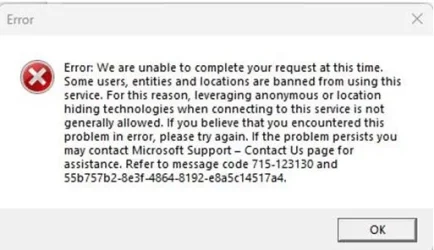
Just tried to use Rufus to create another flash drive and now I get this:
Rufus-error.webp

Any idea why?
 

My Computer

System One

  • OS
    Windows 11 Pro X64 25H2 Build 26200.7019
    Computer type
    PC/Desktop
    Manufacturer/Model
    Dell Vostro 3910
    CPU
    12th Gen Intel Core i7-12700, 2.1Ghz
    Memory
    32.0GB PC3-12800 DDR3 SDRAM
    Graphics Card(s)
    EVGA GeForce GTX 780
    Sound Card
    Realtek HD Audio
    Monitor(s) Displays
    Visio 32" TV
    Screen Resolution
    1920x1080
    Hard Drives
    2TB Samsung NVME SSD 990 PRO with Heatsink
    4TB Fanxiang 2.5" SATA III SSD S101Q
    PSU
    ?
    Keyboard
    Dell USB SK-8115
    Mouse
    Microsoft Sculpt Mobile Mouse 1569
    Internet Speed
    374.10MB Down, 11.75MB Up
    Browser
    Edge - eM Client Pro for E-Mail
    Antivirus
    Windows Security
    Other Info
    Purchased December 2013, many upgrades since then
Okay, I used an iso I already downloaded and the problem went away so it's another Rufus ISO download problem with Microsoft.
 

My Computer

System One

  • OS
    Windows 11 Pro X64 25H2 Build 26200.7019
    Computer type
    PC/Desktop
    Manufacturer/Model
    Dell Vostro 3910
    CPU
    12th Gen Intel Core i7-12700, 2.1Ghz
    Memory
    32.0GB PC3-12800 DDR3 SDRAM
    Graphics Card(s)
    EVGA GeForce GTX 780
    Sound Card
    Realtek HD Audio
    Monitor(s) Displays
    Visio 32" TV
    Screen Resolution
    1920x1080
    Hard Drives
    2TB Samsung NVME SSD 990 PRO with Heatsink
    4TB Fanxiang 2.5" SATA III SSD S101Q
    PSU
    ?
    Keyboard
    Dell USB SK-8115
    Mouse
    Microsoft Sculpt Mobile Mouse 1569
    Internet Speed
    374.10MB Down, 11.75MB Up
    Browser
    Edge - eM Client Pro for E-Mail
    Antivirus
    Windows Security
    Other Info
    Purchased December 2013, many upgrades since then
Okay, I used an iso I already downloaded and the problem went away so it's another Rufus ISO download problem with Microsoft.

This is precisely the sort of thing that makes me always want to know how to perform operations like this using just the native Microsoft tools. Please don't misunderstand, I have absolutely nothing against Rufus. In fact, I think that it is an excellent tool making this task so easy. I'm just saying that it never hurts to know about alternative solutions just in case one doesn't work for some odd reason.

I keep notes for myself on a lot of tasks - like installing Windows with a local account and no MS account and bypassing Win 11 specific requirements. I think my list is up to something like 7 ways to do this that all still work with the latest versions of 11.
 

My Computers

System One System Two

  • OS
    Win11 Pro 25H2 (RTM+)
    Computer type
    PC/Desktop
    Manufacturer/Model
    Acemagic
    CPU
    Intel i7-14650HX
    Memory
    32 GB
    Graphics Card(s)
    No GPU - Built-in Intel Graphics
    Sound Card
    Integrated
    Monitor(s) Displays
    Varies as machine will often be moved to locations with different monitors
    Screen Resolution
    Varies
    Hard Drives
    1 x 1TB Gen 4 NVMe SSD
    PSU
    120W Power Brick
    Keyboard
    Corsair K70 Max RGB Magnetic Keyboard
    Mouse
    Logitech MX Master 3
    Internet Speed
    1Gb Up / 1 Gb Down
    Browser
    Edge
    Antivirus
    Windows Defender
  • Operating System
    Win11 Pro 25H2 (RTM+)
    Computer type
    Laptop
    Manufacturer/Model
    Lenovo ThinkBook 13x Gen 2
    CPU
    Intel i7-1255U
    Memory
    16 GB
    Graphics card(s)
    Intel Iris Xe Graphics
    Sound Card
    Realtek® ALC3306-CG codec
    Monitor(s) Displays
    13.3-inch IPS Display
    Screen Resolution
    WQXGA (2560 x 1600)
    Hard Drives
    2 TB 4 x 4 NVMe SSD
    PSU
    USB-C / Thunderbolt 4 Power / Charging
    Keyboard
    Backlit, spill resistant keyboard
    Mouse
    Buttonless Glass Precision Touchpad
    Internet Speed
    1Gb Up / 1Gb Down
    Browser
    Edge
    Antivirus
    Windows Defender
    Other Info
    WiFi 6e / Bluetooth 5.1 / Facial Recognition / Fingerprint Sensor / ToF (Time of Flight) Human Presence Sensor
This is precisely the sort of thing that makes me always want to know how to perform operations like this using just the native Microsoft tools. Please don't misunderstand, I have absolutely nothing against Rufus. In fact, I think that it is an excellent tool making this task so easy. I'm just saying that it never hurts to know about alternative solutions just in case one doesn't work for some odd reason.

I keep notes for myself on a lot of tasks - like installing Windows with a local account and no MS account and bypassing Win 11 specific requirements. I think my list is up to something like 7 ways to do this that all still work with the latest versions of 11.
In this case, I could not do a clean install using a USB flash drive built by Microsoft's Media Creation Tool, it got the drive error that started this topic. I then used Rufus to create the USB flash drive and had no problem doing a clean install. It also automatically setup a local account and bypassed the Microsoft checks for non-supported hardware. It's definitely a tool worth using for Windows 11 at this time.
 

My Computer

System One

  • OS
    Windows 11 Pro X64 25H2 Build 26200.7019
    Computer type
    PC/Desktop
    Manufacturer/Model
    Dell Vostro 3910
    CPU
    12th Gen Intel Core i7-12700, 2.1Ghz
    Memory
    32.0GB PC3-12800 DDR3 SDRAM
    Graphics Card(s)
    EVGA GeForce GTX 780
    Sound Card
    Realtek HD Audio
    Monitor(s) Displays
    Visio 32" TV
    Screen Resolution
    1920x1080
    Hard Drives
    2TB Samsung NVME SSD 990 PRO with Heatsink
    4TB Fanxiang 2.5" SATA III SSD S101Q
    PSU
    ?
    Keyboard
    Dell USB SK-8115
    Mouse
    Microsoft Sculpt Mobile Mouse 1569
    Internet Speed
    374.10MB Down, 11.75MB Up
    Browser
    Edge - eM Client Pro for E-Mail
    Antivirus
    Windows Security
    Other Info
    Purchased December 2013, many upgrades since then
This is precisely the sort of thing that makes me always want to know how to perform operations like this using just the native Microsoft tools. Please don't misunderstand, I have absolutely nothing against Rufus. In fact, I think that it is an excellent tool making this task so easy. I'm just saying that it never hurts to know about alternative solutions just in case one doesn't work for some odd reason.

I keep notes for myself on a lot of tasks - like installing Windows with a local account and no MS account and bypassing Win 11 specific requirements. I think my list is up to something like 7 ways to do this that all still work with the latest versions of 11.
I know MS did provide a page on their own web site providing instructions on how to install Windows 11 on a "non-compatible" system. Of course it included their own caveat and warning but that is how I managed to get it to run on my X99 build. I'll not forget this as that is when my TBMT flew out the Windows forever. :confused:
 

My Computer

System One

  • OS
    WIN 11, WIN 10, WIN 8.1, WIN 7 U, WIN 7 PRO, WIN 7 HOME (32 Bit), LINUX MINT
    Computer type
    PC/Desktop
    Manufacturer/Model
    DIY, ASUS, and DELL
    CPU
    Intel i7 6900K and i9-7960X / AMD 3800X (8 core)
    Motherboard
    ASUS X99E-WS USB 3.1 and ASUS X299 SAGE
    Memory
    128 GB CORSAIR DOMINATOR PLATINUM (B DIE)
    Graphics Card(s)
    NVIDIA 1070 and RTX 3070
    Sound Card
    Crystal Sound (onboard)
    Monitor(s) Displays
    single Samsung 30" 4K and 8" aux monitor
    Screen Resolution
    4K and something equally attrocious. I'll be working on this.
    Hard Drives
    A, B, C, D, E, F, G, H, I, J, K, L, M, N, O, P, Q, R, S, T, U, V, W

    Ports X, Y, and Z are reserved for USB access and removable drives.

    Drive types consist of the following: Various mechanical hard drives bearing the brand names, Seagate, Toshiba, and Western Digital. Various NVMe drives bearing the brand names Kingston, Intel, Silicon Power, Crucial, Western Digital, and Team Group. Various SATA SSDs bearing various different brand names.

    RAID arrays included:

    LSI RAID 10 (WD Velociraptors) 1115.72 GB
    LSI RAID 10 (WD SSDS) 463.80 GB

    INTEL RAID 0 (KINGSTON HYPER X) System 447.14 GB
    INTEL RAID 1 TOSHIBA ENTERPRIZE class Data 2794.52 GB
    INTEL RAID 1 SEAGATE HYBRID 931.51 GB
    PSU
    SEVERAL. I prefer my Corsair Platinum HX1000i but I also like EVGA power supplies
    Case
    ThermalTake Level 10 GT (among others)
    Cooling
    Noctua is my favorite and I use it in my main. I also own various other coolers.
    Keyboard
    all kinds.
    Mouse
    all kinds
    Internet Speed
    360 mbps - 1 gbps (depending)
    Browser
    FIREFOX
    Antivirus
    KASPERSKY (no apologies)
    Other Info
    Gave Dell touch screen with Windows 11 to daughter and got me an OTVOC. Being a PC builder I own many desktop PCs as well. I am a father of five providing PCs, laptops, and tablets for all my family, most of which I have modified, rebuilt, or simply built from scratch. I do not own a cell phone, never have, never will.
Back
Top Bottom