
Hi,
For reading PDF files i use the program: Sumatra PDF Reader
Since version 3.5.2 i find a problem:
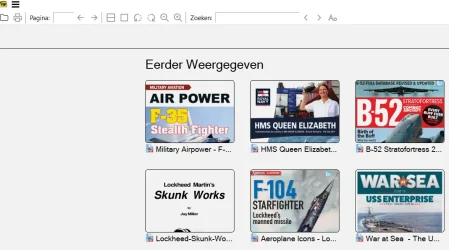
When i used the old version the program always starterd with a screen-menu with icons of all the PDF i have used before
I then can click an icon to start reading a PDF file
Since 3.5.2 After i have read some PDF files, Sumatra PDF does not start with the menu with the icons of all the PFFs i used but start with displaying th latest PDF i used
What can i do to get he old situation back?
What i want is, when i start SumatraPDF, that it start with a menu and displaying Icons of the rememberd PDFs i used, so can choose which PDF to start reading
(See attachment)
For reading PDF files i use the program: Sumatra PDF Reader
Since version 3.5.2 i find a problem:
When i used the old version the program always starterd with a screen-menu with icons of all the PDF i have used before
I then can click an icon to start reading a PDF file
Since 3.5.2 After i have read some PDF files, Sumatra PDF does not start with the menu with the icons of all the PFFs i used but start with displaying th latest PDF i used
What can i do to get he old situation back?
What i want is, when i start SumatraPDF, that it start with a menu and displaying Icons of the rememberd PDFs i used, so can choose which PDF to start reading
(See attachment)
Attachments
My Computer
At a glance
windows 11
- OS
- windows 11






