SYN DS420J+Win11 24H2 = nothing fixes it


ChrisBJC

Member
Local time
10:28 AM
Posts
7
OS
Win11 24H2
Purchased new mini desktop PC (GMKtec) with Win11 Pro 24H2 (21600.8037). Tried to map my existing Synology drive to it (made sure NAS fw was updated, and SMB client is enabled.
I get the 0x80070035 path not found. Tried both IP and name
Verified:
Netbios is enabled
Computer Browser service is on
File & Print Sharing is on
Went into Group Policy and disabled Digital signing and enabled insecure logins
Enabled SMBv1 supprt under Windows Services.
Spent 2 days in forums and on YT looking for a solution. It worked perfectly on my old PC (which died last week)
I have run out of ideas. Someone suggested reinstalling Windows from scratch, unsure if that would fix anything. Thanks for any help.
 
Windows Build/Version
Win11 Pro 24H2 (21600.8037)

My Computer My Computer

At a glance

Win11 24H2AMD Ryzen 5 PRO16 GBRadeon
OS
Win11 24H2
Computer type
PC/Desktop
Manufacturer/Model
GMKtec
CPU
AMD Ryzen 5 PRO
Motherboard
GMKtec
Memory
16 GB
Graphics Card(s)
Radeon
Sound Card
Realtek onboard
Monitor(s) Displays
Lenovo 32" 4K
Internet Speed
1GB
Browser
Firefox, Chrome
 

My Computers My Computers

  • At a glance

    Windows 11 & Zorin ProIntel® Core™ Ultra 9 Processor 275HX 2.7 GHz32 gbNVIDIA® GeForce RTX™ 5060 Laptop GPU
    OS
    Windows 11 & Zorin Pro
    Computer type
    Laptop
    Manufacturer/Model
    Asus Rog Strix G16
    CPU
    Intel® Core™ Ultra 9 Processor 275HX 2.7 GHz
    Motherboard
    AsusteK Computer
    Memory
    32 gb
    Graphics Card(s)
    NVIDIA® GeForce RTX™ 5060 Laptop GPU
    Sound Card
    Realtek High Definition Audio
    Monitor(s) Displays
    Laptop 16 inch
    Screen Resolution
    2560 X 1600
    Hard Drives
    Boot: Samsung 9100 NVME 2 TB Microsoft Storage Controller: Standard NVM Express Driver: Microsoft 6/21/2006. No SATA/AHCI on my motherboard or in bios
    Mouse
    Pad
    Browser
    Google Chrome
    Antivirus
    Microsoft
    Other Info
    Printer: HP Color LaserJet MFP M477dw
  • At a glance

    Windows 11 Pro, Zorin ProIntel Nuc 8i7, Intel Nuc 8i5Intel internal
    Operating System
    Windows 11 Pro, Zorin Pro
    Computer type
    PC/Desktop
    Manufacturer/Model
    Intel
    CPU
    Intel Nuc 8i7, Intel Nuc 8i5
    Motherboard
    Intel
    Graphics card(s)
    Intel internal
    Monitor(s) Displays
    Dell U27
    Hard Drives
    Samsung 990 Pro
    Keyboard
    Dell USB
    Mouse
    Dell USB
    Antivirus
    Windows Defender
  • Dell 8500 Windows 10 Pro extended, Dell 8700 Windows 10 Pro extended , Hp Pavilion Linux
I know you tried it in Group Policy Editor, but run these commands as Admin (to make sure):
Code:
powershell Set-SmbClientConfiguration -RequireSecuritySignature $false -confirm:$false
powershell Set-SmbClientConfiguration -EnableInsecureGuestLogons $true -confirm:$false

Restart Windows.
 

My Computer My Computer

At a glance

Windows 7
OS
Windows 7
I know you tried it in Group Policy Editor, but run these commands as Admin (to make sure):
Code:
powershell Set-SmbClientConfiguration -RequireSecuritySignature $false -confirm:$false
powershell Set-SmbClientConfiguration -EnableInsecureGuestLogons $true -confirm:$false

Restart Windows.
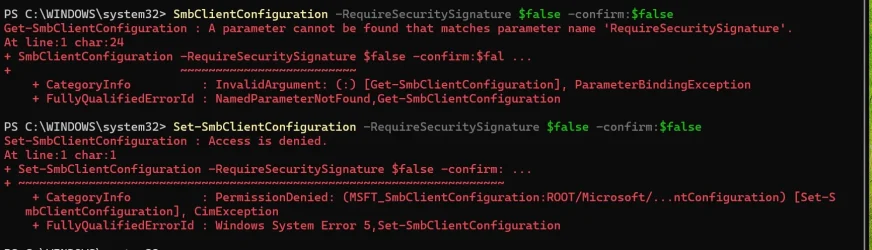
I tried copying/pasting these lines into PS but got numerous errors messages back. I copied from "Set" to the ends, but got an access denied error
 

Attachments

  • PS cap.webp
    PS cap.webp
    87.9 KB · Views: 4

My Computer My Computer

At a glance

Win11 24H2AMD Ryzen 5 PRO16 GBRadeon
OS
Win11 24H2
Computer type
PC/Desktop
Manufacturer/Model
GMKtec
CPU
AMD Ryzen 5 PRO
Motherboard
GMKtec
Memory
16 GB
Graphics Card(s)
Radeon
Sound Card
Realtek onboard
Monitor(s) Displays
Lenovo 32" 4K
Internet Speed
1GB
Browser
Firefox, Chrome
I tried copying/pasting these lines into PS but got numerous errors messages back.
If you look closely you'll see each command line starts with the word 'poweshell'. These commands are intended to be run in a Command Prompt (Admin). If you want to run in PS, then leave out the word 'powershell' and just paste the rest of the command line.


I copied from "Set" to the ends, but got an access denied error
That's because you were not running Powershell as an administrator. The tab must say 'Administrator: Windows Powershell'.

1776033356655.webp

1776033535107.webp
 
Last edited:

My Computers My Computers

  • At a glance

    Windows 11 HomeAMD Athlon Silver 3050U8GBRadeon Graphics
    OS
    Windows 11 Home
    Computer type
    Laptop
    Manufacturer/Model
    Acer Aspire 3 A315-23-R9VY
    CPU
    AMD Athlon Silver 3050U
    Memory
    8GB
    Graphics Card(s)
    Radeon Graphics
    Monitor(s) Displays
    laptop screen
    Screen Resolution
    1366x768 native resolution, up to 2560x1440 with Radeon Virtual Super Resolution
    Hard Drives
    1TB Samsung EVO 870 SSD (from April 2026: 250GB EVO 850)
    Internet Speed
    150 Mbps
    Browser
    Edge, Firefox
    Antivirus
    Defender
    Other Info
    UPDATE - 11 April 2026: due to lid hinges starting to break up this laptop has been retired from active duty. The OS with all software and files has been migrated to my System Seven in 'Other systems' to carry on as my general purpose 'main machine'.

    I've now clean installed 25H2 and used Garlin's scripts to update Secure Boot to CA 2023 and revoke the PCA 2011 certificates. It's new role is to test secure boot issues.

    Info for 2021-2026:
    fully 'Windows 11 ready' laptop. Windows 10 C: partition migrated from my old unsupported 'main machine' then upgraded to 11. A test migration ran Insider builds for 2 months. When 11 was released on 5th October 2021 it was re-imaged back to 10 and was offered the upgrade in Windows Update on 20th October. Windows Update offered the 22H2 Feature Update on 20th September 2022. It got the 23H2 Feature Update on 4th November 2023 through Windows Update, 24H2 on 3rd October 2024 through Windows Update by setting the Target Release Version for 24H2, and 25H2 on 30th September 2025 through Windows Update by setting the Target Release Version for 25H2.
  • At a glance

    Windows 11 ProIntel® Core™ i5-520M8GB(integrated graphics) Intel HD Graphics
    Operating System
    Windows 11 Pro
    Computer type
    Laptop
    Manufacturer/Model
    Dell Latitude E4310
    CPU
    Intel® Core™ i5-520M
    Motherboard
    0T6M8G
    Memory
    8GB
    Graphics card(s)
    (integrated graphics) Intel HD Graphics
    Screen Resolution
    1366x768
    Hard Drives
    500GB Crucial MX500 SSD
    Browser
    Firefox, Edge
    Antivirus
    Defender
    Other Info
    unsupported machine: Legacy bios, MBR, TPM 1.2, upgraded from W10 to W11 using W10/W11 hybrid install media workaround.

    In-place upgrade to 22H2 using ISO and a workaround.
    Feature Update to 23H2 by manually installing the Enablement Package.
    In-place upgrade to 24H2 using hybrid 23H2/24H2 install media.
    Upgraded to 25H2 by Enablement Package.
    Upgraded to 26H2 by Enablement Package.

    Also running Insider Experimental 263xx and 29xxx builds and Windows 10 as native boot .vhdx.
  • My SYSTEM THREE is a Dell Latitude 5410, i7-10610U, 32GB RAM, 512GB NVMe ssd, supported device running Windows 11 Pro.

    My SYSTEM FOUR was a 2-in-1 convertible Lenovo Yoga 11e (1st gen) type 20DA, Celeron N2930, 8GB RAM, 256GB ssd. Unsupported device. This has now been sold. It has been replaced by my System Eight.

    My SYSTEM FIVE is a Dell Latitude 3190 2-in-1, Pentium Silver N5030, 8GB RAM, 1TB NVMe ssd, supported device running Windows 11 Pro, plus Insider Beta, Experimental 263xx and 29xxx builds (and a few others) as a native boot .vhdx.

    My SYSTEM SIX is a Dell Latitude 5550, Core Ultra 7 165H, 64GB RAM, 1TB NVMe SSD, supported device, Windows 11 Pro, Hyper-V host machine. Updated to 25H2 on 30th September 2025.

    My SYSTEM SEVEN is a Lenovo Thinkpad T580, 1920x1080 touchscreen, Intel Core i7-8650U, 16GB RAM, 512GB NVMe SSD + 2nd 512GB NVMe SSD, a supported device for Windows 11. This is my current general purpose 'main machine'. The installed Windows 11 Home from my System One has been migrated to this machine. As its new home has an existing digital licence for Pro I've been able to upgrade the migrated OS from Home to Pro.
    29 Sept. 2026 Feature Update to 26H2 through Windows Update.

    My SYSTEM EIGHT is a 2-in-1 convertible Lenovo Yoga 11e (5th gen) type 20LN, Celeron N4120, 8GB RAM, 512GB NVMe ssd, a supported device for Windows 11. Currently running Windows 11 Pro, plus Insider Beta, Experimental 263xx and 29xxx builds as native boot vhdx.
Have you checked the firewall and services on Synology ?
I have Synology NAS and static IP on my network ( granted acces via IP on Synology)
No problem connecting via clean install Windows 25H2, Raspberrry Pi and iPad
 

My Computer My Computer

At a glance

Windows 11 ProIntel i5 12600KG.Skill Ripjaws V DDR4 3600 MHz / PC4-28800 C...Intel® UHD Graphics 770 (iGPU)
OS
Windows 11 Pro
Computer type
PC/Desktop
Manufacturer/Model
Homemade by me
CPU
Intel i5 12600K
Motherboard
MSI PRO Z690-A DDR4
Memory
G.Skill Ripjaws V DDR4 3600 MHz / PC4-28800 CL16 2x8 GB
Graphics Card(s)
Intel® UHD Graphics 770 (iGPU)
Sound Card
8-Channel (7.1) HD Audio
Monitor(s) Displays
Legion/Lenovo Y25-25
Screen Resolution
Full HD 1920 x 1080
Hard Drives
WD Black NVMe M.2 500 GB (system drive)
Case
Lian-Li
Keyboard
Old solid and heavy IBM🙂
Mouse
Logitech
Internet Speed
1000 mbit
Antivirus
Avast free
Probably because you have tried to assign a Drive letter to the Device rather than a suitably configured Shared folder.

I normally Pin shared folder to Quick access rather than assigning a drive letter, to me that is confusing.
You can Pin Device to Quick access.

Right click Options seem to have changed slightly recently.

"Went into Group Policy" - I am on the Home version so no access to Group Policy.
"Enabled SMBv1 supprt under Windows Services." - Not on mine, neither Windows (SMB 1.0/CIFS Auto removal), or the NAS box (Minimum SMB protocol SMB2).
Network discovery On, auto setup On.
IP assignment Automatic (DHCP in router)
LMHOSTS look-up enabled, set to Default. There is a mention of NetBIOS in that section, I have never touched or knew about that area.

DS220+ - Guest users disabled before going to > 24H2 > 25H2.

I have a Synology NAS in the same model range DS220+ fully updated.
Windows 11 Home is version 25H2 26200.8117

View attachment 168593
 

My Computer My Computer

At a glance

Windows 11
OS
Windows 11
If you look closely you'll see each command line starts with the word 'poweshell'. These commands are intended to be run in a Command Prompt (Admin). If you want to run in PS, then leave out the word 'powershell' and just paste the rest of the command line.


That's because you were not running Powershell as an administrator. The tab must say 'Administrator: Windows Powershell'.

View attachment 168584
View attachment 168585
Noted, thanks. Ran them correctly, they gave no results back, so I assume they worked. I used to be good at this stuff, haven't dabbled in a while to my chagrin.
 

My Computer My Computer

At a glance

Win11 24H2AMD Ryzen 5 PRO16 GBRadeon
OS
Win11 24H2
Computer type
PC/Desktop
Manufacturer/Model
GMKtec
CPU
AMD Ryzen 5 PRO
Motherboard
GMKtec
Memory
16 GB
Graphics Card(s)
Radeon
Sound Card
Realtek onboard
Monitor(s) Displays
Lenovo 32" 4K
Internet Speed
1GB
Browser
Firefox, Chrome
they gave no results back, so I assume they worked.
that is normal behaviour if the command was successful, you'd only see something if there was an error.
 

My Computers My Computers

  • At a glance

    Windows 11 HomeAMD Athlon Silver 3050U8GBRadeon Graphics
    OS
    Windows 11 Home
    Computer type
    Laptop
    Manufacturer/Model
    Acer Aspire 3 A315-23-R9VY
    CPU
    AMD Athlon Silver 3050U
    Memory
    8GB
    Graphics Card(s)
    Radeon Graphics
    Monitor(s) Displays
    laptop screen
    Screen Resolution
    1366x768 native resolution, up to 2560x1440 with Radeon Virtual Super Resolution
    Hard Drives
    1TB Samsung EVO 870 SSD (from April 2026: 250GB EVO 850)
    Internet Speed
    150 Mbps
    Browser
    Edge, Firefox
    Antivirus
    Defender
    Other Info
    UPDATE - 11 April 2026: due to lid hinges starting to break up this laptop has been retired from active duty. The OS with all software and files has been migrated to my System Seven in 'Other systems' to carry on as my general purpose 'main machine'.

    I've now clean installed 25H2 and used Garlin's scripts to update Secure Boot to CA 2023 and revoke the PCA 2011 certificates. It's new role is to test secure boot issues.

    Info for 2021-2026:
    fully 'Windows 11 ready' laptop. Windows 10 C: partition migrated from my old unsupported 'main machine' then upgraded to 11. A test migration ran Insider builds for 2 months. When 11 was released on 5th October 2021 it was re-imaged back to 10 and was offered the upgrade in Windows Update on 20th October. Windows Update offered the 22H2 Feature Update on 20th September 2022. It got the 23H2 Feature Update on 4th November 2023 through Windows Update, 24H2 on 3rd October 2024 through Windows Update by setting the Target Release Version for 24H2, and 25H2 on 30th September 2025 through Windows Update by setting the Target Release Version for 25H2.
  • At a glance

    Windows 11 ProIntel® Core™ i5-520M8GB(integrated graphics) Intel HD Graphics
    Operating System
    Windows 11 Pro
    Computer type
    Laptop
    Manufacturer/Model
    Dell Latitude E4310
    CPU
    Intel® Core™ i5-520M
    Motherboard
    0T6M8G
    Memory
    8GB
    Graphics card(s)
    (integrated graphics) Intel HD Graphics
    Screen Resolution
    1366x768
    Hard Drives
    500GB Crucial MX500 SSD
    Browser
    Firefox, Edge
    Antivirus
    Defender
    Other Info
    unsupported machine: Legacy bios, MBR, TPM 1.2, upgraded from W10 to W11 using W10/W11 hybrid install media workaround.

    In-place upgrade to 22H2 using ISO and a workaround.
    Feature Update to 23H2 by manually installing the Enablement Package.
    In-place upgrade to 24H2 using hybrid 23H2/24H2 install media.
    Upgraded to 25H2 by Enablement Package.
    Upgraded to 26H2 by Enablement Package.

    Also running Insider Experimental 263xx and 29xxx builds and Windows 10 as native boot .vhdx.
  • My SYSTEM THREE is a Dell Latitude 5410, i7-10610U, 32GB RAM, 512GB NVMe ssd, supported device running Windows 11 Pro.

    My SYSTEM FOUR was a 2-in-1 convertible Lenovo Yoga 11e (1st gen) type 20DA, Celeron N2930, 8GB RAM, 256GB ssd. Unsupported device. This has now been sold. It has been replaced by my System Eight.

    My SYSTEM FIVE is a Dell Latitude 3190 2-in-1, Pentium Silver N5030, 8GB RAM, 1TB NVMe ssd, supported device running Windows 11 Pro, plus Insider Beta, Experimental 263xx and 29xxx builds (and a few others) as a native boot .vhdx.

    My SYSTEM SIX is a Dell Latitude 5550, Core Ultra 7 165H, 64GB RAM, 1TB NVMe SSD, supported device, Windows 11 Pro, Hyper-V host machine. Updated to 25H2 on 30th September 2025.

    My SYSTEM SEVEN is a Lenovo Thinkpad T580, 1920x1080 touchscreen, Intel Core i7-8650U, 16GB RAM, 512GB NVMe SSD + 2nd 512GB NVMe SSD, a supported device for Windows 11. This is my current general purpose 'main machine'. The installed Windows 11 Home from my System One has been migrated to this machine. As its new home has an existing digital licence for Pro I've been able to upgrade the migrated OS from Home to Pro.
    29 Sept. 2026 Feature Update to 26H2 through Windows Update.

    My SYSTEM EIGHT is a 2-in-1 convertible Lenovo Yoga 11e (5th gen) type 20LN, Celeron N4120, 8GB RAM, 512GB NVMe ssd, a supported device for Windows 11. Currently running Windows 11 Pro, plus Insider Beta, Experimental 263xx and 29xxx builds as native boot vhdx.
Have you checked the firewall and services on Synology ?
I have Synology NAS and static IP on my network ( granted acces via IP on Synology)
No problem connecting via clean install Windows 25H2, Raspberrry Pi and iPad
Yes, everything is current, and the NAS has a static IP already.
 

My Computer My Computer

At a glance

Win11 24H2AMD Ryzen 5 PRO16 GBRadeon
OS
Win11 24H2
Computer type
PC/Desktop
Manufacturer/Model
GMKtec
CPU
AMD Ryzen 5 PRO
Motherboard
GMKtec
Memory
16 GB
Graphics Card(s)
Radeon
Sound Card
Realtek onboard
Monitor(s) Displays
Lenovo 32" 4K
Internet Speed
1GB
Browser
Firefox, Chrome
that is normal behaviour if the command was successful, you'd only see something if there was an error.
Results are no different than before.
 

My Computer My Computer

At a glance

Win11 24H2AMD Ryzen 5 PRO16 GBRadeon
OS
Win11 24H2
Computer type
PC/Desktop
Manufacturer/Model
GMKtec
CPU
AMD Ryzen 5 PRO
Motherboard
GMKtec
Memory
16 GB
Graphics Card(s)
Radeon
Sound Card
Realtek onboard
Monitor(s) Displays
Lenovo 32" 4K
Internet Speed
1GB
Browser
Firefox, Chrome
Probably because you have tried to assign a Drive letter to the Device rather than a suitably configured Shared folder.

I normally Pin shared folder to Quick access rather than assigning a drive letter, to me that is confusing.
You can Pin Device to Quick access.

Right click Options seem to have changed slightly recently.

"Went into Group Policy" - I am on the Home version so no access to Group Policy.
"Enabled SMBv1 supprt under Windows Services." - Not on mine, neither Windows (SMB 1.0/CIFS Auto removal), or the NAS box (Minimum SMB protocol SMB2).
Network discovery On, auto setup On.
IP assignment Automatic (DHCP in router)
LMHOSTS look-up enabled, set to Default. There is a mention of NetBIOS in that section, I have never touched or knew about that area.

DS220+ - Guest users disabled before going to > 24H2 > 25H2.

I have a Synology NAS in the same model range DS220+ fully updated.
Windows 11 Home is version 25H2 26200.8117

View attachment 168593
Not sure I am understanding .
"Probably because you have tried to assign a Drive letter to the Device rather than a suitably configured Shared folder."
The NAS is pingable using cmd, and IP in a browser, but when trying to "map a network drive", I get the error code and "path not found". I cannot "pinshare" anything if Windows can't access the NAS. The other things you quoted me doing were suggested by the lame Windows troubleshooting script. And since I have Pro it is different than your Home version.
 

My Computer My Computer

At a glance

Win11 24H2AMD Ryzen 5 PRO16 GBRadeon
OS
Win11 24H2
Computer type
PC/Desktop
Manufacturer/Model
GMKtec
CPU
AMD Ryzen 5 PRO
Motherboard
GMKtec
Memory
16 GB
Graphics Card(s)
Radeon
Sound Card
Realtek onboard
Monitor(s) Displays
Lenovo 32" 4K
Internet Speed
1GB
Browser
Firefox, Chrome
UPDATE: Fixed - user error, I had the NAS SMB level sent wrong, working now. Thanks for all who commented!!
 

My Computer My Computer

At a glance

Win11 24H2AMD Ryzen 5 PRO16 GBRadeon
OS
Win11 24H2
Computer type
PC/Desktop
Manufacturer/Model
GMKtec
CPU
AMD Ryzen 5 PRO
Motherboard
GMKtec
Memory
16 GB
Graphics Card(s)
Radeon
Sound Card
Realtek onboard
Monitor(s) Displays
Lenovo 32" 4K
Internet Speed
1GB
Browser
Firefox, Chrome
Back
Top Bottom