Synchronize NAS to OneDrive Cloud Software Help


Witterings

Member
Local time
9:14 AM
Posts
36
OS
Windows 11
I'm trying to find software that'll sync from a local NAS to OneDrive mainly for photos etc.

Quite a few years back I bought what I thought was a lifetime licence for GoodSync but it seems the goalposts have moved on what corporates deem a lifetime licence means so now have to pay annually which has annoyed me a bit.

I've tried Ease US ToDo .... It kept closing when I tried to link it to my OneDrive account so contactded support, they said it was because it was a business OneDrive account so I had to use their Pro version .... it was ony another $10 for a lifetime Licence so fair enough, ... installed and did a test with a 1gb file on a 1gb internet connection, after 24 minutes it'd done 5% so gave up.

Tried CloudSync ... did a test with files 1 to 10 in the source file ... worked great, removed files 1 to 5 from the source and synced again which removed them from the destination folder.
Copied files 1 to 5 back into the source and tried syncing again and it didn't pick up I'd put the files back in .... it's easy to accidentally delete a file, realise and reinstate to the source but this isn't going to pick up on that and put it back into the destination / backup folder.

Tried Aomei Backupper which is great for local use and there is a OneDrive option ..... BUT .... it Syncs it to the OneDrive folder on your laptop / pc and holds a copy there which then in turn sinks it to the Cloud ...... one of the reasons for using the NAS, my laptop's drive size is a fraction of what I store on the NAS.

If I've missed any others people know about I'd be really grateful to hear what they are, I can't stand annual subscriptions but if there's a trial period and a reasonable lifetime price I don't that .... any other suggestions greatly appreciated.
 

My Computers My Computers

  • At a glance

    Windows 11Intel(R) Core(TM) Ultra 7 258V (2.20 GHz)32gb
    OS
    Windows 11
    Computer type
    Laptop
    Manufacturer/Model
    Lenovo Yoga 7 Gen10
    CPU
    Intel(R) Core(TM) Ultra 7 258V (2.20 GHz)
    Memory
    32gb
    Hard Drives
    1tb
  • At a glance

    Windows 11 ProIntel i7Currently 16gb ... may upgrade to 32gb+
    Operating System
    Windows 11 Pro
    Computer type
    PC/Desktop
    Manufacturer/Model
    Dell Optiplex 7090
    CPU
    Intel i7
    Memory
    Currently 16gb ... may upgrade to 32gb+
    Hard Drives
    NVME 512gb
    Internet Speed
    1tb
    Browser
    Chrome
    Antivirus
    Windows Defender
Welcome.

Not sure of the workings of a NAS. Can it be seen/accessed in File Explorer? If so I’d assume this would possibly work.

 
Last edited:

My Computers My Computers

  • At a glance

    Windows 11 Pro 25H2 Build 26200.8655Intel(R) Core(TM) i7-4770K CPU @ 3.50GHz32.0 GB of I forget and the box is in storage.Gigabyte nVidia GeForce GTX 1660 Super OC 6GB
    OS
    Windows 11 Pro 25H2 Build 26200.8655
    Computer type
    PC/Desktop
    Manufacturer/Model
    Sin-built 2013
    CPU
    Intel(R) Core(TM) i7-4770K CPU @ 3.50GHz
    Motherboard
    ASUS ROG Maximus VI Formula
    Memory
    32.0 GB of I forget and the box is in storage.
    Graphics Card(s)
    Gigabyte nVidia GeForce GTX 1660 Super OC 6GB
    Sound Card
    ROG SupremeFX Formula 8-Channel High Definition Audio
    Monitor(s) Displays
    5 x LG 25MS500-B - 1 x 24MK430H-B - 1 x Wacom Pro 22" Touch Screen Tablet
    Screen Resolution
    All over the place
    Hard Drives
    Too many to list. OS on Samsung 1TB 870 QVO SATA
    PSU
    Silverstone 1500
    Case
    NZXT Phantom 820 Full-Tower Case
    Cooling
    Noctua NH-D15 Elite Class Dual Tower CPU Cooler / 6 x EziDIY 120mm / 2 x Corsair 140mm somethings / 1 x 140mm Thermaltake something / 2 x 200mm Corsair.
    Keyboard
    Corsair K95 / Logitech diNovo Edge Wireless
    Mouse
    Logitech: G402 / G502 / Mx Masters / Mx Air Cordless
    Internet Speed
    2000/500Mbps
    Browser
    All sorts
    Antivirus
    Kaspersky Premium
    Other Info
    ㅤㅤㅤㅤㅤㅤㅤㅤㅤㅤㅤㅤㅤㅤㅤㅤㅤㅤㅤㅤㅤㅤㅤㅤㅤㅤㅤㅤㅤㅤㅤㅤㅤㅤㅤㅤㅤㅤㅤㅤ⠀⠀⠀⠀⠀⠀⠀⠀⠀⠀
    TP-Link BE9300 WiFi 7 Bluetooth 5.4 (Archer TBE550E)
    TP-Link TX201 V1 2.5GB Lan

    Grandstream HT812 - VoIP
    ASUS DSL-AX82U - Mesh
    ASUS RT-AC68U - Mesh
    ASUS RT-BE88U Router

    Brother MFC-L2880DW Printer

    I’m on a horse.
  • At a glance

    Windows 11 Pro 25H2 Build 26200.8655 (Wifes)13th Generation Intel® Core™ i5-1340P Process...16GB LPDDR5-52001x Intel® Iris® Xe Graphics
    Operating System
    Windows 11 Pro 25H2 Build 26200.8655 (Wifes)
    Computer type
    Laptop
    Manufacturer/Model
    LENOVO Yoga 7 14IRL8 - Type 82YL
    CPU
    13th Generation Intel® Core™ i5-1340P Processor(Core™ i5-1340P)
    Memory
    16GB LPDDR5-5200
    Graphics card(s)
    1x Intel® Iris® Xe Graphics
    Sound Card
    Optimized with Dolby Atmos®
    Screen Resolution
    QHD 2880 x 1800 OLED
    Hard Drives
    M.2 512 GB SSD PCIe
    Mouse
    Logiteck MX Master 3S
    Internet Speed
    2000/500
    Antivirus
    Defender / Malwarebytes
    Other Info
    …still on a horse.


    Wireless Network: Wi-Fi 6E 2x2 AX; Bluetooth® 5.1 or above
    Ports: 1x 1 Novo button; 2 in 1 Audio Combo jack; Micro SD Card Reader; HDMI 1.4b; 2 x USB Type-C (TBT4)
    USB 3.2 Gen 2 DP 1.4a
    PD 3.0); 1 x USB 3.2 Gen1 Type A
    Camera
    1x 1080P FHD IR/RGB Hybrid with Privacy Shutter and Dual Array Microphone
    Graphics
    1x Intel® Iris® Xe Graphics
    Monitor
    14" WUXGA
    Form Factor
    Convertible Notebook
  • Windows 11 Pro 25H2 Build 26200.8655 (Wifes)

    Yoga 7 2-in-1 14IML9 - Type 83DJ

    Processor: Intel® Core™ Ultra 7 155H Processor(Core™ Ultra 7 155H)

    Memory: 32GB LPD5X-7467

    Hard Drive: 1 TB SSD PCIe

    Wireless Network: 1x Wi-Fi 6E 2x2 AX; Bluetooth® 5.1 or above

    Ports: 1 x HDMI 2.1 TMDS; 1 x Novo Button; 1 x Combo Audio Jack
    2 x USB-C (USB 4.0)
    1 x USB-A 3.2 Gen 1

    Camera: 1080P FHD IR Hybrid with Dual Microphone

    Graphics: Intel® Arc™ Graphics

    Monitor: 14" 2.8K

    ...Where's my horse?
I'm trying to find software that'll sync from a local NAS to OneDrive mainly for photos etc.

Quite a few years back I bought what I thought was a lifetime licence for GoodSync but it seems the goalposts have moved on what corporates deem a lifetime licence means so now have to pay annually which has annoyed me a bit.

I've tried Ease US ToDo .... It kept closing when I tried to link it to my OneDrive account so contactded support, they said it was because it was a business OneDrive account so I had to use their Pro version .... it was ony another $10 for a lifetime Licence so fair enough, ... installed and did a test with a 1gb file on a 1gb internet connection, after 24 minutes it'd done 5% so gave up.

Tried CloudSync ... did a test with files 1 to 10 in the source file ... worked great, removed files 1 to 5 from the source and synced again which removed them from the destination folder.
Copied files 1 to 5 back into the source and tried syncing again and it didn't pick up I'd put the files back in .... it's easy to accidentally delete a file, realise and reinstate to the source but this isn't going to pick up on that and put it back into the destination / backup folder.

Tried Aomei Backupper which is great for local use and there is a OneDrive option ..... BUT .... it Syncs it to the OneDrive folder on your laptop / pc and holds a copy there which then in turn sinks it to the Cloud ...... one of the reasons for using the NAS, my laptop's drive size is a fraction of what I store on the NAS.

If I've missed any others people know about I'd be really grateful to hear what they are, I can't stand annual subscriptions but if there's a trial period and a reasonable lifetime price I don't that .... any other suggestions greatly appreciated.
What type of NAS are you running --Is it a Stand alone Network drive, a Windows separate computer being used as a NAS, a Linux box being used as a NAS or a proprietary NAS box such as QNAP etc.

For Windows @antspants method will work. For Linux you'll need rsync or the GUI version of rsync (grsync - a free installable program if the Linux NAS has any sort of GUI desktop). There's paid software around but it's not necessary especially for home users.

For Qnap I believe there us an rsync facility that can do backup to cloud of data required -- you'll have to check the documentation.

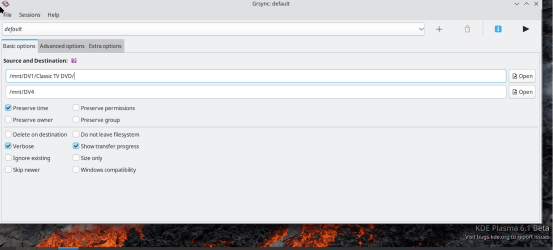
The GUI version of rsync looks like this (zillions of options and handles ANY file system apart from the Windows storage spaces type).

Screenshot_20240609_090300.png

Input and output destinations can be local, including Windows shared drives, LAN, or Internet including cloud servers.

cheers
jimbo
 
Last edited:

My Computer My Computer

At a glance

Windows XP,11 Linux Fedora Rawhide pre-releas...2 X Intel i7
OS
Windows XP,11 Linux Fedora Rawhide pre-release 45
Computer type
PC/Desktop
CPU
2 X Intel i7
Screen Resolution
4KUHD X 2
I'm trying to find software that'll sync from a local NAS to OneDrive mainly for photos etc.

Try SyncBackPro: SyncBackPro backup software for Windows

No subscription, supports syncing from NAS, uploads native files to OneDrive/OneDrive Business directly without using the computers local OneDrive folder, does not zip files prior to uploading them.

I use it myself for syncing/uploading files to OneDrive with the intention to not have the files i upload in my local OneDrive folder.


My Computer My Computer

At a glance

Windows 11 Pro for WorkstationsIntel Xeon w5-2465X (3.10 GHz)128 GBNvidia RTX A5000
OS
Windows 11 Pro for Workstations
Computer type
PC/Desktop
Manufacturer/Model
HP
CPU
Intel Xeon w5-2465X (3.10 GHz)
Motherboard
HP Z4 G5
Memory
128 GB
Graphics Card(s)
Nvidia RTX A5000
Sound Card
On board, Realtek
Monitor(s) Displays
ASUS Swift PG279Q (27")
Screen Resolution
2560x1440
Hard Drives
Samsung MZVL21T0HCLR-00BH1 m.2 1TB, Samsung 990 Pro m.2 4TB, Kingston SFYRD m.2 4TB, Corsair MP510 m.2 4TB, Corsair MP600 Pro m.2 8TB, Corsair MP600 Pro m.2 8TB, Micron 5300 SATA SSD 8TB.
Other Info
This is a HP Z4 G5 Workstation.
Cheers for the replies everyone!

@antspants ..... Your suggestion / link has slightly gone over my head (although with time I'm sure I could work it out) .... but it seems to create a second area (Junction point) that contains the same amount of data as the source unless I've misunderstood it and whilst you can choose an alternative location to your PC, because the files are large it's something I want to avoid .... please correct me if I'm wrong?

@jimbo45 ... apologies ... may bad, should have given more info .... it's an old HP ML110 Gen7 Server I've recomissioned for storage and have installed Openmediavault and set up Samba shares.

@2112 ... I tried that this evening, did the original sync, then removed a couple of files from the source and ran it again and it didn't remove them from the desitnation .... maybe I've missed something in the settings?
 

My Computers My Computers

  • At a glance

    Windows 11Intel(R) Core(TM) Ultra 7 258V (2.20 GHz)32gb
    OS
    Windows 11
    Computer type
    Laptop
    Manufacturer/Model
    Lenovo Yoga 7 Gen10
    CPU
    Intel(R) Core(TM) Ultra 7 258V (2.20 GHz)
    Memory
    32gb
    Hard Drives
    1tb
  • At a glance

    Windows 11 ProIntel i7Currently 16gb ... may upgrade to 32gb+
    Operating System
    Windows 11 Pro
    Computer type
    PC/Desktop
    Manufacturer/Model
    Dell Optiplex 7090
    CPU
    Intel i7
    Memory
    Currently 16gb ... may upgrade to 32gb+
    Hard Drives
    NVME 512gb
    Internet Speed
    1tb
    Browser
    Chrome
    Antivirus
    Windows Defender
@antspants ..... Your suggestion / link has slightly gone over my head (although with time I'm sure I could work it out) .... but it seems to create a second area (Junction point) that contains the same amount of data as the source unless I've misunderstood it and whilst you can choose an alternative location to your PC, because the files are large it's something I want to avoid .... please correct me if I'm wrong?
It is a little over my head also. BUT I assume, all you do:

Can I suggest that you create a test folder on the NAS?

  • Open a command prompt (as admin?).
  • Type the command below into the command prompt, and press Enter.
Code:
mklink /j "%UserProfile%\OneDrive\TESTFOLDERNAME" "NASDRIVELETTER:\TESTFOLDER"
(Change TESTFOLDERNAME" & "NASDRIVELETTER:\TESTFOLDER” with your folder name & path)
  • Press enter
  • Close command prompt


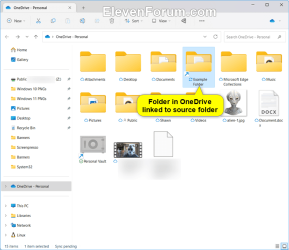
If you look at Brinks second image of the test folder with the yellow speech bubble, it has a shortcut link. I am assuming it just opens the test folder on your NAS? meaning I don’t think the files are copied to the local onedrive folder, because there isn’t one, it’s just a link to the NAS folder.

IMG_4569.png

I could be wrong, hence the test.

But as jimbo mentioned:
For Windows @antspants method will work.
If it isn’t a windows based NAS, probably not.
I appologise for my lack of understanding of NAS setups
 
Last edited:

My Computers My Computers

  • At a glance

    Windows 11 Pro 25H2 Build 26200.8655Intel(R) Core(TM) i7-4770K CPU @ 3.50GHz32.0 GB of I forget and the box is in storage.Gigabyte nVidia GeForce GTX 1660 Super OC 6GB
    OS
    Windows 11 Pro 25H2 Build 26200.8655
    Computer type
    PC/Desktop
    Manufacturer/Model
    Sin-built 2013
    CPU
    Intel(R) Core(TM) i7-4770K CPU @ 3.50GHz
    Motherboard
    ASUS ROG Maximus VI Formula
    Memory
    32.0 GB of I forget and the box is in storage.
    Graphics Card(s)
    Gigabyte nVidia GeForce GTX 1660 Super OC 6GB
    Sound Card
    ROG SupremeFX Formula 8-Channel High Definition Audio
    Monitor(s) Displays
    5 x LG 25MS500-B - 1 x 24MK430H-B - 1 x Wacom Pro 22" Touch Screen Tablet
    Screen Resolution
    All over the place
    Hard Drives
    Too many to list. OS on Samsung 1TB 870 QVO SATA
    PSU
    Silverstone 1500
    Case
    NZXT Phantom 820 Full-Tower Case
    Cooling
    Noctua NH-D15 Elite Class Dual Tower CPU Cooler / 6 x EziDIY 120mm / 2 x Corsair 140mm somethings / 1 x 140mm Thermaltake something / 2 x 200mm Corsair.
    Keyboard
    Corsair K95 / Logitech diNovo Edge Wireless
    Mouse
    Logitech: G402 / G502 / Mx Masters / Mx Air Cordless
    Internet Speed
    2000/500Mbps
    Browser
    All sorts
    Antivirus
    Kaspersky Premium
    Other Info
    ㅤㅤㅤㅤㅤㅤㅤㅤㅤㅤㅤㅤㅤㅤㅤㅤㅤㅤㅤㅤㅤㅤㅤㅤㅤㅤㅤㅤㅤㅤㅤㅤㅤㅤㅤㅤㅤㅤㅤㅤ⠀⠀⠀⠀⠀⠀⠀⠀⠀⠀
    TP-Link BE9300 WiFi 7 Bluetooth 5.4 (Archer TBE550E)
    TP-Link TX201 V1 2.5GB Lan

    Grandstream HT812 - VoIP
    ASUS DSL-AX82U - Mesh
    ASUS RT-AC68U - Mesh
    ASUS RT-BE88U Router

    Brother MFC-L2880DW Printer

    I’m on a horse.
  • At a glance

    Windows 11 Pro 25H2 Build 26200.8655 (Wifes)13th Generation Intel® Core™ i5-1340P Process...16GB LPDDR5-52001x Intel® Iris® Xe Graphics
    Operating System
    Windows 11 Pro 25H2 Build 26200.8655 (Wifes)
    Computer type
    Laptop
    Manufacturer/Model
    LENOVO Yoga 7 14IRL8 - Type 82YL
    CPU
    13th Generation Intel® Core™ i5-1340P Processor(Core™ i5-1340P)
    Memory
    16GB LPDDR5-5200
    Graphics card(s)
    1x Intel® Iris® Xe Graphics
    Sound Card
    Optimized with Dolby Atmos®
    Screen Resolution
    QHD 2880 x 1800 OLED
    Hard Drives
    M.2 512 GB SSD PCIe
    Mouse
    Logiteck MX Master 3S
    Internet Speed
    2000/500
    Antivirus
    Defender / Malwarebytes
    Other Info
    …still on a horse.


    Wireless Network: Wi-Fi 6E 2x2 AX; Bluetooth® 5.1 or above
    Ports: 1x 1 Novo button; 2 in 1 Audio Combo jack; Micro SD Card Reader; HDMI 1.4b; 2 x USB Type-C (TBT4)
    USB 3.2 Gen 2 DP 1.4a
    PD 3.0); 1 x USB 3.2 Gen1 Type A
    Camera
    1x 1080P FHD IR/RGB Hybrid with Privacy Shutter and Dual Array Microphone
    Graphics
    1x Intel® Iris® Xe Graphics
    Monitor
    14" WUXGA
    Form Factor
    Convertible Notebook
  • Windows 11 Pro 25H2 Build 26200.8655 (Wifes)

    Yoga 7 2-in-1 14IML9 - Type 83DJ

    Processor: Intel® Core™ Ultra 7 155H Processor(Core™ Ultra 7 155H)

    Memory: 32GB LPD5X-7467

    Hard Drive: 1 TB SSD PCIe

    Wireless Network: 1x Wi-Fi 6E 2x2 AX; Bluetooth® 5.1 or above

    Ports: 1 x HDMI 2.1 TMDS; 1 x Novo Button; 1 x Combo Audio Jack
    2 x USB-C (USB 4.0)
    1 x USB-A 3.2 Gen 1

    Camera: 1080P FHD IR Hybrid with Dual Microphone

    Graphics: Intel® Arc™ Graphics

    Monitor: 14" 2.8K

    ...Where's my horse?
(Last post was edited)

I believe when Brink says “Junction Point” it just means “Link”
 

My Computers My Computers

  • At a glance

    Windows 11 Pro 25H2 Build 26200.8655Intel(R) Core(TM) i7-4770K CPU @ 3.50GHz32.0 GB of I forget and the box is in storage.Gigabyte nVidia GeForce GTX 1660 Super OC 6GB
    OS
    Windows 11 Pro 25H2 Build 26200.8655
    Computer type
    PC/Desktop
    Manufacturer/Model
    Sin-built 2013
    CPU
    Intel(R) Core(TM) i7-4770K CPU @ 3.50GHz
    Motherboard
    ASUS ROG Maximus VI Formula
    Memory
    32.0 GB of I forget and the box is in storage.
    Graphics Card(s)
    Gigabyte nVidia GeForce GTX 1660 Super OC 6GB
    Sound Card
    ROG SupremeFX Formula 8-Channel High Definition Audio
    Monitor(s) Displays
    5 x LG 25MS500-B - 1 x 24MK430H-B - 1 x Wacom Pro 22" Touch Screen Tablet
    Screen Resolution
    All over the place
    Hard Drives
    Too many to list. OS on Samsung 1TB 870 QVO SATA
    PSU
    Silverstone 1500
    Case
    NZXT Phantom 820 Full-Tower Case
    Cooling
    Noctua NH-D15 Elite Class Dual Tower CPU Cooler / 6 x EziDIY 120mm / 2 x Corsair 140mm somethings / 1 x 140mm Thermaltake something / 2 x 200mm Corsair.
    Keyboard
    Corsair K95 / Logitech diNovo Edge Wireless
    Mouse
    Logitech: G402 / G502 / Mx Masters / Mx Air Cordless
    Internet Speed
    2000/500Mbps
    Browser
    All sorts
    Antivirus
    Kaspersky Premium
    Other Info
    ㅤㅤㅤㅤㅤㅤㅤㅤㅤㅤㅤㅤㅤㅤㅤㅤㅤㅤㅤㅤㅤㅤㅤㅤㅤㅤㅤㅤㅤㅤㅤㅤㅤㅤㅤㅤㅤㅤㅤㅤ⠀⠀⠀⠀⠀⠀⠀⠀⠀⠀
    TP-Link BE9300 WiFi 7 Bluetooth 5.4 (Archer TBE550E)
    TP-Link TX201 V1 2.5GB Lan

    Grandstream HT812 - VoIP
    ASUS DSL-AX82U - Mesh
    ASUS RT-AC68U - Mesh
    ASUS RT-BE88U Router

    Brother MFC-L2880DW Printer

    I’m on a horse.
  • At a glance

    Windows 11 Pro 25H2 Build 26200.8655 (Wifes)13th Generation Intel® Core™ i5-1340P Process...16GB LPDDR5-52001x Intel® Iris® Xe Graphics
    Operating System
    Windows 11 Pro 25H2 Build 26200.8655 (Wifes)
    Computer type
    Laptop
    Manufacturer/Model
    LENOVO Yoga 7 14IRL8 - Type 82YL
    CPU
    13th Generation Intel® Core™ i5-1340P Processor(Core™ i5-1340P)
    Memory
    16GB LPDDR5-5200
    Graphics card(s)
    1x Intel® Iris® Xe Graphics
    Sound Card
    Optimized with Dolby Atmos®
    Screen Resolution
    QHD 2880 x 1800 OLED
    Hard Drives
    M.2 512 GB SSD PCIe
    Mouse
    Logiteck MX Master 3S
    Internet Speed
    2000/500
    Antivirus
    Defender / Malwarebytes
    Other Info
    …still on a horse.


    Wireless Network: Wi-Fi 6E 2x2 AX; Bluetooth® 5.1 or above
    Ports: 1x 1 Novo button; 2 in 1 Audio Combo jack; Micro SD Card Reader; HDMI 1.4b; 2 x USB Type-C (TBT4)
    USB 3.2 Gen 2 DP 1.4a
    PD 3.0); 1 x USB 3.2 Gen1 Type A
    Camera
    1x 1080P FHD IR/RGB Hybrid with Privacy Shutter and Dual Array Microphone
    Graphics
    1x Intel® Iris® Xe Graphics
    Monitor
    14" WUXGA
    Form Factor
    Convertible Notebook
  • Windows 11 Pro 25H2 Build 26200.8655 (Wifes)

    Yoga 7 2-in-1 14IML9 - Type 83DJ

    Processor: Intel® Core™ Ultra 7 155H Processor(Core™ Ultra 7 155H)

    Memory: 32GB LPD5X-7467

    Hard Drive: 1 TB SSD PCIe

    Wireless Network: 1x Wi-Fi 6E 2x2 AX; Bluetooth® 5.1 or above

    Ports: 1 x HDMI 2.1 TMDS; 1 x Novo Button; 1 x Combo Audio Jack
    2 x USB-C (USB 4.0)
    1 x USB-A 3.2 Gen 1

    Camera: 1080P FHD IR Hybrid with Dual Microphone

    Graphics: Intel® Arc™ Graphics

    Monitor: 14" 2.8K

    ...Where's my horse?
... I tried that this evening, did the original sync, then removed a couple of files from the source and ran it again and it didn't remove them from the desitnation .... maybe I've missed something in the settings?

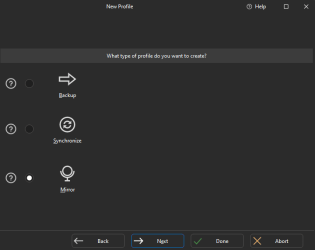
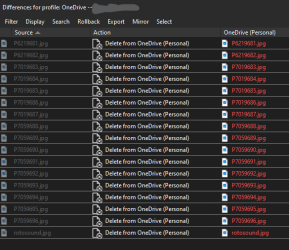
When you create the sync, make sure to choose Mirror instead of Synchronize. When you choose Mirror deleted files on the source will be deleted from the destination. (See the attached image)

I always use Mirror since i want that as well, iow when i remowe files from the source i want them to be deleted from my destination as well.

1718012182157.png

1718011802461.png
 

My Computer My Computer

At a glance

Windows 11 Pro for WorkstationsIntel Xeon w5-2465X (3.10 GHz)128 GBNvidia RTX A5000
OS
Windows 11 Pro for Workstations
Computer type
PC/Desktop
Manufacturer/Model
HP
CPU
Intel Xeon w5-2465X (3.10 GHz)
Motherboard
HP Z4 G5
Memory
128 GB
Graphics Card(s)
Nvidia RTX A5000
Sound Card
On board, Realtek
Monitor(s) Displays
ASUS Swift PG279Q (27")
Screen Resolution
2560x1440
Hard Drives
Samsung MZVL21T0HCLR-00BH1 m.2 1TB, Samsung 990 Pro m.2 4TB, Kingston SFYRD m.2 4TB, Corsair MP510 m.2 4TB, Corsair MP600 Pro m.2 8TB, Corsair MP600 Pro m.2 8TB, Micron 5300 SATA SSD 8TB.
Other Info
This is a HP Z4 G5 Workstation.

Latest Support Threads

Back
Top Bottom