Syncing backups from multiple external drives


ludditefornow

Member
Local time
2:07 PM
Posts
3
OS
Windows 11 Home
Hi all,
This is not a strictly W11 issue but it is a backup issue. Over time, I have backed up the same or similar data to different external devices through necessity. I now have the task of syncing all this data. I am happy for the newest version of duplicates to be kept and the older ones deleted. But I am not really sure how to go about it.

I do have an old NAS with about 1.5 terrabytes available that would allow me to copy all data there. But is there any recommendation of the process I should take and software to utilise to set up and walk away from it after it starts?
 
Windows Build/Version
21H2

My Computers My Computers

  • At a glance

    Windows 11 Homei5-10210U2x8gbintel UHD630
    OS
    Windows 11 Home
    Computer type
    Laptop
    Manufacturer/Model
    HP Paviliion X360
    CPU
    i5-10210U
    Memory
    2x8gb
    Graphics Card(s)
    intel UHD630
    Screen Resolution
    1920x1080
  • At a glance

    Windows 11 HomeRyzen 5800H2x8gb 3200
    Operating System
    Windows 11 Home
    Computer type
    Laptop
    Manufacturer/Model
    Lenovo Legion 5
    CPU
    Ryzen 5800H
    Memory
    2x8gb 3200
    Screen Resolution
    2560x1440
I use a batch script to manually backup files and folders.
 

Attachments

My Computer My Computer

At a glance

Windows 11AMD Ryzen 7 5700GMicron Technology DDR4-3200 16GBNVIDIA GeForce RTX 3060
OS
Windows 11
Computer type
PC/Desktop
Manufacturer/Model
HP Pavilion
CPU
AMD Ryzen 7 5700G
Motherboard
Erica6
Memory
Micron Technology DDR4-3200 16GB
Graphics Card(s)
NVIDIA GeForce RTX 3060
Sound Card
Realtek ALC671
Monitor(s) Displays
Samsung SyncMaster U28E590
Screen Resolution
3840 x 2160
Hard Drives
SAMSUNG MZVLQ1T0HALB-000H1
thank you. How does this deal with files of identical name with possible different sizes or dates?
 

My Computers My Computers

  • At a glance

    Windows 11 Homei5-10210U2x8gbintel UHD630
    OS
    Windows 11 Home
    Computer type
    Laptop
    Manufacturer/Model
    HP Paviliion X360
    CPU
    i5-10210U
    Memory
    2x8gb
    Graphics Card(s)
    intel UHD630
    Screen Resolution
    1920x1080
  • At a glance

    Windows 11 HomeRyzen 5800H2x8gb 3200
    Operating System
    Windows 11 Home
    Computer type
    Laptop
    Manufacturer/Model
    Lenovo Legion 5
    CPU
    Ryzen 5800H
    Memory
    2x8gb 3200
    Screen Resolution
    2560x1440
@ludditefornow,

welcome to ElevenForum!

There are a number of different ways that you can handle syncing of data, but here just a couple of methods that I use with great success:

1) You can use the Robocopy command line utility to sync data between locations. If you are not really familiar with Robocopy the syntax can be a little daunting at first and there can definitely be a bit of a learning curve. If you decide to look at Robocopy the best tip that I can provide is to make use of the "/L" switch while you are learning / experimenting with Robocopy. The "/L" tells Robcopy to not actually perform any copy / move / delete operations, but to simply report what it would do if you had run the command without the "/L". It's a great way to ensure that you don't get yourself into trouble as you experiment.

2) If you are okay with using a third-party utility, my favorite is "FreeFileSync" which is available for free at www.freefilesync.org. This utility has a lot of great features. For example, you could tell it to sync a source to a destination and only keep the newest version of a file or folder. In your example, you note that you may have duplicate files but from different dates or times. FreeFileSync can sync the source and destination and keep whatever version of the file is newest. You can also do 2-way syncs.

Example: I have a laptop and a desktop. Sometimes I update files on my desktop computer, but at other times I may do work on my laptop that updates certain files. With a 2-way sync, FreeFileSync will sync the laptop and desktop, being smart enough to sync whatever the newest version of a file is whether that means copying from the laptop to the desktop or from the desktop to the laptop. If any file has changed in both locations, it's smart enough to know this and warn you of that situation it won't blindly delete something with changes just because it is older than the file in the other location.

There are some other cool tricks it can do, but I won't go into those now unless you are interested in knowing more.

If you need any more details, please say so and I would be happy to answer any questions that you have.
 

My Computers My Computers

  • At a glance

    Win11 Pro 25H2 (RTM+)Intel i7-14650HX32 GBNo GPU - Built-in Intel Graphics
    OS
    Win11 Pro 25H2 (RTM+)
    Computer type
    PC/Desktop
    Manufacturer/Model
    Acemagic
    CPU
    Intel i7-14650HX
    Memory
    32 GB
    Graphics Card(s)
    No GPU - Built-in Intel Graphics
    Sound Card
    Integrated
    Monitor(s) Displays
    Varies as machine will often be moved to locations with different monitors
    Screen Resolution
    Varies
    Hard Drives
    1 x 1TB Gen 4 NVMe SSD
    PSU
    120W Power Brick
    Keyboard
    Corsair K70 Max RGB Magnetic Keyboard
    Mouse
    Logitech MX Master 3
    Internet Speed
    1Gb Up / 1 Gb Down
    Browser
    Edge
    Antivirus
    Windows Defender
  • At a glance

    Win11 Pro 25H2 (RTM+)Intel i7-1255U16 GBIntel Iris Xe Graphics
    Operating System
    Win11 Pro 25H2 (RTM+)
    Computer type
    Laptop
    Manufacturer/Model
    Lenovo ThinkBook 13x Gen 2
    CPU
    Intel i7-1255U
    Memory
    16 GB
    Graphics card(s)
    Intel Iris Xe Graphics
    Sound Card
    Realtek® ALC3306-CG codec
    Monitor(s) Displays
    13.3-inch IPS Display
    Screen Resolution
    WQXGA (2560 x 1600)
    Hard Drives
    2 TB 4 x 4 NVMe SSD
    PSU
    USB-C / Thunderbolt 4 Power / Charging
    Keyboard
    Backlit, spill resistant keyboard
    Mouse
    Buttonless Glass Precision Touchpad
    Internet Speed
    1Gb Up / 1Gb Down
    Browser
    Edge
    Antivirus
    Windows Defender
    Other Info
    WiFi 6e / Bluetooth 5.1 / Facial Recognition / Fingerprint Sensor / ToF (Time of Flight) Human Presence Sensor
Hi all,
This is not a strictly W11 issue but it is a backup issue. Over time, I have backed up the same or similar data to different external devices through necessity. I now have the task of syncing all this data. I am happy for the newest version of duplicates to be kept and the older ones deleted. But I am not really sure how to go about it.

I do have an old NAS with about 1.5 terrabytes available that would allow me to copy all data there. But is there any recommendation of the process I should take and software to utilise to set up and walk away from it after it starts?
Hi there
If you can use Linux (not sure what your OS is on the NAS - but you could even boot an external device with any Linux disto on it) then the simplest method is :

1) Mount all the external drives to /mnt/disk1, /mnt/disk2 /mnt/disk3 etc where the drives are /dev/sda. /dev/sdb etc
2) set up a crontab job for the backup using rsync.
3) if actually there's no duplicate data on the different external devices then you could run these jobs in parallel.

(probably safer toi use rsync becuase you can prevent an older file overwriting a newer one).

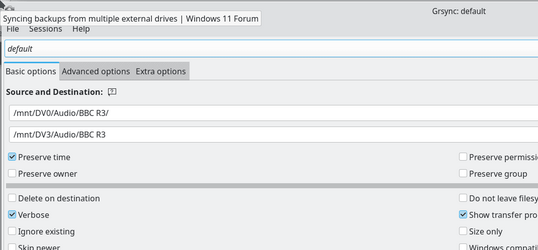
There's zillions of parameters to rsync so test carefully. A good way to start is to use the GUI (GRSYNC) as you can see the commands it generates for the rsync command for various options.

Note also once the program starts running there's a popup log screen which gives you real time info on backup progress, speed etc etc - you can optionally supress it.

E.g :

Screenshot_20220622_170112.png

I use Macrium on Windows for OS image backups and rsync for data backups -- note that Linux can read / write windows ntfs (and fat 32) disks so no prob mounting Windows data disks. (as root / sudo ) -- mount /dev/sdx -t auto -o rw /mnt/dvy for the windows disks -- the -t auto tells linux to determine the file system automatically --- easy - peasy.

Cheers
jimbo
 

My Computer My Computer

At a glance

Windows XP,11 Linux Fedora Rawhide pre-releas...2 X Intel i7
OS
Windows XP,11 Linux Fedora Rawhide pre-release 45
Computer type
PC/Desktop
CPU
2 X Intel i7
Screen Resolution
4KUHD X 2
thanks for this info all. I will take a look over the weekend. I will look at robocopy but these days a GUI based solution like Freefilesync might just be the answer.
 

My Computers My Computers

  • At a glance

    Windows 11 Homei5-10210U2x8gbintel UHD630
    OS
    Windows 11 Home
    Computer type
    Laptop
    Manufacturer/Model
    HP Paviliion X360
    CPU
    i5-10210U
    Memory
    2x8gb
    Graphics Card(s)
    intel UHD630
    Screen Resolution
    1920x1080
  • At a glance

    Windows 11 HomeRyzen 5800H2x8gb 3200
    Operating System
    Windows 11 Home
    Computer type
    Laptop
    Manufacturer/Model
    Lenovo Legion 5
    CPU
    Ryzen 5800H
    Memory
    2x8gb 3200
    Screen Resolution
    2560x1440

Latest Support Threads

Back
Top Bottom