System hung up & then after hard reboot different errors


Can you post better picture of this tab i can't read anything from this picture you posted.

1000013132.webp
 

My Computer

System One

  • OS
    Windows 11
    Computer type
    PC/Desktop
    Manufacturer/Model
    HP Pavilion
    CPU
    AMD Ryzen 7 5700G
    Motherboard
    Erica6
    Memory
    Micron Technology DDR4-3200 16GB
    Graphics Card(s)
    NVIDIA GeForce RTX 3060
    Sound Card
    Realtek ALC671
    Monitor(s) Displays
    Samsung SyncMaster U28E590
    Screen Resolution
    3840 x 2160
    Hard Drives
    SAMSUNG MZVLQ1T0HALB-000H1

My Computer

System One

  • OS
    Windows 11
    Computer type
    PC/Desktop
    Manufacturer/Model
    HP Pavilion
    CPU
    AMD Ryzen 7 5700G
    Motherboard
    Erica6
    Memory
    Micron Technology DDR4-3200 16GB
    Graphics Card(s)
    NVIDIA GeForce RTX 3060
    Sound Card
    Realtek ALC671
    Monitor(s) Displays
    Samsung SyncMaster U28E590
    Screen Resolution
    3840 x 2160
    Hard Drives
    SAMSUNG MZVLQ1T0HALB-000H1

Attachments

  • gmail_images20260124_205401.webp
    gmail_images20260124_205401.webp
    494.8 KB · Views: 2

My Computer

System One

  • OS
    Windows 11 x64 25H2
    Computer type
    Laptop
    Manufacturer/Model
    Lenovo IdeaPad Gaming3 15ARH05D
    CPU
    AMD Ryzen 5 Mobile 4600H
    Memory
    16GB
    Browser
    Firefox, Chrome, Edge, Vivaldi, Brave
    Antivirus
    BitDefender Total Security
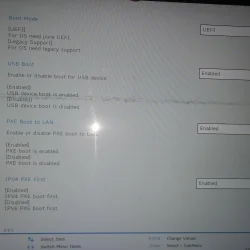
Disable PXE Boot to Lan to see if Windows 11 boots also does your BIOS have boot tap.
 

My Computer

System One

  • OS
    Windows 11
    Computer type
    PC/Desktop
    Manufacturer/Model
    HP Pavilion
    CPU
    AMD Ryzen 7 5700G
    Motherboard
    Erica6
    Memory
    Micron Technology DDR4-3200 16GB
    Graphics Card(s)
    NVIDIA GeForce RTX 3060
    Sound Card
    Realtek ALC671
    Monitor(s) Displays
    Samsung SyncMaster U28E590
    Screen Resolution
    3840 x 2160
    Hard Drives
    SAMSUNG MZVLQ1T0HALB-000H1

Attachments

  • 6314353269978893607_121.webp
    6314353269978893607_121.webp
    22.4 KB · Views: 2

My Computer

System One

  • OS
    Windows 11 x64 25H2
    Computer type
    Laptop
    Manufacturer/Model
    Lenovo IdeaPad Gaming3 15ARH05D
    CPU
    AMD Ryzen 5 Mobile 4600H
    Memory
    16GB
    Browser
    Firefox, Chrome, Edge, Vivaldi, Brave
    Antivirus
    BitDefender Total Security
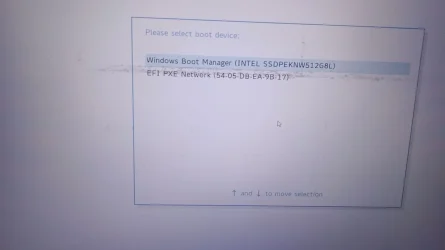
Okay that is the page where you set the first boot device and in the picture Windows boot manager set as a first boot device which is correct order.
 

My Computer

System One

  • OS
    Windows 11
    Computer type
    PC/Desktop
    Manufacturer/Model
    HP Pavilion
    CPU
    AMD Ryzen 7 5700G
    Motherboard
    Erica6
    Memory
    Micron Technology DDR4-3200 16GB
    Graphics Card(s)
    NVIDIA GeForce RTX 3060
    Sound Card
    Realtek ALC671
    Monitor(s) Displays
    Samsung SyncMaster U28E590
    Screen Resolution
    3840 x 2160
    Hard Drives
    SAMSUNG MZVLQ1T0HALB-000H1
Can you please post the log file of Startup Repair tool.
The log file created by Startup Repair can help to find out the cause of the boot problem.

The SrtTrail.txt file is a log generated by Windows Startup Repair when it encounters boot problems, usually indicating corrupt system files or boot configuration issues, located at C:\Windows\System32\LogFiles\Srt\SrtTrail.txt.
 

My Computer

System One

  • OS
    Windows 11
    Computer type
    PC/Desktop
    Manufacturer/Model
    HP Pavilion
    CPU
    AMD Ryzen 7 5700G
    Motherboard
    Erica6
    Memory
    Micron Technology DDR4-3200 16GB
    Graphics Card(s)
    NVIDIA GeForce RTX 3060
    Sound Card
    Realtek ALC671
    Monitor(s) Displays
    Samsung SyncMaster U28E590
    Screen Resolution
    3840 x 2160
    Hard Drives
    SAMSUNG MZVLQ1T0HALB-000H1
Can you please post the log file of Startup Repair tool.
The log file created by Startup Repair can help to find out the cause of the boot problem.

The SrtTrail.txt file is a log generated by Windows Startup Repair when it encounters boot problems, usually indicating corrupt system files or boot configuration issues, located at C:\Windows\System32\LogFiles\Srt\SrtTrail.txt.
how to open the file? As I am unable to open Windows.
 

My Computer

System One

  • OS
    Windows 11 x64 25H2
    Computer type
    Laptop
    Manufacturer/Model
    Lenovo IdeaPad Gaming3 15ARH05D
    CPU
    AMD Ryzen 5 Mobile 4600H
    Memory
    16GB
    Browser
    Firefox, Chrome, Edge, Vivaldi, Brave
    Antivirus
    BitDefender Total Security
You copy it to USB flash drive or open it with notepad.exe command.
 

My Computer

System One

  • OS
    Windows 11
    Computer type
    PC/Desktop
    Manufacturer/Model
    HP Pavilion
    CPU
    AMD Ryzen 7 5700G
    Motherboard
    Erica6
    Memory
    Micron Technology DDR4-3200 16GB
    Graphics Card(s)
    NVIDIA GeForce RTX 3060
    Sound Card
    Realtek ALC671
    Monitor(s) Displays
    Samsung SyncMaster U28E590
    Screen Resolution
    3840 x 2160
    Hard Drives
    SAMSUNG MZVLQ1T0HALB-000H1
You copy it to USB flash drive or open it with notepad.exe command.
thx, in googling found out need to open command prompt via recovery again.. so turned on the laptop again just before ur reply came through :) Its going through automatic repair again, might take around 20-30mins atleast for the process, will share info once ready.
 

My Computer

System One

  • OS
    Windows 11 x64 25H2
    Computer type
    Laptop
    Manufacturer/Model
    Lenovo IdeaPad Gaming3 15ARH05D
    CPU
    AMD Ryzen 5 Mobile 4600H
    Memory
    16GB
    Browser
    Firefox, Chrome, Edge, Vivaldi, Brave
    Antivirus
    BitDefender Total Security
Okay you can start the Notepad by executing notepad command from Command Prompt within recovery environment.
 

My Computer

System One

  • OS
    Windows 11
    Computer type
    PC/Desktop
    Manufacturer/Model
    HP Pavilion
    CPU
    AMD Ryzen 7 5700G
    Motherboard
    Erica6
    Memory
    Micron Technology DDR4-3200 16GB
    Graphics Card(s)
    NVIDIA GeForce RTX 3060
    Sound Card
    Realtek ALC671
    Monitor(s) Displays
    Samsung SyncMaster U28E590
    Screen Resolution
    3840 x 2160
    Hard Drives
    SAMSUNG MZVLQ1T0HALB-000H1
You copy it to USB flash drive or open it with notepad.exe command.
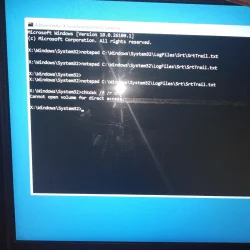
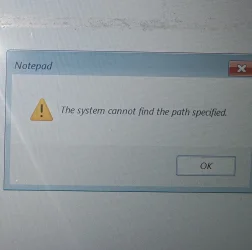
got error stating "The system cannot find the path specified", after opening notepad

Tried running chkdsk /f /r c:
got cannot open volume for direct access
 

My Computer

System One

  • OS
    Windows 11 x64 25H2
    Computer type
    Laptop
    Manufacturer/Model
    Lenovo IdeaPad Gaming3 15ARH05D
    CPU
    AMD Ryzen 5 Mobile 4600H
    Memory
    16GB
    Browser
    Firefox, Chrome, Edge, Vivaldi, Brave
    Antivirus
    BitDefender Total Security
Did you open the notepad and browse to the location of the SrtTrail.txt file?
 

My Computer

System One

  • OS
    Windows 11
    Computer type
    PC/Desktop
    Manufacturer/Model
    HP Pavilion
    CPU
    AMD Ryzen 7 5700G
    Motherboard
    Erica6
    Memory
    Micron Technology DDR4-3200 16GB
    Graphics Card(s)
    NVIDIA GeForce RTX 3060
    Sound Card
    Realtek ALC671
    Monitor(s) Displays
    Samsung SyncMaster U28E590
    Screen Resolution
    3840 x 2160
    Hard Drives
    SAMSUNG MZVLQ1T0HALB-000H1

Attachments

  • gmail_images20260124_214423.webp
    gmail_images20260124_214423.webp
    1.2 MB · Views: 1

My Computer

System One

  • OS
    Windows 11 x64 25H2
    Computer type
    Laptop
    Manufacturer/Model
    Lenovo IdeaPad Gaming3 15ARH05D
    CPU
    AMD Ryzen 5 Mobile 4600H
    Memory
    16GB
    Browser
    Firefox, Chrome, Edge, Vivaldi, Brave
    Antivirus
    BitDefender Total Security
Copy the log file Startup Repair creates for us to view. Open the Command Prompt and execute the following command:

Code:
Copy C:\Windows\System32\Logfiles\Srt\SrtTrail.txt  X:

Replace X: letter with external storage drive like USB flash drive. Following commands displays volumes which are installed on the local machine.

Code:
Diskpart

List Volume
 

My Computer

System One

  • OS
    Windows 11
    Computer type
    PC/Desktop
    Manufacturer/Model
    HP Pavilion
    CPU
    AMD Ryzen 7 5700G
    Motherboard
    Erica6
    Memory
    Micron Technology DDR4-3200 16GB
    Graphics Card(s)
    NVIDIA GeForce RTX 3060
    Sound Card
    Realtek ALC671
    Monitor(s) Displays
    Samsung SyncMaster U28E590
    Screen Resolution
    3840 x 2160
    Hard Drives
    SAMSUNG MZVLQ1T0HALB-000H1

Attachments

  • 1.webp
    1.webp
    646.2 KB · Views: 1

My Computer

System One

  • OS
    Windows 11 x64 25H2
    Computer type
    Laptop
    Manufacturer/Model
    Lenovo IdeaPad Gaming3 15ARH05D
    CPU
    AMD Ryzen 5 Mobile 4600H
    Memory
    16GB
    Browser
    Firefox, Chrome, Edge, Vivaldi, Brave
    Antivirus
    BitDefender Total Security
Please boot your computer with Windows Setup Media and from Windows Recovery Environment start the Command Prompt.

Please type below commands into Command Prompt and press Enter key.

Following commands will repair Master Boot Record (MBR), Boot Sector and BCD Store.


Code:
Bootrec /FixMbr

Bootrec  /FixBoot

Bootrec /scanos

Bootrec  /RebuildBcd
 

My Computer

System One

  • OS
    Windows 11
    Computer type
    PC/Desktop
    Manufacturer/Model
    HP Pavilion
    CPU
    AMD Ryzen 7 5700G
    Motherboard
    Erica6
    Memory
    Micron Technology DDR4-3200 16GB
    Graphics Card(s)
    NVIDIA GeForce RTX 3060
    Sound Card
    Realtek ALC671
    Monitor(s) Displays
    Samsung SyncMaster U28E590
    Screen Resolution
    3840 x 2160
    Hard Drives
    SAMSUNG MZVLQ1T0HALB-000H1
Copy the log file Startup Repair creates for us to view. Open the Command Prompt and execute the following command:

Code:
Copy C:\Windows\System32\Logfiles\Srt\SrtTrail.txt  X:

Replace X: letter with external storage drive like USB flash drive. Following commands displays volumes which are installed on the local machine.

Code:
Diskpart

List Volume
attach USB drive to copy the file?

Please boot your computer with Windows Setup Media and from Windows Recovery Environment start the Command Prompt.

Please type below commands into Command Prompt and press Enter key.

Following commands will repair Master Boot Record (MBR), Boot Sector and BCD Store.


Code:
Bootrec /FixMbr

Bootrec  /FixBoot

Bootrec /scanos

Bootrec  /RebuildBcd

reboot again to run the commands or run it directly as command prompt is still running? I got here through repair mode of W11, not sure what's windows setup media
 

My Computer

System One

  • OS
    Windows 11 x64 25H2
    Computer type
    Laptop
    Manufacturer/Model
    Lenovo IdeaPad Gaming3 15ARH05D
    CPU
    AMD Ryzen 5 Mobile 4600H
    Memory
    16GB
    Browser
    Firefox, Chrome, Edge, Vivaldi, Brave
    Antivirus
    BitDefender Total Security
The USB drive need to be connected and don't worry about restarting Windows recovery environment you already are within it to use those commands.
 

My Computer

System One

  • OS
    Windows 11
    Computer type
    PC/Desktop
    Manufacturer/Model
    HP Pavilion
    CPU
    AMD Ryzen 7 5700G
    Motherboard
    Erica6
    Memory
    Micron Technology DDR4-3200 16GB
    Graphics Card(s)
    NVIDIA GeForce RTX 3060
    Sound Card
    Realtek ALC671
    Monitor(s) Displays
    Samsung SyncMaster U28E590
    Screen Resolution
    3840 x 2160
    Hard Drives
    SAMSUNG MZVLQ1T0HALB-000H1
Diskpart List Volume
Diskpart result:
version 10.0.26100.1
on comp: MININT-BOSRFRU

its asking me command from DISKPART>
should I need to enter List Volume, as a command under it? : DISKPART> List Volume?
 

My Computer

System One

  • OS
    Windows 11 x64 25H2
    Computer type
    Laptop
    Manufacturer/Model
    Lenovo IdeaPad Gaming3 15ARH05D
    CPU
    AMD Ryzen 5 Mobile 4600H
    Memory
    16GB
    Browser
    Firefox, Chrome, Edge, Vivaldi, Brave
    Antivirus
    BitDefender Total Security
Back
Top Bottom