System hung up & then after hard reboot different errors


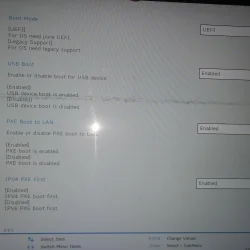
Can you post better picture of this tab i can't read anything from this picture you posted.

1000013132.webp
 

My Computer My Computer

At a glance

Windows 11AMD Ryzen 7 5700GMicron Technology DDR4-3200 16GBNVIDIA GeForce RTX 3060
OS
Windows 11
Computer type
PC/Desktop
Manufacturer/Model
HP Pavilion
CPU
AMD Ryzen 7 5700G
Motherboard
Erica6
Memory
Micron Technology DDR4-3200 16GB
Graphics Card(s)
NVIDIA GeForce RTX 3060
Sound Card
Realtek ALC671
Monitor(s) Displays
Samsung SyncMaster U28E590
Screen Resolution
3840 x 2160
Hard Drives
SAMSUNG MZVLQ1T0HALB-000H1

My Computer My Computer

At a glance

Windows 11AMD Ryzen 7 5700GMicron Technology DDR4-3200 16GBNVIDIA GeForce RTX 3060
OS
Windows 11
Computer type
PC/Desktop
Manufacturer/Model
HP Pavilion
CPU
AMD Ryzen 7 5700G
Motherboard
Erica6
Memory
Micron Technology DDR4-3200 16GB
Graphics Card(s)
NVIDIA GeForce RTX 3060
Sound Card
Realtek ALC671
Monitor(s) Displays
Samsung SyncMaster U28E590
Screen Resolution
3840 x 2160
Hard Drives
SAMSUNG MZVLQ1T0HALB-000H1

Attachments

  • gmail_images20260124_205401.webp
    gmail_images20260124_205401.webp
    494.8 KB · Views: 2

My Computer My Computer

At a glance

Windows 11 x64 25H2AMD Ryzen 5 Mobile 4600H16GB
OS
Windows 11 x64 25H2
Computer type
Laptop
Manufacturer/Model
Lenovo IdeaPad Gaming3 15ARH05D
CPU
AMD Ryzen 5 Mobile 4600H
Memory
16GB
Browser
Firefox, Chrome, Edge, Vivaldi, Brave
Antivirus
BitDefender Total Security
Disable PXE Boot to Lan to see if Windows 11 boots also does your BIOS have boot tap.
 

My Computer My Computer

At a glance

Windows 11AMD Ryzen 7 5700GMicron Technology DDR4-3200 16GBNVIDIA GeForce RTX 3060
OS
Windows 11
Computer type
PC/Desktop
Manufacturer/Model
HP Pavilion
CPU
AMD Ryzen 7 5700G
Motherboard
Erica6
Memory
Micron Technology DDR4-3200 16GB
Graphics Card(s)
NVIDIA GeForce RTX 3060
Sound Card
Realtek ALC671
Monitor(s) Displays
Samsung SyncMaster U28E590
Screen Resolution
3840 x 2160
Hard Drives
SAMSUNG MZVLQ1T0HALB-000H1

Attachments

  • 6314353269978893607_121.webp
    6314353269978893607_121.webp
    22.4 KB · Views: 2

My Computer My Computer

At a glance

Windows 11 x64 25H2AMD Ryzen 5 Mobile 4600H16GB
OS
Windows 11 x64 25H2
Computer type
Laptop
Manufacturer/Model
Lenovo IdeaPad Gaming3 15ARH05D
CPU
AMD Ryzen 5 Mobile 4600H
Memory
16GB
Browser
Firefox, Chrome, Edge, Vivaldi, Brave
Antivirus
BitDefender Total Security
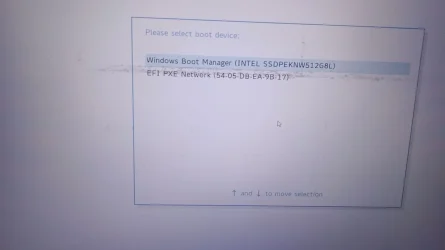
Okay that is the page where you set the first boot device and in the picture Windows boot manager set as a first boot device which is correct order.
 

My Computer My Computer

At a glance

Windows 11AMD Ryzen 7 5700GMicron Technology DDR4-3200 16GBNVIDIA GeForce RTX 3060
OS
Windows 11
Computer type
PC/Desktop
Manufacturer/Model
HP Pavilion
CPU
AMD Ryzen 7 5700G
Motherboard
Erica6
Memory
Micron Technology DDR4-3200 16GB
Graphics Card(s)
NVIDIA GeForce RTX 3060
Sound Card
Realtek ALC671
Monitor(s) Displays
Samsung SyncMaster U28E590
Screen Resolution
3840 x 2160
Hard Drives
SAMSUNG MZVLQ1T0HALB-000H1
Can you please post the log file of Startup Repair tool.
The log file created by Startup Repair can help to find out the cause of the boot problem.

The SrtTrail.txt file is a log generated by Windows Startup Repair when it encounters boot problems, usually indicating corrupt system files or boot configuration issues, located at C:\Windows\System32\LogFiles\Srt\SrtTrail.txt.
 

My Computer My Computer

At a glance

Windows 11AMD Ryzen 7 5700GMicron Technology DDR4-3200 16GBNVIDIA GeForce RTX 3060
OS
Windows 11
Computer type
PC/Desktop
Manufacturer/Model
HP Pavilion
CPU
AMD Ryzen 7 5700G
Motherboard
Erica6
Memory
Micron Technology DDR4-3200 16GB
Graphics Card(s)
NVIDIA GeForce RTX 3060
Sound Card
Realtek ALC671
Monitor(s) Displays
Samsung SyncMaster U28E590
Screen Resolution
3840 x 2160
Hard Drives
SAMSUNG MZVLQ1T0HALB-000H1
Can you please post the log file of Startup Repair tool.
The log file created by Startup Repair can help to find out the cause of the boot problem.

The SrtTrail.txt file is a log generated by Windows Startup Repair when it encounters boot problems, usually indicating corrupt system files or boot configuration issues, located at C:\Windows\System32\LogFiles\Srt\SrtTrail.txt.
how to open the file? As I am unable to open Windows.
 

My Computer My Computer

At a glance

Windows 11 x64 25H2AMD Ryzen 5 Mobile 4600H16GB
OS
Windows 11 x64 25H2
Computer type
Laptop
Manufacturer/Model
Lenovo IdeaPad Gaming3 15ARH05D
CPU
AMD Ryzen 5 Mobile 4600H
Memory
16GB
Browser
Firefox, Chrome, Edge, Vivaldi, Brave
Antivirus
BitDefender Total Security
You copy it to USB flash drive or open it with notepad.exe command.
 

My Computer My Computer

At a glance

Windows 11AMD Ryzen 7 5700GMicron Technology DDR4-3200 16GBNVIDIA GeForce RTX 3060
OS
Windows 11
Computer type
PC/Desktop
Manufacturer/Model
HP Pavilion
CPU
AMD Ryzen 7 5700G
Motherboard
Erica6
Memory
Micron Technology DDR4-3200 16GB
Graphics Card(s)
NVIDIA GeForce RTX 3060
Sound Card
Realtek ALC671
Monitor(s) Displays
Samsung SyncMaster U28E590
Screen Resolution
3840 x 2160
Hard Drives
SAMSUNG MZVLQ1T0HALB-000H1
You copy it to USB flash drive or open it with notepad.exe command.
thx, in googling found out need to open command prompt via recovery again.. so turned on the laptop again just before ur reply came through :) Its going through automatic repair again, might take around 20-30mins atleast for the process, will share info once ready.
 

My Computer My Computer

At a glance

Windows 11 x64 25H2AMD Ryzen 5 Mobile 4600H16GB
OS
Windows 11 x64 25H2
Computer type
Laptop
Manufacturer/Model
Lenovo IdeaPad Gaming3 15ARH05D
CPU
AMD Ryzen 5 Mobile 4600H
Memory
16GB
Browser
Firefox, Chrome, Edge, Vivaldi, Brave
Antivirus
BitDefender Total Security
Okay you can start the Notepad by executing notepad command from Command Prompt within recovery environment.
 

My Computer My Computer

At a glance

Windows 11AMD Ryzen 7 5700GMicron Technology DDR4-3200 16GBNVIDIA GeForce RTX 3060
OS
Windows 11
Computer type
PC/Desktop
Manufacturer/Model
HP Pavilion
CPU
AMD Ryzen 7 5700G
Motherboard
Erica6
Memory
Micron Technology DDR4-3200 16GB
Graphics Card(s)
NVIDIA GeForce RTX 3060
Sound Card
Realtek ALC671
Monitor(s) Displays
Samsung SyncMaster U28E590
Screen Resolution
3840 x 2160
Hard Drives
SAMSUNG MZVLQ1T0HALB-000H1
You copy it to USB flash drive or open it with notepad.exe command.
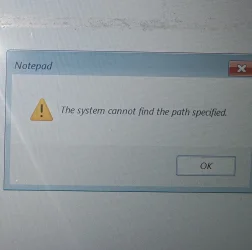
got error stating "The system cannot find the path specified", after opening notepad

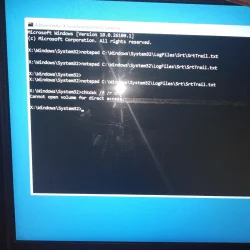
Tried running chkdsk /f /r c:
got cannot open volume for direct access
 

My Computer My Computer

At a glance

Windows 11 x64 25H2AMD Ryzen 5 Mobile 4600H16GB
OS
Windows 11 x64 25H2
Computer type
Laptop
Manufacturer/Model
Lenovo IdeaPad Gaming3 15ARH05D
CPU
AMD Ryzen 5 Mobile 4600H
Memory
16GB
Browser
Firefox, Chrome, Edge, Vivaldi, Brave
Antivirus
BitDefender Total Security
Did you open the notepad and browse to the location of the SrtTrail.txt file?
 

My Computer My Computer

At a glance

Windows 11AMD Ryzen 7 5700GMicron Technology DDR4-3200 16GBNVIDIA GeForce RTX 3060
OS
Windows 11
Computer type
PC/Desktop
Manufacturer/Model
HP Pavilion
CPU
AMD Ryzen 7 5700G
Motherboard
Erica6
Memory
Micron Technology DDR4-3200 16GB
Graphics Card(s)
NVIDIA GeForce RTX 3060
Sound Card
Realtek ALC671
Monitor(s) Displays
Samsung SyncMaster U28E590
Screen Resolution
3840 x 2160
Hard Drives
SAMSUNG MZVLQ1T0HALB-000H1

Attachments

  • gmail_images20260124_214423.webp
    gmail_images20260124_214423.webp
    1.2 MB · Views: 1

My Computer My Computer

At a glance

Windows 11 x64 25H2AMD Ryzen 5 Mobile 4600H16GB
OS
Windows 11 x64 25H2
Computer type
Laptop
Manufacturer/Model
Lenovo IdeaPad Gaming3 15ARH05D
CPU
AMD Ryzen 5 Mobile 4600H
Memory
16GB
Browser
Firefox, Chrome, Edge, Vivaldi, Brave
Antivirus
BitDefender Total Security
Copy the log file Startup Repair creates for us to view. Open the Command Prompt and execute the following command:

Code:
Copy C:\Windows\System32\Logfiles\Srt\SrtTrail.txt  X:

Replace X: letter with external storage drive like USB flash drive. Following commands displays volumes which are installed on the local machine.

Code:
Diskpart

List Volume
 

My Computer My Computer

At a glance

Windows 11AMD Ryzen 7 5700GMicron Technology DDR4-3200 16GBNVIDIA GeForce RTX 3060
OS
Windows 11
Computer type
PC/Desktop
Manufacturer/Model
HP Pavilion
CPU
AMD Ryzen 7 5700G
Motherboard
Erica6
Memory
Micron Technology DDR4-3200 16GB
Graphics Card(s)
NVIDIA GeForce RTX 3060
Sound Card
Realtek ALC671
Monitor(s) Displays
Samsung SyncMaster U28E590
Screen Resolution
3840 x 2160
Hard Drives
SAMSUNG MZVLQ1T0HALB-000H1

Attachments

  • 1.webp
    1.webp
    646.2 KB · Views: 1

My Computer My Computer

At a glance

Windows 11 x64 25H2AMD Ryzen 5 Mobile 4600H16GB
OS
Windows 11 x64 25H2
Computer type
Laptop
Manufacturer/Model
Lenovo IdeaPad Gaming3 15ARH05D
CPU
AMD Ryzen 5 Mobile 4600H
Memory
16GB
Browser
Firefox, Chrome, Edge, Vivaldi, Brave
Antivirus
BitDefender Total Security
Please boot your computer with Windows Setup Media and from Windows Recovery Environment start the Command Prompt.

Please type below commands into Command Prompt and press Enter key.

Following commands will repair Master Boot Record (MBR), Boot Sector and BCD Store.


Code:
Bootrec /FixMbr

Bootrec  /FixBoot

Bootrec /scanos

Bootrec  /RebuildBcd
 

My Computer My Computer

At a glance

Windows 11AMD Ryzen 7 5700GMicron Technology DDR4-3200 16GBNVIDIA GeForce RTX 3060
OS
Windows 11
Computer type
PC/Desktop
Manufacturer/Model
HP Pavilion
CPU
AMD Ryzen 7 5700G
Motherboard
Erica6
Memory
Micron Technology DDR4-3200 16GB
Graphics Card(s)
NVIDIA GeForce RTX 3060
Sound Card
Realtek ALC671
Monitor(s) Displays
Samsung SyncMaster U28E590
Screen Resolution
3840 x 2160
Hard Drives
SAMSUNG MZVLQ1T0HALB-000H1
Copy the log file Startup Repair creates for us to view. Open the Command Prompt and execute the following command:

Code:
Copy C:\Windows\System32\Logfiles\Srt\SrtTrail.txt  X:

Replace X: letter with external storage drive like USB flash drive. Following commands displays volumes which are installed on the local machine.

Code:
Diskpart

List Volume
attach USB drive to copy the file?

Please boot your computer with Windows Setup Media and from Windows Recovery Environment start the Command Prompt.

Please type below commands into Command Prompt and press Enter key.

Following commands will repair Master Boot Record (MBR), Boot Sector and BCD Store.


Code:
Bootrec /FixMbr

Bootrec  /FixBoot

Bootrec /scanos

Bootrec  /RebuildBcd

reboot again to run the commands or run it directly as command prompt is still running? I got here through repair mode of W11, not sure what's windows setup media
 

My Computer My Computer

At a glance

Windows 11 x64 25H2AMD Ryzen 5 Mobile 4600H16GB
OS
Windows 11 x64 25H2
Computer type
Laptop
Manufacturer/Model
Lenovo IdeaPad Gaming3 15ARH05D
CPU
AMD Ryzen 5 Mobile 4600H
Memory
16GB
Browser
Firefox, Chrome, Edge, Vivaldi, Brave
Antivirus
BitDefender Total Security
The USB drive need to be connected and don't worry about restarting Windows recovery environment you already are within it to use those commands.
 

My Computer My Computer

At a glance

Windows 11AMD Ryzen 7 5700GMicron Technology DDR4-3200 16GBNVIDIA GeForce RTX 3060
OS
Windows 11
Computer type
PC/Desktop
Manufacturer/Model
HP Pavilion
CPU
AMD Ryzen 7 5700G
Motherboard
Erica6
Memory
Micron Technology DDR4-3200 16GB
Graphics Card(s)
NVIDIA GeForce RTX 3060
Sound Card
Realtek ALC671
Monitor(s) Displays
Samsung SyncMaster U28E590
Screen Resolution
3840 x 2160
Hard Drives
SAMSUNG MZVLQ1T0HALB-000H1
Diskpart List Volume
Diskpart result:
version 10.0.26100.1
on comp: MININT-BOSRFRU

its asking me command from DISKPART>
should I need to enter List Volume, as a command under it? : DISKPART> List Volume?
 

My Computer My Computer

At a glance

Windows 11 x64 25H2AMD Ryzen 5 Mobile 4600H16GB
OS
Windows 11 x64 25H2
Computer type
Laptop
Manufacturer/Model
Lenovo IdeaPad Gaming3 15ARH05D
CPU
AMD Ryzen 5 Mobile 4600H
Memory
16GB
Browser
Firefox, Chrome, Edge, Vivaldi, Brave
Antivirus
BitDefender Total Security

Latest Support Threads

Back
Top Bottom