System hung up & then after hard reboot different errors


You type the list volume command after you executed diskpart command.
 

My Computer My Computer

At a glance

Windows 11AMD Ryzen 7 5700GMicron Technology DDR4-3200 16GBNVIDIA GeForce RTX 3060
OS
Windows 11
Computer type
PC/Desktop
Manufacturer/Model
HP Pavilion
CPU
AMD Ryzen 7 5700G
Motherboard
Erica6
Memory
Micron Technology DDR4-3200 16GB
Graphics Card(s)
NVIDIA GeForce RTX 3060
Sound Card
Realtek ALC671
Monitor(s) Displays
Samsung SyncMaster U28E590
Screen Resolution
3840 x 2160
Hard Drives
SAMSUNG MZVLQ1T0HALB-000H1

The USB drive need to be connected and don't worry about restarting Windows recovery environment you already are within it to use those commands.
when I try to copy file to the USB, I get error "The system cannot find the drive specified"
I use C, D drives on my laptop. So, tried, E, F, G, H = nothing worked.

Tested the USB on another laptop before attempting, it worked fine in there
 

My Computer My Computer

At a glance

Windows 11 x64 25H2AMD Ryzen 5 Mobile 4600H16GB
OS
Windows 11 x64 25H2
Computer type
Laptop
Manufacturer/Model
Lenovo IdeaPad Gaming3 15ARH05D
CPU
AMD Ryzen 5 Mobile 4600H
Memory
16GB
Browser
Firefox, Chrome, Edge, Vivaldi, Brave
Antivirus
BitDefender Total Security
Okay execute bellow commands one at a time and reboot your system.

Following commands will repair Master Boot Record (MBR), Boot Sector and BCD Store.


Code:
Bootrec /FixMbr

Bootrec  /FixBoot

Bootrec /scanos

Bootrec  /RebuildBcd
 

My Computer My Computer

At a glance

Windows 11AMD Ryzen 7 5700GMicron Technology DDR4-3200 16GBNVIDIA GeForce RTX 3060
OS
Windows 11
Computer type
PC/Desktop
Manufacturer/Model
HP Pavilion
CPU
AMD Ryzen 7 5700G
Motherboard
Erica6
Memory
Micron Technology DDR4-3200 16GB
Graphics Card(s)
NVIDIA GeForce RTX 3060
Sound Card
Realtek ALC671
Monitor(s) Displays
Samsung SyncMaster U28E590
Screen Resolution
3840 x 2160
Hard Drives
SAMSUNG MZVLQ1T0HALB-000H1

My Computer My Computer

At a glance

Windows 11 x64 25H2AMD Ryzen 5 Mobile 4600H16GB
OS
Windows 11 x64 25H2
Computer type
Laptop
Manufacturer/Model
Lenovo IdeaPad Gaming3 15ARH05D
CPU
AMD Ryzen 5 Mobile 4600H
Memory
16GB
Browser
Firefox, Chrome, Edge, Vivaldi, Brave
Antivirus
BitDefender Total Security

My Computer My Computer

At a glance

Windows 11AMD Ryzen 7 5700GMicron Technology DDR4-3200 16GBNVIDIA GeForce RTX 3060
OS
Windows 11
Computer type
PC/Desktop
Manufacturer/Model
HP Pavilion
CPU
AMD Ryzen 7 5700G
Motherboard
Erica6
Memory
Micron Technology DDR4-3200 16GB
Graphics Card(s)
NVIDIA GeForce RTX 3060
Sound Card
Realtek ALC671
Monitor(s) Displays
Samsung SyncMaster U28E590
Screen Resolution
3840 x 2160
Hard Drives
SAMSUNG MZVLQ1T0HALB-000H1

Okay execute bellow commands one at a time and reboot your system.

Following commands will repair Master Boot Record (MBR), Boot Sector and BCD Store.


Code:
Bootrec /FixMbr

Bootrec  /FixBoot

Bootrec /scanos

Bootrec  /RebuildBcd
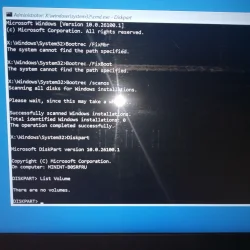
Bootrec /FixMbr:
system cannot find the path specified

Bootrec/FixBoot
system cannot find the path specified

Bootrec /scanos
Total identified Windows installations: 0
 

My Computer My Computer

At a glance

Windows 11 x64 25H2AMD Ryzen 5 Mobile 4600H16GB
OS
Windows 11 x64 25H2
Computer type
Laptop
Manufacturer/Model
Lenovo IdeaPad Gaming3 15ARH05D
CPU
AMD Ryzen 5 Mobile 4600H
Memory
16GB
Browser
Firefox, Chrome, Edge, Vivaldi, Brave
Antivirus
BitDefender Total Security
Looks like the HDD is not detected by your system try reinstalling Windows 11 to see if HDD is detected.
 

My Computer My Computer

At a glance

Windows 11AMD Ryzen 7 5700GMicron Technology DDR4-3200 16GBNVIDIA GeForce RTX 3060
OS
Windows 11
Computer type
PC/Desktop
Manufacturer/Model
HP Pavilion
CPU
AMD Ryzen 7 5700G
Motherboard
Erica6
Memory
Micron Technology DDR4-3200 16GB
Graphics Card(s)
NVIDIA GeForce RTX 3060
Sound Card
Realtek ALC671
Monitor(s) Displays
Samsung SyncMaster U28E590
Screen Resolution
3840 x 2160
Hard Drives
SAMSUNG MZVLQ1T0HALB-000H1
Bootrec /FixMbr:
system cannot find the path specified

Bootrec/FixBoot
system cannot find the path specified

Bootrec /scanos
Total identified Windows installations: 0
 

Attachments

  • gmail_images20260124_221539.webp
    gmail_images20260124_221539.webp
    607.5 KB · Views: 1

My Computer My Computer

At a glance

Windows 11 x64 25H2AMD Ryzen 5 Mobile 4600H16GB
OS
Windows 11 x64 25H2
Computer type
Laptop
Manufacturer/Model
Lenovo IdeaPad Gaming3 15ARH05D
CPU
AMD Ryzen 5 Mobile 4600H
Memory
16GB
Browser
Firefox, Chrome, Edge, Vivaldi, Brave
Antivirus
BitDefender Total Security
Looks like the HDD is not detected by your system try reinstalling Windows 11 to see if HDD is detected.
how to do that? Just insert bootable usb drive with w11 & then?
 

My Computer My Computer

At a glance

Windows 11 x64 25H2AMD Ryzen 5 Mobile 4600H16GB
OS
Windows 11 x64 25H2
Computer type
Laptop
Manufacturer/Model
Lenovo IdeaPad Gaming3 15ARH05D
CPU
AMD Ryzen 5 Mobile 4600H
Memory
16GB
Browser
Firefox, Chrome, Edge, Vivaldi, Brave
Antivirus
BitDefender Total Security
When Diskpart shows "there are no volumes," it typically means the disk has no formatted partitions, the partition table is corrupted, or necessary storage drivers (like NVMe/RAID) are missing, making the drive unreadable in the recovery environment.

Reinstall Windows 11.
 

My Computer My Computer

At a glance

Windows 11AMD Ryzen 7 5700GMicron Technology DDR4-3200 16GBNVIDIA GeForce RTX 3060
OS
Windows 11
Computer type
PC/Desktop
Manufacturer/Model
HP Pavilion
CPU
AMD Ryzen 7 5700G
Motherboard
Erica6
Memory
Micron Technology DDR4-3200 16GB
Graphics Card(s)
NVIDIA GeForce RTX 3060
Sound Card
Realtek ALC671
Monitor(s) Displays
Samsung SyncMaster U28E590
Screen Resolution
3840 x 2160
Hard Drives
SAMSUNG MZVLQ1T0HALB-000H1
how to do that? Just insert bootable usb drive with w11 & then?
 

My Computer My Computer

At a glance

Windows 11AMD Ryzen 7 5700GMicron Technology DDR4-3200 16GBNVIDIA GeForce RTX 3060
OS
Windows 11
Computer type
PC/Desktop
Manufacturer/Model
HP Pavilion
CPU
AMD Ryzen 7 5700G
Motherboard
Erica6
Memory
Micron Technology DDR4-3200 16GB
Graphics Card(s)
NVIDIA GeForce RTX 3060
Sound Card
Realtek ALC671
Monitor(s) Displays
Samsung SyncMaster U28E590
Screen Resolution
3840 x 2160
Hard Drives
SAMSUNG MZVLQ1T0HALB-000H1
When Diskpart shows "there are no volumes," it typically means the disk has no formatted partitions, the partition table is corrupted, or necessary storage drivers (like NVMe/RAID) are missing, making the drive unreadable in the recovery environment.

Reinstall Windows 11.
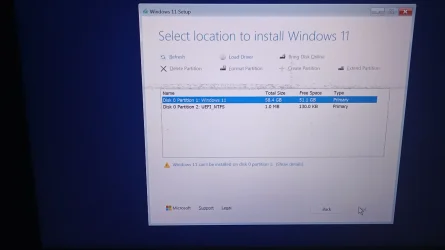
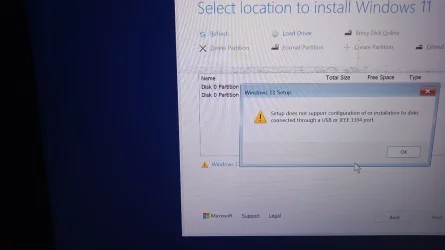
thanks. Tried installing & ran into issues here too

I actually had 2 partitions, for 500GB SSD, D was much larger, now it shows as this.
Can't install or do do anything tried refresh too

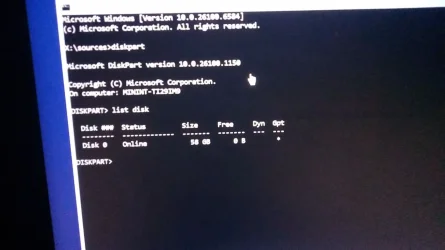
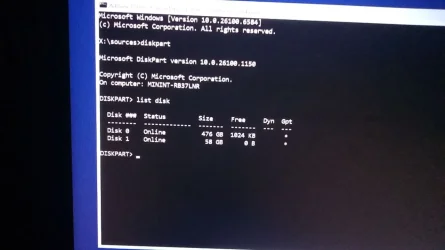
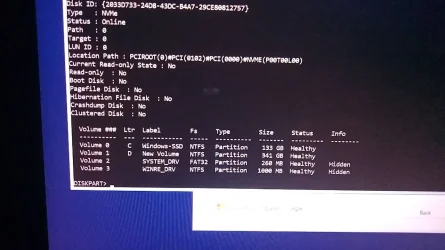
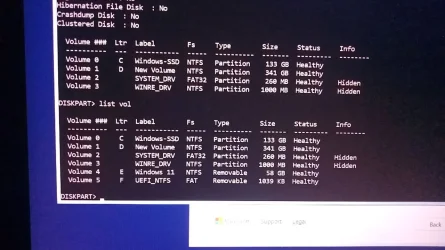
Ran shift+f10, to run diskpart again
 

Attachments

  • IMG_20260124_230932_970.webp
    IMG_20260124_230932_970.webp
    57.7 KB · Views: 1
  • IMG_20260124_231128_043.webp
    IMG_20260124_231128_043.webp
    160.5 KB · Views: 1
  • 6316605069792578882_121.webp
    6316605069792578882_121.webp
    65.5 KB · Views: 1

My Computer My Computer

At a glance

Windows 11 x64 25H2AMD Ryzen 5 Mobile 4600H16GB
OS
Windows 11 x64 25H2
Computer type
Laptop
Manufacturer/Model
Lenovo IdeaPad Gaming3 15ARH05D
CPU
AMD Ryzen 5 Mobile 4600H
Memory
16GB
Browser
Firefox, Chrome, Edge, Vivaldi, Brave
Antivirus
BitDefender Total Security
Install it on Windows 11 partition.
 

My Computer My Computer

At a glance

Windows 11AMD Ryzen 7 5700GMicron Technology DDR4-3200 16GBNVIDIA GeForce RTX 3060
OS
Windows 11
Computer type
PC/Desktop
Manufacturer/Model
HP Pavilion
CPU
AMD Ryzen 7 5700G
Motherboard
Erica6
Memory
Micron Technology DDR4-3200 16GB
Graphics Card(s)
NVIDIA GeForce RTX 3060
Sound Card
Realtek ALC671
Monitor(s) Displays
Samsung SyncMaster U28E590
Screen Resolution
3840 x 2160
Hard Drives
SAMSUNG MZVLQ1T0HALB-000H1
Oh looks like your hard drive either disconnected or died which means new replacement.
 

My Computer My Computer

At a glance

Windows 11AMD Ryzen 7 5700GMicron Technology DDR4-3200 16GBNVIDIA GeForce RTX 3060
OS
Windows 11
Computer type
PC/Desktop
Manufacturer/Model
HP Pavilion
CPU
AMD Ryzen 7 5700G
Motherboard
Erica6
Memory
Micron Technology DDR4-3200 16GB
Graphics Card(s)
NVIDIA GeForce RTX 3060
Sound Card
Realtek ALC671
Monitor(s) Displays
Samsung SyncMaster U28E590
Screen Resolution
3840 x 2160
Hard Drives
SAMSUNG MZVLQ1T0HALB-000H1
I tried checking what happens, after turning off laptop for a while & attempt again, now the disks are again showing as connected. So tried to check if Windows boots properly, but still ran into the earlier Couldn't connect to the network error.

Does this mean, there's some sort of loose connection in the motherboard? Data is so much conflicting.
 

Attachments

  • -6316605069792578887_121.webp
    -6316605069792578887_121.webp
    57.1 KB · Views: 1
  • -6316605069792578888_121.webp
    -6316605069792578888_121.webp
    99 KB · Views: 1
  • -6316605069792578889_121.webp
    -6316605069792578889_121.webp
    100.3 KB · Views: 1

My Computer My Computer

At a glance

Windows 11 x64 25H2AMD Ryzen 5 Mobile 4600H16GB
OS
Windows 11 x64 25H2
Computer type
Laptop
Manufacturer/Model
Lenovo IdeaPad Gaming3 15ARH05D
CPU
AMD Ryzen 5 Mobile 4600H
Memory
16GB
Browser
Firefox, Chrome, Edge, Vivaldi, Brave
Antivirus
BitDefender Total Security
Oh looks like your hard drive either disconnected or died which means new replacement.
does a NVMe get disconnected from motherboard too in laptops? I thought it was only a PC thing. It keeps detecting once in a while, no clue what to make out of it.
 

My Computer My Computer

At a glance

Windows 11 x64 25H2AMD Ryzen 5 Mobile 4600H16GB
OS
Windows 11 x64 25H2
Computer type
Laptop
Manufacturer/Model
Lenovo IdeaPad Gaming3 15ARH05D
CPU
AMD Ryzen 5 Mobile 4600H
Memory
16GB
Browser
Firefox, Chrome, Edge, Vivaldi, Brave
Antivirus
BitDefender Total Security
Can happen just reconnected but tell you the true i think its manufacturing more than disconnected but i could be wrong.
 

My Computer My Computer

At a glance

Windows 11AMD Ryzen 7 5700GMicron Technology DDR4-3200 16GBNVIDIA GeForce RTX 3060
OS
Windows 11
Computer type
PC/Desktop
Manufacturer/Model
HP Pavilion
CPU
AMD Ryzen 7 5700G
Motherboard
Erica6
Memory
Micron Technology DDR4-3200 16GB
Graphics Card(s)
NVIDIA GeForce RTX 3060
Sound Card
Realtek ALC671
Monitor(s) Displays
Samsung SyncMaster U28E590
Screen Resolution
3840 x 2160
Hard Drives
SAMSUNG MZVLQ1T0HALB-000H1
thanks. Tried installing & ran into issues here too

I actually had 2 partitions, for 500GB SSD, D was much larger, now it shows as this.
Can't install or do do anything tried refresh too

Ran shift+f10, to run diskpart again
That is the USB drive that you booted from. Your NVMe drive isn't listed. IMO, your drive is either going bad or needs to be reseated. Being it's a laptop I'm not sure how hard it will be to remove the back. If you want to try, I suggest you do a search for how to remove the back from the laptop first.
 

My Computers My Computers

  • At a glance

    Windows 11 Pro 25H2Intel Core i7-10700K16GB (8GB PC4-19200 DDR4 SDRAM x2)NVIDIA GeForce GTX 1050 TI
    OS
    Windows 11 Pro 25H2
    Computer type
    PC/Desktop
    Manufacturer/Model
    PowerSpec B746
    CPU
    Intel Core i7-10700K
    Motherboard
    ASRock Z490 Phantom Gaming 4/ax
    Memory
    16GB (8GB PC4-19200 DDR4 SDRAM x2)
    Graphics Card(s)
    NVIDIA GeForce GTX 1050 TI
    Sound Card
    Realtek Audio
    Monitor(s) Displays
    #1. LG ULTRAWIDE 34" #2. AOC Q32G2WG3 32"
    Screen Resolution
    #1. 3440 X 1440 #2. 1920 x 1080
    Hard Drives
    NVMe WDC WDS100T2B0C-00PXH0 1TB
    Samsung SSD 860 EVO 1TB
    PSU
    750 Watts (62.5A)
    Case
    PowerSpec/Lian Li ATX 205
    Keyboard
    Logitech K270
    Mouse
    Logitech M185
    Browser
    Microsoft Edge and Firefox
    Antivirus
    Webroot SecureAnywhere CE 26.1
  • At a glance

    Windows 11 Canary ChannelIntel Core i5-8400 CPU @ 2.80GHz16 MB DDR 4-2666
    Operating System
    Windows 11 Canary Channel
    Computer type
    PC/Desktop
    Manufacturer/Model
    PowerSpec G156
    CPU
    Intel Core i5-8400 CPU @ 2.80GHz
    Motherboard
    AsusTeK Prime B360M-A
    Memory
    16 MB DDR 4-2666
    Monitor(s) Displays
    23" Speptre HDMI 75Hz
    Screen Resolution
    1920x1080
    Hard Drives
    Samsung 970 EVO 500GB NVMe
    Keyboard
    Logitek K270
    Mouse
    Logitek M185
    Browser
    Firefox, Edge and Edge Canary
    Antivirus
    Windows Defender
That is the USB drive that you booted from. Your NVMe drive isn't listed. IMO, your drive is either going bad or needs to be reseated. Being it's a laptop I'm not sure how hard it will be to remove the back. If you want to try, I suggest you do a search for how to remove the back from the laptop first.
Can happen just reconnected but tell you the true i think its manufacturing more than disconnected but i could be wrong.

thanks for your help guys, just to update - I took the laptop to the service center on Monday; they stated the drive is corrupted & in their health checkup, it came 82% healthy. I could see the files when they opened it via VM, they suggested to replace SSD, as even if they format, there's a chance for me to encounter issues again. So, yeah replaced with another NVMe SSD (price doubled or tripled since last September & the pricing they had now is changing every half day).
They put the old SSD on a chasis, for me to access or use it. I can see the "D" drive in it but the "C" drive just draws blank.

And to top this, my laptop battery was bloated. Technicians suspect, the bloated battery may have to do something with the SSD corruption, as when the battery bloats, it can cause heat in the system. They aren't sure if that's the exact reason for my SSD issues but that's what they most likely suspect. I asked them to disconnect battery temporarily, not to take chances - as they didn't have new battery ready. They got the battery yesterday, so got it replaced as well.
 

My Computer My Computer

At a glance

Windows 11 x64 25H2AMD Ryzen 5 Mobile 4600H16GB
OS
Windows 11 x64 25H2
Computer type
Laptop
Manufacturer/Model
Lenovo IdeaPad Gaming3 15ARH05D
CPU
AMD Ryzen 5 Mobile 4600H
Memory
16GB
Browser
Firefox, Chrome, Edge, Vivaldi, Brave
Antivirus
BitDefender Total Security
We are glad to hear your issue has been resolved, thank you for letting us know that all is now well!
 

My Computer My Computer

At a glance

Windows 11AMD Ryzen 7 5700GMicron Technology DDR4-3200 16GBNVIDIA GeForce RTX 3060
OS
Windows 11
Computer type
PC/Desktop
Manufacturer/Model
HP Pavilion
CPU
AMD Ryzen 7 5700G
Motherboard
Erica6
Memory
Micron Technology DDR4-3200 16GB
Graphics Card(s)
NVIDIA GeForce RTX 3060
Sound Card
Realtek ALC671
Monitor(s) Displays
Samsung SyncMaster U28E590
Screen Resolution
3840 x 2160
Hard Drives
SAMSUNG MZVLQ1T0HALB-000H1

Latest Support Threads

Back
Top Bottom