Solved System Reserved and Recovery in File Explorer


bimfi

Well-known member
Member
Local time
3:32 AM
Posts
56
OS
Windows 11 Pro (x64) Version 25H2 build 26200.8457
Good morning. Yesterday I did a clean install of Windows 11 pro due to an update failure and boot loop. Everything seems to be working fine. I looked into File Explorer and noticed the two virtual drives (I guess they are virtual) named System Reserved, and Recovery. When I opened them up, I noticed that most of the folders were dated 2019 and 2011 or earlier. I was expecting them to be files from my most recent reinstall. Can I delete them, or at least delete the files, or are they still necessary. Thanks for any and all responses.
 
Windows Build/Version
Windows 11 pro, build 26200.8457 and version 25H2

My Computer My Computer

At a glance

Windows 11 Pro (x64) Version 25H2 build 26200...Ryzen 5 5600XG. Skill 4X8GB 288-pin SDRAM DDR4-3000MSI GeForce GTX 1060 6GB
OS
Windows 11 Pro (x64) Version 25H2 build 26200.8457
Computer type
PC/Desktop
Manufacturer/Model
custom built
CPU
Ryzen 5 5600X
Motherboard
Asus Prime X370-pro
Memory
G. Skill 4X8GB 288-pin SDRAM DDR4-3000
Graphics Card(s)
MSI GeForce GTX 1060 6GB
Sound Card
onboard
Monitor(s) Displays
Dual ViewSonic VG2753 Series [Monitor] (27.2"vis, October 2017)
Screen Resolution
1920 x 1080
Hard Drives
1T SSD (C:\); 2T spinner HDD partitioned into virtual drives; 250gb WD Blue SSD;
PSU
Seasonic Focus Plus SSR-650FX
Case
Cool Master Mastercase Pro 5
Cooling
Cryorig H7
Keyboard
Logitech wireless
Mouse
Logitech wireless
Internet Speed
1 Gb fiber optic AT&T
Browser
Opera
Antivirus
McAfee
Other Info
NordVPN installed

Good morning. Yesterday I did a clean install of Windows 11 pro due to an update failure and boot loop. Everything seems to be working fine. I looked into File Explorer and noticed the two virtual drives (I guess they are virtual) named System Reserved, and Recovery. When I opened them up, I noticed that most of the folders were dated 2019 and 2011 or earlier. I was expecting them to be files from my most recent reinstall. Can I delete them, or at least delete the files, or are they still necessary. Thanks for any and all responses.
Your guess is wrong as those drives are physical, not virtual.
Please post a screenshot of Disk Management so that we can better assess your setup.

Win+R+ diskmgmt.msc (enter)
 

My Computers My Computers

  • At a glance

    All Branches but ReleaseAMD Ryzen 7 7735HS 3200-4500 Mhz 8 cores x 232 GB DDR5Radeon Graphic / NVIDIA GeForce RTX 4060 8 GB...
    OS
    All Branches but Release
    Computer type
    Laptop
    Manufacturer/Model
    Acer Nitro ANV15-51
    CPU
    AMD Ryzen 7 7735HS 3200-4500 Mhz 8 cores x 2
    Motherboard
    Sportage_RBH
    Memory
    32 GB DDR5
    Graphics Card(s)
    Radeon Graphic / NVIDIA GeForce RTX 4060 8 GB GDDR6
    Sound Card
    AMD/Realtek(R) Audio
    Monitor(s) Displays
    Integrated Monitor (15.3"vis)
    Screen Resolution
    FHD 1920X1080 16:9 144Hz
    Hard Drives
    KINGSTON OM8SEP4512Q-AA 1TB
    Western Digital 256GB
    PSU
    19V DC 6.32 A 120 W
    Cooling
    Dual Fans
    Mouse
    MS Bluetooth
    Internet Speed
    Fiber 1GB Cox -us & 1GB Orange-fr
    Browser
    Edge Canary- Firefox Nightly-Chrome Dev-Chrome Dev
    Antivirus
    Windows Defender
  • At a glance

    Windows 11 BetaAMD A9-94208 GB of DDR4AMD Radeon R5
    Operating System
    Windows 11 Beta
    Computer type
    Laptop
    Manufacturer/Model
    Asus X751BP
    CPU
    AMD A9-9420
    Memory
    8 GB of DDR4
    Graphics card(s)
    AMD Radeon R5
    Screen Resolution
    1600x900
    Hard Drives
    Seagate 1 TB
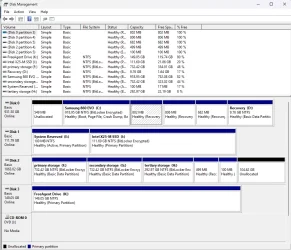
Here is the screen shotdiskmanagement.webpdiskmanagement.webp
 

My Computer My Computer

At a glance

Windows 11 Pro (x64) Version 25H2 build 26200...Ryzen 5 5600XG. Skill 4X8GB 288-pin SDRAM DDR4-3000MSI GeForce GTX 1060 6GB
OS
Windows 11 Pro (x64) Version 25H2 build 26200.8457
Computer type
PC/Desktop
Manufacturer/Model
custom built
CPU
Ryzen 5 5600X
Motherboard
Asus Prime X370-pro
Memory
G. Skill 4X8GB 288-pin SDRAM DDR4-3000
Graphics Card(s)
MSI GeForce GTX 1060 6GB
Sound Card
onboard
Monitor(s) Displays
Dual ViewSonic VG2753 Series [Monitor] (27.2"vis, October 2017)
Screen Resolution
1920 x 1080
Hard Drives
1T SSD (C:\); 2T spinner HDD partitioned into virtual drives; 250gb WD Blue SSD;
PSU
Seasonic Focus Plus SSR-650FX
Case
Cool Master Mastercase Pro 5
Cooling
Cryorig H7
Keyboard
Logitech wireless
Mouse
Logitech wireless
Internet Speed
1 Gb fiber optic AT&T
Browser
Opera
Antivirus
McAfee
Other Info
NordVPN installed

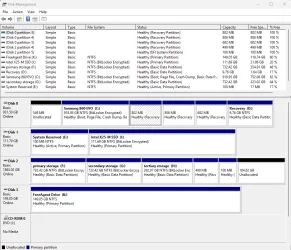
I forgot to expand the file system and status. Here is an updated shot.
Disk Management.webp
 

My Computer My Computer

At a glance

Windows 11 Pro (x64) Version 25H2 build 26200...Ryzen 5 5600XG. Skill 4X8GB 288-pin SDRAM DDR4-3000MSI GeForce GTX 1060 6GB
OS
Windows 11 Pro (x64) Version 25H2 build 26200.8457
Computer type
PC/Desktop
Manufacturer/Model
custom built
CPU
Ryzen 5 5600X
Motherboard
Asus Prime X370-pro
Memory
G. Skill 4X8GB 288-pin SDRAM DDR4-3000
Graphics Card(s)
MSI GeForce GTX 1060 6GB
Sound Card
onboard
Monitor(s) Displays
Dual ViewSonic VG2753 Series [Monitor] (27.2"vis, October 2017)
Screen Resolution
1920 x 1080
Hard Drives
1T SSD (C:\); 2T spinner HDD partitioned into virtual drives; 250gb WD Blue SSD;
PSU
Seasonic Focus Plus SSR-650FX
Case
Cool Master Mastercase Pro 5
Cooling
Cryorig H7
Keyboard
Logitech wireless
Mouse
Logitech wireless
Internet Speed
1 Gb fiber optic AT&T
Browser
Opera
Antivirus
McAfee
Other Info
NordVPN installed

Deary me, what the heck have you done?
Thank you for the remarkable screenshots but this is quite a messy layout you've got there.
Some encrypted, some not, how did that come about?
Did you reinstall on top of reinstallations? :boom:

Please search this site and look for additional tutorials on required partitions needed in Win 11.
Basic partition should look like the one below except in your case, MSR is not needed since you are still using a MBR for booting.

dep-win10-partitions-uefi.webp

 
Last edited:

My Computers My Computers

  • At a glance

    All Branches but ReleaseAMD Ryzen 7 7735HS 3200-4500 Mhz 8 cores x 232 GB DDR5Radeon Graphic / NVIDIA GeForce RTX 4060 8 GB...
    OS
    All Branches but Release
    Computer type
    Laptop
    Manufacturer/Model
    Acer Nitro ANV15-51
    CPU
    AMD Ryzen 7 7735HS 3200-4500 Mhz 8 cores x 2
    Motherboard
    Sportage_RBH
    Memory
    32 GB DDR5
    Graphics Card(s)
    Radeon Graphic / NVIDIA GeForce RTX 4060 8 GB GDDR6
    Sound Card
    AMD/Realtek(R) Audio
    Monitor(s) Displays
    Integrated Monitor (15.3"vis)
    Screen Resolution
    FHD 1920X1080 16:9 144Hz
    Hard Drives
    KINGSTON OM8SEP4512Q-AA 1TB
    Western Digital 256GB
    PSU
    19V DC 6.32 A 120 W
    Cooling
    Dual Fans
    Mouse
    MS Bluetooth
    Internet Speed
    Fiber 1GB Cox -us & 1GB Orange-fr
    Browser
    Edge Canary- Firefox Nightly-Chrome Dev-Chrome Dev
    Antivirus
    Windows Defender
  • At a glance

    Windows 11 BetaAMD A9-94208 GB of DDR4AMD Radeon R5
    Operating System
    Windows 11 Beta
    Computer type
    Laptop
    Manufacturer/Model
    Asus X751BP
    CPU
    AMD A9-9420
    Memory
    8 GB of DDR4
    Graphics card(s)
    AMD Radeon R5
    Screen Resolution
    1600x900
    Hard Drives
    Seagate 1 TB
Windows is currently booting from the EFI System Partition (100 MB) on Disk 2, while the current Windows installation itself is located on Disk 0.

You also have a 100 MB "System Reserved (E:)" partition on Disk 1 marked Active, which suggests that disk was likely created under an older BIOS/MBR installation at some point. You can safely delete that partition, because UEFI/GPT systems do not use "Active" partition flags.

You can determine which recovery partition is currently in use by running:

reagentc /info

To remove unused recovery partition:

diskpart
list disk
select disk #
list partition
select partition #
delete partition override
exit

Be careful not to delete the recovery partition currently used by Windows. Also note that GPT disks may contain a Microsoft Reserved Partition (MSR), which normally does not appear in Disk Management.

The safest thing to do is to remove the drive letters assigned to the "Recovery (D:)" and "System Reserved (E:)" partitions in Disk Management, rather than deleting the partitions themselves.
 

My Computers My Computers

  • At a glance

    Windows 11 ProAMD Ryzen 9 9950X3DKingston FURY Beast 64GB (2x32GB) DDR5 6000MT/sASUS TUF Gaming Radeon RX 9070 OC Edition 16G...
    OS
    Windows 11 Pro
    Computer type
    PC/Desktop
    CPU
    AMD Ryzen 9 9950X3D
    Motherboard
    ASRock B650E Taichi Lite
    Memory
    Kingston FURY Beast 64GB (2x32GB) DDR5 6000MT/s
    Graphics Card(s)
    ASUS TUF Gaming Radeon RX 9070 OC Edition 16GB GDDR6
    Hard Drives
    Solidigm P44 Pro 2TB M.2 NVMe SSD
  • At a glance

    Windows 11 HomeIntel Core Ultra 9 275HX64GB (2x 32GB) DDR5-6400NVIDIA GeForce RTX 5080 16GB GDDR7 Laptop GPU
    Operating System
    Windows 11 Home
    Computer type
    Laptop
    Manufacturer/Model
    Lenovo Legion Pro 7i Gen 10 16"
    CPU
    Intel Core Ultra 9 275HX
    Memory
    64GB (2x 32GB) DDR5-6400
    Graphics card(s)
    NVIDIA GeForce RTX 5080 16GB GDDR7 Laptop GPU
    Hard Drives
    2x 1TB M.2 NVMe SSD (SK Hynix)
Is it that bad? I built this system in 2018, I believe. So, how do I fix this?
 

My Computer My Computer

At a glance

Windows 11 Pro (x64) Version 25H2 build 26200...Ryzen 5 5600XG. Skill 4X8GB 288-pin SDRAM DDR4-3000MSI GeForce GTX 1060 6GB
OS
Windows 11 Pro (x64) Version 25H2 build 26200.8457
Computer type
PC/Desktop
Manufacturer/Model
custom built
CPU
Ryzen 5 5600X
Motherboard
Asus Prime X370-pro
Memory
G. Skill 4X8GB 288-pin SDRAM DDR4-3000
Graphics Card(s)
MSI GeForce GTX 1060 6GB
Sound Card
onboard
Monitor(s) Displays
Dual ViewSonic VG2753 Series [Monitor] (27.2"vis, October 2017)
Screen Resolution
1920 x 1080
Hard Drives
1T SSD (C:\); 2T spinner HDD partitioned into virtual drives; 250gb WD Blue SSD;
PSU
Seasonic Focus Plus SSR-650FX
Case
Cool Master Mastercase Pro 5
Cooling
Cryorig H7
Keyboard
Logitech wireless
Mouse
Logitech wireless
Internet Speed
1 Gb fiber optic AT&T
Browser
Opera
Antivirus
McAfee
Other Info
NordVPN installed

Yesterday I did a clean install of Windows 11 pro due to an update failure and boot loop.

So, how do I fix this?

Perform another clean installation of Windows 11.

At the "Select location to install Windows 11" screen, delete all partitions on Disk 0 so the entire disk becomes unallocated space. Then, delete the existing 100 MB EFI System Partition on Disk 2.

When Windows Setup is running in UEFI mode, it searches all connected disks for an existing EFI partition. If one already exists, Setup may reuse it instead of creating a new EFI partition on the installation disk. If no suitable FAT32-formatted EFI partition is found, Setup creates a new one on the same disk where Windows is being installed.
 
Last edited:

My Computers My Computers

  • At a glance

    Windows 11 ProAMD Ryzen 9 9950X3DKingston FURY Beast 64GB (2x32GB) DDR5 6000MT/sASUS TUF Gaming Radeon RX 9070 OC Edition 16G...
    OS
    Windows 11 Pro
    Computer type
    PC/Desktop
    CPU
    AMD Ryzen 9 9950X3D
    Motherboard
    ASRock B650E Taichi Lite
    Memory
    Kingston FURY Beast 64GB (2x32GB) DDR5 6000MT/s
    Graphics Card(s)
    ASUS TUF Gaming Radeon RX 9070 OC Edition 16GB GDDR6
    Hard Drives
    Solidigm P44 Pro 2TB M.2 NVMe SSD
  • At a glance

    Windows 11 HomeIntel Core Ultra 9 275HX64GB (2x 32GB) DDR5-6400NVIDIA GeForce RTX 5080 16GB GDDR7 Laptop GPU
    Operating System
    Windows 11 Home
    Computer type
    Laptop
    Manufacturer/Model
    Lenovo Legion Pro 7i Gen 10 16"
    CPU
    Intel Core Ultra 9 275HX
    Memory
    64GB (2x 32GB) DDR5-6400
    Graphics card(s)
    NVIDIA GeForce RTX 5080 16GB GDDR7 Laptop GPU
    Hard Drives
    2x 1TB M.2 NVMe SSD (SK Hynix)
I know exactly what happened.
The clean install tutorial explicitly states to remove all secondary drives before clean installing. . This is to prevent your bootloader from being written to the wrong drive. You did not do this so your bootloader did indeed write to the wrong drive.
The tutorial also tells you to delete all partitions on the drive and install windows on unallocated space so that the install can partition the drive correctly. You did not do this either so it's now your partitions are all wonky.
 

My Computers My Computers

  • At a glance

    Windows 11 Pro 25H2 26200.8875i9-10900 10 core 20 threads32 gbnone-Intel UHD Graphics 630
    OS
    Windows 11 Pro 25H2 26200.8875
    Computer type
    PC/Desktop
    Manufacturer/Model
    Dell Optiplex 7080
    CPU
    i9-10900 10 core 20 threads
    Motherboard
    DELL 0J37VM
    Memory
    32 gb
    Graphics Card(s)
    none-Intel UHD Graphics 630
    Sound Card
    Integrated Realtek
    Monitor(s) Displays
    Benq 27
    Screen Resolution
    2560x1440
    Hard Drives
    2x1tb Solidigm m.2 nvme /External drives 512gb Samsung m.2 sata+2tb Kingston m2.nvme
    PSU
    500w
    Case
    MT
    Cooling
    Dell Premium
    Keyboard
    Logitech wired
    Mouse
    Logitech wireless
    Internet Speed
    so slow I'm too embarrassed to tell
    Browser
    #1 Edge #2 Firefox
    Antivirus
    Defender+MWB Premium
  • At a glance

    Windows 11 Pro 24H2 26200.8875AMD Ryzen 7 6800U32 gbintegrated
    Operating System
    Windows 11 Pro 24H2 26200.8875
    Computer type
    PC/Desktop
    Manufacturer/Model
    Beelink Mini PC SER5
    CPU
    AMD Ryzen 7 6800U
    Memory
    32 gb
    Graphics card(s)
    integrated
    Sound Card
    integrated
    Monitor(s) Displays
    Benq 27
    Screen Resolution
    2560x1440
    Hard Drives
    1TB Crucial nvme
    Keyboard
    Logitech wired
    Mouse
    Logitech wireless
    Internet Speed
    still too embarrassed to tell
    Browser
    Firefox
    Antivirus
    Defender
    Other Info
    System 3 is non compliant Dell 9020 i7-4770/24gb ram Win11 PRO 26200.8875
Okay. That sucks, but I have to do it. I will take a breather and start it tomorrow. Thanks!
 

My Computer My Computer

At a glance

Windows 11 Pro (x64) Version 25H2 build 26200...Ryzen 5 5600XG. Skill 4X8GB 288-pin SDRAM DDR4-3000MSI GeForce GTX 1060 6GB
OS
Windows 11 Pro (x64) Version 25H2 build 26200.8457
Computer type
PC/Desktop
Manufacturer/Model
custom built
CPU
Ryzen 5 5600X
Motherboard
Asus Prime X370-pro
Memory
G. Skill 4X8GB 288-pin SDRAM DDR4-3000
Graphics Card(s)
MSI GeForce GTX 1060 6GB
Sound Card
onboard
Monitor(s) Displays
Dual ViewSonic VG2753 Series [Monitor] (27.2"vis, October 2017)
Screen Resolution
1920 x 1080
Hard Drives
1T SSD (C:\); 2T spinner HDD partitioned into virtual drives; 250gb WD Blue SSD;
PSU
Seasonic Focus Plus SSR-650FX
Case
Cool Master Mastercase Pro 5
Cooling
Cryorig H7
Keyboard
Logitech wireless
Mouse
Logitech wireless
Internet Speed
1 Gb fiber optic AT&T
Browser
Opera
Antivirus
McAfee
Other Info
NordVPN installed
Consider:

a) testing drives

b) deciding the preferred disk drive for Windows

c) backing up important files from that disk drive

d) detaching all other disk drives

e) manually deleting all partitions to create an unallocated disk drive

f) clean installing Windows 11 using the newest bootable Windows 11 MCT /iso

g) deleting the extra partitions on various drives (system reserved and Windows recovery partitions)

h) enlarging a storage partition on disk 2 so that there is no longer any unallocated free space for new Windows recovery partitions
 
Last edited:

My Computer My Computer

At a glance

Windows 10Intel(R) Core(TM) i7-4800MQ CPU @ 2.70GHz16 GB Total: Manufacturer : Samsung MemoryTyp...NVIDIA Quadro K3100M; Intel(R) HD Graphics 4600
OS
Windows 10
Computer type
Laptop
Manufacturer/Model
HP
CPU
Intel(R) Core(TM) i7-4800MQ CPU @ 2.70GHz
Motherboard
Product : 190A Version : KBC Version 94.56
Memory
16 GB Total: Manufacturer : Samsung MemoryType : DDR3 FormFactor : SODIMM Capacity : 8GB Speed : 1600
Graphics Card(s)
NVIDIA Quadro K3100M; Intel(R) HD Graphics 4600
Sound Card
IDT High Definition Audio CODEC; PNP Device ID HDAUDIO\FUNC_01&VEN_111D&DEV_76E0
Hard Drives
Model Hitachi HTS727575A9E364
Antivirus
Microsoft Defender
Other Info
Mobile Workstation
Clean Install Windows 11

IMPORTANT: You will have to have the encryption key to unlock all those other drives when you reconnect them. Make sure you have it.
 

My Computers My Computers

  • At a glance

    Windows 11 Pro 25H2 26200.8875i9-10900 10 core 20 threads32 gbnone-Intel UHD Graphics 630
    OS
    Windows 11 Pro 25H2 26200.8875
    Computer type
    PC/Desktop
    Manufacturer/Model
    Dell Optiplex 7080
    CPU
    i9-10900 10 core 20 threads
    Motherboard
    DELL 0J37VM
    Memory
    32 gb
    Graphics Card(s)
    none-Intel UHD Graphics 630
    Sound Card
    Integrated Realtek
    Monitor(s) Displays
    Benq 27
    Screen Resolution
    2560x1440
    Hard Drives
    2x1tb Solidigm m.2 nvme /External drives 512gb Samsung m.2 sata+2tb Kingston m2.nvme
    PSU
    500w
    Case
    MT
    Cooling
    Dell Premium
    Keyboard
    Logitech wired
    Mouse
    Logitech wireless
    Internet Speed
    so slow I'm too embarrassed to tell
    Browser
    #1 Edge #2 Firefox
    Antivirus
    Defender+MWB Premium
  • At a glance

    Windows 11 Pro 24H2 26200.8875AMD Ryzen 7 6800U32 gbintegrated
    Operating System
    Windows 11 Pro 24H2 26200.8875
    Computer type
    PC/Desktop
    Manufacturer/Model
    Beelink Mini PC SER5
    CPU
    AMD Ryzen 7 6800U
    Memory
    32 gb
    Graphics card(s)
    integrated
    Sound Card
    integrated
    Monitor(s) Displays
    Benq 27
    Screen Resolution
    2560x1440
    Hard Drives
    1TB Crucial nvme
    Keyboard
    Logitech wired
    Mouse
    Logitech wireless
    Internet Speed
    still too embarrassed to tell
    Browser
    Firefox
    Antivirus
    Defender
    Other Info
    System 3 is non compliant Dell 9020 i7-4770/24gb ram Win11 PRO 26200.8875
Clean Install Windows 11

IMPORTANT: You will have to have the encryption key to unlock all those other drives when you reconnect them. Make sure you have it.
Not sure if I have the encryption key. I didn't even know they were encrypted until I saw them in disk management. Should I have them somewhere on my PC?
 

My Computer My Computer

At a glance

Windows 11 Pro (x64) Version 25H2 build 26200...Ryzen 5 5600XG. Skill 4X8GB 288-pin SDRAM DDR4-3000MSI GeForce GTX 1060 6GB
OS
Windows 11 Pro (x64) Version 25H2 build 26200.8457
Computer type
PC/Desktop
Manufacturer/Model
custom built
CPU
Ryzen 5 5600X
Motherboard
Asus Prime X370-pro
Memory
G. Skill 4X8GB 288-pin SDRAM DDR4-3000
Graphics Card(s)
MSI GeForce GTX 1060 6GB
Sound Card
onboard
Monitor(s) Displays
Dual ViewSonic VG2753 Series [Monitor] (27.2"vis, October 2017)
Screen Resolution
1920 x 1080
Hard Drives
1T SSD (C:\); 2T spinner HDD partitioned into virtual drives; 250gb WD Blue SSD;
PSU
Seasonic Focus Plus SSR-650FX
Case
Cool Master Mastercase Pro 5
Cooling
Cryorig H7
Keyboard
Logitech wireless
Mouse
Logitech wireless
Internet Speed
1 Gb fiber optic AT&T
Browser
Opera
Antivirus
McAfee
Other Info
NordVPN installed
I was planning on purchasing 2 new drives. A 2T SSD for c: drive (Disk 0), and a 2T HDD drive for storage (Disk 1). My existing storage drive (Disk 2) could be used for low importance storage. Not sure how long that drive will last, seeing that it came out of an old My Cloud device. At least, that is my plan.
 

My Computer My Computer

At a glance

Windows 11 Pro (x64) Version 25H2 build 26200...Ryzen 5 5600XG. Skill 4X8GB 288-pin SDRAM DDR4-3000MSI GeForce GTX 1060 6GB
OS
Windows 11 Pro (x64) Version 25H2 build 26200.8457
Computer type
PC/Desktop
Manufacturer/Model
custom built
CPU
Ryzen 5 5600X
Motherboard
Asus Prime X370-pro
Memory
G. Skill 4X8GB 288-pin SDRAM DDR4-3000
Graphics Card(s)
MSI GeForce GTX 1060 6GB
Sound Card
onboard
Monitor(s) Displays
Dual ViewSonic VG2753 Series [Monitor] (27.2"vis, October 2017)
Screen Resolution
1920 x 1080
Hard Drives
1T SSD (C:\); 2T spinner HDD partitioned into virtual drives; 250gb WD Blue SSD;
PSU
Seasonic Focus Plus SSR-650FX
Case
Cool Master Mastercase Pro 5
Cooling
Cryorig H7
Keyboard
Logitech wireless
Mouse
Logitech wireless
Internet Speed
1 Gb fiber optic AT&T
Browser
Opera
Antivirus
McAfee
Other Info
NordVPN installed
Both Bitlocker and device encryption encrypts partitions(volumes), not the physical disks. Every encrypted partition has its own unique recovery key. Device encryption is automatically enabled if one uses a MS account. For Bitlocker to be enabled the user has to enable it. Check your Microsoft account to see if the keys are stored there. Find your BitLocker recovery key - Microsoft Support

At the time one enables bitlocker it is prudent to make local record of these keys. I personally never do and never will use encryption. It scares me far worse than anyone getting to my data because what I store is of no use to anyone but me. No critical files or passwords are stored on my devices. But I would consider it a catastrophe to be locked out of access to my own data.
We have seen a few cases of that happening when the user used a local account when he enabled bitlocker and kept no record of his keys or lost his keys.
 

My Computers My Computers

  • At a glance

    Windows 11 Pro 25H2 26200.8875i9-10900 10 core 20 threads32 gbnone-Intel UHD Graphics 630
    OS
    Windows 11 Pro 25H2 26200.8875
    Computer type
    PC/Desktop
    Manufacturer/Model
    Dell Optiplex 7080
    CPU
    i9-10900 10 core 20 threads
    Motherboard
    DELL 0J37VM
    Memory
    32 gb
    Graphics Card(s)
    none-Intel UHD Graphics 630
    Sound Card
    Integrated Realtek
    Monitor(s) Displays
    Benq 27
    Screen Resolution
    2560x1440
    Hard Drives
    2x1tb Solidigm m.2 nvme /External drives 512gb Samsung m.2 sata+2tb Kingston m2.nvme
    PSU
    500w
    Case
    MT
    Cooling
    Dell Premium
    Keyboard
    Logitech wired
    Mouse
    Logitech wireless
    Internet Speed
    so slow I'm too embarrassed to tell
    Browser
    #1 Edge #2 Firefox
    Antivirus
    Defender+MWB Premium
  • At a glance

    Windows 11 Pro 24H2 26200.8875AMD Ryzen 7 6800U32 gbintegrated
    Operating System
    Windows 11 Pro 24H2 26200.8875
    Computer type
    PC/Desktop
    Manufacturer/Model
    Beelink Mini PC SER5
    CPU
    AMD Ryzen 7 6800U
    Memory
    32 gb
    Graphics card(s)
    integrated
    Sound Card
    integrated
    Monitor(s) Displays
    Benq 27
    Screen Resolution
    2560x1440
    Hard Drives
    1TB Crucial nvme
    Keyboard
    Logitech wired
    Mouse
    Logitech wireless
    Internet Speed
    still too embarrassed to tell
    Browser
    Firefox
    Antivirus
    Defender
    Other Info
    System 3 is non compliant Dell 9020 i7-4770/24gb ram Win11 PRO 26200.8875
I didn't even know they were encrypted until I saw them in disk management.

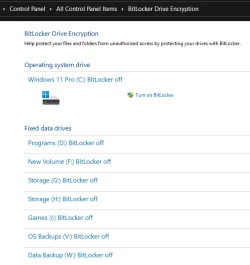
If you don't need bitlocker you could turn it off for each drive.
Control Panel>All Control Panel Items>Bitlocker Drive Enccryption

1779228817885.webp
 

My Computers My Computers

  • At a glance

    Win 11 Pro 25H2 26200.8894Intel® Core™ i7-14700KG.SKILL Ripjaws S5 Series 64GB (2 x 32GB) DDR5ASUS GeForce RTX 4070 Super 12GB
    OS
    Win 11 Pro 25H2 26200.8894
    Computer type
    PC/Desktop
    Manufacturer/Model
    Self Built
    CPU
    Intel® Core™ i7-14700K
    Motherboard
    ASUS TUF Z690-PLUS WIFI (BIOS 4505)
    Memory
    G.SKILL Ripjaws S5 Series 64GB (2 x 32GB) DDR5
    Graphics Card(s)
    ASUS GeForce RTX 4070 Super 12GB
    Sound Card
    Sound Blaster AE-5 Plus
    Monitor(s) Displays
    ASUS TUF Gaming 27" 2K HDR Gaming
    Screen Resolution
    2560 x 1440
    Hard Drives
    Samsung 990 Pro 1TB NVMe (Win 11 25H2)
    SK hynix P41 500GB NVMe
    SK hynix P41 2TB NVMe (x3)
    Crucial P3 Plus 4TB
    PSU
    Corsair RM850x Shift
    Case
    Antec Dark Phantom DP502 FLUX
    Cooling
    Corsair Nautilus 360 RS AIO
    Keyboard
    Logitech MK 320
    Mouse
    Razer Basilisk V3
    Internet Speed
    750Mbs
    Browser
    Firefox
    Antivirus
    Winows Security
    Other Info
    MR 8.1 Home
  • At a glance

    Win 11 Pro 25H2 26200.8894Intel Core i5-1140064 GB DDR4MSI GeForce RTX 3060 Ventus 2X 12GB
    Operating System
    Win 11 Pro 25H2 26200.8894
    Computer type
    PC/Desktop
    Manufacturer/Model
    Self Built
    CPU
    Intel Core i5-11400
    Motherboard
    Asus TUF Gaming Z590 Plus WiFi (BIOS 2803)
    Memory
    64 GB DDR4
    Graphics card(s)
    MSI GeForce RTX 3060 Ventus 2X 12GB
    Sound Card
    SoundBlaster Audigy Fx V2
    Monitor(s) Displays
    Samsung F27T350
    Screen Resolution
    1920x1080
    Hard Drives
    Samsung 980 Pro 1TB
    Samsung 970 EVO Plus 2TB
    Samsung 870 EVO 500GB SSD
    PSU
    Corsair HX750
    Case
    Cougar MX330-G Window
    Cooling
    Thermalright Frozen Edge 240 Black AIO
    Internet Speed
    350Mbps
    Browser
    Firefox
    Antivirus
    Windows Security
  • System Three
    Win 11 Pro 25H2 26200.8894
    ASUS PRIME Z370-P II BIOS 3004 7/12/21
    Intel Core i7-8700 CPU @ 3.20GHz
    32GB DDR4 RAM (4x8)
    iGPU Intel UHD Graphics 630
    Mid-Tower Desktop
Go to:

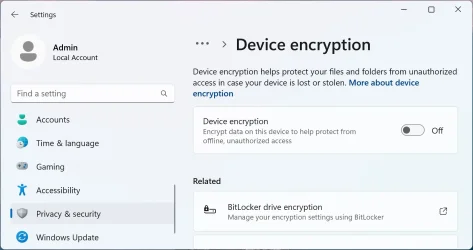
Settings > Privacy & security > Device encryption

Turn it Off.

Device encryption.webp
 

My Computers My Computers

  • At a glance

    Windows 11 ProAMD Ryzen 9 9950X3DKingston FURY Beast 64GB (2x32GB) DDR5 6000MT/sASUS TUF Gaming Radeon RX 9070 OC Edition 16G...
    OS
    Windows 11 Pro
    Computer type
    PC/Desktop
    CPU
    AMD Ryzen 9 9950X3D
    Motherboard
    ASRock B650E Taichi Lite
    Memory
    Kingston FURY Beast 64GB (2x32GB) DDR5 6000MT/s
    Graphics Card(s)
    ASUS TUF Gaming Radeon RX 9070 OC Edition 16GB GDDR6
    Hard Drives
    Solidigm P44 Pro 2TB M.2 NVMe SSD
  • At a glance

    Windows 11 HomeIntel Core Ultra 9 275HX64GB (2x 32GB) DDR5-6400NVIDIA GeForce RTX 5080 16GB GDDR7 Laptop GPU
    Operating System
    Windows 11 Home
    Computer type
    Laptop
    Manufacturer/Model
    Lenovo Legion Pro 7i Gen 10 16"
    CPU
    Intel Core Ultra 9 275HX
    Memory
    64GB (2x 32GB) DDR5-6400
    Graphics card(s)
    NVIDIA GeForce RTX 5080 16GB GDDR7 Laptop GPU
    Hard Drives
    2x 1TB M.2 NVMe SSD (SK Hynix)
Thank you all! Yes, I don’t think I need bitlocker especially since I didn’t even know it was on. I will basically rebuild my PC and keep it backed up religiously 👍

I will give update when I get it all together.
 

My Computer My Computer

At a glance

Windows 11 Pro (x64) Version 25H2 build 26200...Ryzen 5 5600XG. Skill 4X8GB 288-pin SDRAM DDR4-3000MSI GeForce GTX 1060 6GB
OS
Windows 11 Pro (x64) Version 25H2 build 26200.8457
Computer type
PC/Desktop
Manufacturer/Model
custom built
CPU
Ryzen 5 5600X
Motherboard
Asus Prime X370-pro
Memory
G. Skill 4X8GB 288-pin SDRAM DDR4-3000
Graphics Card(s)
MSI GeForce GTX 1060 6GB
Sound Card
onboard
Monitor(s) Displays
Dual ViewSonic VG2753 Series [Monitor] (27.2"vis, October 2017)
Screen Resolution
1920 x 1080
Hard Drives
1T SSD (C:\); 2T spinner HDD partitioned into virtual drives; 250gb WD Blue SSD;
PSU
Seasonic Focus Plus SSR-650FX
Case
Cool Master Mastercase Pro 5
Cooling
Cryorig H7
Keyboard
Logitech wireless
Mouse
Logitech wireless
Internet Speed
1 Gb fiber optic AT&T
Browser
Opera
Antivirus
McAfee
Other Info
NordVPN installed
Is D: the factory reset option?
 

My Computer My Computer

At a glance

Windows 10Intel(R) Core(TM) i7-4800MQ CPU @ 2.70GHz16 GB Total: Manufacturer : Samsung MemoryTyp...NVIDIA Quadro K3100M; Intel(R) HD Graphics 4600
OS
Windows 10
Computer type
Laptop
Manufacturer/Model
HP
CPU
Intel(R) Core(TM) i7-4800MQ CPU @ 2.70GHz
Motherboard
Product : 190A Version : KBC Version 94.56
Memory
16 GB Total: Manufacturer : Samsung MemoryType : DDR3 FormFactor : SODIMM Capacity : 8GB Speed : 1600
Graphics Card(s)
NVIDIA Quadro K3100M; Intel(R) HD Graphics 4600
Sound Card
IDT High Definition Audio CODEC; PNP Device ID HDAUDIO\FUNC_01&VEN_111D&DEV_76E0
Hard Drives
Model Hitachi HTS727575A9E364
Antivirus
Microsoft Defender
Other Info
Mobile Workstation
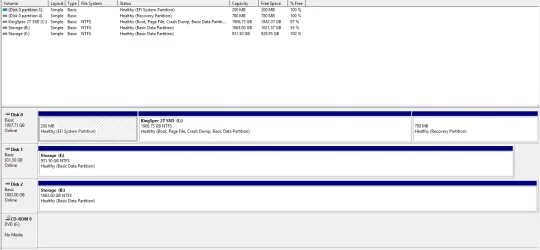
Good afternoon to all. I think I finally got my PC working properly. I ended up purchasing new drives. Took the old C: drive and wiped it after removing any necessary files, and am using it as my E: drive (storage). I have a new HDD drive that is designated as storage also, and designated it B: drive. I took the old storage drive and removed all pertinent files and folders, then wiped it clean and removed all partitions. My only major task is to go through my B: drive and remove all duplicate photos, documents, videos etc. I even included a screenshot of my Disk Management screen.

Attachments​

  • Disk Management 2026-05-27 184301.webp
    Disk Management 2026-05-27 184301.webp
    51.7 KB · Views: 1
 

My Computer My Computer

At a glance

Windows 11 Pro (x64) Version 25H2 build 26200...Ryzen 5 5600XG. Skill 4X8GB 288-pin SDRAM DDR4-3000MSI GeForce GTX 1060 6GB
OS
Windows 11 Pro (x64) Version 25H2 build 26200.8457
Computer type
PC/Desktop
Manufacturer/Model
custom built
CPU
Ryzen 5 5600X
Motherboard
Asus Prime X370-pro
Memory
G. Skill 4X8GB 288-pin SDRAM DDR4-3000
Graphics Card(s)
MSI GeForce GTX 1060 6GB
Sound Card
onboard
Monitor(s) Displays
Dual ViewSonic VG2753 Series [Monitor] (27.2"vis, October 2017)
Screen Resolution
1920 x 1080
Hard Drives
1T SSD (C:\); 2T spinner HDD partitioned into virtual drives; 250gb WD Blue SSD;
PSU
Seasonic Focus Plus SSR-650FX
Case
Cool Master Mastercase Pro 5
Cooling
Cryorig H7
Keyboard
Logitech wireless
Mouse
Logitech wireless
Internet Speed
1 Gb fiber optic AT&T
Browser
Opera
Antivirus
McAfee
Other Info
NordVPN installed
  • Like
Reactions: OAT
Back
Top Bottom