- Local time
- 4:54 AM
- Posts
- 56
- OS
- Windows 11 Pro (x64) Version 25H2 build 26200.8457
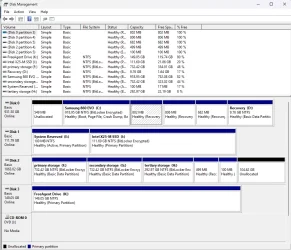
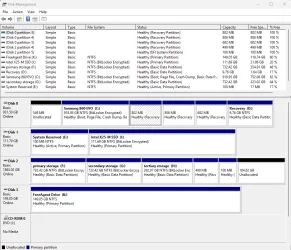
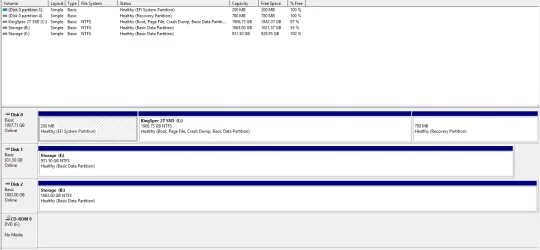
Good morning. Yesterday I did a clean install of Windows 11 pro due to an update failure and boot loop. Everything seems to be working fine. I looked into File Explorer and noticed the two virtual drives (I guess they are virtual) named System Reserved, and Recovery. When I opened them up, I noticed that most of the folders were dated 2019 and 2011 or earlier. I was expecting them to be files from my most recent reinstall. Can I delete them, or at least delete the files, or are they still necessary. Thanks for any and all responses.
- Windows Build/Version
- Windows 11 pro, build 26200.8457 and version 25H2
My Computer
At a glance
Windows 11 Pro (x64) Version 25H2 build 26200...Ryzen 5 5600XG. Skill 4X8GB 288-pin SDRAM DDR4-3000MSI GeForce GTX 1060 6GB
- OS
- Windows 11 Pro (x64) Version 25H2 build 26200.8457
- Computer type
- PC/Desktop
- Manufacturer/Model
- custom built
- CPU
- Ryzen 5 5600X
- Motherboard
- Asus Prime X370-pro
- Memory
- G. Skill 4X8GB 288-pin SDRAM DDR4-3000
- Graphics Card(s)
- MSI GeForce GTX 1060 6GB
- Sound Card
- onboard
- Monitor(s) Displays
- Dual ViewSonic VG2753 Series [Monitor] (27.2"vis, October 2017)
- Screen Resolution
- 1920 x 1080
- Hard Drives
- 1T SSD (C:\); 2T spinner HDD partitioned into virtual drives; 250gb WD Blue SSD;
- PSU
- Seasonic Focus Plus SSR-650FX
- Case
- Cool Master Mastercase Pro 5
- Cooling
- Cryorig H7
- Keyboard
- Logitech wireless
- Mouse
- Logitech wireless
- Internet Speed
- 1 Gb fiber optic AT&T
- Browser
- Opera
- Antivirus
- McAfee
- Other Info
- NordVPN installed