Hi
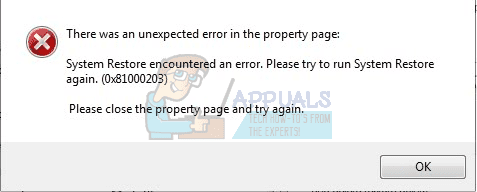
I have a system where I am dual booting Windows 10 and Windows 11. However, after not going into Windows 11 for a few days, today I found that Windows 11 System Restore is not working. Windows is coming up with the 0x81000203 error. I've checked that the relevant services are starting when System Restore is invoked and also gpedit.msc is showing that System Restore is Not Configured. I've also checked two registry keys that apparently have an effect on System Restore in Windows 10 (don't know about Win11) but by all accounts they are both fine (can't say what they are just now - can't find the website).
When I try going into System Restore, the dialogue comes up with another dialogue containing the error message - the dialogue itself says it is searching for my drives but is not finding any of the 11 I've got. Windows boots up just fine and anyway I've run SFC and CHKDSK and both find no problems at all. My question therefore is: what else can I do to try and get System Restore working. It HAS been working as I generally take a restore point before uninstalling anything (I use Revo Uninstall Pro on Win11). I just don't know what else to try.
Tracey
I have a system where I am dual booting Windows 10 and Windows 11. However, after not going into Windows 11 for a few days, today I found that Windows 11 System Restore is not working. Windows is coming up with the 0x81000203 error. I've checked that the relevant services are starting when System Restore is invoked and also gpedit.msc is showing that System Restore is Not Configured. I've also checked two registry keys that apparently have an effect on System Restore in Windows 10 (don't know about Win11) but by all accounts they are both fine (can't say what they are just now - can't find the website).
When I try going into System Restore, the dialogue comes up with another dialogue containing the error message - the dialogue itself says it is searching for my drives but is not finding any of the 11 I've got. Windows boots up just fine and anyway I've run SFC and CHKDSK and both find no problems at all. My question therefore is: what else can I do to try and get System Restore working. It HAS been working as I generally take a restore point before uninstalling anything (I use Revo Uninstall Pro on Win11). I just don't know what else to try.
Tracey
- Windows Build/Version
- Version 21H2 (OS Build 22000.194)
My Computer
System One
-
- OS
- Windows 10/11 (dual boot)
- Computer type
- PC/Desktop
- Manufacturer/Model
- Self-Built
- CPU
- Ryzen 5 3600
- Motherboard
- MSI MPG B550 Gaming Plus ATX
- Memory
- Corsair Vengeance LPX Black 2x16GB 2400MHz`
- Graphics Card(s)
- Nvidia GTX1050Ti Mini
- Sound Card
- RTL ALC892/897
- Monitor(s) Displays
- Philips273V7QDAB 27" + AOCE2470SWH 24"
- Screen Resolution
- 1920 x 1080 (x2)
- Hard Drives
- WD Blue HD 1TB NVMe
Crucial 2TB SSD
- PSU
- Corsair CX650M
- Case
- Corsair Carbide 275R
- Cooling
- Corsair Hydro H60 AIO
- Keyboard
- Logitech K270 (wireless)
- Mouse
- Logitech M185 (wireless) & M100 (wired)
- Internet Speed
- Approx 500Mbs
- Browser
- Librewolf (main) Firefox (reserve)
- Antivirus
- Malwarebytes Premium & MS Defender
- Other Info
- Printers: CutePDF
Wacom Tablet CTL-4100 (small)