System Restore


I click an icon. It takes < 40 seconds to do a full image backup of my system, including compression, 256 bit encryption, and a verification pass.
What solution do you use more specifically?
 

My Computer

System One

  • OS
    Windows 11
    Computer type
    PC/Desktop
    Manufacturer/Model
    Asus
    CPU
    Intel Core i7-13700
    Motherboard
    ASUS TUF GAMING B760-PLUS WIFI
    Memory
    Corsair VENGEANCE DDR5 32GB
    Graphics Card(s)
    MSI GeForce RTX 5070 12G VENTUS 2X OC
    Monitor(s) Displays
    Samsung LS32AG504
    Hard Drives
    Kingston Fury Renegade M.2 2TB SSD
    PSU
    Corsair RM850X 2021 / 850W / 80+ Gold
    Browser
    Chrome
    Antivirus
    Defender
I use it every time I am installing a new program or update just in case.
I once had a guest for a few nights and let him use my PC. I created a restore point before he started using my PC. I did a system restore when he left.
Why not give him a guest account? Windows has an inbuilt guest account that is disabled by default. It can be enabled and then given. Once the guest leaves, just delete everything under c:\users\guest and disable the account.
Rinse and repeat.

In this sense Mac OSX is so much better.
 

My Computer

System One

  • OS
    Windows 11
    Computer type
    Laptop
    CPU
    Intel
    Memory
    16 GB
    Graphics Card(s)
    Intel UHD Integrated
    Mouse
    Inbuilt
    Browser
    Firefox
    Antivirus
    Microsoft Defender
Why not give him a guest account? Windows has an inbuilt guest account that is disabled by default. It can be enabled and then given. Once the guest leaves, just delete everything under c:\users\guest and disable the account.
Rinse and repeat.

In this sense Mac OSX is so much better.
no need. It will be the same, I will have to restore and get rid of everything he did there anyway.
 

My Computers

System One System Two

  • OS
    Windows 11 Pro
    Computer type
    PC/Desktop
    CPU
    AMD Ryzen 7 9800X3D
    Motherboard
    MSI PRO B850-P Wifi
    Memory
    32GB DDR5 CL30 Kingston Fury
    Graphics Card(s)
    ASUS Prime Radeon RX 9060 XT OC Edition 16GB
    Monitor(s) Displays
    LG Ultrawide 34" + LG 27" 1080p
    Screen Resolution
    3440x1440
    Hard Drives
    Main Boot Drive : 512GB Adata XPG RGB Gen3x4 NVMe M.2 SSD
    PSU
    EVGA 750 Watts 80+ Gold
    Case
    Deepcool Genome II
    Cooling
    Thermalright Burst Assassin 120
    Internet Speed
    1Gbps
    Browser
    Chrome
    Antivirus
    "Moderna"
  • Operating System
    Windows 11 Pro
    Computer type
    PC/Desktop
    CPU
    i7-4790K
    Motherboard
    ASRock Xtreme6 Z97
    Memory
    16GB Corsair Vengeance Pro
    Graphics card(s)
    MSI R9 290
    Monitor(s) Displays
    LG Ultrawide 34"
    Screen Resolution
    3440x1440
    Hard Drives
    500GB Adata SSD (OS Only)
    PSU
    Thermaltake 475 Watts 80 Bronze
    Case
    Thermaltake Commander I Snow Edition
    Cooling
    Deep Cool Archer Air Cooler
    Keyboard
    Armageddon MKA-5R RGB-Hornet
    Mouse
    Logitech G402
    Internet Speed
    1Gbps
    Browser
    Chrome
    Antivirus
    Moderna :)
Does anyone still use System Restore?
Was it a successful restoration?
 

My Computers

System One System Two

  • OS
    Windows 11 Pro
    Computer type
    PC/Desktop
    Manufacturer/Model
    Stigg's Build
    CPU
    Intel Core i9-10900X
    Motherboard
    GIGABYTE X299X DESIGNARE 10G
    Memory
    Corsair 64 GB (4 x 16 GB) CMW64GX4M4C3000C15 Vengeance RGB Pro 3000Mhz DDR4
    Graphics Card(s)
    GIGABYTE GeForce GTX 1660 Super Mini ITX 6 GB OC
    Sound Card
    Realtek ALC1220
    Monitor(s) Displays
    Samsung 27" FHD LED FreeSync Gaming Monitor (LS27F350FHEXXY)
    Screen Resolution
    1920 x 1080
    Hard Drives
    Samsung 970 Pro Series 1TB M.2 2280 NVMe SSD
    Western Digital Red Pro WD8003FFBX-68B9AN0 8 TB, 7200 RPM, SATA-III
    Western Digital Red Pro WD8003FFBX-68B9AN0 8 TB, 7200 RPM, SATA-III
    PSU
    Corsair HX1200 1200W 80 Plus Platinum
    Case
    Fractal Design Define 7 Black Solid Case
    Cooling
    Noctua NH-D15 Chromax Black
    Keyboard
    Razer Ornata V2
    Mouse
    Razer DeathAdder Essential
    Internet Speed
    FTTN 100Mbps / 40Mbps
    Browser
    Mozilla Firefox
    Antivirus
    N/A
    Other Info
    Logitech BRIO 4k Ultra HD USB-C Webcam
  • Operating System
    Windows 10 Pro
    Computer type
    Laptop
    Manufacturer/Model
    ASUS ROG Zephyrus M GM501GS
    CPU
    Core i7-8750H
    Motherboard
    Zephyrus M GM501GS
    Memory
    SK Hynix 32 GB (2 x 16 GB) HMA82GS6CJR8N-VK 16 GB DDR4-2666 DDR4 SDRAM
    Graphics card(s)
    NVIDIA GeForce GTX 1070
    Sound Card
    Realtek ALC294
    Monitor(s) Displays
    AU Optronics B156HAN07.1 [15.6" LCD]
    Screen Resolution
    1920 x 1080
    Hard Drives
    Samsung MZVKW512HMJP-00000 512 GB, PCI-E 3.0 x4
    Samsung SSD 860 QVO 4TB 4 TB, SATA-III
    PSU
    N/A
    Case
    N/A
    Cooling
    N/A
    Keyboard
    PC/AT Enhanced PS2 Keyboard (101/102-Key)
    Mouse
    Razer DeathAdder Essential
    Internet Speed
    FTTN 100Mbps / 40Mbps
    Browser
    Mozilla Firefox
    Antivirus
    N/A
    Other Info
    USB2.0 HD UVC Webcam
Does anyone still use System Restore?
Was it a successful restoration?
If you are using a third party Antivirus Software it may cause issues.
I generally use a repair install I find it works better.
 

My Computer

System One

  • OS
    Windows 11
    Computer type
    PC/Desktop
    Manufacturer/Model
    Generic
    CPU
    AMD Ryzen 8700G
    Motherboard
    Gigabyte B650 UD AC
    Memory
    64 GB
    Graphics Card(s)
    Onboard
    Sound Card
    Onboard
    Monitor(s) Displays
    Del U2723QE
    Screen Resolution
    3840 x 2160
    Hard Drives
    Corsiar MP600 1TB
    PSU
    Silverstone 750 GOLD
    Case
    Silverstone FARA 513
Does anyone still use System Restore?
Was it a successful restoration?
I used a system restore recently after updating my BIOS for the 2023 Certificates because for some reason, I had problems with the Microsoft sign in pin page. The system restore worked perfectly and of course didn't in any way affect my BIOS update. I did however then do a Reset this PC and downloaded a fresh copy of W11 Pro from the cloud and that honestly works an absolute treat. Yes, there's the aggro of having to export all my bookmarks to HTML and sync my Brave Browser with another machine and of course you lose all the Apps you may have added and then have to reinstall them.
 

My Computer

System One

  • OS
    Windows 11 Pro 25H2
    Computer type
    PC/Desktop
    Manufacturer/Model
    MSI
    CPU
    Intel i5 10400
    Motherboard
    B560M PRO-VDH WiFi BIOS 1.A1
    Memory
    x2 8gb Corsair Vengeance LPX 3600
    Graphics Card(s)
    Intel(R) UHD Graphics 630
    Sound Card
    Realtek onboard AL897
    Monitor(s) Displays
    MSI MAG Artymis 242C
    Screen Resolution
    1920 x 1080
    Hard Drives
    Samsung 970 Evo Plus 500gb
    PSU
    EVGA SuperNova 650w G3
    Case
    Gaming case
    Keyboard
    MSI GK20
    Mouse
    MSI Versa 300
    Internet Speed
    500mbps
    Browser
    Brave
    Antivirus
    Bitdefender
    Other Info
    MSI Herald BE9400 WiFi PCIe
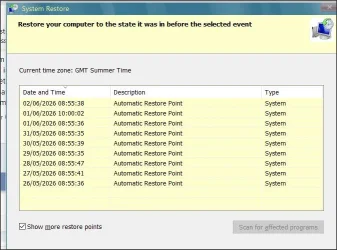
Yes. I have a restore point created daily on schedule, on Win 10 and 11.

And hte whole value is that, compared with restoring an entire partition, personal data is not affected- and you can even scan to see what will be affected by using a restore point.

As such, for me, SR and imaging are entirely, usefully and necessarily complementary. A matter of having the right tool for the job in hand.

1.webp

That said, yes, sometimes restoring fails and a couple of times over the years, fails for some weeks- then starts working again (see the appstaging issue early in this thread). But when it works, in the right situations, it's a boon.
 

My Computer

System One

  • OS
    Windows 11 Pro
    Computer type
    Laptop
    Manufacturer/Model
    Lenovo t480s
    CPU
    i7-8650U
    Memory
    16GB
    Graphics Card(s)
    Intel UHD 620
    Screen Resolution
    1920x1080
    Hard Drives
    C SN810 SDCPNRY-512G-1006
    Browser
    Edge, Firefox
    Antivirus
    Defender
I don't know how much work/time you put on those image backups and how smooth it is but I don't reinstall that often and when I do I can do it manually.
You usually do an image of a fresh system with all your programs installed which will take between 10 & 20 mins. If you run into a problem (virus infection, etc.), image restoration will take up to 30mins max (usually takes me 10mins) compared to an hour of clean OS installation plus a whole day of tweaking and re-installing your programs.
 

My Computers

System One System Two

  • OS
    Windows 11 Pro
    Computer type
    PC/Desktop
    CPU
    AMD Ryzen 7 9800X3D
    Motherboard
    MSI PRO B850-P Wifi
    Memory
    32GB DDR5 CL30 Kingston Fury
    Graphics Card(s)
    ASUS Prime Radeon RX 9060 XT OC Edition 16GB
    Monitor(s) Displays
    LG Ultrawide 34" + LG 27" 1080p
    Screen Resolution
    3440x1440
    Hard Drives
    Main Boot Drive : 512GB Adata XPG RGB Gen3x4 NVMe M.2 SSD
    PSU
    EVGA 750 Watts 80+ Gold
    Case
    Deepcool Genome II
    Cooling
    Thermalright Burst Assassin 120
    Internet Speed
    1Gbps
    Browser
    Chrome
    Antivirus
    "Moderna"
  • Operating System
    Windows 11 Pro
    Computer type
    PC/Desktop
    CPU
    i7-4790K
    Motherboard
    ASRock Xtreme6 Z97
    Memory
    16GB Corsair Vengeance Pro
    Graphics card(s)
    MSI R9 290
    Monitor(s) Displays
    LG Ultrawide 34"
    Screen Resolution
    3440x1440
    Hard Drives
    500GB Adata SSD (OS Only)
    PSU
    Thermaltake 475 Watts 80 Bronze
    Case
    Thermaltake Commander I Snow Edition
    Cooling
    Deep Cool Archer Air Cooler
    Keyboard
    Armageddon MKA-5R RGB-Hornet
    Mouse
    Logitech G402
    Internet Speed
    1Gbps
    Browser
    Chrome
    Antivirus
    Moderna :)
I have system restore points activated. Have not tested/restored anything yet. In case of something happens.
 

My Computer

System One

  • OS
    Windows 11
    Computer type
    PC/Desktop
    Manufacturer/Model
    Asus
    CPU
    Intel Core i7-13700
    Motherboard
    ASUS TUF GAMING B760-PLUS WIFI
    Memory
    Corsair VENGEANCE DDR5 32GB
    Graphics Card(s)
    MSI GeForce RTX 5070 12G VENTUS 2X OC
    Monitor(s) Displays
    Samsung LS32AG504
    Hard Drives
    Kingston Fury Renegade M.2 2TB SSD
    PSU
    Corsair RM850X 2021 / 850W / 80+ Gold
    Browser
    Chrome
    Antivirus
    Defender
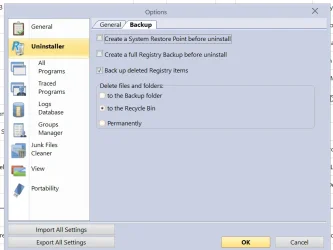
Bear in mind that Windows creates restore points rather erratically if left to itself- put another way, when you really need one you may find the last was created a while back, not when you'd like it to have been. And of course certain 3rd party programs are written so as to created a restore point before completing an action.
 

My Computer

System One

  • OS
    Windows 11 Pro
    Computer type
    Laptop
    Manufacturer/Model
    Lenovo t480s
    CPU
    i7-8650U
    Memory
    16GB
    Graphics Card(s)
    Intel UHD 620
    Screen Resolution
    1920x1080
    Hard Drives
    C SN810 SDCPNRY-512G-1006
    Browser
    Edge, Firefox
    Antivirus
    Defender
Bear in mind that Windows creates restore points rather erratically if left to itself- put another way, when you really need one you may find the last was created a while back, not when you'd like it to have been. And of course certain 3rd party programs are written so as to created a restore point before completing an action.
What exactly is it 'restore points' restore?
 

My Computer

System One

  • OS
    Windows 11
    Computer type
    PC/Desktop
    Manufacturer/Model
    Asus
    CPU
    Intel Core i7-13700
    Motherboard
    ASUS TUF GAMING B760-PLUS WIFI
    Memory
    Corsair VENGEANCE DDR5 32GB
    Graphics Card(s)
    MSI GeForce RTX 5070 12G VENTUS 2X OC
    Monitor(s) Displays
    Samsung LS32AG504
    Hard Drives
    Kingston Fury Renegade M.2 2TB SSD
    PSU
    Corsair RM850X 2021 / 850W / 80+ Gold
    Browser
    Chrome
    Antivirus
    Defender
Thank you for your reply.

Changes since the restore point was created. Updates, system files, drivers, programs, Essentially SR monitors a list of file types.

See the 3rd para here:

Note: there may be an equivalent elevenforum tutorial - I just haven't taken the time to look for you as I knew of this one.
 

My Computer

System One

  • OS
    Windows 11 Pro
    Computer type
    Laptop
    Manufacturer/Model
    Lenovo t480s
    CPU
    i7-8650U
    Memory
    16GB
    Graphics Card(s)
    Intel UHD 620
    Screen Resolution
    1920x1080
    Hard Drives
    C SN810 SDCPNRY-512G-1006
    Browser
    Edge, Firefox
    Antivirus
    Defender
What solution do you use more specifically?
macium X from nvme to nvme, then less frequently copy one to external 6 TB HDD. Without the verification pass, it take around 20s.

I use macrium on the command line an have a shortcut to it which I can launch from the desktop context menu or the task bar.
 

My Computers

System One System Two

  • OS
    Windows 11 Pro x64
    Computer type
    PC/Desktop
    Manufacturer/Model
    📷🔈🎧 🪛 DIY Photoshop/Audio/Game/tinker
    CPU
    i9 14900K P/E 5.8/4.5 GHz, cache 5.0 GHz
    Motherboard
    Asus ROG Maximus Z790 Dark Hero
    Memory
    🐏 96GB (2x48) G.skill Ripjaws 6800 MT/s
    Graphics Card(s)
    Asus ROG Strix 4070 Ti OC
    Sound Card
    🔊Bowers & Wilkins 606 S3 speakers; Audiolabs 7000a integrated amp; RSL 10S Mk2 sub; Creative Pebble Pro Minimilist
    Monitor(s) Displays
    🖥️🖥️ Eizo CG2730 ColorEdge, ViewSonic VP2768
    Screen Resolution
    🖥️🖥️ 2560 x 1440p x 2
    Hard Drives
    💾 WDC SN850X 4TB nvme, SN850 1TB nvme, SK-Hynix 2 TB P41 nvme,. Sabrent USB-C DS-SC5B 5-bay docking station: 6TB WDC Black, 6TB Ironwolf Pro; 2x 2TB WDC Black HDD
    PSU
    ⚡️ 850W Seasonic Vertex PX-850 ATX 3.0/PCI-E 5.0
    Case
    Fractal Design North XL Mesh, Black Walnut
    Cooling
    ❄️ EK Nucleus black 360 AIO w/Phanteks T30-120 fans, 2 Noctua NF-A14 Chromax case fan, 1 T30-120 fan cooling memory
    Keyboard
    ⌨️ Keychron Q3 Max TKL with custom GMK Redsuns Red Samuri keycaps, TX Stabs
    Mouse
    🖱️ Logitech G305 wireless gaming
    Internet Speed
    ⬇️ 500 Mb/s ⬆️ 12 Mb/s
    Browser
    🔥🦊 Firefox
    Antivirus
    🦺 Defender, Macrium Reflect X 🏆
    Other Info
    Phangkey Amaterasu V2 Desk Mat
  • Computer type
    Laptop
    Manufacturer/Model
    💻 Apple 13" Macbook Pro 2020 (m1)

    CPU
    Apple M1
    Screen Resolution
    2560x1600
    Browser
    Firefox
Thank you for your reply.

Changes since the restore point was created. Updates, system files, drivers, programs, Essentially SR monitors a list of file types.

See the 3rd para here:

Note: there may be an equivalent elevenforum tutorial - I just haven't taken the time to look for you as I knew of this one.
So not stored files like pictures and videos on C drive?
 

My Computer

System One

  • OS
    Windows 11
    Computer type
    PC/Desktop
    Manufacturer/Model
    Asus
    CPU
    Intel Core i7-13700
    Motherboard
    ASUS TUF GAMING B760-PLUS WIFI
    Memory
    Corsair VENGEANCE DDR5 32GB
    Graphics Card(s)
    MSI GeForce RTX 5070 12G VENTUS 2X OC
    Monitor(s) Displays
    Samsung LS32AG504
    Hard Drives
    Kingston Fury Renegade M.2 2TB SSD
    PSU
    Corsair RM850X 2021 / 850W / 80+ Gold
    Browser
    Chrome
    Antivirus
    Defender
System Restore neither backs up, secures nor modifies personal data.

If you looked at the file type list via the link I gave you, you could have confirmed that.

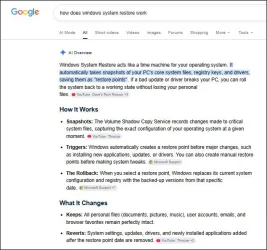
Google would also have informed you of that. Try searching thus:
1.webp

The one type of personal file that could be caught would be script files where the file type is in the list I indicated.
 

My Computer

System One

  • OS
    Windows 11 Pro
    Computer type
    Laptop
    Manufacturer/Model
    Lenovo t480s
    CPU
    i7-8650U
    Memory
    16GB
    Graphics Card(s)
    Intel UHD 620
    Screen Resolution
    1920x1080
    Hard Drives
    C SN810 SDCPNRY-512G-1006
    Browser
    Edge, Firefox
    Antivirus
    Defender
So not stored files like pictures and videos on C drive?

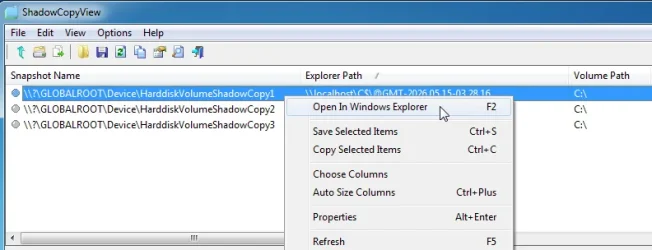
In the shadowcopy.

you can easily test .

create a text file on your desktop

create a restore point

delete the text file from your desktop.

look in the shadowcopy for it.

to see the contents of your shadowcopies and copy stuff out you can either link to them with a simple batch file

or an easy to use litle portable program is very handy

for example

dhadowcopyview-explorer.webp
 
Last edited:

My Computers

System One System Two

  • OS
    Win7,Win11
    Computer type
    PC/Desktop
    CPU
    i7-9700
    Motherboard
    gigabyte b365m ds3h
    Memory
    2x16gb 3600mhz
    Monitor(s) Displays
    benq gw2480
    PSU
    bequiet pure power 11 400CM
    Cooling
    cryorig m9i
  • Operating System
    win7,win11
    Computer type
    PC/Desktop
    CPU
    i5-8400
    Motherboard
    gigabyte b365m ds3h
    Memory
    2x8gb 3200
    PSU
    xfx pro 450
Bear in mind that Windows creates restore points rather erratically if left to itself- put another way, when you really need one you may find the last was created a while back, not when you'd like it to have been. And of course certain 3rd party programs are written so as to created a restore point before completing an action.
Revouninstaller does it.


I prefer using Geek which does not do that.


My Computer

System One

  • OS
    windows 11 ,Ubuntu Cinnamon - for tinkering only
    Computer type
    PC/Desktop
    Manufacturer/Model
    No Name - Assembled by a Compute shop in a Strip Mall.
    CPU
    Intel i511400
    Motherboard
    ASUS PRIME B560-PLUS motherboard
    Memory
    16 GB
    Graphics Card(s)
    0
    Sound Card
    0
    Monitor(s) Displays
    25 in BenQ
    Screen Resolution
    1920 x 1080
    Hard Drives
    9 SSDs 4 Nvme, 2 in M.2 slot and 2 in PCIE with adapter + 5 Sata. DVD drive
    PSU
    600w
    Case
    Antec- VSK4000E-U3 Mid Tower
    Internet Speed
    Bell pure fibre optic. 1 GB package. Wireless adapter +/- 500/500
    Browser
    Firefox, Microsoft Edge
    Antivirus
    Defender

My Computers

System One System Two

  • OS
    Win 11 Pro
    Computer type
    Laptop
    Manufacturer/Model
    ASUS Vivobook
    CPU
    AMD Ryzen™ 7 7730U
    Motherboard
    M1605YA
    Memory
    24GB Dual-Channel DDR4 @ 1596MHz (22-22-22-52)
    Graphics Card(s)
    512MB ATI AMD Radeon Graphics (ASUStek Computer Inc)
    Monitor(s) Displays
    Generic PnP Monitor (1920x1200@60Hz) - P1 PLUS (1920x1080@59Hz)
    Screen Resolution
    1920 X 1200
    Hard Drives
    953GB Western Digital WD
    PSU
    45 Watts
    Mouse
    Lenovo Bluetooth.
    Internet Speed
    500 Mbps
    Browser
    Edge
    Antivirus
    Defender
  • Operating System
    Windows 11
    Computer type
    Laptop
    Manufacturer/Model
    ACER NITRO
    CPU
    AMD Ryzen 7 5800H / 3.2 GHz
    Motherboard
    CZ Scala_CAS (FP6)
    Memory
    32 GB DDR4 SDRAM 3200 MHz
    Graphics card(s)
    NVIDIA GeForce RTX 3060 6 GB GDDR6 SDRAM
    Sound Card
    Realtek Audio. NVIDIA High Definition Audio
    Monitor(s) Displays
    15.6" LED backlight 1920 x 1080 (Full HD) 144 Hz
    Screen Resolution
    1920 x 1080 (Full HD)
    Hard Drives
    Samsung 970 Evo Plus 2TB NVMe M.2
    PSU
    180 Watt, 19.5 V
    Mouse
    Lenovo Bluetooth
    Internet Speed
    500 Mbps
    Browser
    Edge
    Antivirus
    Defender

My Computer

System One

  • OS
    windows 11 ,Ubuntu Cinnamon - for tinkering only
    Computer type
    PC/Desktop
    Manufacturer/Model
    No Name - Assembled by a Compute shop in a Strip Mall.
    CPU
    Intel i511400
    Motherboard
    ASUS PRIME B560-PLUS motherboard
    Memory
    16 GB
    Graphics Card(s)
    0
    Sound Card
    0
    Monitor(s) Displays
    25 in BenQ
    Screen Resolution
    1920 x 1080
    Hard Drives
    9 SSDs 4 Nvme, 2 in M.2 slot and 2 in PCIE with adapter + 5 Sata. DVD drive
    PSU
    600w
    Case
    Antec- VSK4000E-U3 Mid Tower
    Internet Speed
    Bell pure fibre optic. 1 GB package. Wireless adapter +/- 500/500
    Browser
    Firefox, Microsoft Edge
    Antivirus
    Defender
What exactly is it 'restore points' restore?
It is like a "bookmark".
Before you install a software or windows update, it's always a good habit to create a restore point prior to installing. If the software/update creates a problem or making your PC slow, restore it to the "restore point" that you created and it will go back to the same exact state before you installed the software/update like nothing happened.
 

My Computers

System One System Two

  • OS
    Windows 11 Pro
    Computer type
    PC/Desktop
    CPU
    AMD Ryzen 7 9800X3D
    Motherboard
    MSI PRO B850-P Wifi
    Memory
    32GB DDR5 CL30 Kingston Fury
    Graphics Card(s)
    ASUS Prime Radeon RX 9060 XT OC Edition 16GB
    Monitor(s) Displays
    LG Ultrawide 34" + LG 27" 1080p
    Screen Resolution
    3440x1440
    Hard Drives
    Main Boot Drive : 512GB Adata XPG RGB Gen3x4 NVMe M.2 SSD
    PSU
    EVGA 750 Watts 80+ Gold
    Case
    Deepcool Genome II
    Cooling
    Thermalright Burst Assassin 120
    Internet Speed
    1Gbps
    Browser
    Chrome
    Antivirus
    "Moderna"
  • Operating System
    Windows 11 Pro
    Computer type
    PC/Desktop
    CPU
    i7-4790K
    Motherboard
    ASRock Xtreme6 Z97
    Memory
    16GB Corsair Vengeance Pro
    Graphics card(s)
    MSI R9 290
    Monitor(s) Displays
    LG Ultrawide 34"
    Screen Resolution
    3440x1440
    Hard Drives
    500GB Adata SSD (OS Only)
    PSU
    Thermaltake 475 Watts 80 Bronze
    Case
    Thermaltake Commander I Snow Edition
    Cooling
    Deep Cool Archer Air Cooler
    Keyboard
    Armageddon MKA-5R RGB-Hornet
    Mouse
    Logitech G402
    Internet Speed
    1Gbps
    Browser
    Chrome
    Antivirus
    Moderna :)
Back
Top Bottom