System Will Not Go To Sleep


Modern standby and hibernate is all you have now.
Your other system probably used S3 which is why you were used to everything turning off.
There is a tutorial to disable modern standby and enable S3 should you want to.

Ok, I got what you sent. Thank you so much. I will check on it.

I would have to re-read it all over and over to get all the English descriptions.
Surely will report back after I get to it.

Thanks again!
 

My Computers

System One System Two

  • OS
    Windows 11 Pro 64-bit / 24H2 / Build 26100.6584
    Computer type
    PC/Desktop
    Manufacturer/Model
    Dell XPS 8960
    CPU
    Intel(R) Core(TM) i7-13700, 16 Core(s)
    Motherboard
    Dell Inc. Base Board.
    Memory
    Total: 64.00 GB
    Graphics Card(s)
    NVIDIA GeForce RTX 4060 Ti
    Sound Card
    Realtek Audio & Integrated NVIDIA High Definition Audio
    Monitor(s) Displays
    Three Dell Monitors
    Screen Resolution
    1920 x 1080
    Hard Drives
    1TB ATA
    1TB ATA
    2TB ATA
    2TB ATA
    Keyboard
    Dell Keyboard
    Mouse
    Wireless Mouse
    Internet Speed
    935 Mbs (Down) 31 Mbs (Up)
    Browser
    Google Chrome. Firefox. Opera.
    Antivirus
    Windows Defender
    Other Info
    TP-Link Gigabit PCI Express Adapter (Ethernet 802.3)
    Sophos TAP Adapter Provider (Ethernet 802.3)
  • Operating System
    Microsoft Windows 11 Home 64-bit. 22631 Multiprocessor Free
    Computer type
    Laptop
    Manufacturer/Model
    Dell Inspiron 15-3530
    CPU
    13th Gen Intel(R) Core(TM) i7-1355U
    Motherboard
    Dell Inc. 0122F5
    Memory
    Total Memory: 16.00 GB Usable Memory: 15.69 GB
    Graphics card(s)
    Intel(R) Iris(R) Xe Graphics
    Sound Card
    (1) Intel® Smart Sound Technology for Bluetooth® Audio (2) Intel® Smart Sound Technology for USB Audio (3) Realtek Audio
    Monitor(s) Displays
    Integrated
    Screen Resolution
    1920 x 1080
    Hard Drives
    NVMe PC SN740 NVMe WD 512GB
    PSU
    Integrated
    Keyboard
    Integrated
    Mouse
    Integrated
    Internet Speed
    143 Mbs Down / 43 Mbs Up
    Browser
    Google Chrome . Firefox
    Antivirus
    Windows Defender
suggestion tell Copilot it could have a suggestion what to do. I used to have to shut down mine I followed the instructions now it stops running
 

My Computer

System One

  • OS
    Win 11 Home
    Computer type
    Laptop
    Manufacturer/Model
    Dell Inspiron i7640-7366BLU 2 in 1
    CPU
    Intel Core Ultra7 Processor
    Memory
    16gb
    Graphics Card(s)
    Intel Arc
    Monitor(s) Displays
    on laptop 1XHDMI 1.4
    Screen Resolution
    1920x1200 Full HD+
    Hard Drives
    1TB SSD
    Keyboard
    on laptop / on screen using as tablet
    Mouse
    Microsoft 3500
    Internet Speed
    800 mg
    Browser
    Edge
    Antivirus
    Defender
I am looking at all of the responses I have a few,
1) go to task manger and task bar settings see what is running maybe a task or tasks you can end causing issues.
2) Control panel see what the power plan is reset a another.
3) Go to Dell tell them what your desktop is doing they know your computer
4) I go to Copilot it has helped me a lot I use phone app as well as pc app. I ask using phone app you may have to reset desktop that having on your phone app on you can follow instructions on your phone app.
Once you use Copilot you will have one more source to get help.
Dell told me several times that the XPS Desktop is so by design.
They replaced the motherboard and remoted to my PC many times.

Whatever it might be, I just need to use this PC like any normal PC I have used for decades now.
I need to be able to use the SLEEP mode.
 

My Computers

System One System Two

  • OS
    Windows 11 Pro 64-bit / 24H2 / Build 26100.6584
    Computer type
    PC/Desktop
    Manufacturer/Model
    Dell XPS 8960
    CPU
    Intel(R) Core(TM) i7-13700, 16 Core(s)
    Motherboard
    Dell Inc. Base Board.
    Memory
    Total: 64.00 GB
    Graphics Card(s)
    NVIDIA GeForce RTX 4060 Ti
    Sound Card
    Realtek Audio & Integrated NVIDIA High Definition Audio
    Monitor(s) Displays
    Three Dell Monitors
    Screen Resolution
    1920 x 1080
    Hard Drives
    1TB ATA
    1TB ATA
    2TB ATA
    2TB ATA
    Keyboard
    Dell Keyboard
    Mouse
    Wireless Mouse
    Internet Speed
    935 Mbs (Down) 31 Mbs (Up)
    Browser
    Google Chrome. Firefox. Opera.
    Antivirus
    Windows Defender
    Other Info
    TP-Link Gigabit PCI Express Adapter (Ethernet 802.3)
    Sophos TAP Adapter Provider (Ethernet 802.3)
  • Operating System
    Microsoft Windows 11 Home 64-bit. 22631 Multiprocessor Free
    Computer type
    Laptop
    Manufacturer/Model
    Dell Inspiron 15-3530
    CPU
    13th Gen Intel(R) Core(TM) i7-1355U
    Motherboard
    Dell Inc. 0122F5
    Memory
    Total Memory: 16.00 GB Usable Memory: 15.69 GB
    Graphics card(s)
    Intel(R) Iris(R) Xe Graphics
    Sound Card
    (1) Intel® Smart Sound Technology for Bluetooth® Audio (2) Intel® Smart Sound Technology for USB Audio (3) Realtek Audio
    Monitor(s) Displays
    Integrated
    Screen Resolution
    1920 x 1080
    Hard Drives
    NVMe PC SN740 NVMe WD 512GB
    PSU
    Integrated
    Keyboard
    Integrated
    Mouse
    Integrated
    Internet Speed
    143 Mbs Down / 43 Mbs Up
    Browser
    Google Chrome . Firefox
    Antivirus
    Windows Defender
I am looking at all of the responses I have a few,
1) go to task manger and task bar settings see what is running maybe a task or tasks you can end causing issues.
2) Control panel see what the power plan is reset a another.
3) Go to Dell tell them what your desktop is doing they know your computer
4) I go to Copilot it has helped me a lot I use phone app as well as pc app. I ask using phone app you may have to reset desktop that having on your phone app on you can follow instructions on your phone app.
Once you use Copilot you will have one more source to get help.
I checked my Task Manger and found these, which I don't think any is an issue.

QMxNetworkSync.exe is a software component associated with the Update Notifier by MAGIX. This executable file is part of the MAGIX software suite, which is a collection of multimedia applications for creating, editing, managing and organizing such content as music, photos, and videos.
--------------------
This is for my remote login to my office computer.

The scgui.exe process allows users to access and control various features of the Sophos antivirus program, such as scanning for viruses, managing quarantined files, and configuring real-time protection settings.
--------------------
SecurityHealthSystray.exe
is a legitimate Microsoft Windows file that runs in the system tray, displaying the Windows Security icon, providing alerts for antivirus (Defender), firewall, and overall system health, and offering quick access to Windows Security settings.
--------------------
ShdTray.exe, also known as Shield Tray, is an executable file associated with the software RollBack Rx Home and RollBack Rx Professional developed by Horizon DataSys.
--------------------
WavePad.exe is the executable file for NCH Software's WavePad Audio Editor
--------------------
WhatsApp
Been using this for so many years now.
--------------------

As mentioned in my previous posts on this forum, Dell replaced (by their in-town technician) the motherboard, remotely checked and reconfigured my system, including the power settings. Always to tell me the XPS is so by design. I can't fight Dell coporations on such issue; am nobody. I have also reinstalled Widnows a few times.

I had tried a utility, known one, which I could not remember which. It broke my boot system. Luckily, I had just backued up my system a week earlier, so I restored the PC. I tried it another day, it also happened, so I delited the utility; is was from a whell known software outfit.

In my opinion, I am sure I am right that a sleep mode should not have any thing still running in the computer. Having been using computers for decades, this XPS would be the first of it's kind, to go to sleep and still have every item still running in the case.

Just two weeks ago, a co-worker brought up Microsoft Copilot being in new laptops. I've always heard about it but never got to know more; way too many things coming out to keep me busy. You now seem to make me get into knowing more about it. I will jump in to know more on Copilot. Thanks for that!

In Hibernation mode, something wakes up the computer, which is intermittent. However, everything shuts down (Hibernated). I have to press the power button to unhibernate it, where everything comes back to 'life' as if on Sleep mode.

In Sleep mode, the only item that turns off is the power button light on the front of the case.
when display and system sleep time reaches, I still have all in Post #9, including the network light still blinking in sleep mode.

I maybe wrong, but I doubt it that all the above should not happen in a Windows sleep mode

Now, let me go and check out what Copilot really is.

Cheers
 

My Computers

System One System Two

  • OS
    Windows 11 Pro 64-bit / 24H2 / Build 26100.6584
    Computer type
    PC/Desktop
    Manufacturer/Model
    Dell XPS 8960
    CPU
    Intel(R) Core(TM) i7-13700, 16 Core(s)
    Motherboard
    Dell Inc. Base Board.
    Memory
    Total: 64.00 GB
    Graphics Card(s)
    NVIDIA GeForce RTX 4060 Ti
    Sound Card
    Realtek Audio & Integrated NVIDIA High Definition Audio
    Monitor(s) Displays
    Three Dell Monitors
    Screen Resolution
    1920 x 1080
    Hard Drives
    1TB ATA
    1TB ATA
    2TB ATA
    2TB ATA
    Keyboard
    Dell Keyboard
    Mouse
    Wireless Mouse
    Internet Speed
    935 Mbs (Down) 31 Mbs (Up)
    Browser
    Google Chrome. Firefox. Opera.
    Antivirus
    Windows Defender
    Other Info
    TP-Link Gigabit PCI Express Adapter (Ethernet 802.3)
    Sophos TAP Adapter Provider (Ethernet 802.3)
  • Operating System
    Microsoft Windows 11 Home 64-bit. 22631 Multiprocessor Free
    Computer type
    Laptop
    Manufacturer/Model
    Dell Inspiron 15-3530
    CPU
    13th Gen Intel(R) Core(TM) i7-1355U
    Motherboard
    Dell Inc. 0122F5
    Memory
    Total Memory: 16.00 GB Usable Memory: 15.69 GB
    Graphics card(s)
    Intel(R) Iris(R) Xe Graphics
    Sound Card
    (1) Intel® Smart Sound Technology for Bluetooth® Audio (2) Intel® Smart Sound Technology for USB Audio (3) Realtek Audio
    Monitor(s) Displays
    Integrated
    Screen Resolution
    1920 x 1080
    Hard Drives
    NVMe PC SN740 NVMe WD 512GB
    PSU
    Integrated
    Keyboard
    Integrated
    Mouse
    Integrated
    Internet Speed
    143 Mbs Down / 43 Mbs Up
    Browser
    Google Chrome . Firefox
    Antivirus
    Windows Defender
I am looking at all of the responses I have a few,
1) go to task manger and task bar settings see what is running maybe a task or tasks you can end causing issues.
2) Control panel see what the power plan is reset a another.
3) Go to Dell tell them what your desktop is doing they know your computer
4) I go to Copilot it has helped me a lot I use phone app as well as pc app. I ask using phone app you may have to reset desktop that having on your phone app on you can follow instructions on your phone app.
Once you use Copilot you will have one more source to get help.
#3 Actually, I can't discuss this with Dell anymore since they are upset with me bugging on this case. They keep helping and keep telling me the XPS is so by design. Their last request was for me to send the PC back with a pre-post box they already sent me, so they can check it out. No doubt the result will be the same. After many remote checks and mortherboard replacement by their technician in town, they'll return the PC and tell me it's per design. Really very frustrating there's not much I can do about putting my PC to sleep. 😥
 

My Computers

System One System Two

  • OS
    Windows 11 Pro 64-bit / 24H2 / Build 26100.6584
    Computer type
    PC/Desktop
    Manufacturer/Model
    Dell XPS 8960
    CPU
    Intel(R) Core(TM) i7-13700, 16 Core(s)
    Motherboard
    Dell Inc. Base Board.
    Memory
    Total: 64.00 GB
    Graphics Card(s)
    NVIDIA GeForce RTX 4060 Ti
    Sound Card
    Realtek Audio & Integrated NVIDIA High Definition Audio
    Monitor(s) Displays
    Three Dell Monitors
    Screen Resolution
    1920 x 1080
    Hard Drives
    1TB ATA
    1TB ATA
    2TB ATA
    2TB ATA
    Keyboard
    Dell Keyboard
    Mouse
    Wireless Mouse
    Internet Speed
    935 Mbs (Down) 31 Mbs (Up)
    Browser
    Google Chrome. Firefox. Opera.
    Antivirus
    Windows Defender
    Other Info
    TP-Link Gigabit PCI Express Adapter (Ethernet 802.3)
    Sophos TAP Adapter Provider (Ethernet 802.3)
  • Operating System
    Microsoft Windows 11 Home 64-bit. 22631 Multiprocessor Free
    Computer type
    Laptop
    Manufacturer/Model
    Dell Inspiron 15-3530
    CPU
    13th Gen Intel(R) Core(TM) i7-1355U
    Motherboard
    Dell Inc. 0122F5
    Memory
    Total Memory: 16.00 GB Usable Memory: 15.69 GB
    Graphics card(s)
    Intel(R) Iris(R) Xe Graphics
    Sound Card
    (1) Intel® Smart Sound Technology for Bluetooth® Audio (2) Intel® Smart Sound Technology for USB Audio (3) Realtek Audio
    Monitor(s) Displays
    Integrated
    Screen Resolution
    1920 x 1080
    Hard Drives
    NVMe PC SN740 NVMe WD 512GB
    PSU
    Integrated
    Keyboard
    Integrated
    Mouse
    Integrated
    Internet Speed
    143 Mbs Down / 43 Mbs Up
    Browser
    Google Chrome . Firefox
    Antivirus
    Windows Defender
they are upset with me bugging on this case
There seems to be some misunderstanding here.
As your own checks told you, you have S0 Modern standby [aka S0 Low power idle] & you have Hibernation.
You do not have S3 Sleep.
You do not have any sleep states.
That is becoming increasingly common.

When your display goes off, the computer enters S0 Modern standby.
The computer remains on. It's idling. Some Windows Apps can continue running in the background.

In your case, your computer remains connected to your network so an email app can keep getting emails.
You can change that if you want.
Enable or Disable Modern Standby Network Connectivity - ElevenForumTutorials

You can also try disabling S0 Modern standby but that will not necessarily enable S3 Sleep.
Always make a new system image beforehand.
- It is possible for computers to go haywire after this change. I have experienced this myself.

You can turn your computer off using the Start menu item or running a command shortcut such as
shutdown /s /t 0 /f


Denis
 
Last edited:

My Computer

System One

  • OS
    Windows 11 Home x64 Version 25H2 Build 26200.8037
You can turn your computer off using the Start menu item or running a command shortcut such as
shutdown /s /t 0 /f


Denis

I used that command on my neigbours Dell.. large red button placed on her desktop labelled "Shutdown" :-)
 

My Computer

System One

  • OS
    Windows 11 Pro 25H2
    Computer type
    PC/Desktop
    Manufacturer/Model
    My Self
    CPU
    Intel Alder lake i7 12700K
    Motherboard
    Asus z690 Gaming WiFi D4, Bios Ver 4505
    Memory
    32 Gb Corsair Vengeance LPX DDR4 3200 XMP2
    Graphics Card(s)
    EVGA 3070ti FTW3 Ultra Gaming & Intel Arc
    Sound Card
    Via Display port
    Monitor(s) Displays
    Dell AW2723DF
    Screen Resolution
    2560 x 1440 @ 280Hz G-Sync mode
    Hard Drives
    WD Black SN850 1Tb NVME (Boot Drive)
    WD BLACK SN850X + Heatsink 1Tb NVME
    Samsung 870 Qvo 1Tb SSD,
    Pioneer DVD-RW DVR-219L
    WD Black SN850x NVME 2Tb x3
    PSU
    Corsair RM850
    Case
    Phanteks Enthoo Pro M Tempered Glass
    Cooling
    Be Quiet Shadow Rock 3
    Keyboard
    Logitech G Pro
    Mouse
    Logitech G903, Lightspeed + Powerplay Mat
    Internet Speed
    900Mb/900Mb Fritz!Box 7590ax v2
    Browser
    Firefox
    Antivirus
    MS Defender
    Other Info
    Logitech C930e webcam
    Synology DS218 play 2 x 4Tb Synology HAT3300-4T
I used that command on my neigbours Dell.. large red button placed on her desktop labelled "Shutdown" :-)Shu
Shutting down is not my issue. I need to be able to put the PC to sleep.
 

My Computers

System One System Two

  • OS
    Windows 11 Pro 64-bit / 24H2 / Build 26100.6584
    Computer type
    PC/Desktop
    Manufacturer/Model
    Dell XPS 8960
    CPU
    Intel(R) Core(TM) i7-13700, 16 Core(s)
    Motherboard
    Dell Inc. Base Board.
    Memory
    Total: 64.00 GB
    Graphics Card(s)
    NVIDIA GeForce RTX 4060 Ti
    Sound Card
    Realtek Audio & Integrated NVIDIA High Definition Audio
    Monitor(s) Displays
    Three Dell Monitors
    Screen Resolution
    1920 x 1080
    Hard Drives
    1TB ATA
    1TB ATA
    2TB ATA
    2TB ATA
    Keyboard
    Dell Keyboard
    Mouse
    Wireless Mouse
    Internet Speed
    935 Mbs (Down) 31 Mbs (Up)
    Browser
    Google Chrome. Firefox. Opera.
    Antivirus
    Windows Defender
    Other Info
    TP-Link Gigabit PCI Express Adapter (Ethernet 802.3)
    Sophos TAP Adapter Provider (Ethernet 802.3)
  • Operating System
    Microsoft Windows 11 Home 64-bit. 22631 Multiprocessor Free
    Computer type
    Laptop
    Manufacturer/Model
    Dell Inspiron 15-3530
    CPU
    13th Gen Intel(R) Core(TM) i7-1355U
    Motherboard
    Dell Inc. 0122F5
    Memory
    Total Memory: 16.00 GB Usable Memory: 15.69 GB
    Graphics card(s)
    Intel(R) Iris(R) Xe Graphics
    Sound Card
    (1) Intel® Smart Sound Technology for Bluetooth® Audio (2) Intel® Smart Sound Technology for USB Audio (3) Realtek Audio
    Monitor(s) Displays
    Integrated
    Screen Resolution
    1920 x 1080
    Hard Drives
    NVMe PC SN740 NVMe WD 512GB
    PSU
    Integrated
    Keyboard
    Integrated
    Mouse
    Integrated
    Internet Speed
    143 Mbs Down / 43 Mbs Up
    Browser
    Google Chrome . Firefox
    Antivirus
    Windows Defender
There seems to be some misunderstanding here.
As your own checks told you, you have S0 Modern standby [aka S0 Low power idle] & you have Hibernation.
You do not have S3 Sleep.
You do not have any sleep states.
That is becoming increasingly common.

When your display goes off, the computer enters S0 Modern standby.
The computer remains on. It's idling. Some Windows Apps can continue running in the background.

In your case, your computer remains connected to your network so an email app can keep getting emails.
You can change that if you want.
Enable or Disable Modern Standby Network Connectivity - ElevenForumTutorials

You can also try disabling S0 Modern standby but that will not necessarily enable S3 Sleep.
Always make a new system image beforehand.
- It is possible for computers to go haywire after this change. I have experienced this myself.

You can turn your computer off using the Start menu item or running a command shortcut such as
shutdown /s /t 0 /f


Denis
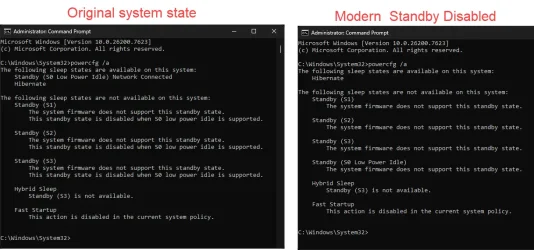
Hello, please see what I got after disabling Modern Standby.
Looks like my computer is not built for the S3 power mode; not supported.
 

Attachments

  • PowerMode.webp
    PowerMode.webp
    86.6 KB · Views: 1

My Computers

System One System Two

  • OS
    Windows 11 Pro 64-bit / 24H2 / Build 26100.6584
    Computer type
    PC/Desktop
    Manufacturer/Model
    Dell XPS 8960
    CPU
    Intel(R) Core(TM) i7-13700, 16 Core(s)
    Motherboard
    Dell Inc. Base Board.
    Memory
    Total: 64.00 GB
    Graphics Card(s)
    NVIDIA GeForce RTX 4060 Ti
    Sound Card
    Realtek Audio & Integrated NVIDIA High Definition Audio
    Monitor(s) Displays
    Three Dell Monitors
    Screen Resolution
    1920 x 1080
    Hard Drives
    1TB ATA
    1TB ATA
    2TB ATA
    2TB ATA
    Keyboard
    Dell Keyboard
    Mouse
    Wireless Mouse
    Internet Speed
    935 Mbs (Down) 31 Mbs (Up)
    Browser
    Google Chrome. Firefox. Opera.
    Antivirus
    Windows Defender
    Other Info
    TP-Link Gigabit PCI Express Adapter (Ethernet 802.3)
    Sophos TAP Adapter Provider (Ethernet 802.3)
  • Operating System
    Microsoft Windows 11 Home 64-bit. 22631 Multiprocessor Free
    Computer type
    Laptop
    Manufacturer/Model
    Dell Inspiron 15-3530
    CPU
    13th Gen Intel(R) Core(TM) i7-1355U
    Motherboard
    Dell Inc. 0122F5
    Memory
    Total Memory: 16.00 GB Usable Memory: 15.69 GB
    Graphics card(s)
    Intel(R) Iris(R) Xe Graphics
    Sound Card
    (1) Intel® Smart Sound Technology for Bluetooth® Audio (2) Intel® Smart Sound Technology for USB Audio (3) Realtek Audio
    Monitor(s) Displays
    Integrated
    Screen Resolution
    1920 x 1080
    Hard Drives
    NVMe PC SN740 NVMe WD 512GB
    PSU
    Integrated
    Keyboard
    Integrated
    Mouse
    Integrated
    Internet Speed
    143 Mbs Down / 43 Mbs Up
    Browser
    Google Chrome . Firefox
    Antivirus
    Windows Defender
what I got after disabling Modern Standby.
Looks like my computer is not built for the S3 power mode; not supported
Yes, I've had that aswell and so have lots of other people.
I had to choose between having these possible states
- On & in use, S0 Modern standby, Hibernate, Off
or
- On & in use, Hibernate, Off
At the time, I chose the second set but I've since learnt to live with S0 Modern standby.
Once I'd learnt how to control it enough to have Task scheduler run scripts during S0 Modern standby, I liked it more.
Running scripts during S0 Modern standby - my post #86 - ElevenForum

I still resent Intel's & MS's statements that S0 Modern standby was what users demanded.


All the best,
Denis
 

My Computer

System One

  • OS
    Windows 11 Home x64 Version 25H2 Build 26200.8037
Last edited:

My Computer

System One

  • OS
    Windows 11 Home x64 Version 25H2 Build 26200.8037
As my last post explained, your computer does not have that capability.


Denis
Sorry I really apologize. I took it that if "unavailable", it can be made available. Sorry I got it wrong.

Cheers
 

My Computers

System One System Two

  • OS
    Windows 11 Pro 64-bit / 24H2 / Build 26100.6584
    Computer type
    PC/Desktop
    Manufacturer/Model
    Dell XPS 8960
    CPU
    Intel(R) Core(TM) i7-13700, 16 Core(s)
    Motherboard
    Dell Inc. Base Board.
    Memory
    Total: 64.00 GB
    Graphics Card(s)
    NVIDIA GeForce RTX 4060 Ti
    Sound Card
    Realtek Audio & Integrated NVIDIA High Definition Audio
    Monitor(s) Displays
    Three Dell Monitors
    Screen Resolution
    1920 x 1080
    Hard Drives
    1TB ATA
    1TB ATA
    2TB ATA
    2TB ATA
    Keyboard
    Dell Keyboard
    Mouse
    Wireless Mouse
    Internet Speed
    935 Mbs (Down) 31 Mbs (Up)
    Browser
    Google Chrome. Firefox. Opera.
    Antivirus
    Windows Defender
    Other Info
    TP-Link Gigabit PCI Express Adapter (Ethernet 802.3)
    Sophos TAP Adapter Provider (Ethernet 802.3)
  • Operating System
    Microsoft Windows 11 Home 64-bit. 22631 Multiprocessor Free
    Computer type
    Laptop
    Manufacturer/Model
    Dell Inspiron 15-3530
    CPU
    13th Gen Intel(R) Core(TM) i7-1355U
    Motherboard
    Dell Inc. 0122F5
    Memory
    Total Memory: 16.00 GB Usable Memory: 15.69 GB
    Graphics card(s)
    Intel(R) Iris(R) Xe Graphics
    Sound Card
    (1) Intel® Smart Sound Technology for Bluetooth® Audio (2) Intel® Smart Sound Technology for USB Audio (3) Realtek Audio
    Monitor(s) Displays
    Integrated
    Screen Resolution
    1920 x 1080
    Hard Drives
    NVMe PC SN740 NVMe WD 512GB
    PSU
    Integrated
    Keyboard
    Integrated
    Mouse
    Integrated
    Internet Speed
    143 Mbs Down / 43 Mbs Up
    Browser
    Google Chrome . Firefox
    Antivirus
    Windows Defender
Back
Top Bottom