Laptop will not go to sleep!


Eleven Forum = EF

Ten Forum = TF

Okay got it.

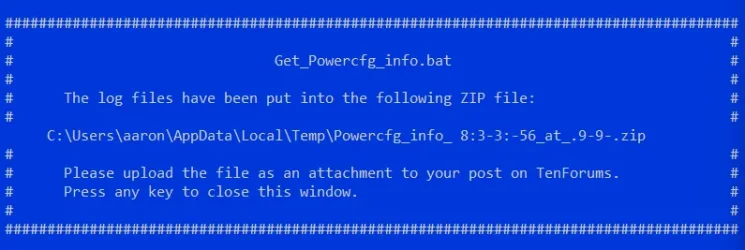
I ran the powercfg bat file.

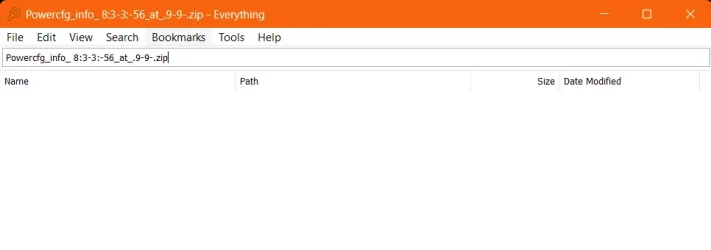
but I couldn't find the saved file at the location.

I searched in everything, it shows nothing.
 

Attachments
  • Screenshot 2025-10-17 084113.webp
    Screenshot 2025-10-17 084113.webp
    35.1 KB · Views: 1
  • Screenshot 2025-10-17 084154.webp
    Screenshot 2025-10-17 084154.webp
    10.8 KB · Views: 1

My Computer My Computer

At a glance

Windows 11 Home EditionIntel® Core™ i7-6700HQ CPU @ 2.60GHz16GBIntel HD Graphics 530
OS
Windows 11 Home Edition
Computer type
Laptop
Manufacturer/Model
Lenovo Ideapad Y700-15ISK, 80NV
CPU
Intel® Core™ i7-6700HQ CPU @ 2.60GHz
Memory
16GB
Graphics Card(s)
Intel HD Graphics 530

Eleven Forum = EF

Ten Forum = TF

Question: with everything uploaded so far. Have we been able to narrow down the problem? is it an app? is it a system issue? hardware issue?
 

My Computer My Computer

At a glance

Windows 11 Home EditionIntel® Core™ i7-6700HQ CPU @ 2.60GHz16GBIntel HD Graphics 530

OS
Windows 11 Home Edition
Computer type
Laptop
Manufacturer/Model
Lenovo Ideapad Y700-15ISK, 80NV
CPU
Intel® Core™ i7-6700HQ CPU @ 2.60GHz
Memory
16GB
Graphics Card(s)
Intel HD Graphics 530
The BIOS and drivers are 2015 to 2018 on the Lenovo website.


create-system-restore-point


Trial and error steps:


See if reinstalling the Chipset MEI driver and GPU drivers from the Lenovo website makes any impact:

(enter the serial number)


1) Please make free or pay backup images:

(Acronis, Aoemi, EaseUS, Hasleo, Macrium, Paragon, etc.)

Macrium is widely used in Ten Forums.

Macrium Software | Your Image is Everything


Backup and Restore with Macrium Reflect


2) Clean install Windows 10


3) Document sleep capability


4) Upgrade to Windows 11 > report sleep capability / inability


5) Plan to restore an image after trial and error / diagnostics have completed
 
Last edited:

My Computer My Computer

At a glance

Windows 10Intel(R) Core(TM) i7-4800MQ CPU @ 2.70GHz16 GB Total: Manufacturer : Samsung MemoryTyp...NVIDIA Quadro K3100M; Intel(R) HD Graphics 4600
OS
Windows 10
Computer type
Laptop
Manufacturer/Model
HP
CPU
Intel(R) Core(TM) i7-4800MQ CPU @ 2.70GHz
Motherboard
Product : 190A Version : KBC Version 94.56
Memory
16 GB Total: Manufacturer : Samsung MemoryType : DDR3 FormFactor : SODIMM Capacity : 8GB Speed : 1600
Graphics Card(s)
NVIDIA Quadro K3100M; Intel(R) HD Graphics 4600
Sound Card
IDT High Definition Audio CODEC; PNP Device ID HDAUDIO\FUNC_01&VEN_111D&DEV_76E0
Hard Drives
Model Hitachi HTS727575A9E364
Antivirus
Microsoft Defender
Other Info
Mobile Workstation
1) Please make free or pay backup images:

(Acronis, Aoemi, EaseUS, Hasleo, Macrium, Paragon, etc.)

Macrium is widely used in Ten Forums.

Macrium Software | Your Image is Everything


Backup and Restore with Macrium Reflect


2) Clean install Windows 10


3) Document sleep capability


4) Upgrade to Windows 11 > report sleep capability / inability


5) Plan to restore an image after trial and error / diagnostics have completed
K so go back to windows 10. Then upgrade to windows 11.

It's too much. I will just continue using hibernate. I mean it sucks but it is what it is.

I take it that from the reports you haven't been able to narrow down the problem??
 

My Computer My Computer

At a glance

Windows 11 Home EditionIntel® Core™ i7-6700HQ CPU @ 2.60GHz16GBIntel HD Graphics 530
OS
Windows 11 Home Edition
Computer type
Laptop
Manufacturer/Model
Lenovo Ideapad Y700-15ISK, 80NV
CPU
Intel® Core™ i7-6700HQ CPU @ 2.60GHz
Memory
16GB
Graphics Card(s)
Intel HD Graphics 530
Please see the edit.
 

My Computer My Computer

At a glance

Windows 10Intel(R) Core(TM) i7-4800MQ CPU @ 2.70GHz16 GB Total: Manufacturer : Samsung MemoryTyp...NVIDIA Quadro K3100M; Intel(R) HD Graphics 4600
OS
Windows 10
Computer type
Laptop
Manufacturer/Model
HP
CPU
Intel(R) Core(TM) i7-4800MQ CPU @ 2.70GHz
Motherboard
Product : 190A Version : KBC Version 94.56
Memory
16 GB Total: Manufacturer : Samsung MemoryType : DDR3 FormFactor : SODIMM Capacity : 8GB Speed : 1600
Graphics Card(s)
NVIDIA Quadro K3100M; Intel(R) HD Graphics 4600
Sound Card
IDT High Definition Audio CODEC; PNP Device ID HDAUDIO\FUNC_01&VEN_111D&DEV_76E0
Hard Drives
Model Hitachi HTS727575A9E364
Antivirus
Microsoft Defender
Other Info
Mobile Workstation

My Computer My Computer

At a glance

Windows 11 Home x64 Version 25H2 Build 26200....
OS
Windows 11 Home x64 Version 25H2 Build 26200.8037
Didn't my post #29 Event viewer suggestion yield any useful information?
And my post #14 & post #31 question - do other user accounts have sleep problems?


Denis
there are no other user accounts present. It's just one local account.

I looked for options to create another local account but couldn't find it. How do I create another local account in windows 11?

This whole thing is frustrating.

It's a simple sleep function. Why is diagnosing the cause such a pain?

Why is making a local account a taboo for windows 11?

I don't get this. It's like they just don't care about user experience.
 

My Computer My Computer

At a glance

Windows 11 Home EditionIntel® Core™ i7-6700HQ CPU @ 2.60GHz16GBIntel HD Graphics 530
OS
Windows 11 Home Edition
Computer type
Laptop
Manufacturer/Model
Lenovo Ideapad Y700-15ISK, 80NV
CPU
Intel® Core™ i7-6700HQ CPU @ 2.60GHz
Memory
16GB
Graphics Card(s)
Intel HD Graphics 530

My Computer My Computer

At a glance

Windows 11 Home x64 Version 25H2 Build 26200....
OS
Windows 11 Home x64 Version 25H2 Build 26200.8037

My Computer My Computer

At a glance

Windows 11 Home EditionIntel® Core™ i7-6700HQ CPU @ 2.60GHz16GBIntel HD Graphics 530
OS
Windows 11 Home Edition
Computer type
Laptop
Manufacturer/Model
Lenovo Ideapad Y700-15ISK, 80NV
CPU
Intel® Core™ i7-6700HQ CPU @ 2.60GHz
Memory
16GB
Graphics Card(s)
Intel HD Graphics 530
Have you updated ALL your drivers, including chipset, from MANUFACTURER, NOT Windows Update? Even if some of them are the same version, installing again might fix issues, aka in-place upgrade/repair. Windows Update will report there are no newer drivers if it doesn't find new versions. It won't reinstall anything to fix issues. Also as I have said in many threads, Windows Update usually installs the absolute basic (core) driver that makes the device work, let alone it might be an older version than latest official OEM driver. No access to all device features, no Control Panel to adjust performance and quality, nothing. Just make the device work, Linux generic driver style. Everyone using Linux knows to have access to all features and better performance he must install the OEM proprietary drivers. Same here in Windows. To get the best compatibility and performance out of your devices you must devote some time and manually download all OFFICIAL drivers from manufacturer. Forget the easy and lazy option called Windows Update. "If you want the work done properly, do it yourself" as they say. After you update ALL the drivers, check the sleep function again.

I had also recommended to disable all startup applications and non-Microsoft services like app Updaters and other useless nonsense. Have you? One app or service running in the background might prevent the system to sleep.
 

My Computers My Computers

  • At a glance

    Windows 11 Pro 23H2 (5699), 25H2 (8737)Mobile DualCore Intel Core 2 Duo T7250, 2000 MHz4GBMobile Intel(R) GMA 4500M (Mobile 4 series)
    OS
    Windows 11 Pro 23H2 (5699), 25H2 (8737)
    Computer type
    Laptop
    Manufacturer/Model
    Acer Extensa 5630EZ
    CPU
    Mobile DualCore Intel Core 2 Duo T7250, 2000 MHz
    Motherboard
    Acer Extensa 5630
    Memory
    4GB
    Graphics Card(s)
    Mobile Intel(R) GMA 4500M (Mobile 4 series)
    Sound Card
    Realtek ALC268 @ Intel 82801IB ICH9 - High Definition Audio Controller
    Monitor(s) Displays
    1
    Screen Resolution
    1280x800
    Hard Drives
    Samsung SSD 850 EVO 250GB SATA Device (250 GB, SATA-III)
    Internet Speed
    VDSL 50 Mbps
    Browser
    MICROSOFT EDGE
    Antivirus
    WINDOWS DEFENDER
    Other Info
    Legacy MBR installation, no TPM, no Secure Boot, no WDDM 2.0 graphics drivers, no SSE4.2, cannot get more unsupported ;) This is only my test laptop. I had installed Windows 11 here before upgrading my main PC. For my main PC I use everyday see my 2nd system specs.
  • At a glance

    Windows 11 Pro v25H2 (build 26200.8737)Intel Core-i7 3770 3.40GHz s1155 (3rd generat...2x Kingston Hyper-X Blu 8GB DDR3-1600GIGABYTE GeForce RTX 3050 WINDFORCE OC V2 6GB...
    Operating System
    Windows 11 Pro v25H2 (build 26200.8737)
    Computer type
    PC/Desktop
    Manufacturer/Model
    Custom-built PC
    CPU
    Intel Core-i7 3770 3.40GHz s1155 (3rd generation)
    Motherboard
    Asus P8H61 s1155 ATX
    Memory
    2x Kingston Hyper-X Blu 8GB DDR3-1600
    Graphics card(s)
    GIGABYTE GeForce RTX 3050 WINDFORCE OC V2 6GB (GV-N3050WF2OCV2-6GD)
    Sound Card
    Realtek HD audio (ALC887)
    Monitor(s) Displays
    Sony Bravia KDL-19L4000 19" LCD TV via VGA
    Screen Resolution
    1440x900 32-bit 60Hz
    Hard Drives
    WD Blue SA510 2.5 1000GB SSD as system disk, Western Digital Caviar Purple 4TB SATA III (WD40PURZ) as second
    PSU
    Thermaltake Litepower RGB 550W Full Wired
    Case
    SUPERCASE MIDI-TOWER
    Cooling
    Deepcool Gamma Archer CPU cooler, 1x 8cm fan at the back
    Keyboard
    Mitsumi 101-key PS/2
    Mouse
    Sunnyline OptiEye PS/2
    Internet Speed
    100Mbps
    Browser
    Microsoft Edge, Mozilla Firefox
    Antivirus
    Microsoft Windows Defender
    Other Info
    Legacy BIOS (MBR) installation, no TPM, no Secure Boot, WDDM 3.0 graphics drivers, WEI score 7.4
made another local account. still will not sleep.

it goes to sleep and then wakes up to the lock screen
Pardon?

If you mean that both accounts go to sleep but immediately wake up again [to the lock screen] then I would have though that that suggested Event viewer, Custom view might yield some info about what's waking it up.
Didn't my post #29 Event viewer suggestion yield any useful information?


Best of luck,
Denis
 

My Computer My Computer

At a glance

Windows 11 Home x64 Version 25H2 Build 26200....
OS
Windows 11 Home x64 Version 25H2 Build 26200.8037
Have you updated ALL your drivers, including chipset, from MANUFACTURER, NOT Windows Update? Even if some of them are the same version, installing again might fix issues, aka in-place upgrade/repair. Windows Update will report there are no newer drivers if it doesn't find new versions. It won't reinstall anything to fix issues. Also as I have said in many threads, Windows Update usually installs the absolute basic (core) driver that makes the device work, let alone it might be an older version than latest official OEM driver. No access to all device features, no Control Panel to adjust performance and quality, nothing. Just make the device work, Linux generic driver style. Everyone using Linux knows to have access to all features and better performance he must install the OEM proprietary drivers. Same here in Windows. To get the best compatibility and performance out of your devices you must devote some time and manually download all OFFICIAL drivers from manufacturer. Forget the easy and lazy option called Windows Update. "If you want the work done properly, do it yourself" as they say. After you update ALL the drivers, check the sleep function again.
Yes, I have.

I have a lenovo Y700.

I went to this website.


Manually downloaded and installed all the available drivers.

I had also recommended to disable all startup applications and non-Microsoft services like app Updaters and other useless nonsense. Have you? One app or service running in the background might prevent the system to sleep.
Confirmed. I have disabled all the startup apps. All of them.

At this point, I have made peace with using hibernation as my sleep option.

This is outrageously dumb. But it is what it is. This is my work laptop and I will make do with hibernation.

I seriously appreciate all the input and suggestions.

If anyone is reading this and comes to find a solution. Please do let me know.

Cheers
 

My Computer My Computer

At a glance

Windows 11 Home EditionIntel® Core™ i7-6700HQ CPU @ 2.60GHz16GBIntel HD Graphics 530
OS
Windows 11 Home Edition
Computer type
Laptop
Manufacturer/Model
Lenovo Ideapad Y700-15ISK, 80NV
CPU
Intel® Core™ i7-6700HQ CPU @ 2.60GHz
Memory
16GB
Graphics Card(s)
Intel HD Graphics 530
Pardon?

If you mean that both accounts go to sleep but immediately wake up again [to the lock screen] then I would have though that that suggested Event viewer, Custom view might yield some info about what's waking it up.


Best of luck,
Denis
Hey Denis,

Affirmative, both accounts enter sleep for a split second but wakes up almost instantly to the lock screen.

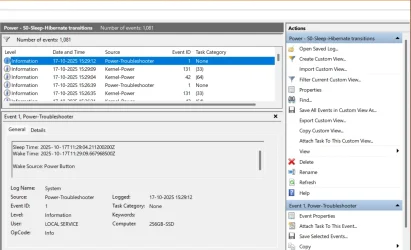
The information I got was power button, Local service (see attached)

I do not know what this means. Since, my power button is not stuck nor do I press it.
 

Attachments

  • Screenshot 2025-10-17 154611.webp
    Screenshot 2025-10-17 154611.webp
    66.5 KB · Views: 1
Last edited:

My Computer My Computer

At a glance

Windows 11 Home EditionIntel® Core™ i7-6700HQ CPU @ 2.60GHz16GBIntel HD Graphics 530
OS
Windows 11 Home Edition
Computer type
Laptop
Manufacturer/Model
Lenovo Ideapad Y700-15ISK, 80NV
CPU
Intel® Core™ i7-6700HQ CPU @ 2.60GHz
Memory
16GB
Graphics Card(s)
Intel HD Graphics 530
Last thing to check is to open Device Manager, right-click on network and USB devices and then select Properties. Go to Power Management and uncheck the box "Allow this device to wake the Computer". Test sleep again. Do that for any other device that has a Power Management tab in Properties, test sleep again.

Also in Control Panel, Power Options, Edit Plan Settings, Advanced Power Settings, expand Sleep section and make sure "Allow wake timers" is disabled.
Again in the Advance Power Settings, go to Multimedia Settings section, set "When sharing media" to "Allow the computer to sleep". However, this setting may impair your ability to watch videos as the computer will sleep while watching. So use it last.
 

My Computers My Computers

  • At a glance

    Windows 11 Pro 23H2 (5699), 25H2 (8737)Mobile DualCore Intel Core 2 Duo T7250, 2000 MHz4GBMobile Intel(R) GMA 4500M (Mobile 4 series)
    OS
    Windows 11 Pro 23H2 (5699), 25H2 (8737)
    Computer type
    Laptop
    Manufacturer/Model
    Acer Extensa 5630EZ
    CPU
    Mobile DualCore Intel Core 2 Duo T7250, 2000 MHz
    Motherboard
    Acer Extensa 5630
    Memory
    4GB
    Graphics Card(s)
    Mobile Intel(R) GMA 4500M (Mobile 4 series)
    Sound Card
    Realtek ALC268 @ Intel 82801IB ICH9 - High Definition Audio Controller
    Monitor(s) Displays
    1
    Screen Resolution
    1280x800
    Hard Drives
    Samsung SSD 850 EVO 250GB SATA Device (250 GB, SATA-III)
    Internet Speed
    VDSL 50 Mbps
    Browser
    MICROSOFT EDGE
    Antivirus
    WINDOWS DEFENDER
    Other Info
    Legacy MBR installation, no TPM, no Secure Boot, no WDDM 2.0 graphics drivers, no SSE4.2, cannot get more unsupported ;) This is only my test laptop. I had installed Windows 11 here before upgrading my main PC. For my main PC I use everyday see my 2nd system specs.
  • At a glance

    Windows 11 Pro v25H2 (build 26200.8737)Intel Core-i7 3770 3.40GHz s1155 (3rd generat...2x Kingston Hyper-X Blu 8GB DDR3-1600GIGABYTE GeForce RTX 3050 WINDFORCE OC V2 6GB...
    Operating System
    Windows 11 Pro v25H2 (build 26200.8737)
    Computer type
    PC/Desktop
    Manufacturer/Model
    Custom-built PC
    CPU
    Intel Core-i7 3770 3.40GHz s1155 (3rd generation)
    Motherboard
    Asus P8H61 s1155 ATX
    Memory
    2x Kingston Hyper-X Blu 8GB DDR3-1600
    Graphics card(s)
    GIGABYTE GeForce RTX 3050 WINDFORCE OC V2 6GB (GV-N3050WF2OCV2-6GD)
    Sound Card
    Realtek HD audio (ALC887)
    Monitor(s) Displays
    Sony Bravia KDL-19L4000 19" LCD TV via VGA
    Screen Resolution
    1440x900 32-bit 60Hz
    Hard Drives
    WD Blue SA510 2.5 1000GB SSD as system disk, Western Digital Caviar Purple 4TB SATA III (WD40PURZ) as second
    PSU
    Thermaltake Litepower RGB 550W Full Wired
    Case
    SUPERCASE MIDI-TOWER
    Cooling
    Deepcool Gamma Archer CPU cooler, 1x 8cm fan at the back
    Keyboard
    Mitsumi 101-key PS/2
    Mouse
    Sunnyline OptiEye PS/2
    Internet Speed
    100Mbps
    Browser
    Microsoft Edge, Mozilla Firefox
    Antivirus
    Microsoft Windows Defender
    Other Info
    Legacy BIOS (MBR) installation, no TPM, no Secure Boot, WDDM 3.0 graphics drivers, WEI score 7.4
Hey Denis,

Affirmative, bot accounts enter sleep for a split second but wakes up almost instantly to the lock screen.

The information I got was power button, Local service (see attached)

I do not know what this means. Since, my power button is not stuck nor do I press it.
Just a thought... If your optical mouse is on a shiny reflective surface, it might detect a stray reflection as movement. The mouse thinks you moved it and wakes the computer before it can sleep. However, there would be other symptoms such as the mouse stuttering (not smoothly moving around) and being difficult to move the cursor because of the too many false inputs.
 

My Computers My Computers

  • At a glance

    Windows 11 Pro 23H2 (5699), 25H2 (8737)Mobile DualCore Intel Core 2 Duo T7250, 2000 MHz4GBMobile Intel(R) GMA 4500M (Mobile 4 series)
    OS
    Windows 11 Pro 23H2 (5699), 25H2 (8737)
    Computer type
    Laptop
    Manufacturer/Model
    Acer Extensa 5630EZ
    CPU
    Mobile DualCore Intel Core 2 Duo T7250, 2000 MHz
    Motherboard
    Acer Extensa 5630
    Memory
    4GB
    Graphics Card(s)
    Mobile Intel(R) GMA 4500M (Mobile 4 series)
    Sound Card
    Realtek ALC268 @ Intel 82801IB ICH9 - High Definition Audio Controller
    Monitor(s) Displays
    1
    Screen Resolution
    1280x800
    Hard Drives
    Samsung SSD 850 EVO 250GB SATA Device (250 GB, SATA-III)
    Internet Speed
    VDSL 50 Mbps
    Browser
    MICROSOFT EDGE
    Antivirus
    WINDOWS DEFENDER
    Other Info
    Legacy MBR installation, no TPM, no Secure Boot, no WDDM 2.0 graphics drivers, no SSE4.2, cannot get more unsupported ;) This is only my test laptop. I had installed Windows 11 here before upgrading my main PC. For my main PC I use everyday see my 2nd system specs.
  • At a glance

    Windows 11 Pro v25H2 (build 26200.8737)Intel Core-i7 3770 3.40GHz s1155 (3rd generat...2x Kingston Hyper-X Blu 8GB DDR3-1600GIGABYTE GeForce RTX 3050 WINDFORCE OC V2 6GB...
    Operating System
    Windows 11 Pro v25H2 (build 26200.8737)
    Computer type
    PC/Desktop
    Manufacturer/Model
    Custom-built PC
    CPU
    Intel Core-i7 3770 3.40GHz s1155 (3rd generation)
    Motherboard
    Asus P8H61 s1155 ATX
    Memory
    2x Kingston Hyper-X Blu 8GB DDR3-1600
    Graphics card(s)
    GIGABYTE GeForce RTX 3050 WINDFORCE OC V2 6GB (GV-N3050WF2OCV2-6GD)
    Sound Card
    Realtek HD audio (ALC887)
    Monitor(s) Displays
    Sony Bravia KDL-19L4000 19" LCD TV via VGA
    Screen Resolution
    1440x900 32-bit 60Hz
    Hard Drives
    WD Blue SA510 2.5 1000GB SSD as system disk, Western Digital Caviar Purple 4TB SATA III (WD40PURZ) as second
    PSU
    Thermaltake Litepower RGB 550W Full Wired
    Case
    SUPERCASE MIDI-TOWER
    Cooling
    Deepcool Gamma Archer CPU cooler, 1x 8cm fan at the back
    Keyboard
    Mitsumi 101-key PS/2
    Mouse
    Sunnyline OptiEye PS/2
    Internet Speed
    100Mbps
    Browser
    Microsoft Edge, Mozilla Firefox
    Antivirus
    Microsoft Windows Defender
    Other Info
    Legacy BIOS (MBR) installation, no TPM, no Secure Boot, WDDM 3.0 graphics drivers, WEI score 7.4
Last thing to check is to open Device Manager, right-click on network and USB devices and then select Properties. Go to Power Management and uncheck the box "Allow this device to wake the Computer". Test sleep again. Do that for any other device that has a Power Management tab in Properties, test sleep again.
Done
Also in Control Panel, Power Options, Edit Plan Settings, Advanced Power Settings, expand Sleep section and make sure "Allow wake timers" is disabled.
Done
Again in the Advance Power Settings, go to Multimedia Settings section, set "When sharing media" to "Allow the computer to sleep". However, this setting may impair your ability to watch videos as the computer will sleep while watching. So use it last.
Done
Just a thought... If your optical mouse is on a shiny reflective surface, it might detect a stray reflection as movement. The mouse thinks you moved it and wakes the computer before it can sleep. However, there would be other symptoms such as the mouse stuttering (not smoothly moving around) and being difficult to move the cursor because of the too many false inputs.
I unplugged the mouse.

After doing all this still no go.
 

My Computer My Computer

At a glance

Windows 11 Home EditionIntel® Core™ i7-6700HQ CPU @ 2.60GHz16GBIntel HD Graphics 530
OS
Windows 11 Home Edition
Computer type
Laptop
Manufacturer/Model
Lenovo Ideapad Y700-15ISK, 80NV
CPU
Intel® Core™ i7-6700HQ CPU @ 2.60GHz
Memory
16GB
Graphics Card(s)
Intel HD Graphics 530
The information I got was power button, Local service (see attached)

I do not know what this means. Since, my power button is not stuck nor do I press it.
I have one computer where the same event is often ascribed to the Power button when I know that I woke it by clicking the touchpad button.


Denis
 

My Computer My Computer

At a glance

Windows 11 Home x64 Version 25H2 Build 26200....
OS
Windows 11 Home x64 Version 25H2 Build 26200.8037
I have one computer where the same event is often ascribed to the Power button when I know that I woke it by clicking the touchpad button.


Denis
hmm but my external mouse is disconnected and I didn't touch the touchpad.

Is it safe to assume it's a hardware trigger? and not a software issue?
 

My Computer My Computer

At a glance

Windows 11 Home EditionIntel® Core™ i7-6700HQ CPU @ 2.60GHz16GBIntel HD Graphics 530
OS
Windows 11 Home Edition
Computer type
Laptop
Manufacturer/Model
Lenovo Ideapad Y700-15ISK, 80NV
CPU
Intel® Core™ i7-6700HQ CPU @ 2.60GHz
Memory
16GB
Graphics Card(s)
Intel HD Graphics 530
I have another computer that is almost always woken by software and that Event consistently says 'Wake source unknown' for it.
Whereas this one consistently blames the power button when I use the trackpad button.
So, yes I think you're probably looking at a hardware-initiated problem.

Could you check for and disable any apps that interact with the mouse [I've seen recent Dell mice have a controlling piece of software called Dell peripheral manager and I used to have Logitech mice that had controlling software].

If disabling that software does not help then try disabling the mouse in Device mgr.
I know that's easier said than done, there are lots of entries in the Human interface devices section and you'll probably end up having to disable all of them.

But then you would not have any pointer with which to return to Device mgr to re-enable them afterwards.


Denis
 

My Computer My Computer

At a glance

Windows 11 Home x64 Version 25H2 Build 26200....
OS
Windows 11 Home x64 Version 25H2 Build 26200.8037
I have another computer that is almost always woken by software and that Event consistently says 'Wake source unknown' for it.
So, yes I think you're probably looking at a hardware-initiated problem.

Could you check for and disable any apps that interact with the mouse [I've seen recent Dell mice have a controlling piece of software called Dell peripheral manager and I used to have Logitech mice that had controlling software].

If disabling that software does not help then try disabling the mouse in Device mgr.
I know that's easier said than done, there are lots of entries in the Human interface devices section and you'll probably end up having to disable all of them.

But then you would not have any pointer with which to return to Device mgr to re-enable them afterwards.


Denis
nah I do not think this issue warrants such a move, disabling apps that interact with mouse. I guess all the apps interact with mouse. Maybe I misunderstood you. You would have to guide me how to do it. But, I feel I can live with hibernation.
 

My Computer My Computer

At a glance

Windows 11 Home EditionIntel® Core™ i7-6700HQ CPU @ 2.60GHz16GBIntel HD Graphics 530
OS
Windows 11 Home Edition
Computer type
Laptop
Manufacturer/Model
Lenovo Ideapad Y700-15ISK, 80NV
CPU
Intel® Core™ i7-6700HQ CPU @ 2.60GHz
Memory
16GB
Graphics Card(s)
Intel HD Graphics 530

Latest Support Threads

Back
Top Bottom