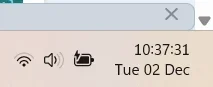
Solved Systray, would like to add day-of-week in the empty space left of the clock


d4005

Well-known member
Member
Local time
1:55 PM
Posts
115
OS
Win11 Pro 25H2
I've looked around the region and date/time options and asked google and copilot and the nearest I can get to an answer is to add the whole day name to the left of the date (which basically doubles the width of the thing. But there's an empty space left of the clock where a 3-letter short version of the day would fit nicely. I just don't know if it's possible.

Here's how it naturally looks:

time1.webp

Here's how I'd like it to look (mocked up in photoshop):

time2.webp
 
Windows Build/Version
Latest Win 11 Pro 25H2 with all updates.

My Computer

System One

  • OS
    Win11 Pro 25H2
    Computer type
    Laptop
    Manufacturer/Model
    Lenovo ThinkBook 16p G6 IAX
    CPU
    Intel Core Ultra 9 275HX
    Memory
    32GB
    Graphics Card(s)
    NVIDIA® GeForce RTX™ 5060 Laptop GPU
    Monitor(s) Displays
    3 external monitors, Samsung 43" super widescreen (providing 2x 1080p via separate inputs), 1x LG 27" 1080p
    Screen Resolution
    2560x1600 and 3x 1920x1080
    Hard Drives
    1TB SSD internal, 2x4TB SSD external
    Keyboard
    Logitech illuminated and silent thing
    Mouse
    Traditional MS Intellimouse
    Internet Speed
    256Mb down/50Mb up
    Browser
    Chrome mostly, Edge for PDF's, Brave for YouTube
    Antivirus
    MalwareBytes/Defender
    Other Info
    Also an m4 Mac Mini for work dev stuff that I operate remotely via HelpWire.
I did by going via Control Panel>Clock & Region>Region and added ddd in front of d/MM/YYYY. See photos.

Also see: -

Day.webp

Day2.webp
 

My Computers

System One System Two

  • OS
    Windows 11 Pro
    Computer type
    PC/Desktop
    Manufacturer/Model
    GMKtec K11
    CPU
    AMD Ryzen 9 8945HS
    Memory
    32GB DDR5 SO-DIMM
    Graphics Card(s)
    Integrated AMD Radeon 780M (4.00 GHz)
    Monitor(s) Displays
    Benq 2250HM
    Screen Resolution
    1920 x 1080
    Hard Drives
    1 TB PCIe 4.0 NVMe M.2 SSD
  • Operating System
    Windows 11 Home
    Computer type
    Laptop
    Manufacturer/Model
    ASUS Zenbook 14 OLED 14" Laptop - UX3405CA-QL192W
    CPU
    Intel® Core™ Ultra 7 - 255H processor
    Memory
    16 GB LPDDR5 SDRAM
    Graphics card(s)
    Intel Arc 140T onboard graphics
    Screen Resolution
    1920 x 1200 (16:10 WUXGA resolution) OLED Touchscreen
    Hard Drives
    1TB SSD
I did by going via Control Panel>Clock & Region>Region and added ddd in front of d/MM/YYYY. See photos.

Also see: -

View attachment 155169

View attachment 155170

That's not 100% what I was after but it's as close as it seem like I can get. I was hoping to put the day to the left of the time in the empty space there, so that the date/time widget doesn't get any wider, but only making it 3 characters and a space wider is way more acceptable than the full day (especially on Wednesday) :-) Shame you can't insert ddd before the time but they don't let you customize that one. Might be possible in the registry but I'm happy enough with this solution :cool:
 

My Computer

System One

  • OS
    Win11 Pro 25H2
    Computer type
    Laptop
    Manufacturer/Model
    Lenovo ThinkBook 16p G6 IAX
    CPU
    Intel Core Ultra 9 275HX
    Memory
    32GB
    Graphics Card(s)
    NVIDIA® GeForce RTX™ 5060 Laptop GPU
    Monitor(s) Displays
    3 external monitors, Samsung 43" super widescreen (providing 2x 1080p via separate inputs), 1x LG 27" 1080p
    Screen Resolution
    2560x1600 and 3x 1920x1080
    Hard Drives
    1TB SSD internal, 2x4TB SSD external
    Keyboard
    Logitech illuminated and silent thing
    Mouse
    Traditional MS Intellimouse
    Internet Speed
    256Mb down/50Mb up
    Browser
    Chrome mostly, Edge for PDF's, Brave for YouTube
    Antivirus
    MalwareBytes/Defender
    Other Info
    Also an m4 Mac Mini for work dev stuff that I operate remotely via HelpWire.
In Control Panel, I set the short date to dd d mmm and omitted the year. The single 'd' omits the leading zero. This means the clock takes up less space.
You don't need the obliques, but you do need some character between the groups. And if you hover, you will see the year.

1764672118812.webp

To edit the groups, you do need to first click on 'Additional settings and select the 'date' tab.

1764671978221.webp
 

Attachments

  • 1764671862073.webp
    1764671862073.webp
    1.9 KB · Views: 1

My Computers

System One System Two

  • OS
    Windows 11 Pro 25H2 26200.8524
    Computer type
    Laptop
    Manufacturer/Model
    Acemagic LX15PRO
    CPU
    AMD Ryzen 7 5825U with Radeon Graphics
    Memory
    16GB
    Screen Resolution
    1920 x 1080
    Hard Drives
    SSD 2TB
    Internet Speed
    30 Mbps
    Browser
    Brave
    Antivirus
    Webroot Secure Anywhere
    Other Info
    System 3

    Acer Swift SF114-34 laptop
    OS Windows 11 Pro 26200.8524
    CPU Pentium Silver N6000
    RAM 4GB
    SSD Samsung 970 EVO Plus SSD 2TB (an upgrade)
  • Operating System
    Windows 11 Pro 23H2 22631.2506
    Computer type
    Laptop
    Manufacturer/Model
    HP Mini 210-1090NR PC (bought in late 2009!)
    CPU
    Atom N450 1.66GHz
    Memory
    2GB
    Browser
    Brave
    Antivirus
    Webroot
In Control Panel, I set the short date to dd d mmm and omitted the year. This means the clock takes less space.
You don't need the obliques but you do need some chacter between the groups.

View attachment 155177

Very nice. I took that and omitted the year too but kept the month as a number: ddd dd/MM

1764672116796.webp
 

My Computer

System One

  • OS
    Win11 Pro 25H2
    Computer type
    Laptop
    Manufacturer/Model
    Lenovo ThinkBook 16p G6 IAX
    CPU
    Intel Core Ultra 9 275HX
    Memory
    32GB
    Graphics Card(s)
    NVIDIA® GeForce RTX™ 5060 Laptop GPU
    Monitor(s) Displays
    3 external monitors, Samsung 43" super widescreen (providing 2x 1080p via separate inputs), 1x LG 27" 1080p
    Screen Resolution
    2560x1600 and 3x 1920x1080
    Hard Drives
    1TB SSD internal, 2x4TB SSD external
    Keyboard
    Logitech illuminated and silent thing
    Mouse
    Traditional MS Intellimouse
    Internet Speed
    256Mb down/50Mb up
    Browser
    Chrome mostly, Edge for PDF's, Brave for YouTube
    Antivirus
    MalwareBytes/Defender
    Other Info
    Also an m4 Mac Mini for work dev stuff that I operate remotely via HelpWire.
Try a dot instead of an oblique as it takes even less space.
 

My Computers

System One System Two

  • OS
    Windows 11 Pro 25H2 26200.8524
    Computer type
    Laptop
    Manufacturer/Model
    Acemagic LX15PRO
    CPU
    AMD Ryzen 7 5825U with Radeon Graphics
    Memory
    16GB
    Screen Resolution
    1920 x 1080
    Hard Drives
    SSD 2TB
    Internet Speed
    30 Mbps
    Browser
    Brave
    Antivirus
    Webroot Secure Anywhere
    Other Info
    System 3

    Acer Swift SF114-34 laptop
    OS Windows 11 Pro 26200.8524
    CPU Pentium Silver N6000
    RAM 4GB
    SSD Samsung 970 EVO Plus SSD 2TB (an upgrade)
  • Operating System
    Windows 11 Pro 23H2 22631.2506
    Computer type
    Laptop
    Manufacturer/Model
    HP Mini 210-1090NR PC (bought in late 2009!)
    CPU
    Atom N450 1.66GHz
    Memory
    2GB
    Browser
    Brave
    Antivirus
    Webroot

My Computer

System One

  • OS
    Win11 Pro 25H2
    Computer type
    Laptop
    Manufacturer/Model
    Lenovo ThinkBook 16p G6 IAX
    CPU
    Intel Core Ultra 9 275HX
    Memory
    32GB
    Graphics Card(s)
    NVIDIA® GeForce RTX™ 5060 Laptop GPU
    Monitor(s) Displays
    3 external monitors, Samsung 43" super widescreen (providing 2x 1080p via separate inputs), 1x LG 27" 1080p
    Screen Resolution
    2560x1600 and 3x 1920x1080
    Hard Drives
    1TB SSD internal, 2x4TB SSD external
    Keyboard
    Logitech illuminated and silent thing
    Mouse
    Traditional MS Intellimouse
    Internet Speed
    256Mb down/50Mb up
    Browser
    Chrome mostly, Edge for PDF's, Brave for YouTube
    Antivirus
    MalwareBytes/Defender
    Other Info
    Also an m4 Mac Mini for work dev stuff that I operate remotely via HelpWire.
Just be aware that the change you made will also affect other software that uses the Windows short date format.
Can you give examples and will it matter?
 

My Computers

System One System Two

  • OS
    Windows 11 Pro 25H2 26200.8524
    Computer type
    Laptop
    Manufacturer/Model
    Acemagic LX15PRO
    CPU
    AMD Ryzen 7 5825U with Radeon Graphics
    Memory
    16GB
    Screen Resolution
    1920 x 1080
    Hard Drives
    SSD 2TB
    Internet Speed
    30 Mbps
    Browser
    Brave
    Antivirus
    Webroot Secure Anywhere
    Other Info
    System 3

    Acer Swift SF114-34 laptop
    OS Windows 11 Pro 26200.8524
    CPU Pentium Silver N6000
    RAM 4GB
    SSD Samsung 970 EVO Plus SSD 2TB (an upgrade)
  • Operating System
    Windows 11 Pro 23H2 22631.2506
    Computer type
    Laptop
    Manufacturer/Model
    HP Mini 210-1090NR PC (bought in late 2009!)
    CPU
    Atom N450 1.66GHz
    Memory
    2GB
    Browser
    Brave
    Antivirus
    Webroot
Excel-type apps, for one. It only matters if something is trying to parse that date; if it's just for display, then it likely doesn't break anything.

View attachment 155210
 

My Computer

System One

  • OS
    Windows 11 Pro 25H2
    Computer type
    PC/Desktop
    Manufacturer/Model
    Intel NUC12WSHi7
    CPU
    12th Gen Core i7-1260P
    Motherboard
    NUC12WSBi7
    Memory
    64 GB Micron PC4-25600
    Graphics Card(s)
    Intel Iris Xe Graphics
    Sound Card
    on-board Realtek HD Audio
    Monitor(s) Displays
    Dell U3219Q
    Screen Resolution
    3840 x 2160
    Hard Drives
    Samsung SSD 990 PRO 1TB
    Crucial MX500 2 TB
    Antivirus
    Microsoft Defender
Excel-type apps, for one. It only matters if something is trying to parse that date; if it's just for display, then it likely doesn't break anything.

It doesn't affect Google Docs/Sheets etc so I'm good :cool:
 

My Computer

System One

  • OS
    Win11 Pro 25H2
    Computer type
    Laptop
    Manufacturer/Model
    Lenovo ThinkBook 16p G6 IAX
    CPU
    Intel Core Ultra 9 275HX
    Memory
    32GB
    Graphics Card(s)
    NVIDIA® GeForce RTX™ 5060 Laptop GPU
    Monitor(s) Displays
    3 external monitors, Samsung 43" super widescreen (providing 2x 1080p via separate inputs), 1x LG 27" 1080p
    Screen Resolution
    2560x1600 and 3x 1920x1080
    Hard Drives
    1TB SSD internal, 2x4TB SSD external
    Keyboard
    Logitech illuminated and silent thing
    Mouse
    Traditional MS Intellimouse
    Internet Speed
    256Mb down/50Mb up
    Browser
    Chrome mostly, Edge for PDF's, Brave for YouTube
    Antivirus
    MalwareBytes/Defender
    Other Info
    Also an m4 Mac Mini for work dev stuff that I operate remotely via HelpWire.

My Computers

System One System Two

  • OS
    Windows 11 25H2
    Computer type
    Laptop
    Manufacturer/Model
    Alienware 18 Area-51
    CPU
    Intel Core Ultra 9 275HX (24-Core)
    Motherboard
    Alienware
    Memory
    64GB DDR5 6400MT/s
    Graphics Card(s)
    NVIDIA GeForce RTX 5080 and Intel UHD Graphics
    Sound Card
    Onboard, Realtek high-performance Audio chips (ALC3329 & ALC1708))
    Monitor(s) Displays
    300HZ 18-inch QHD 500 nit Comfort View+
    Screen Resolution
    2560 x 1600
    Hard Drives
    2TB NVMe M.2 PCIe Gen 5 SSD
    Case
    Magnesium Alloy
    Cooling
    Advanced Cryo-Tech Quad-Fan Cooling system & large vapor chamber
    Keyboard
    Cherry MX ultra low profile mechanical keyboard with per key AlienFX RGB lighting
    Mouse
    Logitech MX Master 4
    Browser
    Vivaldi (main), Firefox, Chrome, Edge
    Antivirus
    MS Defender and Malwarebytes Free
  • Operating System
    Windows 11 25H2
    Computer type
    Laptop
    Manufacturer/Model
    Microsoft Surface Laptop 7
    CPU
    Qualcomm Snapdragon X Elite (12 Core) ARM based CPU
    Motherboard
    Microsoft Corp.
    Memory
    16GB LPDDR5
    Graphics card(s)
    Qualcomm Adreno X1-85
    Sound Card
    Omnisonic speakers with Dolby Atmos spatial sound
    Monitor(s) Displays
    120 Hz 13.8-inch 600 nit PixelSense Flow touchscreen
    Screen Resolution
    2304x1536
    Hard Drives
    1TB NVMe Gen 4 SSD
    Case
    Anodized Aluminum
    Cooling
    Traditional active cooling fan system
    Keyboard
    Mechanical QWERTY, backlit when in use
    Mouse
    Logitech MX Master 4 and Surface Arc Mouse
    Browser
    Vivaldi (main), Firefox, Chrome, Edge
    Antivirus
    MS Defender and Malwarebytes Free
And all your file explorer date displays as well.
Good point; I added a Y to the string, so my clock now looks like this and the year appears in File Explorer.

1764694537236.webp
 

My Computers

System One System Two

  • OS
    Windows 11 Pro 25H2 26200.8524
    Computer type
    Laptop
    Manufacturer/Model
    Acemagic LX15PRO
    CPU
    AMD Ryzen 7 5825U with Radeon Graphics
    Memory
    16GB
    Screen Resolution
    1920 x 1080
    Hard Drives
    SSD 2TB
    Internet Speed
    30 Mbps
    Browser
    Brave
    Antivirus
    Webroot Secure Anywhere
    Other Info
    System 3

    Acer Swift SF114-34 laptop
    OS Windows 11 Pro 26200.8524
    CPU Pentium Silver N6000
    RAM 4GB
    SSD Samsung 970 EVO Plus SSD 2TB (an upgrade)
  • Operating System
    Windows 11 Pro 23H2 22631.2506
    Computer type
    Laptop
    Manufacturer/Model
    HP Mini 210-1090NR PC (bought in late 2009!)
    CPU
    Atom N450 1.66GHz
    Memory
    2GB
    Browser
    Brave
    Antivirus
    Webroot
And all your file explorer date displays as well.

Oh, just seen that, not nice:

1764697254538.webp

Reworked it a bit:

1764697336527.webp

Would be nice if I could make Explorer use Courier New to have it all lining up but that's not an option.
 
Last edited:

My Computer

System One

  • OS
    Win11 Pro 25H2
    Computer type
    Laptop
    Manufacturer/Model
    Lenovo ThinkBook 16p G6 IAX
    CPU
    Intel Core Ultra 9 275HX
    Memory
    32GB
    Graphics Card(s)
    NVIDIA® GeForce RTX™ 5060 Laptop GPU
    Monitor(s) Displays
    3 external monitors, Samsung 43" super widescreen (providing 2x 1080p via separate inputs), 1x LG 27" 1080p
    Screen Resolution
    2560x1600 and 3x 1920x1080
    Hard Drives
    1TB SSD internal, 2x4TB SSD external
    Keyboard
    Logitech illuminated and silent thing
    Mouse
    Traditional MS Intellimouse
    Internet Speed
    256Mb down/50Mb up
    Browser
    Chrome mostly, Edge for PDF's, Brave for YouTube
    Antivirus
    MalwareBytes/Defender
    Other Info
    Also an m4 Mac Mini for work dev stuff that I operate remotely via HelpWire.
Oh, just seen that, not nice:

View attachment 155239

Reworked it a bit:

View attachment 155240

I gotta try and see if I can use Courier [New] to have it all lining up.
Yeah most people aren't aware that taskbar date and clock will display the same way in file explorer and most people need the years of their files when they go through them. 😉
 

My Computers

System One System Two

  • OS
    Windows 11 25H2
    Computer type
    Laptop
    Manufacturer/Model
    Alienware 18 Area-51
    CPU
    Intel Core Ultra 9 275HX (24-Core)
    Motherboard
    Alienware
    Memory
    64GB DDR5 6400MT/s
    Graphics Card(s)
    NVIDIA GeForce RTX 5080 and Intel UHD Graphics
    Sound Card
    Onboard, Realtek high-performance Audio chips (ALC3329 & ALC1708))
    Monitor(s) Displays
    300HZ 18-inch QHD 500 nit Comfort View+
    Screen Resolution
    2560 x 1600
    Hard Drives
    2TB NVMe M.2 PCIe Gen 5 SSD
    Case
    Magnesium Alloy
    Cooling
    Advanced Cryo-Tech Quad-Fan Cooling system & large vapor chamber
    Keyboard
    Cherry MX ultra low profile mechanical keyboard with per key AlienFX RGB lighting
    Mouse
    Logitech MX Master 4
    Browser
    Vivaldi (main), Firefox, Chrome, Edge
    Antivirus
    MS Defender and Malwarebytes Free
  • Operating System
    Windows 11 25H2
    Computer type
    Laptop
    Manufacturer/Model
    Microsoft Surface Laptop 7
    CPU
    Qualcomm Snapdragon X Elite (12 Core) ARM based CPU
    Motherboard
    Microsoft Corp.
    Memory
    16GB LPDDR5
    Graphics card(s)
    Qualcomm Adreno X1-85
    Sound Card
    Omnisonic speakers with Dolby Atmos spatial sound
    Monitor(s) Displays
    120 Hz 13.8-inch 600 nit PixelSense Flow touchscreen
    Screen Resolution
    2304x1536
    Hard Drives
    1TB NVMe Gen 4 SSD
    Case
    Anodized Aluminum
    Cooling
    Traditional active cooling fan system
    Keyboard
    Mechanical QWERTY, backlit when in use
    Mouse
    Logitech MX Master 4 and Surface Arc Mouse
    Browser
    Vivaldi (main), Firefox, Chrome, Edge
    Antivirus
    MS Defender and Malwarebytes Free
Back
Top Bottom