- Local time
- 10:14 AM
- Posts
- 298
- OS
- Windows 11 Pro 25H2 (26200.9168)
Good morning all,
I have a question for anyone who uses/used T-Mobile Home Internet.
We currently have a G4SE (white box) that is placed in a good location and currently has a Good-Very Good signal.
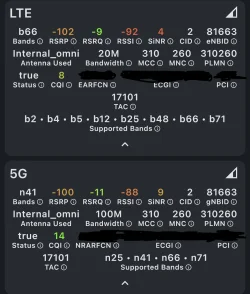
Attached is a current screenshot from the HINT app and my personal system specs are detailed below. (I've attempted to block out any identifying info -- please let me know if I missed something).
While my download speeds are good (100-300Mbps -- this morning 195Mbps), the upload speed is an absolutely abysmal 4Mbps. This does make streaming and uploading videos bit difficult. I would be happy with around 20Mbps, which I do get on rare occasions.
Is there anything I can do to improve this without spending any money? We are moving eventually so this connection will not last. I would rather not buy an antenna since I have no idea what our internet provider will be when we move or if the antenna will be of any use or even needed.
I was thinking about turning off the 5G band, but I'm not sure if that will help any or how to easily do that and if necessary turn it back on again if there was no change.
Thanks in advance for any ideas/advice.
I have a question for anyone who uses/used T-Mobile Home Internet.
We currently have a G4SE (white box) that is placed in a good location and currently has a Good-Very Good signal.
Attached is a current screenshot from the HINT app and my personal system specs are detailed below. (I've attempted to block out any identifying info -- please let me know if I missed something).
While my download speeds are good (100-300Mbps -- this morning 195Mbps), the upload speed is an absolutely abysmal 4Mbps. This does make streaming and uploading videos bit difficult. I would be happy with around 20Mbps, which I do get on rare occasions.
Is there anything I can do to improve this without spending any money? We are moving eventually so this connection will not last. I would rather not buy an antenna since I have no idea what our internet provider will be when we move or if the antenna will be of any use or even needed.
I was thinking about turning off the 5G band, but I'm not sure if that will help any or how to easily do that and if necessary turn it back on again if there was no change.
Thanks in advance for any ideas/advice.
- Windows Build/Version
- Windows 11 25H2 -- 26200.7922
Attachments
My Computer
At a glance
Windows 11 Pro 25H2 (26200.9168)AMD Ryzen 7 7800X3D32gb Team Group (T-Force) DDR5-6000Zotac nVidia GeForce RTX 4070 SUPER - 12gb
- OS
- Windows 11 Pro 25H2 (26200.9168)
- Computer type
- PC/Desktop
- Manufacturer/Model
- Pre-built
- CPU
- AMD Ryzen 7 7800X3D
- Motherboard
- MSI Pro B650-VC WiFi
- Memory
- 32gb Team Group (T-Force) DDR5-6000
- Graphics Card(s)
- Zotac nVidia GeForce RTX 4070 SUPER - 12gb
- Sound Card
- Sound BlasterX G6
- Monitor(s) Displays
- Koorui G2421V and ViewSonic VX2453
- Screen Resolution
- P:2560x1440 S:1920x1080
- Hard Drives
- WD Blue SN5000 - 500gb NVME
WD Blue SN580 - 2TB NVME
Seagate 4TB HDD - ST4000VN008-2DR166
- Keyboard
- Mountain Everest
- Mouse
- Logitech G502 Hero
- Internet Speed
- T-Mobile Home Internet
- Browser
- Firefox
- Other Info
- QNAP TS-469 Pro NAS
TP-Link W7200 (2 unit mesh network)
Elgato Streamdeck


 Tower capacity is also a major factor in your speeds that you have no control over. If you know of other customers in the area, you could ask them what their speeds are.T-Mobile has an external antenna for some of their modems depending upon model. Maybe you can talk them into sending you one.