Task Scheduler tasks that can be disabled?


GracieAllen

Well-known member
Member
Local time
5:06 AM
Posts
111
OS
Windows 11 Pro
I'm not sure where to ask this, so I'll put it with general things...

Similar to the old Windows 10 thing with lists of services that can safely be disabled (which I really wish there was one for Windows 11), is there a list somewhere that shows which of the massive number of tasks in the task scheduler can be disabled? My search didn't find anything for Windows 11, and I don't want to get crazy in there, but the list of tasks seems very large.
 
Windows Build/Version
Windows Pro 23H2 22631.3296

My Computers My Computers

  • At a glance

    Windows 11 Proi9-12900 overclocked just a touch64 GB DDR4NVidia 4060 Ti
    OS
    Windows 11 Pro
    Computer type
    PC/Desktop
    Manufacturer/Model
    Home Built
    CPU
    i9-12900 overclocked just a touch
    Motherboard
    MSI Tomahawk
    Memory
    64 GB DDR4
    Graphics Card(s)
    NVidia 4060 Ti
    Monitor(s) Displays
    Dell 3818 & Dell 2407 on the desktop, Dell 2405 on the laptop, Dell 3014 in the RV for traveling.
    Screen Resolution
    3840x1600
    Hard Drives
    1TB SSD for O/S, 4TB for non-image stuff, 8TB SSD for images, 10TB spinning platters for backups.
    PSU
    EVGA 850 silver
    Case
    Phantek
    Cooling
    Noctua NH-D15
    Keyboard
    Logitech wireless
    Mouse
    Logitech wireless M575 trackball
    Internet Speed
    Varies between 20 and 400 Mbps
    Browser
    Firefox, Chrome
    Antivirus
    Windows Defender
    Other Info
    Plain ordinary PC.
  • At a glance

    Windows 11 ProI9-988064GBNvidia Quadro RTX 3000
    Operating System
    Windows 11 Pro
    Computer type
    Laptop
    Manufacturer/Model
    Dell 7740 Precision
    CPU
    I9-9880
    Motherboard
    Dell
    Memory
    64GB
    Graphics card(s)
    Nvidia Quadro RTX 3000
    Monitor(s) Displays
    17" 4K and Dell 2405 as needed. Dell 3014 in RV when traveling.
    Screen Resolution
    3840x2160, 2560x1600 with connected to 3014
    Hard Drives
    Nothing spinning, 4, 1TB NVME SSD internal.
    PSU
    Dell 240W
    Keyboard
    Logitech wireless
    Mouse
    Logitech M570 wireless trackball
    Internet Speed
    Depends on how fast the hotspot is wherever I am.
    Browser
    firefox, Chrome
    Antivirus
    Windows Defender...
    Other Info
    Just an ordinary laptop for doing image processing and presentation.
I'm not sure where to ask this, so I'll put it with general things...

Similar to the old Windows 10 thing with lists of services that can safely be disabled (which I really wish there was one for Windows 11), is there a list somewhere that shows which of the massive number of tasks in the task scheduler can be disabled? My search didn't find anything for Windows 11, and I don't want to get crazy in there, but the list of tasks seems very large.


On Windows 11, things are designed to be very hard to sort through and undo or not.
It's much easier to create a topic for a specific thing or Task that you want to disable.

As you have surmised... there are no quick and easy lists, like back in the day with the Black Viper website or similar.

It would be much easier to come at the problem from the other side.
Like if you don't want... EDGE to start with Windows, for example, search Google or make topics for something like that.

Unfortunately, by the time you get Services and Tasks trimmed down to something reasonable... we'll be on to Windows 12. :(

One thing that might help, is that a lot of the Tasks are based on settings in the Services.
In my case I have no printer, I don't use Bluetooth, and I don't use Smart Cards.
So... I can disable those things in Services, which will then disable at least some Tasks.


Before you start messing around with any of this... make sure you have some 3rd party backup software, and have made fresh backup(s). That way... if you maybe turn OFF the wrong thing... you can restore from a backup and try something else.


Microsoft has been steadily steering us towards an operating system, that doesn't allow much tinkering.
And that's coming from someone like me, who never gives up or in... :(
 

My Computers My Computers

  • At a glance

    Win 11 Home ♦♦♦26200.8875 ♦♦♦♦♦♦♦25H2AMD Ryzen 7 3700XG.Skill (F4-3200C14D-16GTZKW)EVGA RTX 2070 (08G-P4-2171-KR)
    OS
    Win 11 Home ♦♦♦26200.8875 ♦♦♦♦♦♦♦25H2
    Computer type
    PC/Desktop
    Manufacturer/Model
    Built by Ghot® [May 2020]
    CPU
    AMD Ryzen 7 3700X
    Motherboard
    Asus Pro WS X570-ACE (BIOS 5302)
    Memory
    G.Skill (F4-3200C14D-16GTZKW)
    Graphics Card(s)
    EVGA RTX 2070 (08G-P4-2171-KR)
    Sound Card
    Realtek ALC1220P / ALC S1220A
    Monitor(s) Displays
    Dell U3011 30"
    Screen Resolution
    2560 x 1600
    Hard Drives
    2x Samsung 860 EVO 500GB,
    WD 4TB Black FZBX - SATA III,
    WD 8TB Black FZBX - SATA III,
    DRW-24B1ST CD/DVD Burner
    PSU
    PC Power & Cooling 750W Quad EPS12V
    Case
    Cooler Master ATCS 840 Tower
    Cooling
    CM Hyper 212 EVO (push/pull)
    Keyboard
    Ducky DK9008 Shine II Blue LED
    Mouse
    Logitech Optical M-100
    Internet Speed
    300/300
    Browser
    Firefox (latest)
    Antivirus
    Bitdefender Total Security
    Other Info
    Speakers: Klipsch Pro Media 2.1
  • At a glance

    Windows XP Pro 32bit w/SP3AMD Athlon 64 X2 5000+ (OC'd @ 3.2Ghz)TWIN2X2048-6400C4DHX (2 x 1GB, DDR2 800)EVGA 256-P2-N758-TR GeForce 8600GT SSC
    Operating System
    Windows XP Pro 32bit w/SP3
    Computer type
    PC/Desktop
    Manufacturer/Model
    Built by Ghot® (not in use)
    CPU
    AMD Athlon 64 X2 5000+ (OC'd @ 3.2Ghz)
    Motherboard
    ASUS M2N32-SLI Deluxe Wireless Edition
    Memory
    TWIN2X2048-6400C4DHX (2 x 1GB, DDR2 800)
    Graphics card(s)
    EVGA 256-P2-N758-TR GeForce 8600GT SSC
    Sound Card
    Onboard
    Monitor(s) Displays
    ViewSonic G90FB Black 19" Professional (CRT)
    Screen Resolution
    up to 2048 x 1536
    Hard Drives
    WD 36GB 10,000rpm Raptor SATA
    Seagate 80GB 7200rpm SATA
    Lite-On LTR-52246S CD/RW
    Lite-On LH-18A1P CD/DVD Burner
    PSU
    PC Power & Cooling Silencer 750 Quad EPS12V
    Case
    Generic Beige case, 80mm fans
    Cooling
    ZALMAN 9500A 92mm CPU Cooler
    Keyboard
    Logitech Classic Keybooard 200
    Mouse
    Logitech Optical M-BT96a
    Internet Speed
    300/300
    Browser
    Firefox 3.x ??
    Antivirus
    Symantec (Norton)
    Other Info
    Still assembled, still runs. Haven't turned it on for 15 years?
is there a list somewhere that shows which of the massive number of tasks in the task scheduler can be disabled? My search didn't find anything for Windows 11, and I don't want to get crazy in there, but the list of tasks seems very large.
I assume you're referring to the list of tasks you see in Task Scheduler when you open the library, then open Microsoft, and then open Windows:
Clipboard_02.jpg
and @Ghot is right: if you start trying to disable all of the tasks in there that do nothing for you, or seem to do nothing for you, you'll grow old and tired before you finish.

OTOH, if you're referring to the list you see when you just click Task Scheduler Library, that list is eminently editable. All I have in there are two that Microsoft put there, two that Google put there, and two that I put there. That's it. I took out anything else that was there so long ago that I don't remember what I removed:
Clipboard_01.jpg
 

My Computers My Computers

  • At a glance

    11 Pro 24H2 26100.2454i7-9700 @ 3.00GHz32GBDDR4 @ 2666MHzIntel HD 630 Graphics onboard
    OS
    11 Pro 24H2 26100.2454
    Computer type
    PC/Desktop
    Manufacturer/Model
    Lenovo ThinkCentre M920S SFF
    CPU
    i7-9700 @ 3.00GHz
    Motherboard
    Lenovo 3132
    Memory
    32GBDDR4 @ 2666MHz
    Graphics Card(s)
    Intel HD 630 Graphics onboard
    Sound Card
    Realtek HD Audio
    Monitor(s) Displays
    LG E2442
    Screen Resolution
    1920x1080
    Hard Drives
    1 x Samsung 970 EVO PLUS 500GB NVMe SSD, 1 x WD_BLACK SN770
    250GB NVMe SSD (OS and programs), 1 x WD_BLACK SN770
    500GB NVMe SSD (Data)
    Case
    Lenovo SFF
    Keyboard
    Cherry Stream TKL JK-8600US-2 Wired
    Mouse
    LogiTech M510 wireless
    Internet Speed
    Fast (for fixed wireless!)
    Browser
    Chrome, sometimes Firefox
    Antivirus
    Malwarebytes Premium & Defender (working together beautifully!)
  • At a glance

    11 Pro 24H2 26100.2454i5-8400 @ 2.80GHz32GB DDR4 @ 2600MHzIntel HD 630 Graphics onboard
    Operating System
    11 Pro 24H2 26100.2454
    Computer type
    PC/Desktop
    Manufacturer/Model
    Lenovo ThinkCentre M920S SFF
    CPU
    i5-8400 @ 2.80GHz
    Motherboard
    Lenovo 3132
    Memory
    32GB DDR4 @ 2600MHz
    Graphics card(s)
    Intel HD 630 Graphics onboard
    Sound Card
    Realtek High Definition Audio onboard
    Monitor(s) Displays
    LG FULL HD (1920x1080@59Hz)
    Screen Resolution
    1920 x 1080
    Hard Drives
    1 x Samsung 970 EVO PLUS NVMe; 1 x Samsung 980 NVMe SSD
    Case
    Lenovo Think Centre SFF
    Keyboard
    Cherry Stream TKL JK-8600US-2 Wired
    Mouse
    LogiTech M510 wireless
    Internet Speed
    Fast (for fixed wireless!)
    Browser
    Chrome
    Antivirus
    Malwarebytes Premium and MS Defender, beautiful together
I disable those.
Code:
rem =============================== Windows Scheduled Tasks ================================

schtasks /DELETE /TN "AMDInstallLauncher" /f
schtasks /DELETE /TN "AMDInstallUEP" /f
schtasks /DELETE /TN "AMDLinkUpdate" /f
schtasks /DELETE /TN "AMDRyzenMasterSDKTask" /f
schtasks /DELETE /TN "DUpdaterTask" /f
schtasks /DELETE /TN "ModifyLinkUpdate" /f
schtasks /DELETE /TN "StartCN" /f
schtasks /DELETE /TN "StartDVR" /f

schtasks /Change /TN "CreateExplorerShellUnelevatedTask" /Enable

schtasks /Change /TN "Microsoft\Windows\.NET Framework\.NET Framework NGEN v4.0.30319" /Disable
schtasks /Change /TN "Microsoft\Windows\.NET Framework\.NET Framework NGEN v4.0.30319 64" /Disable
schtasks /Change /TN "Microsoft\Windows\.NET Framework\.NET Framework NGEN v4.0.30319 64 Critical" /Disable
schtasks /Change /TN "Microsoft\Windows\.NET Framework\.NET Framework NGEN v4.0.30319 Critical" /Disable
schtasks /Change /TN "Microsoft\Windows\Application Experience\Microsoft Compatibility Appraiser" /Disable
schtasks /Change /TN "Microsoft\Windows\Application Experience\PcaPatchDbTask" /Disable
schtasks /Change /TN "Microsoft\Windows\Application Experience\SdbinstMergeDbTask" /Disable
schtasks /Change /TN "Microsoft\Windows\Application Experience\StartupAppTask" /Disable
schtasks /Change /TN "Microsoft\Windows\Autochk\Proxy" /Disable
schtasks /Change /TN "Microsoft\Windows\Customer Experience Improvement Program\Consolidator" /Disable
schtasks /Change /TN "Microsoft\Windows\Customer Experience Improvement Program\UsbCeip" /Disable
schtasks /Change /TN "Microsoft\Windows\Defrag\ScheduledDefrag" /Disable
schtasks /Change /TN "Microsoft\Windows\Device Information\Device" /Disable
schtasks /Change /TN "Microsoft\Windows\Device Information\Device User" /Disable
schtasks /Change /TN "Microsoft\Windows\Diagnosis\RecommendedTroubleshootingScanner" /Disable
schtasks /Change /TN "Microsoft\Windows\Diagnosis\Scheduled" /Disable
schtasks /Change /TN "Microsoft\Windows\DiskCleanup\SilentCleanup" /Disable
schtasks /Change /TN "Microsoft\Windows\DiskDiagnostic\Microsoft-Windows-DiskDiagnosticDataCollector" /Disable
schtasks /Change /TN "Microsoft\Windows\DiskFootprint\Diagnostics" /Disable
schtasks /Change /TN "Microsoft\Windows\DiskFootprint\StorageSense" /Disable
schtasks /Change /TN "Microsoft\Windows\DUSM\dusmtask" /Disable
schtasks /Change /TN "Microsoft\Windows\EnterpriseMgmt\MDMMaintenenceTask" /Disable
schtasks /Change /TN "Microsoft\Windows\Feedback\Siuf\DmClient" /Disable
schtasks /Change /TN "Microsoft\Windows\Feedback\Siuf\DmClientOnScenarioDownload" /Disable
schtasks /Change /TN "Microsoft\Windows\FileHistory\File History (maintenance mode)" /Disable
schtasks /Change /TN "Microsoft\Windows\Flighting\FeatureConfig\ReconcileFeatures" /Disable
schtasks /Change /TN "Microsoft\Windows\Flighting\FeatureConfig\UsageDataFlushing" /Disable
schtasks /Change /TN "Microsoft\Windows\Flighting\FeatureConfig\UsageDataReporting" /Disable
schtasks /Change /TN "Microsoft\Windows\Flighting\OneSettings\RefreshCache" /Disable
schtasks /Change /TN "Microsoft\Windows\Input\LocalUserSyncDataAvailable" /Disable
schtasks /Change /TN "Microsoft\Windows\Input\MouseSyncDataAvailable" /Disable
schtasks /Change /TN "Microsoft\Windows\Input\PenSyncDataAvailable" /Disable
schtasks /Change /TN "Microsoft\Windows\Input\TouchpadSyncDataAvailable" /Disable
schtasks /Change /TN "Microsoft\Windows\International\Synchronize Language Settings" /Disable
schtasks /Change /TN "Microsoft\Windows\LanguageComponentsInstaller\Installation" /Disable
schtasks /Change /TN "Microsoft\Windows\LanguageComponentsInstaller\ReconcileLanguageResources" /Disable
schtasks /Change /TN "Microsoft\Windows\LanguageComponentsInstaller\Uninstallation" /Disable
schtasks /Change /TN "Microsoft\Windows\License Manager\TempSignedLicenseExchange" /Disable
schtasks /Change /TN "Microsoft\Windows\Management\Provisioning\Cellular" /Disable
schtasks /Change /TN "Microsoft\Windows\Management\Provisioning\Logon" /Disable
schtasks /Change /TN "Microsoft\Windows\Maintenance\WinSAT" /Disable
schtasks /Change /TN "Microsoft\Windows\Maps\MapsToastTask" /Disable
schtasks /Change /TN "Microsoft\Windows\Maps\MapsUpdateTask" /Disable
schtasks /Change /TN "Microsoft\Windows\MUI\LPRemove" /Disable
schtasks /Change /TN "Microsoft\Windows\Multimedia\SystemSoundsService" /Disable
schtasks /Change /TN "Microsoft\Windows\NlaSvc\WiFiTask" /Disable
schtasks /Change /TN "Microsoft\Windows\NetTrace\GatherNetworkInfo" /Disable
schtasks /Change /TN "Microsoft\Windows\PI\Sqm-Tasks" /Disable
schtasks /Change /TN "Microsoft\Windows\Power Efficiency Diagnostics\AnalyzeSystem" /Disable
schtasks /Change /TN "Microsoft\Windows\Printing\EduPrintProv" /Disable
schtasks /Change /TN "Microsoft\Windows\Printing\PrinterCleanupTask" /Disable
schtasks /Change /TN "Microsoft\Windows\Printing\PrintJobCleanupTask" /Disable
schtasks /Change /TN "Microsoft\Windows\PushToInstall\Registration" /Disable
schtasks /Change /TN "Microsoft\Windows\Ras\MobilityManager" /Disable
schtasks /Change /TN "Microsoft\Windows\RecoveryEnvironment\VerifyWinRE" /Disable
schtasks /Change /TN "Microsoft\Windows\RemoteAssistance\RemoteAssistanceTask" /Disable
schtasks /Change /TN "Microsoft\Windows\RetailDemo\CleanupOfflineContent" /Disable
schtasks /Change /TN "Microsoft\Windows\Servicing\StartComponentCleanup" /Disable
schtasks /Change /TN "Microsoft\Windows\SettingSync\NetworkStateChangeTask" /Disable
schtasks /Change /TN "Microsoft\Windows\Setup\SetupCleanupTask" /Disable
schtasks /Change /TN "Microsoft\Windows\Setup\SnapshotCleanupTask" /Disable
schtasks /Change /TN "Microsoft\Windows\Shell\FamilySafetyMonitor" /Disable
schtasks /Change /TN "Microsoft\Windows\Shell\FamilySafetyRefreshTask" /Disable
schtasks /Change /TN "Microsoft\Windows\Shell\ThemesSyncedImageDownload" /Disable
schtasks /Change /TN "Microsoft\Windows\Shell\UpdateUserPictureTask" /Disable
schtasks /Change /TN "Microsoft\Windows\SpacePort\SpaceAgentTask" /Disable
schtasks /Change /TN "Microsoft\Windows\SpacePort\SpaceManagerTask" /Disable
schtasks /Change /TN "Microsoft\Windows\Speech\SpeechModelDownloadTask" /Disable
schtasks /Change /TN "Microsoft\Windows\Storage Tiers Management\Storage Tiers Management Initialization" /Disable
schtasks /Change /TN "Microsoft\Windows\Sysmain\ResPriStaticDbSync" /Disable
schtasks /Change /TN "Microsoft\Windows\Sysmain\WsSwapAssessmentTask" /Disable
schtasks /Change /TN "Microsoft\Windows\Task Manager\Interactive" /Disable
schtasks /Change /TN "Microsoft\Windows\TextServicesFramework\MsCtfMonitor" /Disable
schtasks /Change /TN "Microsoft\Windows\Time Synchronization\ForceSynchronizeTime" /Disable
schtasks /Change /TN "Microsoft\Windows\Time Synchronization\SynchronizeTime" /Disable
schtasks /Change /TN "Microsoft\Windows\Time Zone\SynchronizeTimeZone" /Disable
schtasks /Change /TN "Microsoft\Windows\TPM\Tpm-HASCertRetr" /Disable
schtasks /Change /TN "Microsoft\Windows\TPM\Tpm-Maintenance" /Disable
schtasks /Change /TN "Microsoft\Windows\UPnP\UPnPHostConfig" /Disable
schtasks /Change /TN "Microsoft\Windows\User Profile Service\HiveUploadTask" /Disable
schtasks /Change /TN "Microsoft\Windows\WCM\WiFiTask" /Disable
schtasks /Change /TN "Microsoft\Windows\WDI\ResolutionHost" /Disable
schtasks /Change /TN "Microsoft\Windows\Windows Filtering Platform\BfeOnServiceStartTypeChange" /Disable
schtasks /Change /TN "Microsoft\Windows\WindowsUpdate\Scheduled Start" /Disable
schtasks /Change /TN "Microsoft\Windows\WlanSvc\CDSSync" /Disable
schtasks /Change /TN "Microsoft\Windows\WOF\WIM-Hash-Management" /Disable
schtasks /Change /TN "Microsoft\Windows\WOF\WIM-Hash-Validation" /Disable
schtasks /Change /TN "Microsoft\Windows\Work Folders\Work Folders Logon Synchronization" /Disable
schtasks /Change /TN "Microsoft\Windows\Work Folders\Work Folders Maintenance Work" /Disable
schtasks /Change /TN "Microsoft\Windows\Workplace Join\Automatic-Device-Join" /Disable
schtasks /Change /TN "Microsoft\Windows\WwanSvc\NotificationTask" /Disable
schtasks /Change /TN "Microsoft\Windows\WwanSvc\OobeDiscovery" /Disable

Some notable disabled tasks:
Data Usage (DUSM)
Disk Defrag (Trim)
Disk Cleanup
Time sync
 

My Computer My Computer

At a glance

Home26H2CanAMD Ryzen 5 8600G (07/24)2x32GB Kingston FURY DDR5 5600 MHz CL36 @5200...ASROCK Radeon RX 6600 Challenger D 8G @48FPS ...
OS
Home26H2Can
Computer type
PC/Desktop
CPU
AMD Ryzen 5 8600G (07/24)
Motherboard
ASROCK B650M-HDV/M.2 (07/24) BIOS 4.21 AGESA ComboAM5 1.3.0.1 (04/26)
Memory
2x32GB Kingston FURY DDR5 5600 MHz CL36 @5200 CL36 (07/24)
Graphics Card(s)
ASROCK Radeon RX 6600 Challenger D 8G @48FPS (08/24)
Sound Card
Creative Sound BlasterX AE-5 Plus (05/24)
Monitor(s) Displays
24" Philips 24M1N3200ZS/00 (05/24)
Screen Resolution
1920×1080@165Hz via DP1.4
Hard Drives
Kingston KC3000 NVMe 2TB (05/24)
ADATA XPG GAMMIX S11 Pro 512GB (07/19)
PSU
Seasonic Core GM 550 Gold (04/24)
Case
Fractal Design Define 7 Mini with 3x Noctua NF-P14s/12@555rpm (04/24)
Cooling
Noctua NH-U12S with Noctua NF-P12 (04/24)
Keyboard
HP Pavilion Wired Keyboard 300 (07/24) + Rabalux 76017 Parker (01/24)
Mouse
Logitech M330 Silent Plus (01/26)
Internet Speed
500/100 Mbps via RouterOS (05/21) & TCP Optimizer
Browser
Edge, Brave for YouTube, LibreWolf for FB
Antivirus
NextDNS blocking 1/3 Traffic
Other Info
Phone: Motorola Moto G86 (02/26)
Backup: Hasleo Backup Suite (PreOS)
Headphones: Sennheiser RS170 (09/10)
Chair: Huzaro Force 4.4 Grey Mesh (05/24)
Notifier: Xiaomi Mi Band 9 Milanese (10/24)
FlexCore USB-C 3.2 Gen 1 (M) to LAN (F) (08/25)
but the list of tasks seems very large

If you want to know exactly how many are on your particular system, download and run (as admin) TaskSchedulerView
Puts it all in list view for easy manipulation. Just right click on a particular task for options. All the details of each task are shown as well. Makes task scheduler a whole lot easier to handle, A thousand less clicks. :-)
Total tasks are shown in lower left hand corner. I have 202 on this old win 10 machine. It's a stand alone freebie

Task Scheduler Viewer for Windows 11/ 10 / 7 / 8 / Vista
 
Last edited:

My Computer My Computer

At a glance

windows 10 21h2
OS
windows 10 21h2
Thanks for that fishingfool - That's one handy program :-)
 

My Computer My Computer

At a glance

Win 11 Pro 25H2 26200 8875Intel Core I9 12900K32 GBNvidia GeForce RTX 3060 24GB
OS
Win 11 Pro 25H2 26200 8875
Computer type
PC/Desktop
Manufacturer/Model
HP Omen45L
CPU
Intel Core I9 12900K
Motherboard
HP 8917
Memory
32 GB
Graphics Card(s)
Nvidia GeForce RTX 3060 24GB
Sound Card
HP
Monitor(s) Displays
2 HP 27 & 23
Screen Resolution
3840x2160
Hard Drives
2 TB Samsung 990 EVO 2 TB Samsung 1 TB SATA ST1000
PSU
HP 800 Watt
Case
HP
Cooling
Water
Keyboard
Logo Tech G 213
Mouse
Logi Tech 502
Browser
FireFox
Antivirus
MS Defender / Malwarebytes Prem.
Other Info
Omen 45SL purchased from HP 12 2022 - Brother Printer MFC-L2700DW APC 500 Back UPS Macrium Reflect Home 8.1 25H2 Oct 2025 KEK CA 2023 cert April 2026
Thanks for the information. I think I'll take the advice above, maybe disable a couple tasks I'm sure I won't need, and leave things alone... I figure I'm more dangerous in there playing around with no guide than the average bull in a china shop, so... I've got good backups, but I'd rather NOT have to go through the mess of restoring!
 

My Computers My Computers

  • At a glance

    Windows 11 Proi9-12900 overclocked just a touch64 GB DDR4NVidia 4060 Ti
    OS
    Windows 11 Pro
    Computer type
    PC/Desktop
    Manufacturer/Model
    Home Built
    CPU
    i9-12900 overclocked just a touch
    Motherboard
    MSI Tomahawk
    Memory
    64 GB DDR4
    Graphics Card(s)
    NVidia 4060 Ti
    Monitor(s) Displays
    Dell 3818 & Dell 2407 on the desktop, Dell 2405 on the laptop, Dell 3014 in the RV for traveling.
    Screen Resolution
    3840x1600
    Hard Drives
    1TB SSD for O/S, 4TB for non-image stuff, 8TB SSD for images, 10TB spinning platters for backups.
    PSU
    EVGA 850 silver
    Case
    Phantek
    Cooling
    Noctua NH-D15
    Keyboard
    Logitech wireless
    Mouse
    Logitech wireless M575 trackball
    Internet Speed
    Varies between 20 and 400 Mbps
    Browser
    Firefox, Chrome
    Antivirus
    Windows Defender
    Other Info
    Plain ordinary PC.
  • At a glance

    Windows 11 ProI9-988064GBNvidia Quadro RTX 3000
    Operating System
    Windows 11 Pro
    Computer type
    Laptop
    Manufacturer/Model
    Dell 7740 Precision
    CPU
    I9-9880
    Motherboard
    Dell
    Memory
    64GB
    Graphics card(s)
    Nvidia Quadro RTX 3000
    Monitor(s) Displays
    17" 4K and Dell 2405 as needed. Dell 3014 in RV when traveling.
    Screen Resolution
    3840x2160, 2560x1600 with connected to 3014
    Hard Drives
    Nothing spinning, 4, 1TB NVME SSD internal.
    PSU
    Dell 240W
    Keyboard
    Logitech wireless
    Mouse
    Logitech M570 wireless trackball
    Internet Speed
    Depends on how fast the hotspot is wherever I am.
    Browser
    firefox, Chrome
    Antivirus
    Windows Defender...
    Other Info
    Just an ordinary laptop for doing image processing and presentation.
If you want to know exactly how many are on your particular system, download and run (as admin) TaskSchedulerView
Puts it all in list view for easy manipulation. Just right click on a particular task for options. All the details of each task are shown as well. Makes task scheduler a whole lot easier to handle, A thousand less clicks. :-)
Total tasks are shown in lower left hand corner. I have 202 on this old win 10 machine. It's a stand alone freebie

Task Scheduler Viewer for Windows 11/ 10 / 7 / 8 / Vista

Also give HiBit Uninstaller a try. It's way more than just an uninstaller. It's Task Schedule Manager makes it easy to disable and delete tasks. Same with Services and a bunch of other useful features.
 

My Computer My Computer

At a glance

Windows 11i9-1100k32GB DDR Corsair at 3600Intel UHD750 Integrated
OS
Windows 11
Computer type
PC/Desktop
Manufacturer/Model
Custom Built
CPU
i9-1100k
Motherboard
ASUS Maximus Hero XIII Z590
Memory
32GB DDR Corsair at 3600
Graphics Card(s)
Intel UHD750 Integrated
Monitor(s) Displays
Benq EW3270U 4K
Screen Resolution
4K HDR
Hard Drives
samsung ssd m2 gen4 1TB,
WD ssd.m2 1TB
WD m2 ssd gen3 500GB
WD 1TV USB Externa
WD 5TB USB External
Seagate 6TB USB External
Seagate 8TB USB External

-WD Elements 4TB USB External just died on me but 20Tb after formatting is still enough for me
PSU
Coirsair Modular 500MX
Keyboard
Razer Huntsman V2 Analog
Mouse
Razer Orochi V2
Internet Speed
550MB
Browser
chrome, safari, duckduckgo, tor
What is it you're actually trying to achieve?? If you disable too much or the wrong thing you'll have performance or compatibility issues.
 

My Computers My Computers

  • At a glance

    Windows 11 Enterprise 25H2 26200 7462Intel XEON E5-2699 v364GB Teamgroup UD4-3600NVIDIA GeForce GTX 1080 Ti
    OS
    Windows 11 Enterprise 25H2 26200 7462
    Computer type
    PC/Desktop
    Manufacturer/Model
    Custom Build
    CPU
    Intel XEON E5-2699 v3
    Motherboard
    ASUS X99-A
    Memory
    64GB Teamgroup UD4-3600
    Graphics Card(s)
    NVIDIA GeForce GTX 1080 Ti
    Sound Card
    Integrated
    Monitor(s) Displays
    ACER X34 Predator
    Screen Resolution
    3440 x 1440
    Hard Drives
    Crucial CT1000P 3P SSD8 1TB
    Crucial CT1000 BX500 SSD 1TB
    PSU
    GameMax Pro
    Case
    Fractal Design
    Cooling
    Corsair H110iGT + 6 140mm Fans
    Keyboard
    Corsair K4
    Mouse
    G-Skill G502
    Internet Speed
    300MBs
    Browser
    Chrome
    Antivirus
    OEM
    Other Info
    ASUS RT-AC87U Router
  • At a glance

    25H2 26200.50748GB
    Operating System
    25H2 26200.5074
    Computer type
    Laptop
    Manufacturer/Model
    ASUS X555LA
    Memory
    8GB
    Browser
    Chrome
    Antivirus
    OEM
Windows 11, getting the bad wrap again?
So far, I've seen very little difference between Windows 8.1 and Windows 11, except for the cosmetics.
Under the covers, they are pretty much the same.

Windows already comes with all the tools necessary to make all the adjustments that can be made, without destroying Windows completely.
 
My only goal was to NOT have a bunch of unnecessary "stuff" running that uses memory, bogs things down, does things I don't want, or does things I don't use, and can always do something annoying, stupid or damaging.

I'm OLD. I came from an era where designed and created efficient code that ran fast and used memory effectively. It was a GOOD thing. It seems that those concepts are dead and gone. These days, it seems the answer to everything is to shove more memory into the box, put in a faster processor, and add a larger, faster GPU.

When I look at the umpteen processes sitting there in Windows 11 when the system isn't even doing anything, I'm amazed and somewhat appalled at the amount of "stuff". Same for the number of services and the number of tasks that run periodically and often, that I suspect aren't doing anything necessary.

SO, I figured, just like services, if there are tasks in the Task Manager that don't do anything useful, it would be nice to disable them. Unfortunately, it appears the level of knowledge about much of what's running at any given time has decreased as the quantity and complexity has increased - I'm for SURE not any kind of expert about what a LOT of the services and tasks are doing and which are needed.

Without a guide like Black Viper's, it's not worth the time, trouble and risk to mess with trying to clean up to any great extent, so I just left things alone except for services and/or tasks that could CLEARLY (even to me) be safely made manual or disabled...
 

My Computers My Computers

  • At a glance

    Windows 11 Proi9-12900 overclocked just a touch64 GB DDR4NVidia 4060 Ti
    OS
    Windows 11 Pro
    Computer type
    PC/Desktop
    Manufacturer/Model
    Home Built
    CPU
    i9-12900 overclocked just a touch
    Motherboard
    MSI Tomahawk
    Memory
    64 GB DDR4
    Graphics Card(s)
    NVidia 4060 Ti
    Monitor(s) Displays
    Dell 3818 & Dell 2407 on the desktop, Dell 2405 on the laptop, Dell 3014 in the RV for traveling.
    Screen Resolution
    3840x1600
    Hard Drives
    1TB SSD for O/S, 4TB for non-image stuff, 8TB SSD for images, 10TB spinning platters for backups.
    PSU
    EVGA 850 silver
    Case
    Phantek
    Cooling
    Noctua NH-D15
    Keyboard
    Logitech wireless
    Mouse
    Logitech wireless M575 trackball
    Internet Speed
    Varies between 20 and 400 Mbps
    Browser
    Firefox, Chrome
    Antivirus
    Windows Defender
    Other Info
    Plain ordinary PC.
  • At a glance

    Windows 11 ProI9-988064GBNvidia Quadro RTX 3000
    Operating System
    Windows 11 Pro
    Computer type
    Laptop
    Manufacturer/Model
    Dell 7740 Precision
    CPU
    I9-9880
    Motherboard
    Dell
    Memory
    64GB
    Graphics card(s)
    Nvidia Quadro RTX 3000
    Monitor(s) Displays
    17" 4K and Dell 2405 as needed. Dell 3014 in RV when traveling.
    Screen Resolution
    3840x2160, 2560x1600 with connected to 3014
    Hard Drives
    Nothing spinning, 4, 1TB NVME SSD internal.
    PSU
    Dell 240W
    Keyboard
    Logitech wireless
    Mouse
    Logitech M570 wireless trackball
    Internet Speed
    Depends on how fast the hotspot is wherever I am.
    Browser
    firefox, Chrome
    Antivirus
    Windows Defender...
    Other Info
    Just an ordinary laptop for doing image processing and presentation.
But those background processes aren't doing you any harm so why mess with them. Windows is setup for compatibility, if you turn something off today and want to do something in a few days you may find it doesn't work or blows up in your face.
 

My Computers My Computers

  • At a glance

    Windows 11 Enterprise 25H2 26200 7462Intel XEON E5-2699 v364GB Teamgroup UD4-3600NVIDIA GeForce GTX 1080 Ti
    OS
    Windows 11 Enterprise 25H2 26200 7462
    Computer type
    PC/Desktop
    Manufacturer/Model
    Custom Build
    CPU
    Intel XEON E5-2699 v3
    Motherboard
    ASUS X99-A
    Memory
    64GB Teamgroup UD4-3600
    Graphics Card(s)
    NVIDIA GeForce GTX 1080 Ti
    Sound Card
    Integrated
    Monitor(s) Displays
    ACER X34 Predator
    Screen Resolution
    3440 x 1440
    Hard Drives
    Crucial CT1000P 3P SSD8 1TB
    Crucial CT1000 BX500 SSD 1TB
    PSU
    GameMax Pro
    Case
    Fractal Design
    Cooling
    Corsair H110iGT + 6 140mm Fans
    Keyboard
    Corsair K4
    Mouse
    G-Skill G502
    Internet Speed
    300MBs
    Browser
    Chrome
    Antivirus
    OEM
    Other Info
    ASUS RT-AC87U Router
  • At a glance

    25H2 26200.50748GB
    Operating System
    25H2 26200.5074
    Computer type
    Laptop
    Manufacturer/Model
    ASUS X555LA
    Memory
    8GB
    Browser
    Chrome
    Antivirus
    OEM
Which is why I"m NOT trying to get rid of the unnecessary garbage any more. I just ignore it.
 

My Computers My Computers

  • At a glance

    Windows 11 Proi9-12900 overclocked just a touch64 GB DDR4NVidia 4060 Ti
    OS
    Windows 11 Pro
    Computer type
    PC/Desktop
    Manufacturer/Model
    Home Built
    CPU
    i9-12900 overclocked just a touch
    Motherboard
    MSI Tomahawk
    Memory
    64 GB DDR4
    Graphics Card(s)
    NVidia 4060 Ti
    Monitor(s) Displays
    Dell 3818 & Dell 2407 on the desktop, Dell 2405 on the laptop, Dell 3014 in the RV for traveling.
    Screen Resolution
    3840x1600
    Hard Drives
    1TB SSD for O/S, 4TB for non-image stuff, 8TB SSD for images, 10TB spinning platters for backups.
    PSU
    EVGA 850 silver
    Case
    Phantek
    Cooling
    Noctua NH-D15
    Keyboard
    Logitech wireless
    Mouse
    Logitech wireless M575 trackball
    Internet Speed
    Varies between 20 and 400 Mbps
    Browser
    Firefox, Chrome
    Antivirus
    Windows Defender
    Other Info
    Plain ordinary PC.
  • At a glance

    Windows 11 ProI9-988064GBNvidia Quadro RTX 3000
    Operating System
    Windows 11 Pro
    Computer type
    Laptop
    Manufacturer/Model
    Dell 7740 Precision
    CPU
    I9-9880
    Motherboard
    Dell
    Memory
    64GB
    Graphics card(s)
    Nvidia Quadro RTX 3000
    Monitor(s) Displays
    17" 4K and Dell 2405 as needed. Dell 3014 in RV when traveling.
    Screen Resolution
    3840x2160, 2560x1600 with connected to 3014
    Hard Drives
    Nothing spinning, 4, 1TB NVME SSD internal.
    PSU
    Dell 240W
    Keyboard
    Logitech wireless
    Mouse
    Logitech M570 wireless trackball
    Internet Speed
    Depends on how fast the hotspot is wherever I am.
    Browser
    firefox, Chrome
    Antivirus
    Windows Defender...
    Other Info
    Just an ordinary laptop for doing image processing and presentation.
Gracie, bring it over here, and I'll walk you through a safe process to minimize the garbage running in the background.
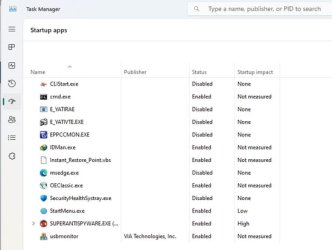
It's not difficult. Start off by running the task manager. Ctrl+Alt+Del
Startup Apps.jpg

Then, In Startup Apps, you'll see all the programs that Windows wants to start when you boot up your PC.
Just right click on any app that you don't want of need to be starting and select Disable.
This picture was taken on my own desktop PC, and as you can see, I've disabled a bunch of apps.

Want that PC to boot up a little bit faster? Like about 27 seconds faster?

RUN>msconfig> Enter
Click on the Boot tab:

Msconfig 1.jpg
The Windows default "Timeout:" is 30 seconds. Why? Just change it to 3 seconds and safe yourself the 27 seconds on every boot-up. If you change anything, be sure to always click "Apply" before you click "OK".

Good Luck, And, have fun!

TM :cool:
 
Want that PC to boot up a little bit faster? Like about 27 seconds faster?

The Windows default "Timeout:" is 30 seconds. Why? Just change it to 3 seconds and safe yourself the 27 seconds on every boot-up.
The timeout only applies if you have multiple items on your boot menu.
 

My Computer My Computer

At a glance

Windows 11 Enterprise 25H2 [rev. 8893]
OS
Windows 11 Enterprise 25H2 [rev. 8893]
Thanks for the reply. I have the Startup configured - there are only 2 things that start when the system does. Everything else is disabled.
 

My Computers My Computers

  • At a glance

    Windows 11 Proi9-12900 overclocked just a touch64 GB DDR4NVidia 4060 Ti
    OS
    Windows 11 Pro
    Computer type
    PC/Desktop
    Manufacturer/Model
    Home Built
    CPU
    i9-12900 overclocked just a touch
    Motherboard
    MSI Tomahawk
    Memory
    64 GB DDR4
    Graphics Card(s)
    NVidia 4060 Ti
    Monitor(s) Displays
    Dell 3818 & Dell 2407 on the desktop, Dell 2405 on the laptop, Dell 3014 in the RV for traveling.
    Screen Resolution
    3840x1600
    Hard Drives
    1TB SSD for O/S, 4TB for non-image stuff, 8TB SSD for images, 10TB spinning platters for backups.
    PSU
    EVGA 850 silver
    Case
    Phantek
    Cooling
    Noctua NH-D15
    Keyboard
    Logitech wireless
    Mouse
    Logitech wireless M575 trackball
    Internet Speed
    Varies between 20 and 400 Mbps
    Browser
    Firefox, Chrome
    Antivirus
    Windows Defender
    Other Info
    Plain ordinary PC.
  • At a glance

    Windows 11 ProI9-988064GBNvidia Quadro RTX 3000
    Operating System
    Windows 11 Pro
    Computer type
    Laptop
    Manufacturer/Model
    Dell 7740 Precision
    CPU
    I9-9880
    Motherboard
    Dell
    Memory
    64GB
    Graphics card(s)
    Nvidia Quadro RTX 3000
    Monitor(s) Displays
    17" 4K and Dell 2405 as needed. Dell 3014 in RV when traveling.
    Screen Resolution
    3840x2160, 2560x1600 with connected to 3014
    Hard Drives
    Nothing spinning, 4, 1TB NVME SSD internal.
    PSU
    Dell 240W
    Keyboard
    Logitech wireless
    Mouse
    Logitech M570 wireless trackball
    Internet Speed
    Depends on how fast the hotspot is wherever I am.
    Browser
    firefox, Chrome
    Antivirus
    Windows Defender...
    Other Info
    Just an ordinary laptop for doing image processing and presentation.
I disabled 86 OEM tasks on Windows 11 23H2 and installed 5 custom ones. I used the helper file paexec.exe to gain admin access to those pesky tasks that are locked and need admin privileges to disable. Attached are my commands with some annotations. Change the file extension from *.txt to *.cmd or *bat to execute. The NirSoft app TaskSchedulerView v1.74 is very helpful in managing Windows tasks.
 

Attachments

Last edited:

My Computer My Computer

At a glance

Linux & Windows 11 DUAL BOOT
OS
Linux & Windows 11 DUAL BOOT
Computer type
PC/Desktop
Manufacturer/Model
Home Built
I disabled 86 OEM tasks on Windows 11 23H2 and installed 5 custom ones.
Nice script, you have not disabled credentials update, though you have disabled updates, but that is your prerogative.
 

My Computer My Computer

At a glance

Home26H2CanAMD Ryzen 5 8600G (07/24)2x32GB Kingston FURY DDR5 5600 MHz CL36 @5200...ASROCK Radeon RX 6600 Challenger D 8G @48FPS ...
OS
Home26H2Can
Computer type
PC/Desktop
CPU
AMD Ryzen 5 8600G (07/24)
Motherboard
ASROCK B650M-HDV/M.2 (07/24) BIOS 4.21 AGESA ComboAM5 1.3.0.1 (04/26)
Memory
2x32GB Kingston FURY DDR5 5600 MHz CL36 @5200 CL36 (07/24)
Graphics Card(s)
ASROCK Radeon RX 6600 Challenger D 8G @48FPS (08/24)
Sound Card
Creative Sound BlasterX AE-5 Plus (05/24)
Monitor(s) Displays
24" Philips 24M1N3200ZS/00 (05/24)
Screen Resolution
1920×1080@165Hz via DP1.4
Hard Drives
Kingston KC3000 NVMe 2TB (05/24)
ADATA XPG GAMMIX S11 Pro 512GB (07/19)
PSU
Seasonic Core GM 550 Gold (04/24)
Case
Fractal Design Define 7 Mini with 3x Noctua NF-P14s/12@555rpm (04/24)
Cooling
Noctua NH-U12S with Noctua NF-P12 (04/24)
Keyboard
HP Pavilion Wired Keyboard 300 (07/24) + Rabalux 76017 Parker (01/24)
Mouse
Logitech M330 Silent Plus (01/26)
Internet Speed
500/100 Mbps via RouterOS (05/21) & TCP Optimizer
Browser
Edge, Brave for YouTube, LibreWolf for FB
Antivirus
NextDNS blocking 1/3 Traffic
Other Info
Phone: Motorola Moto G86 (02/26)
Backup: Hasleo Backup Suite (PreOS)
Headphones: Sennheiser RS170 (09/10)
Chair: Huzaro Force 4.4 Grey Mesh (05/24)
Notifier: Xiaomi Mi Band 9 Milanese (10/24)
FlexCore USB-C 3.2 Gen 1 (M) to LAN (F) (08/25)
I would use Autoruns and only disable the third party tasks & services you think you don't need.
 

My Computer My Computer

At a glance

Windows 11 ProCore i7-13700K64 GB Kingston Fury Beast DDR5Gigabyte GeForce RTX 2060 Super Gaming OC 8G
OS
Windows 11 Pro
Computer type
PC/Desktop
Manufacturer/Model
Self build
CPU
Core i7-13700K
Motherboard
Asus TUF Gaming Plus WiFi Z790
Memory
64 GB Kingston Fury Beast DDR5
Graphics Card(s)
Gigabyte GeForce RTX 2060 Super Gaming OC 8G
Sound Card
Realtek S1200A
Monitor(s) Displays
Viewsonic VP2770 & Dell (secondary)
Screen Resolution
2560 x 1440
Hard Drives
Kingston KC3000 2TB NVME SSD & SATA HDDs & SSD
PSU
EVGA SuperNova G2 850W
Case
Nanoxia Deep Silence 1
Cooling
Noctua NH-D14
Keyboard
Microsoft Digital Media Pro
Mouse
Logitech Wireless
Internet Speed
80 Mb / s
Browser
Chrome
Antivirus
Defender, Malwarebytes Free & AdwCleaner
@ TairikuOkami. I actually had been using Windows Update Blocker v1.8 so that I could toggle Windows Update on and off as needed. But I'm transitioning my PC boxes to remove Windows Update capability altogether. But thanks for the steer on credentials update. I will modify when I get a chance.

@Steve C,. Thank you for sharing....
 

My Computer My Computer

At a glance

Linux & Windows 11 DUAL BOOT
OS
Linux & Windows 11 DUAL BOOT
Computer type
PC/Desktop
Manufacturer/Model
Home Built
Back
Top Bottom