I'm not sure this is the right forum to post in but this is my best guess. If I should post this elsewhere, just let me know.
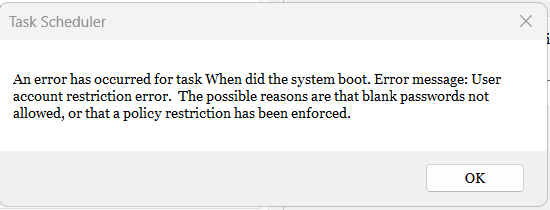
I have defined a task in the Task Scheduler to run at bootup. It's just a .bat file. It runs fine when I tell it to "run now." But it didn't run when I booted up earlier today. Looking at the task definition, I see it says it will run only when the user is logged on. Well, my suspicion is that running at bootup occurs before the system logs me on. So I was trying to change the properties to run even if the user is not logged on. When I try to make that change, it prompts me for the user password. The user doesn't have a password. It's a local administrator user & I have no password so that a bootup doesn't prompt me for a password. This is a safe environment, a home computer, & I'm the only person with physical access to the computer. The error message I get from Task Scheduler when I try to modify the task is that a user with no password can't modify the task definition.
I've looked at the Policy Editor & I am not seeing anything obvious that I could change to make the Task Scheduler accept my change for a user without a password.
Please help.
I have defined a task in the Task Scheduler to run at bootup. It's just a .bat file. It runs fine when I tell it to "run now." But it didn't run when I booted up earlier today. Looking at the task definition, I see it says it will run only when the user is logged on. Well, my suspicion is that running at bootup occurs before the system logs me on. So I was trying to change the properties to run even if the user is not logged on. When I try to make that change, it prompts me for the user password. The user doesn't have a password. It's a local administrator user & I have no password so that a bootup doesn't prompt me for a password. This is a safe environment, a home computer, & I'm the only person with physical access to the computer. The error message I get from Task Scheduler when I try to modify the task is that a user with no password can't modify the task definition.
I've looked at the Policy Editor & I am not seeing anything obvious that I could change to make the Task Scheduler accept my change for a user without a password.
Please help.
- Windows Build/Version
- Windows 11 Pro 64-bit version 23H2 build 22631.4112.
My Computer
At a glance
Windows 11 Pro 64-bit 25H2Intel Core i9-13900K4x32G Teamgroup TForce Vulcan DDR5 6000 DIMMsMSI/NVidia GeForce RTX 4070 Gaming X Trio 12G...
- OS
- Windows 11 Pro 64-bit 25H2
- Computer type
- PC/Desktop
- Manufacturer/Model
- Self build
- CPU
- Intel Core i9-13900K
- Motherboard
- ASUS Z790-Plus WiFi TUF Gaming
- Memory
- 4x32G Teamgroup TForce Vulcan DDR5 6000 DIMMs
- Graphics Card(s)
- MSI/NVidia GeForce RTX 4070 Gaming X Trio 12G GDDR6X + built into motherboard Intel UHD Graphics
- Sound Card
- Built into graphics card + built into motherboard Realtek Audio
- Monitor(s) Displays
- Two connected to the NVidia adapter - Primary: Dell SE2417HGX 23" diagonal connected via HDMI-to-DisplayPort dongle, Secondary: Toshiba TV 32" diagonal connected via HDMI through Onkyo TX-NR717 surround receiver. Third: Viewsonic VS19151 32" diagonal connected wirelessly via WiFi/Miracast & j5create JVAW56 dongle.
- Screen Resolution
- 1920x1080 on all 3 monitors
- Hard Drives
- Samsung 970 EVO Plus NVMe M.2 2T
6xSATA-to-USB 3.0 Fideco external enclosures holding SATA drives of various brands & sizes 1x20T, 2x18T, 2x6T, 1x500G, all connected to a multi-port USB hub
For backups: USB 3.0 HDDs of various brands & sizes 3x20T, 1x1T + SSDs of various brands & sizes 2x480G, 1x1T, all connected to another multi-port USB hub, powered on only while actually performing backups & (may it never happen) restores
- PSU
- MSI MPG A1000G PCIe5 1000W, TrippLite Smart1500TSU 1200W UPS for the main system, TrippLite ECO850LCD 850W UPS for the DASD & my Internet connectivity boxes (no reason to throw out legacy equipment that stil works fine)
- Case
- Fractal North
- Cooling
- DeepCool AK620 CPU cooler (air, 2 fans), 2 case fans, 1 fan in PSU, 3 fans in graphics adapter; 4xpersonal cooling fans strategically placed to cool the external HDDs
- Keyboard
- Cherry MX 11900 USB (wired)
- Mouse
- Touchpad built into the keyboard
- Internet Speed
- 500Mbps via Spectrum cable TV/cell phone bundle
- Browser
- Firefox
- Antivirus
- Built into Windows 11
- Other Info
- The ethernet adapter integrated into the motherboard died. I am now using a TPLink TX201 ethernet adapter in a PCIe expansion slot for Internet connectivity.