Taskbar malfunction after enabling Taskbar Position setting


p4rfektm4kine

New member
Local time
9:24 AM
Posts
1
OS
Windows 11
A few weeks back, I tried this ViveTool command to enable settings for Taskbar Position: vivetool.exe /enable /id:59213768

It works, but now there is a problem—taskbar elements are misplaced between the top and bottom positions.

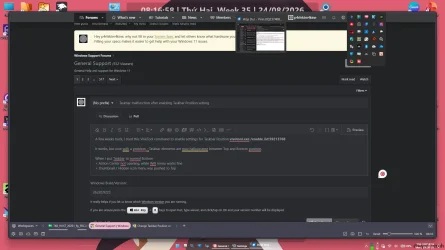
When I set the taskbar to the bottom (image 1):
  • Action Center does not open, while the Wi-Fi menu works fine.
  • The thumbnail / hidden icons menu is pushed to the top.

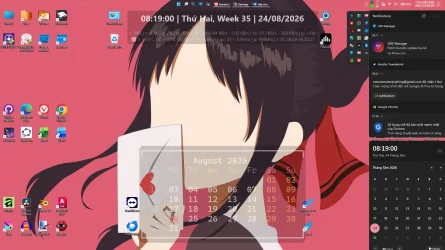
When I set the taskbar to the top (image 2):
  • Action Center opens, but the Wi-Fi menu does not open.
  • Thumbnails disappear, while the hidden icons menu is still at the top.
Is there any way to reset Taskbar behavior? Many thanks
 
Windows Build/Version
26220.9223

Attachments

  • 1787534232945.webp
    1787534232945.webp
    103.1 KB · Views: 0
  • 1787534351767.webp
    1787534351767.webp
    142.6 KB · Views: 0

My Computer My Computer

At a glance

Windows 11
OS
Windows 11
Computer type
Laptop
Manufacturer/Model
MSI
I've not an insider nor have I ever used Vive tool.but I would think you can use the tool to disable any function you enabled prior.

I did have co-pilot analyze your thread and got this answer:

1. The feature is incomplete​

The taskbar position flag is not fully implemented. Only part of the shell respects the new geometry.

2. Different UI components anchor independently​

Action Center, Quick Settings, hidden icons, and thumbnail previews are separate XAML/WinUI surfaces.Some reposition, others don’t, and some break entirely.

3. Disabling the flag may not fully revert the shell​

Windows caches taskbar layout and flyout positions.Even after disabling the feature, broken geometry can persist.

🛠️ Realistic reset paths (what actually works)​

These are the practical fixes that go beyond the simplistic reply in the thread.

1. Disable the feature


vivetool.exe /disable /id:59213768

Reboot.

2. Clear shell layout caches

Delete:
  • %LocalAppData%\Microsoft\Windows\Shell\LayoutCache
  • %LocalAppData%\Microsoft\Windows\Explorer\IconCache*
Then restart Explorer or reboot.

3. Re-register shell components

This resets XAML islands and flyouts:
powershell -ExecutionPolicy Bypass -Command "Get-AppxPackage Microsoft.Windows.ShellExperienceHost | Reset-AppxPackage"
powershell -ExecutionPolicy Bypass -Command "Get-AppxPackage Microsoft.Windows.StartMenuExperienceHost | Reset-AppxPackage"

4. Update to a newer Canary build

These experimental flags often stabilize in later builds.

5. In‑place repair install
If the shell remains corrupted, this is the guaranteed reset.
 

My Computers My Computers

  • At a glance

    Windows 11 Pro 25H2 26200.9168i9-10900 10 core 20 threads32 gbnone-Intel UHD Graphics 630
    OS
    Windows 11 Pro 25H2 26200.9168
    Computer type
    PC/Desktop
    Manufacturer/Model
    Dell Optiplex 7080
    CPU
    i9-10900 10 core 20 threads
    Motherboard
    DELL 0J37VM
    Memory
    32 gb
    Graphics Card(s)
    none-Intel UHD Graphics 630
    Sound Card
    Integrated Realtek
    Monitor(s) Displays
    Benq 27
    Screen Resolution
    2560x1440
    Hard Drives
    2x1tb Solidigm m.2 nvme /External drives 512gb Samsung m.2 sata+2tb Kingston m2.nvme
    PSU
    500w
    Case
    MT
    Cooling
    Dell Premium
    Keyboard
    Logitech wired
    Mouse
    Logitech wireless
    Internet Speed
    so slow I'm too embarrassed to tell
    Browser
    #1 Edge #2 Firefox
    Antivirus
    Defender+MWB Premium
  • At a glance

    Windows 11 Pro 24H2 26200.9168AMD Ryzen 7 6800U32 gbintegrated
    Operating System
    Windows 11 Pro 24H2 26200.9168
    Computer type
    PC/Desktop
    Manufacturer/Model
    Beelink Mini PC SER5
    CPU
    AMD Ryzen 7 6800U
    Memory
    32 gb
    Graphics card(s)
    integrated
    Sound Card
    integrated
    Monitor(s) Displays
    Benq 27
    Screen Resolution
    2560x1440
    Hard Drives
    1TB Crucial nvme
    Keyboard
    Logitech wired
    Mouse
    Logitech wireless
    Internet Speed
    still too embarrassed to tell
    Browser
    Firefox
    Antivirus
    Defender
  • System 3 is non compliant Dell 9020 i7-4770/24gb ram Win11 PRO 26200.9168

Latest Support Threads

Back
Top Bottom