Solved Taskbar shortcut to hide or show desktop icons


wiganken

Well-known member
Power User
VIP
Local time
3:38 AM
Posts
1,278
Location
UK
OS
Windows 11 Pro
Reason for the question is that my ASUS Zenbook has an OLED screen and, to prevent burn-in I would like to be able to hide the icons and get them to reappear at the click of a shortcut icon on the taskbar.
I know I can press Win+D keys to close all open windows to see the desktop icons but this is not what I mean.

I know I can right-click on any blank area on the desktop and then select View then tick or untick Show desktop icons but this is three clicks.
What I would like is to make this quicker by placing a shortcut on the taskbar that would toggle the icons on or off by one click.

Is this possible?
Thanks.
 

My Computers My Computers

  • At a glance

    Windows 11 ProAMD Ryzen 9 8945HS32GB DDR5 SO-DIMMIntegrated AMD Radeon 780M (4.00 GHz)
    OS
    Windows 11 Pro
    Computer type
    PC/Desktop
    Manufacturer/Model
    GMKtec K11
    CPU
    AMD Ryzen 9 8945HS
    Memory
    32GB DDR5 SO-DIMM
    Graphics Card(s)
    Integrated AMD Radeon 780M (4.00 GHz)
    Monitor(s) Displays
    Benq 2250HM
    Screen Resolution
    1920 x 1080
    Hard Drives
    1 TB PCIe 4.0 NVMe M.2 SSD
  • At a glance

    Windows 11 HomeIntel® Core™ Ultra 7 - 255H processor16 GB LPDDR5 SDRAMIntel Arc 140T onboard graphics
    Operating System
    Windows 11 Home
    Computer type
    Laptop
    Manufacturer/Model
    ASUS Zenbook 14 OLED 14" Laptop - UX3405CA-QL192W
    CPU
    Intel® Core™ Ultra 7 - 255H processor
    Memory
    16 GB LPDDR5 SDRAM
    Graphics card(s)
    Intel Arc 140T onboard graphics
    Screen Resolution
    1920 x 1200 (16:10 WUXGA resolution) OLED Touchscreen
    Hard Drives
    1TB SSD
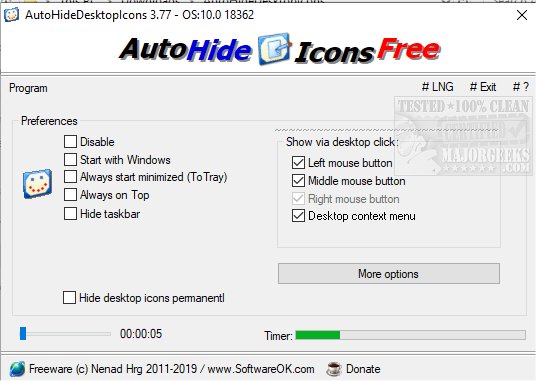
So I found this for you. Once you open the program, it is then placed in the notification icons (near the clock). In order to show the icons again permanently, just right click and Exit the program.

I played around a bit with it. Once you open the program, it will hide your Desktop icons and open its app window. You can press the X button on the window, and it gets minimized to the notification icon area. The Desktop icons will go invisible. In order to show the icons, just click anywhere on the Desktop, and the icons will then show.

It also has autohide of the TaskBar built in it.

Try playing a bit with it and see if it works for you:
 

My Computer My Computer

At a glance

Windows 11
OS
Windows 11
Computer type
PC/Desktop
Manufacturer/Model
Custom Built
@pepanee - Thank you very much for that. It seems to be better than I could have wished for because I set it to start with Windows and set the timer to 16 seconds. The icons show after I sign-in but then they disappear after 16 seconds so I don't have to take any action. When I want them back I simply click anywhere on the desktop and they'll stay there for another 16 seconds before disappearing again. Brilliant for my OLED screen.
The only thing to note is that it does not install for all users. It is a portable app and each user has to decide whether to install or not so Administrators may have to force it onto other users in order to protect OLED screen.

I have also set my taskbat to Autohide so that too is not showing. A totally black screen. Brilliant for my OLED screen.
 
Last edited:

My Computers My Computers

  • At a glance

    Windows 11 ProAMD Ryzen 9 8945HS32GB DDR5 SO-DIMMIntegrated AMD Radeon 780M (4.00 GHz)
    OS
    Windows 11 Pro
    Computer type
    PC/Desktop
    Manufacturer/Model
    GMKtec K11
    CPU
    AMD Ryzen 9 8945HS
    Memory
    32GB DDR5 SO-DIMM
    Graphics Card(s)
    Integrated AMD Radeon 780M (4.00 GHz)
    Monitor(s) Displays
    Benq 2250HM
    Screen Resolution
    1920 x 1080
    Hard Drives
    1 TB PCIe 4.0 NVMe M.2 SSD
  • At a glance

    Windows 11 HomeIntel® Core™ Ultra 7 - 255H processor16 GB LPDDR5 SDRAMIntel Arc 140T onboard graphics
    Operating System
    Windows 11 Home
    Computer type
    Laptop
    Manufacturer/Model
    ASUS Zenbook 14 OLED 14" Laptop - UX3405CA-QL192W
    CPU
    Intel® Core™ Ultra 7 - 255H processor
    Memory
    16 GB LPDDR5 SDRAM
    Graphics card(s)
    Intel Arc 140T onboard graphics
    Screen Resolution
    1920 x 1200 (16:10 WUXGA resolution) OLED Touchscreen
    Hard Drives
    1TB SSD
You're welcome. That's good to hear. I don't know what you mean as it cannot run for other users; I'm a little confused by what you mean about that.
But if all is well, then that's good.
 

My Computer My Computer

At a glance

Windows 11
OS
Windows 11
Computer type
PC/Desktop
Manufacturer/Model
Custom Built
@wiganken You might try this as well: Auto Hide Desktop ... . .. It will hide icons when you are idle for however longer you set it to.
 

My Computers My Computers

  • At a glance

    Windows 11 Pro x64 24H2 v26200.5074AMD Ryzen 9 3600X 12-Core @ 3.80GHzCorsair 32GB DDR4EVGA GeForce gtx 1660 Super
    OS
    Windows 11 Pro x64 24H2 v26200.5074
    Computer type
    PC/Desktop
    Manufacturer/Model
    Built Myself in 2025
    CPU
    AMD Ryzen 9 3600X 12-Core @ 3.80GHz
    Motherboard
    MSI X570 Gaming Plus
    Memory
    Corsair 32GB DDR4
    Graphics Card(s)
    EVGA GeForce gtx 1660 Super
    Sound Card
    On Board
    Monitor(s) Displays
    2 X AOC 27" , Dell 27"
    Screen Resolution
    1920 X 1080
    Hard Drives
    ~~~~~~~~~~~~~~~~~~~~~~~~~~
    ~ P34A60 512GB NVMe PCIe Gen3x4 M.2
    ~ 6TB Toshiba HDD
    ~ 6TB HDD (Backup)
    ~ SanDisk 250GB SSD
    ~ 2 X 1TB HDD
    ~~~~~~~~~~
    PSU
    eVGA 750w G+
    Case
    GAMDIAS White ATX Mid Tower Gaming Computer PC Case w/Tempered Glass
    Cooling
    AMD Wraith Prism
    Keyboard
    Nulea RT05 Wireless Ergonomic
    Mouse
    Nulea MD280 Wireless Vertical Mouse
    Internet Speed
    761Mbps (Download) / 692Mbps (Upload)
    Browser
    Firefox
    Antivirus
    Malwarebytes
    Other Info
    *This is my Main Computer That I use*
  • At a glance

    Windows 11 Pro x64 24H2 v26100.2894AMD Ryzen 7 1800X @ 3.60Ghz16GBAMD RX580
    Operating System
    Windows 11 Pro x64 24H2 v26100.2894
    Computer type
    PC/Desktop
    CPU
    AMD Ryzen 7 1800X @ 3.60Ghz
    Motherboard
    Asus Crosshair VI Hero
    Memory
    16GB
    Graphics card(s)
    AMD RX580
    Sound Card
    onBoard
    Monitor(s) Displays
    LG 27UK650-W 27", eMachine 22"
    Screen Resolution
    1920 X 1080
    Hard Drives
    250GB SSD
    PSU
    CORSAIR RM850
    Case
    GAMDIAS Black ATX Mid Tower Gaming Computer PC Case w/Tempered Glass
    Cooling
    Liquid
    Keyboard
    Nulea RT05 Wireless Ergonomic
    Mouse
    Nulea MD280 Wireless Vertical Mouse
    Internet Speed
    752Mbps (Download) / 537Mbps (Upload)
    Browser
    Firefox
    Antivirus
    Malwarebytes
    Other Info
    I use this computer for photo/video editing and to track severe weather
I don't know what you mean as it cannot run for other users
It can run for other users but each user needs to install and use the app stand-alone. It does not install for all users. It does not show in the installed programs or apps listing.
 

My Computers My Computers

  • At a glance

    Windows 11 ProAMD Ryzen 9 8945HS32GB DDR5 SO-DIMMIntegrated AMD Radeon 780M (4.00 GHz)
    OS
    Windows 11 Pro
    Computer type
    PC/Desktop
    Manufacturer/Model
    GMKtec K11
    CPU
    AMD Ryzen 9 8945HS
    Memory
    32GB DDR5 SO-DIMM
    Graphics Card(s)
    Integrated AMD Radeon 780M (4.00 GHz)
    Monitor(s) Displays
    Benq 2250HM
    Screen Resolution
    1920 x 1080
    Hard Drives
    1 TB PCIe 4.0 NVMe M.2 SSD
  • At a glance

    Windows 11 HomeIntel® Core™ Ultra 7 - 255H processor16 GB LPDDR5 SDRAMIntel Arc 140T onboard graphics
    Operating System
    Windows 11 Home
    Computer type
    Laptop
    Manufacturer/Model
    ASUS Zenbook 14 OLED 14" Laptop - UX3405CA-QL192W
    CPU
    Intel® Core™ Ultra 7 - 255H processor
    Memory
    16 GB LPDDR5 SDRAM
    Graphics card(s)
    Intel Arc 140T onboard graphics
    Screen Resolution
    1920 x 1200 (16:10 WUXGA resolution) OLED Touchscreen
    Hard Drives
    1TB SSD
Last edited:

My Computers My Computers

  • At a glance

    Windows 11 ProAMD Ryzen 9 8945HS32GB DDR5 SO-DIMMIntegrated AMD Radeon 780M (4.00 GHz)
    OS
    Windows 11 Pro
    Computer type
    PC/Desktop
    Manufacturer/Model
    GMKtec K11
    CPU
    AMD Ryzen 9 8945HS
    Memory
    32GB DDR5 SO-DIMM
    Graphics Card(s)
    Integrated AMD Radeon 780M (4.00 GHz)
    Monitor(s) Displays
    Benq 2250HM
    Screen Resolution
    1920 x 1080
    Hard Drives
    1 TB PCIe 4.0 NVMe M.2 SSD
  • At a glance

    Windows 11 HomeIntel® Core™ Ultra 7 - 255H processor16 GB LPDDR5 SDRAMIntel Arc 140T onboard graphics
    Operating System
    Windows 11 Home
    Computer type
    Laptop
    Manufacturer/Model
    ASUS Zenbook 14 OLED 14" Laptop - UX3405CA-QL192W
    CPU
    Intel® Core™ Ultra 7 - 255H processor
    Memory
    16 GB LPDDR5 SDRAM
    Graphics card(s)
    Intel Arc 140T onboard graphics
    Screen Resolution
    1920 x 1200 (16:10 WUXGA resolution) OLED Touchscreen
    Hard Drives
    1TB SSD
It can run for other users but each user needs to install and use the app stand-alone. It does not install for all users. It does not show in the installed programs or apps listing.
Oh, so each user can have the app open during startup I believe =)
 

My Computer My Computer

At a glance

Windows 11
OS
Windows 11
Computer type
PC/Desktop
Manufacturer/Model
Custom Built
Yes, as each user signs-in the app runs in the background and is effective immediately.
 

My Computers My Computers

  • At a glance

    Windows 11 ProAMD Ryzen 9 8945HS32GB DDR5 SO-DIMMIntegrated AMD Radeon 780M (4.00 GHz)
    OS
    Windows 11 Pro
    Computer type
    PC/Desktop
    Manufacturer/Model
    GMKtec K11
    CPU
    AMD Ryzen 9 8945HS
    Memory
    32GB DDR5 SO-DIMM
    Graphics Card(s)
    Integrated AMD Radeon 780M (4.00 GHz)
    Monitor(s) Displays
    Benq 2250HM
    Screen Resolution
    1920 x 1080
    Hard Drives
    1 TB PCIe 4.0 NVMe M.2 SSD
  • At a glance

    Windows 11 HomeIntel® Core™ Ultra 7 - 255H processor16 GB LPDDR5 SDRAMIntel Arc 140T onboard graphics
    Operating System
    Windows 11 Home
    Computer type
    Laptop
    Manufacturer/Model
    ASUS Zenbook 14 OLED 14" Laptop - UX3405CA-QL192W
    CPU
    Intel® Core™ Ultra 7 - 255H processor
    Memory
    16 GB LPDDR5 SDRAM
    Graphics card(s)
    Intel Arc 140T onboard graphics
    Screen Resolution
    1920 x 1200 (16:10 WUXGA resolution) OLED Touchscreen
    Hard Drives
    1TB SSD
It can run for other users but each user needs to install and use the app stand-alone.
It's a portable app, though? So each user just has to run it from a folder that they can all access. Something like "C:\AutoHideDesktopIcons". No installation necessary.
 

My Computer My Computer

At a glance

Windows 11 Pro
OS
Windows 11 Pro
It's a portable app, though? So each user just has to run it from a folder that they can all access. Something like "C:\AutoHideDesktopIcons". No installation necessary.
Yes, that should work.
 

My Computers My Computers

  • At a glance

    Windows 11 ProAMD Ryzen 9 8945HS32GB DDR5 SO-DIMMIntegrated AMD Radeon 780M (4.00 GHz)
    OS
    Windows 11 Pro
    Computer type
    PC/Desktop
    Manufacturer/Model
    GMKtec K11
    CPU
    AMD Ryzen 9 8945HS
    Memory
    32GB DDR5 SO-DIMM
    Graphics Card(s)
    Integrated AMD Radeon 780M (4.00 GHz)
    Monitor(s) Displays
    Benq 2250HM
    Screen Resolution
    1920 x 1080
    Hard Drives
    1 TB PCIe 4.0 NVMe M.2 SSD
  • At a glance

    Windows 11 HomeIntel® Core™ Ultra 7 - 255H processor16 GB LPDDR5 SDRAMIntel Arc 140T onboard graphics
    Operating System
    Windows 11 Home
    Computer type
    Laptop
    Manufacturer/Model
    ASUS Zenbook 14 OLED 14" Laptop - UX3405CA-QL192W
    CPU
    Intel® Core™ Ultra 7 - 255H processor
    Memory
    16 GB LPDDR5 SDRAM
    Graphics card(s)
    Intel Arc 140T onboard graphics
    Screen Resolution
    1920 x 1200 (16:10 WUXGA resolution) OLED Touchscreen
    Hard Drives
    1TB SSD

Latest Support Threads

Back
Top Bottom