JavaScript is disabled. For a better experience, please enable JavaScript in your browser before proceeding.
You are using an out of date browser. It may not display this or other websites correctly.
You should upgrade or use an
alternative browser .
TeraCopy default copy handler issue
I was using TeraCopy quite happily in Windows 10.
In Windows 11 even though TeraCopy is set as default copy handler within software it does not work as such.
Any ideas how to solve issue?
I have tried contacting Code Sector for help but they never reply.
Retired R.C.M.P. Veteran
Power User
VIP
@jaburmester ,
I have Teracopy Pro and it successfully migrated from Windows 10 to Windows 11 some years ago.
I have attached a copy of my Teracopy Preferences settings.
If your settings are the same, then I would next uninstall Teracopy, reboot, and reinstall it. It should ask you to designate it as the default copy app. It is possible that there was a "hiccup" somewhere in your Windows 11 installation that might have changed your Teracopy registry settings.
Have you run a System File Checker scan as an Administrator? Brink should have a Tutorial here on that.
Have a great day.,
Regards,
Phil
OS
Windows 11 Pro Version 25H2 (Build 26200.8457
Computer type
PC/Desktop
Manufacturer/Model
Dell XPS8930 SE
CPU
Intel i7-9700K 4700 MHz
Motherboard
Dell XPS 8930
Memory
32 GB (4 x 8GB SK Hynix DDR4 @1333 MHz) (2666 MHz)
Graphics Card(s)
NVIDIA GeForce RTX 2060 (6 GB) GDDR6 300 MHz
Sound Card
None
Monitor(s) Displays
Dell UltraSharp U2518D 25"
Screen Resolution
2560 x 1440
Hard Drives
NVMe Intel 1024 TB
Seagate 2 TB, SATA-III
Western Digital Black 4TB
PSU
850 W Gold Standard
Case
Dell XPS 8930 Base (Special Edition)
Cooling
Air
Keyboard
Dell 0G4D2W
Mouse
Dell MOCZUL
Internet Speed
Download 553 Mbps, Upload 686 Mbps
Browser
Google Chrome
Antivirus
ESET Smart Security Premium, plus Malwarebytes Premium
Other Info
BIOS Version 1.1.31
Operating System
Windows 11 Pro Version 25H2 (Build 26200.8457)
Computer type
Laptop
Manufacturer/Model
Dell XPS 15 7590
CPU
i7-9750H 4.5 GHz
Motherboard
Dell XPS 15 7590
Memory
16 GB (2 x 8GB @ 1333 MHz) DDR4-2666 MHz
Graphics card(s)
NVIDIA GeForce 1650 4 GB GDDR5
Sound Card
None
Monitor(s) Displays
Dell XPS 15 7590, 15.6" InfinityEdge Anti-Glare, Non-Touch
Screen Resolution
1920 x 1080
Hard Drives
512 GB M.2 PCle NVMe SK Hynix
PSU
130W Power Adapter
Case
Dell XPS 15 7590
Cooling
Air
Keyboard
Laptop
Mouse
Logitech M510
Internet Speed
Download: 400 Mbps, Upload: 203 Mbps
Browser
Google Chrome
Antivirus
ESET Smart Security Premium, plus Malwarebytes Premium
Other Info
BIOS Version 1.35.0
Active member
Thread Starter
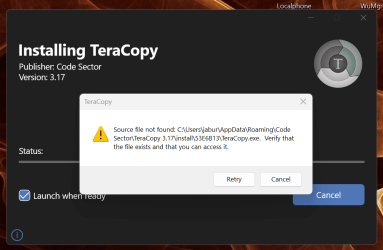
I uninstalled TerraCopy Pro 3.17 and now when I try and reinstall I get the above error.
Please note I do not have access to C:\User\jabur\AppData\Roaming\Cose Sector\TeraCopy 3.17\install\53E6B13\TeraCopy.exe as this location does not exist.
Any ideas how to resolve issue.
Last edited: Nov 9, 2024
Active member
Thread Starter
Managed to install by first installing an old version of TeraCopy from 10/10/21 and then updating to latest version.
Retired R.C.M.P. Veteran
Power User
VIP
@jaburmester ,
Thanks for the update. Is the newest version of Teracopy working properly?
Have a great day.
Regards,
Phil
OS
Windows 11 Pro Version 25H2 (Build 26200.8457
Computer type
PC/Desktop
Manufacturer/Model
Dell XPS8930 SE
CPU
Intel i7-9700K 4700 MHz
Motherboard
Dell XPS 8930
Memory
32 GB (4 x 8GB SK Hynix DDR4 @1333 MHz) (2666 MHz)
Graphics Card(s)
NVIDIA GeForce RTX 2060 (6 GB) GDDR6 300 MHz
Sound Card
None
Monitor(s) Displays
Dell UltraSharp U2518D 25"
Screen Resolution
2560 x 1440
Hard Drives
NVMe Intel 1024 TB
Seagate 2 TB, SATA-III
Western Digital Black 4TB
PSU
850 W Gold Standard
Case
Dell XPS 8930 Base (Special Edition)
Cooling
Air
Keyboard
Dell 0G4D2W
Mouse
Dell MOCZUL
Internet Speed
Download 553 Mbps, Upload 686 Mbps
Browser
Google Chrome
Antivirus
ESET Smart Security Premium, plus Malwarebytes Premium
Other Info
BIOS Version 1.1.31
Operating System
Windows 11 Pro Version 25H2 (Build 26200.8457)
Computer type
Laptop
Manufacturer/Model
Dell XPS 15 7590
CPU
i7-9750H 4.5 GHz
Motherboard
Dell XPS 15 7590
Memory
16 GB (2 x 8GB @ 1333 MHz) DDR4-2666 MHz
Graphics card(s)
NVIDIA GeForce 1650 4 GB GDDR5
Sound Card
None
Monitor(s) Displays
Dell XPS 15 7590, 15.6" InfinityEdge Anti-Glare, Non-Touch
Screen Resolution
1920 x 1080
Hard Drives
512 GB M.2 PCle NVMe SK Hynix
PSU
130W Power Adapter
Case
Dell XPS 15 7590
Cooling
Air
Keyboard
Laptop
Mouse
Logitech M510
Internet Speed
Download: 400 Mbps, Upload: 203 Mbps
Browser
Google Chrome
Antivirus
ESET Smart Security Premium, plus Malwarebytes Premium
Other Info
BIOS Version 1.35.0
Active member
Thread Starter
@jaburmester ,
Thanks for the update. Is the newest version of Teracopy working properly?
Have a great day.
Regards,
Phil
Yes working fine.
Thanks for the update. Is the newest version of Teracopy working properly?
3.17 has been around a while.
I prefer to not set it as my default copy handler but have it added to my context menu as a choice. I just use explorer for the small stuff.
If you just install teracopy using it's defaults, you're missing out:
How to Make TeraCopy Faster? | Code Sector Help Center
Ver.4 is in beta and is available for download in both installable and portable versions here:
TeraCopy 4 Beta – Code Sector Blog