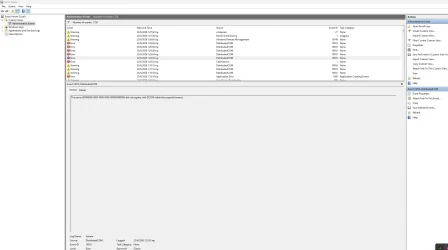
The server {00000000-0000-0000-0000-000000000000} did not register with DCOM within the required timeout.


larysid

Active member
Member
Local time
9:59 AM
Posts
157
OS
win 11 pro 25 h2
Hello! I own a custom desktop PC (win 11 25h2, AMD RYZEN 5800X, ASUS ROG STRIX X570F, NVIDIA 3080, corsair 32gb RAM) and since yesterday, after several updates (for example one drive, edge, armoury crate aura creator and ms store webexperiencepack, windows app runtime 1.8 and 2.2 as well) I have this DCOM error at every shutdown/restart.... I have already tried: Clean boot, full shutdown, cleared temp and system files via dism.exe, used sfc /scannow and dism restore health, cleared file explorer in folder options general tab and resetted folders as well, cleared internet history and flushed DNS, reinstalled my GPU nvidia app- game ready drivers, but nothing fixes this cosmetic bug... Even a system restore to previous state (10 days before, where there wasn't this error), did not fix this bug...
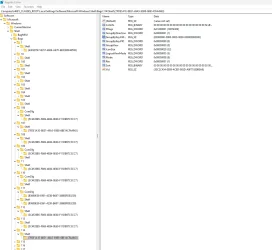
It has to do with shell bags...I have also checked to my laptop ac 16250 dell, but there is no such an error there in its event viewer..
So I suspect Armoury crate's rog live service update is at fault...
Of course I am fully updated to everything in my desktop PC..
Does anybody know how to fix it, please?
 
Windows Build/Version
windows 11 25h2 latest build

Attachments
  • 2026-06-23_01-38_1.webp
    2026-06-23_01-38_1.webp
    93.1 KB · Views: 1
  • 2026-06-23_01-38.webp
    2026-06-23_01-38.webp
    88.8 KB · Views: 1

My Computer My Computer

At a glance

win 11 pro 25 h2
OS
win 11 pro 25 h2
Computer type
PC/Desktop
Unless you are actually experiencing an issue it's best to just ignore DCOM errors. They're often non-issues or self-recovering
 

My Computer My Computer

At a glance

Linux Mint
OS
Linux Mint
Computer type
Laptop
Manufacturer/Model
System76 Lemur Pro
Unless you are actually experiencing an issue it's best to just ignore DCOM errors. They're often non-issues or self-recovering
yes you are right!! I have already seen, some similar posts.. I think I will ignore it, waiting for next updates to fix it... but if anybody here to this post, has another idea regarding this, please inform me.. Till then, I will just ignore it (I am facing no problems except from these DCOM errors)!
 

My Computer My Computer

At a glance

win 11 pro 25 h2
OS
win 11 pro 25 h2
Computer type
PC/Desktop
AI states:
> Windows logs dozens of cosmetic DCOM timeouts in the background that have zero impact on your day-to-day usage. Microsoft designed the Event Viewer to log everything, even self-recovering hiccups. Trying to force a "fix" for a harmless DCOM log often causes more stability issues than the error itself.

But if you want to look further...
1) Wait for an App/Driver Update
2) Check for Specific Software Conflicts
3) Run Standard System Repairs
which include
> a) DISM.exe /Online /Cleanup-image /Restorehealth
> b) sfc /scannow
which you state that you have already done.
 

My Computer My Computer

At a glance

Windows 11
OS
Windows 11
Computer type
PC/Desktop
Manufacturer/Model
Custom Built
@pepanee that is a fact. Microsoft is liberal with their use of 'error' for things that really should be a warning or info.
 

My Computer My Computer

At a glance

Linux Mint
OS
Linux Mint
Computer type
Laptop
Manufacturer/Model
System76 Lemur Pro
thank you all!!! I will ignore it!!!
 

My Computer My Computer

At a glance

win 11 pro 25 h2
OS
win 11 pro 25 h2
Computer type
PC/Desktop
  • Helpful
Reactions: OAT
I just got the same error logs also in a group of 6, every shutdown/restart. I was messing with external drive settings and do a couple of restarts. After one of restarts this started to log. Don't know if it's related, but probably yes. Erlier I had errors with this number {6FA05A24-B1DF-4155-909E-7B424F2D2BB5}almost every shut down and this {3E11DF0F-42EB-4747-9A35-802D98B5BCF0} sometimes. Now they are gone, but this 6 times {00000000-0000-0000-0000-000000000000} apear. Like everyone already said it's save to ignore this errors. They will probably fix themself in time.
 

My Computer My Computer

At a glance

Windows 11
OS
Windows 11
I just got the same error logs also in a group of 6, every shutdown/restart. I was messing with external drive settings and do a couple of restarts. After one of restarts this started to log. Don't know if it's related, but probably yes. Erlier I had errors with this number {6FA05A24-B1DF-4155-909E-7B424F2D2BB5}almost every shut down and this {3E11DF0F-42EB-4747-9A35-802D98B5BCF0} sometimes. Now they are gone, but this 6 times {00000000-0000-0000-0000-000000000000} apear. Like everyone already said it's save to ignore this errors. They will probably fix themself in time.
It will be fixed by itself...for the time being I am seeing these dcom errors once per 5 or 6 restarts...if you check a little down to the event viewer it will say with a triangle notification something like clsid {00000...000}.. the same thing is happening to my laptop as well.. maybe it is something with ms store update... I have no idea.. I will just ignore them.. we can do nothing about it... Just to wait for a fix!! It a common bug, as I can see..
 

My Computer My Computer

At a glance

win 11 pro 25 h2
OS
win 11 pro 25 h2
Computer type
PC/Desktop
This is just my opinion but I think you’re putting way too much energy into a harmless log entry. This specific DCOM timeout shows up on every modern Windows 10/11 system — clean installs, brand‑new hardware, different vendors, different drivers. It’s not a fault, it’s not corruption, and it’s not something you can “fix” because nothing is actually broken.

Microsoft doesn’t even treat these as real errors anymore. They’re legacy noise from old components that Windows still logs for compatibility.

If your PC runs normally, then this event is meaningless. Stop chasing it. There’s nothing to repair, and nothing to diagnose.

I see a pattern here.
 

My Computers My Computers

  • At a glance

    Windows 11 Pro 25H2 Build 26200.8655Intel(R) Core(TM) i7-4770K CPU @ 3.50GHz32.0 GB of I forget and the box is in storage.Gigabyte nVidia GeForce GTX 1660 Super OC 6GB
    OS
    Windows 11 Pro 25H2 Build 26200.8655
    Computer type
    PC/Desktop
    Manufacturer/Model
    Sin-built 2013
    CPU
    Intel(R) Core(TM) i7-4770K CPU @ 3.50GHz
    Motherboard
    ASUS ROG Maximus VI Formula
    Memory
    32.0 GB of I forget and the box is in storage.
    Graphics Card(s)
    Gigabyte nVidia GeForce GTX 1660 Super OC 6GB
    Sound Card
    ROG SupremeFX Formula 8-Channel High Definition Audio
    Monitor(s) Displays
    5 x LG 25MS500-B - 1 x 24MK430H-B - 1 x Wacom Pro 22" Touch Screen Tablet
    Screen Resolution
    All over the place
    Hard Drives
    Too many to list. OS on Samsung 1TB 870 QVO SATA
    PSU
    Silverstone 1500
    Case
    NZXT Phantom 820 Full-Tower Case
    Cooling
    Noctua NH-D15 Elite Class Dual Tower CPU Cooler / 6 x EziDIY 120mm / 2 x Corsair 140mm somethings / 1 x 140mm Thermaltake something / 2 x 200mm Corsair.
    Keyboard
    Corsair K95 / Logitech diNovo Edge Wireless
    Mouse
    Logitech: G402 / G502 / Mx Masters / Mx Air Cordless
    Internet Speed
    2000/500Mbps
    Browser
    All sorts
    Antivirus
    Kaspersky Premium
    Other Info
    ㅤㅤㅤㅤㅤㅤㅤㅤㅤㅤㅤㅤㅤㅤㅤㅤㅤㅤㅤㅤㅤㅤㅤㅤㅤㅤㅤㅤㅤㅤㅤㅤㅤㅤㅤㅤㅤㅤㅤㅤ⠀⠀⠀⠀⠀⠀⠀⠀⠀⠀
    TP-Link BE9300 WiFi 7 Bluetooth 5.4 (Archer TBE550E)
    TP-Link TX201 V1 2.5GB Lan

    Grandstream HT812 - VoIP
    ASUS DSL-AX82U - Mesh
    ASUS RT-AC68U - Mesh
    ASUS RT-BE88U Router

    Brother MFC-L2880DW Printer

    I’m on a horse.
  • At a glance

    Windows 11 Pro 25H2 Build 26200.8655 (Wifes)13th Generation Intel® Core™ i5-1340P Process...16GB LPDDR5-52001x Intel® Iris® Xe Graphics
    Operating System
    Windows 11 Pro 25H2 Build 26200.8655 (Wifes)
    Computer type
    Laptop
    Manufacturer/Model
    LENOVO Yoga 7 14IRL8 - Type 82YL
    CPU
    13th Generation Intel® Core™ i5-1340P Processor(Core™ i5-1340P)
    Memory
    16GB LPDDR5-5200
    Graphics card(s)
    1x Intel® Iris® Xe Graphics
    Sound Card
    Optimized with Dolby Atmos®
    Screen Resolution
    QHD 2880 x 1800 OLED
    Hard Drives
    M.2 512 GB SSD PCIe
    Mouse
    Logiteck MX Master 3S
    Internet Speed
    2000/500
    Antivirus
    Defender / Malwarebytes
    Other Info
    …still on a horse.


    Wireless Network: Wi-Fi 6E 2x2 AX; Bluetooth® 5.1 or above
    Ports: 1x 1 Novo button; 2 in 1 Audio Combo jack; Micro SD Card Reader; HDMI 1.4b; 2 x USB Type-C (TBT4)
    USB 3.2 Gen 2 DP 1.4a
    PD 3.0); 1 x USB 3.2 Gen1 Type A
    Camera
    1x 1080P FHD IR/RGB Hybrid with Privacy Shutter and Dual Array Microphone
    Graphics
    1x Intel® Iris® Xe Graphics
    Monitor
    14" WUXGA
    Form Factor
    Convertible Notebook
  • Windows 11 Pro 25H2 Build 26200.8655 (Wifes)

    Yoga 7 2-in-1 14IML9 - Type 83DJ

    Processor: Intel® Core™ Ultra 7 155H Processor(Core™ Ultra 7 155H)

    Memory: 32GB LPD5X-7467

    Hard Drive: 1 TB SSD PCIe

    Wireless Network: 1x Wi-Fi 6E 2x2 AX; Bluetooth® 5.1 or above

    Ports: 1 x HDMI 2.1 TMDS; 1 x Novo Button; 1 x Combo Audio Jack
    2 x USB-C (USB 4.0)
    1 x USB-A 3.2 Gen 1

    Camera: 1080P FHD IR Hybrid with Dual Microphone

    Graphics: Intel® Arc™ Graphics

    Monitor: 14" 2.8K

    ...Where's my horse?
This is just my opinion but I think you’re putting way too much energy into a harmless log entry. This specific DCOM timeout shows up on every modern Windows 10/11 system — clean installs, brand‑new hardware, different vendors, different drivers. It’s not a fault, it’s not corruption, and it’s not something you can “fix” because nothing is actually broken.

Microsoft doesn’t even treat these as real errors anymore. They’re legacy noise from old components that Windows still logs for compatibility.

If your PC runs normally, then this event is meaningless. Stop chasing it. There’s nothing to repair, and nothing to diagnose.

I see a pattern here.
You are absolutely right!!! Thank you again!!!
 

My Computer My Computer

At a glance

win 11 pro 25 h2
OS
win 11 pro 25 h2
Computer type
PC/Desktop
Been getting the same errors too myself recently.
 

My Computer My Computer

At a glance

Windows 11 Home13th Gen Intel(R) Core(TM) i7-13620H16 GBRTX 4050 (Laptop)
OS
Windows 11 Home
Computer type
Laptop
Manufacturer/Model
MSI Katana 15 B13VEK
CPU
13th Gen Intel(R) Core(TM) i7-13620H
Motherboard
MSI- MS 1585
Memory
16 GB
Graphics Card(s)
RTX 4050 (Laptop)
Screen Resolution
1920X1080P
Hard Drives
SAMSUNG MZVL41T0HBLB-00BTW
Been getting the same errors too myself recently.

Do You also get warnings like that:

Event ID 10016
According to the application-specific permission settings, the Local Activation permission is not granted to the COM server application with the CLSID{00000000-0000-0000-0000-0000000000}and APPID{15C20B67-12E7-4BB6-92BB-7AFF07997402}

two times, and

Event ID 10016
According to the application-specific permission settings, the Local Activation permission is not granted to the COM server application with the CLSID{2593F8B9-4EAF-457C-B68A-50F6B8EA6B54}and APPID{15C20B67-12E7-4BB6-92BB-7AFF07997402}

also two times?

And by any chance are You using Firefox? Because for me this warnings pop up every time I run Firefox.
 
Last edited:

My Computer My Computer

At a glance

Windows 11
OS
Windows 11
Yes, I'm repeatedly seeing these DCOM related errors/warnings running Windows 11 Pro (26200.8737) following startup:

Warning7/7/2026 8:38:20 PMDistributedCOM10016The application-specific permission settings do not grant Local Activation permission for the COM Server application with CLSID
{9EA82395-E31B-41CA-8DF7-EC1CEE7194DF}
and APPID
{2ED83BAA-B2FD-43B1-99BF-E6149C622692}
to the user NT AUTHORITY\NETWORK SERVICE SID (S-1-5-20) from address LocalHost (Using LRPC) running in the application container Unavailable SID (Unavailable). This security permission can be modified using the Component Services administrative tool.
Warning7/8/2026 12:41:57 AMDistributedCOM10016The application-specific permission settings do not grant Local Activation permission for the COM Server application with CLSID
{2593F8B9-4EAF-457C-B68A-50F6B8EA6B54}
and APPID
{15C20B67-12E7-4BB6-92BB-7AFF07997402}
to the user PC\User SID (S-1-5-21-198*******-) from address LocalHost (Using LRPC) running in the application container Unavailable SID (Unavailable). This security permission can be modified using the Component Services administrative tool.
Warning7/8/2026 12:41:57 AMDistributedCOM10016(repeated)
Warning7/8/2026 12:41:57 AMDistributedCOM10016The application-specific permission settings do not grant Local Activation permission for the COM Server application with CLSID
{00000000-0000-0000-0000-000000000000}
and APPID
{15C20B67-12E7-4BB6-92BB-7AFF07997402}
to the user PC\User SID (S-1-5-21-198*******-) from address LocalHost (Using LRPC) running in the application container Unavailable SID (Unavailable). This security permission can be modified using the Component Services administrative tool.
Warning7/8/2026 12:41:57 AMDistributedCOM10016(repeated)
Warning7/8/2026 12:42:13 AMDistributedCOM10016(repeated)
Error7/8/2026 2:12:46 AMDistributedCOM10010The server {00000000-0000-0000-0000-000000000000} did not register with DCOM within the required timeout.

This is in addition to sometimes seeing massive delays launching applications (particularly right after startup) as described in this thread. I am seeing these behaviors on many computers now. They appear to be unrelated.
 

My Computer My Computer

At a glance

Windows 11
OS
Windows 11
Computer type
PC/Desktop
Manufacturer/Model
Intel i9-14900K
Guys you are all right above! We don't know why these dcom {0000....0000} errors appear (sometimes at shutdown) and which app is the culprit...I cannot also explain which is at fault regarding the yellow warning dcom error CLSID{00000000-0000-0000-0000-0000000000}...As I have already seen through many discussions about them, it's the latest windows update at fault...I can see randomly the first error every 4 or 5 PC's restarts, whereas the second one (which is just a yellow warning) always appears while my pc is turned on... The same thing happens to my dell laptop (I haven't seen the red dcom error 00000..000 yet, but I always see this clsid 00000..00} warning)...
Personally I just ignore them...they will be fixed soon I think...At first, I thought it was my fault because, a week ago before opening this thread, I didn't have these errors (so I used a previous restore point, did sfc and dism, reinstalled gpu and some apps due to their corruption after using restore point, but nothing fixed it)...
So it's clearly windows updates or ms store updates at fault...
Just ignore them, till the day that they will be fixed by themselves...
 

My Computer My Computer

At a glance

win 11 pro 25 h2
OS
win 11 pro 25 h2
Computer type
PC/Desktop

Latest Support Threads

Back
Top Bottom