Thunderbird 115: CSS Customization


I did not have the @namespace statement in my css. I started from scratch and started adding stuff one by one and checked if it was working. The orange close tab is now working even with my old method. I could not get it to break like before. I left out things that did not work and need to fix those. Your help is greatly appreciated. I will eventually have to learn how to use the developer toolkit. Next up is folder and line spacing to get more lines on the screen. These don't seem to do anything.
Code:
  /********************************
     Set Font Size in Folder Pane
  ********************************/

#folderTree >treechildren::-moz-tree-cell-text {
   font-size:  10pt !important;
   font-family: Arial !important;
   }

  /***********************
     Folder list spacing
  ***********************/

#folderTree treechildren::-moz-tree-row {
   min-height: 17px !important;
   height: 17px !important;
}

  /**********************************************************************
     Set Font Size In Thread Pane
     Allow Meesages to use other fonts needs to be checked in Display >
     Formatting > Advanced in order for font-family to have any effect
  **********************************************************************/

#threadTree >treechildren::-moz-tree-cell-text {
   font-size: 10pt !important;
   font-family: Arial !important;
   }

  /***********************
     Thread list spacing
  ***********************/

#threadTree >treechildren::-moz-tree-row {
   min-height: 18px !important;
   height: 18px !important;
}
 

My Computer My Computer

At a glance

Windows 11Skylake Gen 6
OS
Windows 11
Computer type
Laptop
Manufacturer/Model
Thinkpad L460
CPU
Skylake Gen 6
For the above, try the following rules (or maybe some variations thereof).
userChrome.css
Code:
 /********************************
     Set Font Size in Folder Pane
  ********************************/

#folderTree {
   font-size:   10pt  !important;
   font-family: Arial !important;
   }

  /***********************
     Folder list spacing
  ***********************/

#folderTree .container {
   line-height: 17px !important;
}

  /**********************************************************************
     Set Font Size In Thread Pane
     Allow Meesages to use other fonts needs to be checked in Display >
     Formatting > Advanced in order for font-family to have any effect
  **********************************************************************/

#threadTree > .tree-table {
   font-size:   10pt  !important;
   font-family: Arial !important;
   }

  /***********************
     Thread list spacing
  ***********************/

#threadTree > table[is="tree-view-table"] td {
  line-height: 18px !important;
}

Its mostly the old "moz-" type selectors which are breaking.

pn: Presumably, you have also tried out the Compact, Default & Relaxed Density spacing in the Settings menu?
 
Last edited:

My Computer My Computer

At a glance

Win 11 25H2intel i7-870032GbIntel iGPU
OS
Win 11 25H2
Computer type
PC/Desktop
Manufacturer/Model
custom
CPU
intel i7-8700
Motherboard
Asus Z370 TUF Gaming
Memory
32Gb
Graphics Card(s)
Intel iGPU
Sound Card
Realtek
Hard Drives
Samsung
PSU
Corsair
Cooling
Fans
I have compact set. Your line spacing works when increasing it, but I believe my setting is at the limit on how much the spacing can be reduced. That's how it was in 102 too. I think compact mode is the smallest spacing I will get, so I probably don't need to add those rules unless I want a larger line spacing.
 

My Computer My Computer

At a glance

Windows 11Skylake Gen 6
OS
Windows 11
Computer type
Laptop
Manufacturer/Model
Thinkpad L460
CPU
Skylake Gen 6
click click;
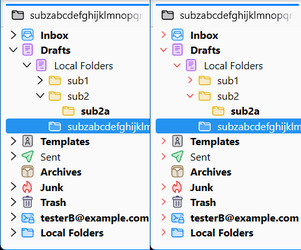
For the twisty icons in the folder pane; these rules appear to work. Although the free source squared "+" & "-" .svg icons I have used as samples are not perfect for the demo, hopefully you can do better with your own icons.

Code:
 /************twisty .icons in folder pane**************************/
 /*twisty icons in folderTree
 "adjust padding according to your own icon"                       
 ********************************************************************/

#folderTree li > div .twisty .twisty-icon{
  color:            transparent !important; /* to hide default twisty icon */
  background-color: transparent !important; /* bg-color if req'd */
  padding-top:      1px         !important;
  padding-right:    0px         !important;
  background-image: url('icons/minus-square-regular.svg') !important;
}
 /*******************************************************************
  twisty icon in folderTree for "collapsed" folders                  
  nb: if the following rule is omitted, then all twistys have the icon
        from the above rule, and which gets rotated automatically.
  *******************************************************************/

#folderTree ul >.collapsed .twisty .twisty-icon {
  color:            transparent !important; /* to hide default twisty icon */
  background-color: transparent !important; /* bg-color if req'd */
  padding-top       0px         !important; /* according to own icon size */ 
  background-image: url('icons/plus-square-regular.svg') !important;  
} 

  /***************************************************************
  tree indentation adjustment-default calc'n is with 16px so to 
  adjust to 18px (add 2px extra)? 
  *****************************************************************/

#folderTree ul {
  --indent: calc((16px + 2px)  *  var(--depth)) !important; /*adjust as needed -see above */
}

 /************twisty .icons in folder pane**************************/

twisty.png
 

My Computer My Computer

At a glance

Win 11 25H2intel i7-870032GbIntel iGPU
OS
Win 11 25H2
Computer type
PC/Desktop
Manufacturer/Model
custom
CPU
intel i7-8700
Motherboard
Asus Z370 TUF Gaming
Memory
32Gb
Graphics Card(s)
Intel iGPU
Sound Card
Realtek
Hard Drives
Samsung
PSU
Corsair
Cooling
Fans
das10
My twisty icons don't work, but if you give me a pointer where you downloaded yours, I can give them a try
 
Last edited:

My Computer My Computer

At a glance

Windows 11Skylake Gen 6
OS
Windows 11
Computer type
Laptop
Manufacturer/Model
Thinkpad L460
CPU
Skylake Gen 6
@click click
The icons you see in das10's shots are native TBird. Have you done something in Settings so that icons don't show up? Try right clicking a folder and check Properties.
 

My Computers My Computers

  • At a glance

    11 Pro 24H2 26100.2454i7-9700 @ 3.00GHz32GBDDR4 @ 2666MHzIntel HD 630 Graphics onboard
    OS
    11 Pro 24H2 26100.2454
    Computer type
    PC/Desktop
    Manufacturer/Model
    Lenovo ThinkCentre M920S SFF
    CPU
    i7-9700 @ 3.00GHz
    Motherboard
    Lenovo 3132
    Memory
    32GBDDR4 @ 2666MHz
    Graphics Card(s)
    Intel HD 630 Graphics onboard
    Sound Card
    Realtek HD Audio
    Monitor(s) Displays
    LG E2442
    Screen Resolution
    1920x1080
    Hard Drives
    1 x Samsung 970 EVO PLUS 500GB NVMe SSD, 1 x WD_BLACK SN770
    250GB NVMe SSD (OS and programs), 1 x WD_BLACK SN770
    500GB NVMe SSD (Data)
    Case
    Lenovo SFF
    Keyboard
    Cherry Stream TKL JK-8600US-2 Wired
    Mouse
    LogiTech M510 wireless
    Internet Speed
    Fast (for fixed wireless!)
    Browser
    Chrome, sometimes Firefox
    Antivirus
    Malwarebytes Premium & Defender (working together beautifully!)
  • At a glance

    11 Pro 24H2 26100.2454i5-8400 @ 2.80GHz32GB DDR4 @ 2600MHzIntel HD 630 Graphics onboard
    Operating System
    11 Pro 24H2 26100.2454
    Computer type
    PC/Desktop
    Manufacturer/Model
    Lenovo ThinkCentre M920S SFF
    CPU
    i5-8400 @ 2.80GHz
    Motherboard
    Lenovo 3132
    Memory
    32GB DDR4 @ 2600MHz
    Graphics card(s)
    Intel HD 630 Graphics onboard
    Sound Card
    Realtek High Definition Audio onboard
    Monitor(s) Displays
    LG FULL HD (1920x1080@59Hz)
    Screen Resolution
    1920 x 1080
    Hard Drives
    1 x Samsung 970 EVO PLUS NVMe; 1 x Samsung 980 NVMe SSD
    Case
    Lenovo Think Centre SFF
    Keyboard
    Cherry Stream TKL JK-8600US-2 Wired
    Mouse
    LogiTech M510 wireless
    Internet Speed
    Fast (for fixed wireless!)
    Browser
    Chrome
    Antivirus
    Malwarebytes Premium and MS Defender, beautiful together
i'm talking about the folder twisty, not the folder icons
 

My Computer My Computer

At a glance

Windows 11Skylake Gen 6
OS
Windows 11
Computer type
Laptop
Manufacturer/Model
Thinkpad L460
CPU
Skylake Gen 6

My Computer My Computer

At a glance

Win 11 25H2intel i7-870032GbIntel iGPU
OS
Win 11 25H2
Computer type
PC/Desktop
Manufacturer/Model
custom
CPU
intel i7-8700
Motherboard
Asus Z370 TUF Gaming
Memory
32Gb
Graphics Card(s)
Intel iGPU
Sound Card
Realtek
Hard Drives
Samsung
PSU
Corsair
Cooling
Fans
Ok your twisty icons work. I tried solid angle-right.svg and angle-down.svg and they show up double. Your icons don't have that problem. The other icons I wanted had the same problem showing double.
2023-09-26_010835.jpg
 
Last edited:

My Computer My Computer

At a glance

Windows 11Skylake Gen 6
OS
Windows 11
Computer type
Laptop
Manufacturer/Model
Thinkpad L460
CPU
Skylake Gen 6
That is because I chose svg's which had square backgrounds, whilst the "angle-right.svg" and "angle-down.svg" you chose don't. If possible, try to change the canvas size of your icon so it has a square aspect ratio ie. don't change the main image of the icon as such, but make the canvas square and the main image is in the centre.

On my System, the twisty icon only occupies around 16px x 16px , and manipulating it using transformations with external icons is a bit difficult (for me at least, as I am no expert in either CSS coding or images).

If all you want to do is manipulate the default twisty, you can color & transform it in place uisng something like this;
Code:
 /************twisty .icons in folder pane**************************/
 /*twisty icons in folderTree
 "adjust padding according to your own icon"                       
 ********************************************************************/

#folderTree li > div .twisty .twisty-icon{
  color:            red !important;
  background-color: transparent !important; /* bg-color if req'd */
  padding-top:      1px             !important;
  padding-right:    0px             !important;
  transform:        scale(0.75,0.75) !important;
}
 /*******************************************************************
  twisty icon in folderTree for "collapsed" folders                  
  nb: if the following rule is omitted, then all twistys have the icon
        from the above rule, and which gets rotated automatically.
  *******************************************************************/

#folderTree ul >.collapsed .twisty .twisty-icon {
  color:            red         !important;
  background-color: transparent !important; /* bg-color if req'd */
  padding-top       0px         !important; /* according to own icon size */ 
  transform: rotate(-90deg) scale(0.75,0.75) !important;
} 

  /***************************************************************
  tree indentation adjustment-default calc'n is with 16px so to 
  adjust to 18px (add 2px extra)? 
  *****************************************************************/

twisty2.png
 

My Computer My Computer

At a glance

Win 11 25H2intel i7-870032GbIntel iGPU
OS
Win 11 25H2
Computer type
PC/Desktop
Manufacturer/Model
custom
CPU
intel i7-8700
Motherboard
Asus Z370 TUF Gaming
Memory
32Gb
Graphics Card(s)
Intel iGPU
Sound Card
Realtek
Hard Drives
Samsung
PSU
Corsair
Cooling
Fans
Well, your expertise is miles better than mine. (y)The smaller size fits much better and I will use that. Thanks again for being so helpful. I still have some more things I would like to change. I hope I'm not being a pain. Can the arrows be made bold? I tried font-weight: bold !important; but that did not work
 

My Computer My Computer

At a glance

Windows 11Skylake Gen 6
OS
Windows 11
Computer type
Laptop
Manufacturer/Model
Thinkpad L460
CPU
Skylake Gen 6
Unfortunately, the default twisty is in svg file format & not a font character, so it does not have a 'boldness' (weight) property.
 
Last edited:

My Computer My Computer

At a glance

Win 11 25H2intel i7-870032GbIntel iGPU
OS
Win 11 25H2
Computer type
PC/Desktop
Manufacturer/Model
custom
CPU
intel i7-8700
Motherboard
Asus Z370 TUF Gaming
Memory
32Gb
Graphics Card(s)
Intel iGPU
Sound Card
Realtek
Hard Drives
Samsung
PSU
Corsair
Cooling
Fans
Ok, next question. :D I want to hide the Forwarded/Replied etc. icons from appearing in the thread pane under the subject column. Is there a way to hide these? it's confusing when you don't know what they mean and you have to go looking for an explanation and later forget again. There are others too that show now and then under subject.

2023-09-26_161629.jpg
2023-09-26_161717.jpg
2023-09-26_164436.jpg
 

My Computer My Computer

At a glance

Windows 11Skylake Gen 6
OS
Windows 11
Computer type
Laptop
Manufacturer/Model
Thinkpad L460
CPU
Skylake Gen 6
Maybe this works for all images which appear within the "Subject" Column (I had to create a test replied message to try it - but probably works on forwarded, redirected as well; also I don't ever recall seeing any other persistent images inside that column, but I may be wrong ).

Code:
/* "all" images (?) which appear in the "Subject" Column */
#threadPane td > div img {
  fill:  transparent !important;
}

(or perhaps change the fill to a less distracting color like lightgrey - which I personally would if I did find them distracting).

update: For the non-persistent new messages indicator (? Golden Star icon) this updated rule should work.
Code:
/* "all" images (?) which appear in the "Subject" Column */
#threadPane td > div img {
  stroke: transparent !important;
  fill:   transparent !important;
}
 
Last edited:

My Computer My Computer

At a glance

Win 11 25H2intel i7-870032GbIntel iGPU
OS
Win 11 25H2
Computer type
PC/Desktop
Manufacturer/Model
custom
CPU
intel i7-8700
Motherboard
Asus Z370 TUF Gaming
Memory
32Gb
Graphics Card(s)
Intel iGPU
Sound Card
Realtek
Hard Drives
Samsung
PSU
Corsair
Cooling
Fans
I never had much use for the subject column indicators and I just as soon not see them. They're gone now. The new indicator still shows when something new arrives, but it's not persistent . Do you know where I might find documentation on #foilderTree , #threadPane, etc. and abreviations such as li, div, td ?
 
Last edited:

My Computer My Computer

At a glance

Windows 11Skylake Gen 6
OS
Windows 11
Computer type
Laptop
Manufacturer/Model
Thinkpad L460
CPU
Skylake Gen 6
For Thunderbird panes use the following page, or use the search at the top of that page. To learn about particular terms like li, div, td etc, use Google to search for the terms like "html li" or "css li" etc.

 
Last edited:

My Computer My Computer

At a glance

Win 11 25H2intel i7-870032GbIntel iGPU
OS
Win 11 25H2
Computer type
PC/Desktop
Manufacturer/Model
custom
CPU
intel i7-8700
Motherboard
Asus Z370 TUF Gaming
Memory
32Gb
Graphics Card(s)
Intel iGPU
Sound Card
Realtek
Hard Drives
Samsung
PSU
Corsair
Cooling
Fans
Has anyone noticed that when scrolling thread items, hover highlighting keeps trying to follow the lines passing by the cursor?

In v102 hover highlighting is hidden/off during scroll . I find it distracting and wonder if there is a way to turn off this behavior.
 

My Computer My Computer

At a glance

Windows 11Skylake Gen 6
OS
Windows 11
Computer type
Laptop
Manufacturer/Model
Thinkpad L460
CPU
Skylake Gen 6
Note: the above doesn't happen when using the scrollbar. Only when scrolling with the mouse wheel or scrollpoint etc.
 

My Computer My Computer

At a glance

Windows 11Skylake Gen 6
OS
Windows 11
Computer type
Laptop
Manufacturer/Model
Thinkpad L460
CPU
Skylake Gen 6
Since the forced update to Supernova i had multiple problems, but i think i resolved them now. Except one thing that's driving me crazy, every time i get a new email.

There is no margin below the messages list anymore. So, it's not clear visually that the lowest message i see is the last in the list. And, it's more difficult to click now, with my settings (compact view, 21px line height).

How can i add back the space at the end of the messages list?
 

My Computer My Computer

At a glance

Windows 10
OS
Windows 10
Ive always seen this thread and wondered, Is this a thread for email enthusiasts?
 

My Computer My Computer

At a glance

11[email protected]Viper Steelseries 32gb@ 3600mhzGigabyte 2070 Super 8GB, +200 core + 600 memory
OS
11
Computer type
PC/Desktop
Manufacturer/Model
Custom
CPU
[email protected]
Motherboard
Gigabyte Gaming X Z490
Memory
Viper Steelseries 32gb@ 3600mhz
Graphics Card(s)
Gigabyte 2070 Super 8GB, +200 core + 600 memory
Monitor(s) Displays
ASUS 4k HDR, Two 1080p Benq and Samsung
Screen Resolution
3840x2160/2560x1440/1920x1080
Hard Drives
Adata XPG SX8200 PRO 1tb
Samsung EVO 870 500GB
PSU
Corsair RX 650
Case
NZXT h510
Cooling
CM HYPER 212 RGB
Keyboard
Razer Ornata Chroma
Mouse
Steelseries Rival 710

Latest Support Threads

Back
Top Bottom