

I downloaded the version from uupdump that was labeled as 23H2, but after installing it, it turned out to be 22H2—is that right?
22631.7584_amd64_pt-br_professional_47b617ee_convert_virtual
I'm using an older PC now, and from what I've researched, the latest unrestricted version of Windows 11 is 23H2. I want to install it and block quality updates so the version doesn't change—is that right? I haven't messed around with this in two years, so I'm a bit out of the loop, haha.
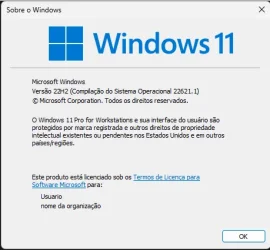
22631.7584_amd64_pt-br_professional_47b617ee_convert_virtual
I'm using an older PC now, and from what I've researched, the latest unrestricted version of Windows 11 is 23H2. I want to install it and block quality updates so the version doesn't change—is that right? I haven't messed around with this in two years, so I'm a bit out of the loop, haha.
- Windows Build/Version
- 22h2
My Computer
At a glance
Windows 10, Pro for Workstationscore 2 duo E74004G DDR2NVIDIA Geforce 6200 TurboCache
- OS
- Windows 10, Pro for Workstations
- Computer type
- PC/Desktop
- Manufacturer/Model
- Custom
- CPU
- core 2 duo E7400
- Motherboard
- MSI G31M3-L V2 (MS-7529)
- Memory
- 4G DDR2
- Graphics Card(s)
- NVIDIA Geforce 6200 TurboCache
- Sound Card
- None
- Monitor(s) Displays
- Philips TV 43PFG5102/78
- Screen Resolution
- 1920x1080
- Hard Drives
- HDD: Old 930gb, Second HDD 698gb
- PSU
- 300W
- Case
- Goldship
- Cooling
- default
- Keyboard
- Exbom
- Mouse
- Exbom
- Internet Speed
- 600mb
- Browser
- Opera
- Antivirus
- Windows Segurity
- Other Info
- I no longer have my old computer—the one with the Ryzen 5500, GeForce 1650 Super, and 16GB of DDR4 3200 MHz RAM.






