Do you mean the thin lightgrey Vertical line (splitter) ? If so try:
Use either the variable var(--sidebar-background) or any specific color which you want.
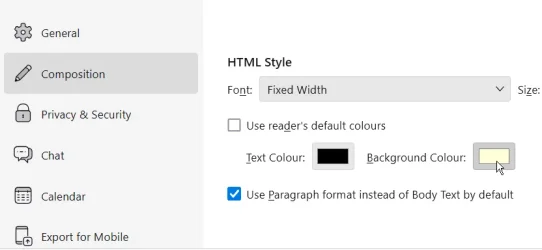
For the Composition Window, try changing the background in Settings > Composition HTML style as shown (untick "Use reader's default colours") and set your own color by clicking on the "Background Color" button:
Code:
/* change color of the folderPane splitter */
#folderPaneSplitter {
border-color:  var(--sidebar-background) !important;
}
Use either the variable var(--sidebar-background) or any specific color which you want.
For the Composition Window, try changing the background in Settings > Composition HTML style as shown (untick "Use reader's default colours") and set your own color by clicking on the "Background Color" button:
My Computer
At a glance
Win 11 25H2intel i7-870032GbIntel iGPU
- OS
- Win 11 25H2
- Computer type
- PC/Desktop
- Manufacturer/Model
- custom
- CPU
- intel i7-8700
- Motherboard
- Asus Z370 TUF Gaming
- Memory
- 32Gb
- Graphics Card(s)
- Intel iGPU
- Sound Card
- Realtek
- Hard Drives
- Samsung
- PSU
- Corsair
- Cooling
- Fans