Thunderbird 115: CSS Customization


there is something else which either doesn't work or I am not using correctly:
CSS:
/* future: before start date, not due today */
/* doesn't work. Affects all not-started-items, not just those with due date */
.calendar-task-tree > treechildren::-moz-tree-cell-text(future) {color:orange!important}

I think this is supposed to style all tasks with a due-date in the the future.
But in my tests, this styles all "unstarted" tasks with or without due-date.

Looking through the source, I figured out how it works:

There are 5 different possible progress states of a task:
  1. future
  2. inprogress: if either condition is met: (has start date OR % completed > 0 OR status = "in process")
  3. completed: if it has the "completed" checkmark in the checkbox
  4. duetoday: due date = today
  5. overdue: due date = in the past
If none of the states from 2-5 apply, then the state is set to "future".
Unfortunately, this includes tasks with AND without due date. So, I still have to figure out how to style them differently.

JavaScript:
  /**
   * This function return the progress state of a task:
   * completed, overdue, duetoday, inprogress, future
   *
   * @param aTask     The task to check.
   * @returns The progress atom.
   */
  getProgressAtom(aTask) {
    let nowdate = new Date();

    if (aTask.recurrenceInfo) {
      return "repeating";
    }

    if (aTask.isCompleted) {
      return "completed";
    }

    if (aTask.dueDate && aTask.dueDate.isValid) {
      if (cal.dtz.dateTimeToJsDate(aTask.dueDate).getTime() < nowdate.getTime()) {
        return "overdue";
      } else if (
        aTask.dueDate.year == nowdate.getFullYear() &&
        aTask.dueDate.month == nowdate.getMonth() &&
        aTask.dueDate.day == nowdate.getDate()
      ) {
        return "duetoday";
      }
    }

    if (
      aTask.entryDate &&
      aTask.entryDate.isValid &&
      cal.dtz.dateTimeToJsDate(aTask.entryDate).getTime() < nowdate.getTime()
    ) {
      return "inprogress";
    }

    return "future";
  },
};
 

My Computer

System One

  • OS
    Wimdows 10
@das10 : Yes, I am currently on Thunderbird 115. But the DOM selectors rarely change.
Limiting styling to only 1 column instead of entire row:
As far as I can tell, it doesn't appear to be possible using CSS.
Re: "to style tasks with a due date differently from tasks without due-date" - Unfortunately couldn't make this work either.

Thunderbird is not exposing any more details about the pseudo classes in the task tree than we already know about from various sources, and the usual methods of using pseudo :is :not etc. is not an option either:(

Normally, all of this should be achievable with CSS. The problem seems to be that the task <tree> is "stored in a different way to other elements":

Styling a Tree

The body of the tree must be styled in a somewhat different way than other elements. This is because the tree body is stored in a different way to other elements. The outer <treechildren> is the only real element in the tree body. The inner elements are just placeholders.
I have read the entire help document, but I don't understand it entirely. Do you understand what they say ?

Here is how the <tree> should apparently look like in the DOM Inspector (Browser Toolbox):
treecol
treechildren

But I still don't know how to apply this knowledge to ...
  • ... limit styles to only 1 column (instead of the entire row)
  • ... style tasks with a due date differently from tasks without due-date
It's a pity that this is badly documented and the DOM Inspector apparently can't see the <treechildren> subnodes (otherwise it would be a walk in the park).

calendar-task-tree.js contains information about the task table:

JavaScript:
  class CalendarTaskTree extends customElements.get("tree") {
    connectedCallback() {
      super.connectedCallback();
      if (this.delayConnectedCallback() || this.hasConnected) {
        return;
      }
      this.hasConnected = true;
      this.appendChild(
        MozXULElement.parseXULToFragment(
          `
          <treecols>
            <treecol is="treecol-image" id="calendar-task-tree-col-completed"
                     class="calendar-task-tree-col-completed"
                     style="min-width: 18px"
                     fixed="true"
                     cycler="true"
                     sortKey="completedDate"
                     itemproperty="completed"
                     closemenu="none"
                     src="chrome://messenger/skin/icons/new/compact/checkbox.svg"
                     label="&calendar.unifinder.tree.done.label;"
                     tooltiptext="&calendar.unifinder.tree.done.tooltip2;"/>
            <splitter class="tree-splitter"/>
            <treecol is="treecol-image" id="calendar-task-tree-col-priority"
                     class="calendar-task-tree-col-priority"
                     style="min-width: 17px"
                     fixed="true"
                     itemproperty="priority"
                     closemenu="none"
                     src="chrome://messenger/skin/icons/new/compact/priority.svg"
                     label="&calendar.unifinder.tree.priority.label;"
                     tooltiptext="&calendar.unifinder.tree.priority.tooltip2;"/>
            <splitter class="tree-splitter"/>
            <treecol class="calendar-task-tree-col-title"
                     itemproperty="title"
                     style="flex: 1 auto"
                     closemenu="none"
                     label="&calendar.unifinder.tree.title.label;"
                     tooltiptext="&calendar.unifinder.tree.title.tooltip2;"/>
            <splitter class="tree-splitter"/>
            <treecol class="calendar-task-tree-col-entrydate"
                     itemproperty="entryDate"
                     style="flex: 1 auto"
                     closemenu="none"
                     label="&calendar.unifinder.tree.startdate.label;"
                     tooltiptext="&calendar.unifinder.tree.startdate.tooltip2;"/>
            <splitter class="tree-splitter"/>
            <treecol class="calendar-task-tree-col-duedate"
                     itemproperty="dueDate"
                     style="flex: 1 auto"
                     closemenu="none"
                     label="&calendar.unifinder.tree.duedate.label;"
                     tooltiptext="&calendar.unifinder.tree.duedate.tooltip2;"/>
            <splitter class="tree-splitter"/>
            <treecol class="calendar-task-tree-col-duration"
                     itemproperty="duration"
                     sortKey="dueDate"
                     style="flex: 1 auto"
                     closemenu="none"
                     label="&calendar.unifinder.tree.duration.label;"
                     tooltiptext="&calendar.unifinder.tree.duration.tooltip2;"/>
            <splitter class="tree-splitter"/>
            <treecol class="calendar-task-tree-col-completeddate"
                     itemproperty="completedDate"
                     style="flex: 1 auto"
                     closemenu="none"
                     label="&calendar.unifinder.tree.completeddate.label;"
                     tooltiptext="&calendar.unifinder.tree.completeddate.tooltip2;"/>
            <splitter class="tree-splitter"/>
            <treecol class="calendar-task-tree-col-percentcomplete"
                     itemproperty="percentComplete"
                     style="flex: 1 auto; min-width: 40px;"
                     closemenu="none"
                     label="&calendar.unifinder.tree.percentcomplete.label;"
                     tooltiptext="&calendar.unifinder.tree.percentcomplete.tooltip2;"/>
            <splitter class="tree-splitter"/>
            <treecol class="calendar-task-tree-col-categories"
                     itemproperty="categories"
                     style="flex: 1 auto"
                     closemenu="none"
                     label="&calendar.unifinder.tree.categories.label;"
                     tooltiptext="&calendar.unifinder.tree.categories.tooltip2;"/>
            <splitter class="tree-splitter"/>
            <treecol class="calendar-task-tree-col-location"
                     itemproperty="location"
                     style="flex: 1 auto"
                     closemenu="none"
                     label="&calendar.unifinder.tree.location.label;"
                     tooltiptext="&calendar.unifinder.tree.location.tooltip2;"/>
            <splitter class="tree-splitter"/>
            <treecol class="calendar-task-tree-col-status"
                     itemproperty="status"
                     style="flex: 1 auto"
                     closemenu="none"
                     label="&calendar.unifinder.tree.status.label;"
                     tooltiptext="&calendar.unifinder.tree.status.tooltip2;"/>
            <splitter class="tree-splitter"/>
            <treecol class="calendar-task-tree-col-calendar"
                     itemproperty="calendar"
                     style="flex: 1 auto"
                     closemenu="none"
                     label="&calendar.unifinder.tree.calendarname.label;"
                     tooltiptext="&calendar.unifinder.tree.calendarname.tooltip2;"/>
          </treecols>
          <treechildren class="calendar-task-treechildren"
                        tooltip="taskTreeTooltip"
                        ondblclick="mTreeView.onDoubleClick(event)"/>
          `,
          ["chrome://calendar/locale/global.dtd", "chrome://calendar/locale/calendar.dtd"]
        )
      );

I tried to build various selectors based on this information, but none worked.

This is as far as I got currently. If I find out more, I'll let you know. Please do the same if you uncover more.
 
Last edited:

My Computer

System One

  • OS
    Wimdows 10
@eleven11
In the js script that you have shown:

Within the <treecols> tag, I note that only the following 2 col identifiers are present. I think these happen to be the only 2 columns where limited sort of customization is possible, and where cells can be co-related to the property of a different column:

treecol is="treecol-image" id="calendar-task-tree-col-completed"
treecol is="treecol-image" id="calendar-task-tree-col-priority"


Those correspond to the Completed checkbox and the Priority Columns.

Within those 2 columns, aside from the priority & completed status you already use, you can, for example customize the background-color for some types of "status" and "categories". However there is no way to customize them with cross-reference to any of the task where the Due Date is blank (even in Sunbird, where a few more styles can be applied to Columnar cells under Category and Status, I personally found it impossible to stylize the Cells with reference to blank Due Dates).

This is just a "rough" concept showing some colorization of those 2 Columns (it looks too busy, but it is just to illustrate the point).

eg: Completed Column cells related to "Category" (Alarms, Anniversary, Birthday, Business) and Status "Cancelled".
Tbird-Completed.webp

eg: Priority Column cells related to some of the "Completed" Status (Cancelled, Completed, In Progress,Overdue).
Tbird-Priority.webp

Basic usage eg: For the Completed Status Column, pair "calendar-task-tree-col-completed" with say "birthday" Category.
or a Status like this:

Code:
.calendar-task-tree > treechildren::-moz-tree-cell(calendar-task-tree-col-completed     birthday) {
  background-color: lightcyan !important;
}

.calendar-task-tree > treechildren::-moz-tree-cell(calendar-task-tree-col-completed     status-cancelled) {
  background-image: repeating-linear-gradient(135deg, #dededeaa 0px, white 2px, #ffaaaacc 3px) !important;
  outline: 1px solid initial !important;
}

Similarly for the Priority Column, pair "calendar-task-tree-col-priority" with a Category Name or a Status like "status-cancelled" or say "overdue" eg:

Code:
.calendar-task-tree > treechildren::-moz-tree-cell(calendar-task-tree-col-priority     status-cancelled) {
  background-image: repeating-linear-gradient(135deg, #dedede88 0px, white 2px, #ffaaaa88 3px) !important;
}

.calendar-task-tree > treechildren::-moz-tree-cell(calendar-task-tree-col-priority     overdue) {
  background-color: yellow !important;
}
 
Last edited:

My Computer

System One

  • OS
    Win 11 25H2
    Computer type
    PC/Desktop
    Manufacturer/Model
    custom
    CPU
    intel i7-8700
    Motherboard
    Asus Z370 TUF Gaming
    Memory
    32Gb
    Graphics Card(s)
    Intel iGPU
    Sound Card
    Realtek
    Hard Drives
    Samsung
    PSU
    Corsair
    Cooling
    Fans
@das10: Wow! Just wow! You are really a genius. It will take me a couple of days to digest this and try to understand everything you did. I will report back once I got the full picture.

In the meanwhile, I wanted to point you to this very helpful post by user "morat" over at mozillazine:
forums.mozillazine.org/viewtopic.php?p=15000853#p15000853

Instructions:
  1. select a row in the task pane
  2. open the error console (CTRL+SHIFT+J)
  3. paste and run the following code by morat:
    JavaScript:
    (function () {  var tree = document.getElementById("calendar-task-tree");
      var row = tree.view.selection.currentIndex;
      var rowProp = tree.view.getRowProperties(row);
      var out = [];
      if (rowProp) out.push("Row Properties: " + rowProp);
      for (var i = 0; i < tree.columns.length; i++) {
        var columnId = tree.columns[i].id;
        var columnHidden = tree.columns[i].element.getAttribute("hidden");
        var columnLabel = tree.columns[i].element.getAttribute("label");
        var col = tree.columns.getColumnAt(i);
        var cellText = tree.view.getCellText(row, col);
        var cellProp = tree.view.getCellProperties(row, col);
        out.push("");
        out.push("Column Number: " + (i + 1));
        if (columnId) out.push("Column Id: " + columnId);
        if (columnHidden) out.push("Column Hidden: " + columnHidden);
        if (columnLabel) out.push("Column Label: " + columnLabel);
        if (cellText) out.push("Cell Text: " + cellText);
        if (cellProp) out.push("Cell Properties: " + cellProp);
      }
      console.log(out.join("\n"));
    })();
 

My Computer

System One

  • OS
    Wimdows 10
@das10: Ok, now I understand what you did. That's really clever and creative. The alarm icon in the priority column is particularly cool. Thanks a bunch for sharing this hack with us!!

I also discovered something new - we can style repeating tasks like this:
CSS:
.calendar-task-tree > treechildren::-moz-tree-image(calendar-task-tree-col-completed, repeating) {
  fill-opacity: 0.6;
}

Meanwhile I tried Morat's javascript code above but I couldn't squeeze out any information we don't already know. Maybe you find something I overlooked ?

@eleven11
there is no way to customize them with cross-reference to any of the task where the Due Date is blank (even in Sunbird, where a few more styles can be applied to Columnar cells under Category and Status, I personally found it impossible to stylize the Cells with reference to blank Due Dates).
Thanks for trying.
Note that I wanted to style tasks which do have a due date (not tasks without due date).
 
Last edited:

My Computer

System One

  • OS
    Wimdows 10
@eleven;
I tried the script by Morat, but like you, I couldn't find any additional information to extract beyond what we already have.
 

My Computer

System One

  • OS
    Win 11 25H2
    Computer type
    PC/Desktop
    Manufacturer/Model
    custom
    CPU
    intel i7-8700
    Motherboard
    Asus Z370 TUF Gaming
    Memory
    32Gb
    Graphics Card(s)
    Intel iGPU
    Sound Card
    Realtek
    Hard Drives
    Samsung
    PSU
    Corsair
    Cooling
    Fans
@das10 : thanks for trying. At least Morat's script gave me a better understanding of what's going on under the hood.
I think for the moment, we have pretty much maxed out the possibilities. But we have really pushed the envelope.
Let's keep each other posted when we find out more.

I am particularly looking out for a way to style tasks with a due date, in case you ever find out how to.

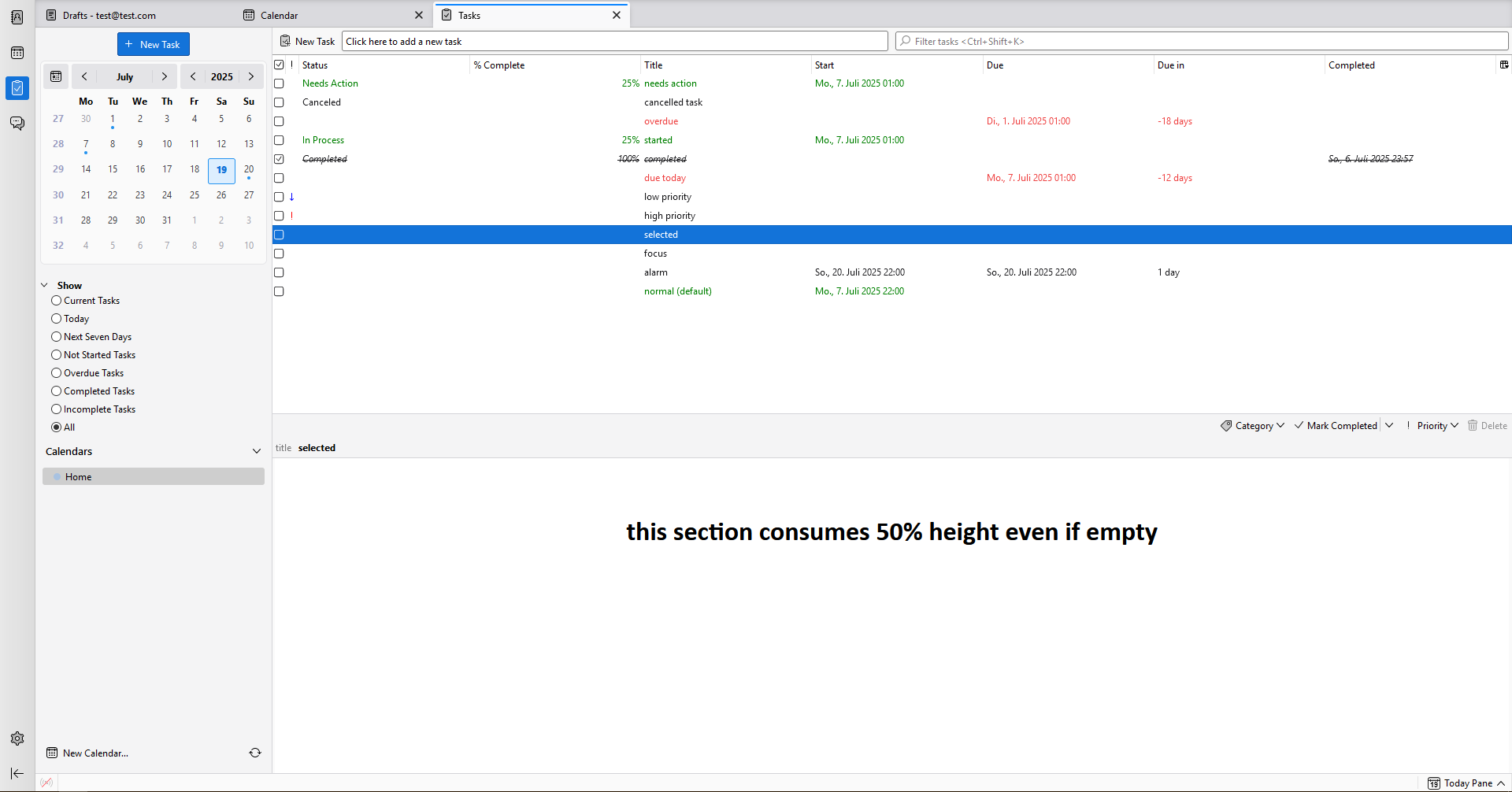
Also, what's quite bothering: When selecting a task, the task details/description frame consumes 50% of the task pane, even if the task has no description at all (description pane is empty). I know I can give the task pane a higher min-height percentage. But the ideal solution would be an "intelligent" solution: The description section should have height: fit-content. I tried all sorts of CSS (with and without AI help) but nothing worked. I think the problem is that there is a flex="1" property in the HTML tag itself. And I don't know how to override this.

In case this also bothers you and you find a solution, please let us know.
Ideally, the description section should expand as much as needed (height: fit-cotent) but as little as needed if it is empty.

hOX1Eum.png
 
Last edited:

My Computer

System One

  • OS
    Wimdows 10
@das10 and everyone:
Here is how my tasks look so far, in case someone needs it.
Update since last screenshot:
  • alarm icon
  • low priority icon (snail)
  • cancelled tasks: checkbox grayed-out + crossed out
task styles.webp

And here is my QuickFilter button style:
quickfilter style.webp

My userChrome.css that includes the styles depcited above:

CSS:
/* ------------------------------ UI ------------------------------- */
#toolbar-menubar {order: -1 !important;} /* place menubar on top */
#spacesToolbar {background-color: #d2d2d2 !important}
#unifiedToolbar {
  background: #F0F0F0  !important;
  max-height:    28px  !important;
  margin:         0px  !important;
  padding-top:    0px  !important;
  padding-bottom: 0px  !important; }

#threadPaneQuickFilterButton[aria-pressed="true"] {background-color:#0FF3!important}
button.check-button[aria-pressed="true"]::before      {background-color:cyan!important; border-color:#007cff82!important}
.toolbarbutton-1:hover {background-color: #CEF!important}
 
/* menubar > * {background-color: yellow!important} */
/* toolbar > * {background-color: cyan!important} */

/* tabs bar */
/* scrollbox, .scrollbox-clip {background: #e2e2e2 !important;} */


/* ------------------------------ FOLDER PANE ------------------------------- */
#folderPane    {background-color: #F0F0F0 !important}

/* hide folder pane unread count */
.unread > .container > .unread-count { display:none !important; }

/* don't bolden folders+subfolders with unread messages */
li[is="folder-tree-row"]:is(.unread),
li[is="folder-tree-row"]:is(.unread) > div > span.name {
  font-weight: normal !important;
}


/* ------------------------------ THREAD PANE ------------------------------- */
/*underline subject lines of ALL collapsed threads */
/*(regardless of whether or not they contain unread messages) */
#threadTree tbody .children.collapsed   :where(td, .subject-line) {text-decoration: underline !important}

/* message row height in Table view */
tr[is="thread-row"] {height: 24px !important}


/* ------------------------------ HEADER PANE ------------------------------- */
/* compact header pane */
.message-header-container {padding-top: 1px !important; padding-bottom: 2px !important;}
.message-header-container, .message-header-extra-container {row-gap: 1px !important;}


/* ----------------------------- CALENDAR ----------------------------- */
.calendar-month-day-box-day-off {background-color: #DFD!important}
.calendar-month-day-box-other-month {background-color:#DDD!important}


/* ------------------------------ TASKS ------------------------------- */
/* progress state of a task: future, inprogress, completed, duetoday, overdue */

#calendar-task-tree {min-height:60% !important}
toolbarbutton#calendar-delete-task-button {visibility:0!important; opacity:0!important; display:none!important}
#task-actions-toolbox {padding-right:10mm!important}
 

/* normal/standard/default tasks */
.calendar-task-tree > treechildren::-moz-tree-cell-text(),
.calendar-task-tree > treechildren::-moz-tree-cell-text(selected,focus)
{color:WindowText!important}


/* future: before start date, not due today */
/* status = "future" if no other status (inprogress, completed, duetoday, overday) applies */
/* affects all unstarted items, wether or not they have a due date. */
.calendar-task-tree > treechildren::-moz-tree-cell-text(future) {color:WindowText!important}


/* has due-date */
/* apparently cannot be styled according to https://forums.mozillazine.org/viewtopic.php?p=15000853#p15000853 */
/* .calendar-task-tree > treechildren::-moz-tree-cell-text[dueDate] {color:orange!important} */


/* started tasks: (has start date OR >0% completed OR status = "in process") */
.calendar-task-tree > treechildren::-moz-tree-cell-text(status-in-process),
.calendar-task-tree > treechildren::-moz-tree-cell-text(inprogress)
{color: blue !important}

/* status = needs action */
.calendar-task-tree > treechildren::-moz-tree-cell-text(status-needs-action) {
  padding-bottom: 0px !important;  /* if padding-bottom is ignored, you can try a negative margin instead: margin-bottom: -1px !important; */
  background-image: repeating-linear-gradient(to right, transparent 0px, transparent 1px, red 1px, red 2px) !important; /* Dotted underline via tiny repeating gradient: */
  background-repeat: repeat-x !important;
  background-size: 100% 1px !important;                 /* height of the “line” is 1px, full width: */
  background-position: 0 calc(100% - 1px) !important;   /* Position it right under the glyphs-play with the vertical offset: */
}

/* due today, not overdue */
.calendar-task-tree > treechildren::-moz-tree-cell-text(duetoday) {background:magenta!important; color:white!important; font-weight:bolder!important}

/* [progress="overdue"] */
.calendar-task-tree > treechildren::-moz-tree-cell-text(overdue) {color:red!important; font-weight:bold}

/* completed */
.calendar-task-tree > treechildren::-moz-tree-cell-text(completed) {color:green!important; font-style:normal!important; text-decoration:none!important}

/* canceled */
#calendar-task-tree treechildren::-moz-tree-cell-text(status-cancelled) {color:gray!important; opacity:0.5!important; text-decoration:line-through!important}
.calendar-task-tree > treechildren::-moz-tree-image(calendar-task-tree-col-completed, status-cancelled) {
background-image: url("data:image/svg+xml;utf8,<svg xmlns='http://www.w3.org/2000/svg'><text x='2' y='15' font-size='13' fill='darkgray'>✘</text></svg>") !important;
opacity:0.2;
}

/* repeating */
.calendar-task-tree > treechildren::-moz-tree-image(calendar-task-tree-col-completed, repeating) {
  fill-opacity: 0.6;
}


/* categories: simply use the category name. All other syntaxes fail. */
/* .calendar-task-tree > treechildren::-moz-tree-cell-text(category-birthday),
.calendar-task-tree > treechildren::-moz-tree-cell-text[categories~="birthday"],
.calendar-task-tree > treechildren::-moz-tree-row(category-birthday),
.calendar-task-tree > treechildren::-moz-tree-row[categories~="birthday"], */
.calendar-task-tree > treechildren::-moz-tree-cell-text(birthday) {font-style:italic; background:#cbf0ff}


/* hover, focus, selected */
.calendar-task-tree > treechildren::-moz-tree-row(hover),
.calendar-task-tree > treechildren::-moz-tree-row(current),
.calendar-task-tree > treechildren::-moz-tree-row(hover,focus) {background:transparent!important; border:1px dotted black !important}
.calendar-task-tree > treechildren::-moz-tree-row(selected)       {background:#eee!important; border:1px dotted black !important; outline:1px dotted black !important}

.calendar-task-tree > treechildren::-moz-tree-row(deselected,focus) {border:1px dotted magenta !important}


/* green checkmark in "completed" checkbox */
/* .calendar-task-tree-col-completed >.treecol-icon,                                     /* in column header */
.calendar-task-tree > treechildren::-moz-tree-image(calendar-task-tree-col-completed)                /* in all rows */
{
  -moz-context-properties: fill, fill-opacity, stroke; /* when Thunderbird or Firefox draws an SVG icon in a tree-cell or button, it may ignore your CSS fill/stroke rules unless you explicitly opt in.  Listing them in -moz-context-properties enables those properties to be taken from your CSS rather than the icon’s own hard-coded color */
  fill: green !important;
  stroke: black !important;
}


/* priority icons */
/* selected */
.calendar-task-tree > treechildren::-moz-tree-image(calendar-task-tree-col-priority, selected) {stroke: var(--calendar-priority-icon-color)}

/*low priority symbol = blue */
.calendar-task-tree > treechildren::-moz-tree-image(calendar-task-tree-col-priority, lowpriority) {
  background-image: url("data:image/svg+xml;utf8,<svg xmlns='http://www.w3.org/2000/svg'><text x='1' y='13' font-size='13'>🐌</text></svg>") !important;
  background-size:       1.5em 1.5em  !important;
  background-position:   center       !important;
  background-repeat:     no-repeat    !important;
  stroke:                transparent  !important;
}
/*high priority symbol = red */
.calendar-task-tree > treechildren::-moz-tree-image(calendar-task-tree-col-priority, highpriority) {
  border: 1px solid red !important;
  border-radius: 1px;
  background: yellow    !important;
  background-image: url("data:image/svg+xml,%3Csvg width='16' height='16' xmlns='http://www.w3.org/2000/svg' fill='Red' fill-opacity='context-fill-opacity'%3E%3Cpath d='M8 2a1 1 0 0 1 1 1v5a1 1 0 1 1-2 0V3a1 1 0 0 1 1-1zm0 11.5a1.5 1.5 0 1 1 0-3 1.5 1.5 0 0 1 0 3z'/%3E%3C/svg%3E") !important;
  background-size:       1.5em 1.5em  !important;
  background-position:   center       !important;
  background-repeat:     no-repeat    !important;
  stroke:                transparent  !important;
}

/* alarm/reminder */
.calendar-task-tree > treechildren::-moz-tree-cell(calendar-task-tree-col-priority, alarm){
  /* text-decoration:underline !important; */
  display: inline-block !important;
  vertical-align: text-bottom;
  background-image: url("data:image/svg+xml;utf8,<svg xmlns='http://www.w3.org/2000/svg'><text x='0' y='14' font-size='14' fill='red'>⏰</text></svg>") !important; /* !important required to over-ride the background-image used for "needs-action" */
  background-size:      contain   !important;
  background-repeat:    no-repeat !important;
  margin-inline-end:    0         !important;
  padding-inline-start: 1.7em     !important;
}

 

My Computer

System One

  • OS
    Wimdows 10
@das10: hello. Any idea how to expand the task description section only as much as needed (height:fit-content) ?
 

My Computer

System One

  • OS
    Wimdows 10
I haven't found it possible to "auto-expand" that area according to its content.
 

My Computer

System One

  • OS
    Win 11 25H2
    Computer type
    PC/Desktop
    Manufacturer/Model
    custom
    CPU
    intel i7-8700
    Motherboard
    Asus Z370 TUF Gaming
    Memory
    32Gb
    Graphics Card(s)
    Intel iGPU
    Sound Card
    Realtek
    Hard Drives
    Samsung
    PSU
    Corsair
    Cooling
    Fans
Recently I noticed that the font for thread pane items is now darker than the folder pane font. Sometimes, when opening Thunderbird, you can see it changing from normal to the darker shade. This started happening in later versions of 128 ESR. I'm now using 140 ESR. Any suggestions as to what I can try to have the thread pane not do this?
 

My Computer

System One

  • OS
    Windows 11
    Computer type
    Laptop
    Manufacturer/Model
    Thinkpad L460
    CPU
    Skylake Gen 6
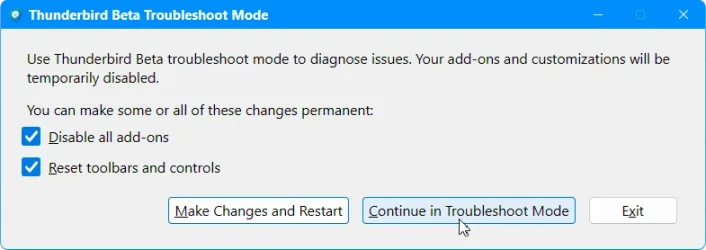
I cannot think of anything in particular. But if you use any add-ons and/or .CSS cusomizations, then have you tried the Troubleshoot mode to see if they might be causing the issue?

The Troubleshoot mode is only temporary (it will temporarily disable any add-ons, any .CSS customizations etc.), and will not make any permanent changes unless you specifically ask it to.

You can find more information about the mode here:

Note: Make sure to select the "Continue in Troubleshoot Mode", when you start Thunderbird in that mode, and get the Safe Mode Dialog.
Troubleshoot_Tbird.webp
 

My Computer

System One

  • OS
    Win 11 25H2
    Computer type
    PC/Desktop
    Manufacturer/Model
    custom
    CPU
    intel i7-8700
    Motherboard
    Asus Z370 TUF Gaming
    Memory
    32Gb
    Graphics Card(s)
    Intel iGPU
    Sound Card
    Realtek
    Hard Drives
    Samsung
    PSU
    Corsair
    Cooling
    Fans
Thanks das10, I found a work-around for the problem which I added in the thread pane section of my css
#threadTree tbody { font-family: Helvetica !important;} font-weight: normal !important; }
even though I had * font-family: Helvetica, sans-serif, Arial, Monospace !important; set globally

I came across another problem though. There's always something not working when going from one ESR to another.:(
This time the background color for received messages doesn't change to the color I use for composition. I can't find a
setting to change this. Fonts and Colors no longer exists in the General Section. It's now called Language and Fonts.(n)
 
Last edited:

My Computer

System One

  • OS
    Windows 11
    Computer type
    Laptop
    Manufacturer/Model
    Thinkpad L460
    CPU
    Skylake Gen 6
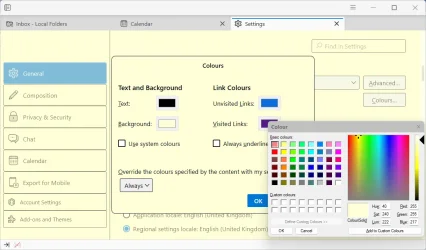
I presume you mean this old General Setting?

Tbird Fonts & Colors.webp


I had never noticed that it is missing in the newer Thunerbird Settings. It appears to have been removed. But you can try the equivalent settings in the "Advanced Preferences" (You'll find its button at the bottom of General Settings - it is the equivalent of about:config which you also have in Firefox).

Code:
browser.display.background_color       set your b/g color in Hex format (e.g., #F0F0F0)
browser.display.document_color_use     set to 2 (always use your colors)
browser.display.foreground_color       set your f/g color (ie. text) in Hex format (eg, #303030)
browser.display.use_system_colors      set/toggle to false

Tbird_adv_pref.webp
(pn: showing colors for my own Light theme - as you can see there are equivalent b/g f/g colors for Dark theme).
 

My Computer

System One

  • OS
    Win 11 25H2
    Computer type
    PC/Desktop
    Manufacturer/Model
    custom
    CPU
    intel i7-8700
    Motherboard
    Asus Z370 TUF Gaming
    Memory
    32Gb
    Graphics Card(s)
    Intel iGPU
    Sound Card
    Realtek
    Hard Drives
    Samsung
    PSU
    Corsair
    Cooling
    Fans
Do you view emails in plain text.? The only way I know of, of how to set the background of the message pane alone is to use a userContent.css file. And that only affects the color when messages are viewed in plain text (if viewed as html, the color does not apply to the main content of the message).
 

My Computer

System One

  • OS
    Win 11 25H2
    Computer type
    PC/Desktop
    Manufacturer/Model
    custom
    CPU
    intel i7-8700
    Motherboard
    Asus Z370 TUF Gaming
    Memory
    32Gb
    Graphics Card(s)
    Intel iGPU
    Sound Card
    Realtek
    Hard Drives
    Samsung
    PSU
    Corsair
    Cooling
    Fans
Yes, plain text. Actually Original HTML is checked, but I also get text only messages too, but they are now dislpaying in white instead of #FFFFFC
 
Last edited:

My Computer

System One

  • OS
    Windows 11
    Computer type
    Laptop
    Manufacturer/Model
    Thinkpad L460
    CPU
    Skylake Gen 6
Make a userContent.css file (in same folder as userChrome.css file) and try something like:
Code:
body {
    background-color: #fffee0 !important;
}

Sorry! That also changes the b/g colors in Settings, Addresses, &c.
------------

This in userContent.css changes the b/g of the text block/s only and the outer padding is still not changed :(
Code:
/* background for View messages as Plain Text */
@namespace url("http://www.w3.org/1999/xhtml");
.moz-text-plain {
  & pre {
    background-color: #ffffe0 !important;
  }
}
 
Last edited:

My Computer

System One

  • OS
    Win 11 25H2
    Computer type
    PC/Desktop
    Manufacturer/Model
    custom
    CPU
    intel i7-8700
    Motherboard
    Asus Z370 TUF Gaming
    Memory
    32Gb
    Graphics Card(s)
    Intel iGPU
    Sound Card
    Realtek
    Hard Drives
    Samsung
    PSU
    Corsair
    Cooling
    Fans
I can live with that. Thanks. I find it strange that the padding is treated differently.
What does the & pre do?

Also, can this be applied to html text. I get a lot of files treated as html, but only contains text on a white background instead of the intended color above
 
Last edited:

My Computer

System One

  • OS
    Windows 11
    Computer type
    Laptop
    Manufacturer/Model
    Thinkpad L460
    CPU
    Skylake Gen 6
That code is from SearchFox:

line 71:

As I couldn't test the userContent.css live using the Browser Toolbox (whether it appears in the Toolbox Style sheets is very much hit & miss, unlike userChrome.css which always appears), I used the code from the above page when testing.

For, emails sent as html, I find that the same code applies to some messages only, and in some it has no effect at all. The message area appears to be protected/sandboxed and it is difficult to target the message area as a whole.
 
Last edited:

My Computer

System One

  • OS
    Win 11 25H2
    Computer type
    PC/Desktop
    Manufacturer/Model
    custom
    CPU
    intel i7-8700
    Motherboard
    Asus Z370 TUF Gaming
    Memory
    32Gb
    Graphics Card(s)
    Intel iGPU
    Sound Card
    Realtek
    Hard Drives
    Samsung
    PSU
    Corsair
    Cooling
    Fans
Back
Top Bottom