

Gorlash
Active member
- Local time
- 11:20 AM
- Posts
- 9
- OS
- Windows 11
I am using Thunderbird beta V149.0b1 ...
I use chrome/userChrome.css to set colors for the file and folder lists in TBird, but after a recent update, that code stopped working.
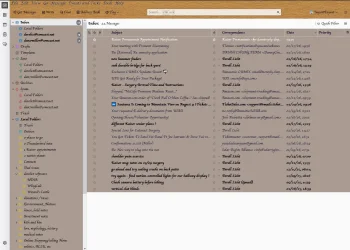
So I found a thread here from 2024, where a user named @das10 gave some excellent examples of how to properly use that file for setting colors, fonts, and more within Thunderbird... that is working *beautifully* for me... but one element is not getting background color set; this is visible in the attached image.
Note that when the messages listed in the Messages pane (actually called the Threads pane), do not fill the window, we get a blank space on the bottom that does not pick up the background color for that window.
Does @das10 or anyone else, know how to set the background for that open space???
I use chrome/userChrome.css to set colors for the file and folder lists in TBird, but after a recent update, that code stopped working.
So I found a thread here from 2024, where a user named @das10 gave some excellent examples of how to properly use that file for setting colors, fonts, and more within Thunderbird... that is working *beautifully* for me... but one element is not getting background color set; this is visible in the attached image.
Note that when the messages listed in the Messages pane (actually called the Threads pane), do not fill the window, we get a blank space on the bottom that does not pick up the background color for that window.
Does @das10 or anyone else, know how to set the background for that open space???
Attachments
My Computer
At a glance
Windows 11Core i7
- OS
- Windows 11
- Computer type
- Laptop
- Manufacturer/Model
- Acer
- CPU
- Core i7






