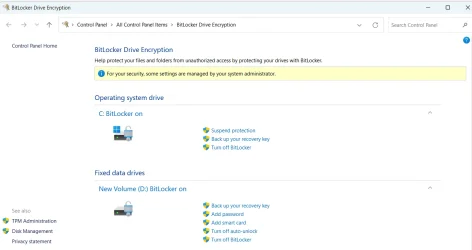
I'm very concerned about my backup images. I declined bitlocker while trying to backup an image. seemed to be the only way I could get it to work. I'm worried if I crash,my backup images might not be any good. If someone could tell me what I should do I'd sure be greatful. Also, if I need to enable bitlocker again in Macrium, I have no Idea how to do it. Would I be better off to disable bitlocker in win 11 pro? Thanks for all help!
My Computer
At a glance
Windows 11 proAMD Ryzen 7 5700XG.SKILL Ripjaws V Series (Intel XMP) DDR4 RAM...ASUS Dual GeForce RTX™ 4060 White Edition
OS
Windows 11 pro
Computer type
PC/Desktop
Manufacturer/Model
custom build
CPU
AMD Ryzen 7 5700X
Motherboard
AMD ROG STRIX B550-F
Memory
G.SKILL Ripjaws V Series (Intel XMP) DDR4 RAM 32GB (2x16GB)
Graphics Card(s)
ASUS Dual GeForce RTX™ 4060 White Edition
Sound Card
on-board
Monitor(s) Displays
SAMSUNG 32-Inch Odyssey G50D Series
Screen Resolution
2560 x 1440
Hard Drives
Samsung 990 EVO Plus 1TB, ssd INTEL SSD 730 series 240 GB, and Samsung 840 Evo ssd 500 GB.
PSU
CORSAIR - RMe Series 1000W 80 PLUS Gold Fully Modular ATX Power Supply
Case
Antec 900 Nine Hundred ATX Mid Tower Computer Gaming Case
Cooling
ID-COOLING SE-214-XT Black CPU Cooler All-Black Layout
Is Bitlocker really currently activated - Settings > Privacy & Security > Device Encryption. Also check Menu > Windows Tools > Control Panel > Bitlocker Drive Encryption
Do you have a real need for Bitlocker? Consider whether any contents of your device that do actually require that type of security might be better off stored elsewhere so you can do without Bitlocker?
General comment, not directed at OP ... I'm always a bit perplexed at the need for securing a whole device just for a handful of bank statements, highly personal documents, etc, if in fact they exist at all. I frequently find that the reason for Bitlocker is simply because ..
- Windows said so
- everyone else does it
- I don't want my (inconsequential files) stolen
- protects from accidental deletions (True! I have seen this)
- it's trendy to be able to show off your technical prowess with "Oh yeh, I've got my computer Bitlockered"
I clicked to turn off bitlocker off but, it said decrypting would take a long time are you sure so I canceled. I just want to be sure if I crash, my Macrium backups are going to work. I don't want it to fail because of bitlocker.
My Computer
At a glance
Windows 11 proAMD Ryzen 7 5700XG.SKILL Ripjaws V Series (Intel XMP) DDR4 RAM...ASUS Dual GeForce RTX™ 4060 White Edition
OS
Windows 11 pro
Computer type
PC/Desktop
Manufacturer/Model
custom build
CPU
AMD Ryzen 7 5700X
Motherboard
AMD ROG STRIX B550-F
Memory
G.SKILL Ripjaws V Series (Intel XMP) DDR4 RAM 32GB (2x16GB)
Graphics Card(s)
ASUS Dual GeForce RTX™ 4060 White Edition
Sound Card
on-board
Monitor(s) Displays
SAMSUNG 32-Inch Odyssey G50D Series
Screen Resolution
2560 x 1440
Hard Drives
Samsung 990 EVO Plus 1TB, ssd INTEL SSD 730 series 240 GB, and Samsung 840 Evo ssd 500 GB.
PSU
CORSAIR - RMe Series 1000W 80 PLUS Gold Fully Modular ATX Power Supply
Case
Antec 900 Nine Hundred ATX Mid Tower Computer Gaming Case
Cooling
ID-COOLING SE-214-XT Black CPU Cooler All-Black Layout
That's just Window's best guess, it may, it may not. Depends on how much is on your device.
If you don't think you really need it, then remove it
Create a backup image of your system (Macrium Reflect freeware version from majorgeeks, and/or AOMEI Backupper freeware version)
Wait until you won't need the device (even though message says you can still use it during decryption), run the decryption and go outside and play in the park (or just let in run overnight). There's no need to sit there and watch it, you'll go spare.
I got a new Notebook in Oct. with Wi11 Home, set up then updated to 23H2, rebooted and got 24H2 which automatically set Bitlocker encryption. I used the PowerShell script on this page to turn it Off, no problem: