Witterings
Member
- Local time
- 7:11 AM
- Posts
- 36
- OS
- Windows 11
Is there any way BitLocker can be set to ask for a login if I try and access a folder on the encrypted drive?
I'm using a local account as opposed to Microsoft account, I've installed a 2nd drive in my PC which I've switched on BitLocker for and use that for work files.
I have a number of shortcuts on my desktop to folders on the drive and if I haven't previously unlocked it and double click on any of them I get a "Drive or network connection is unavailable" message.
If I go into This PC and double click the drive, it then asks for my password as it should and the folder shortcuts all work after that until the machine's rebooted.
I know it's a 1st world issue but it's something I do a lot and also try to navigate to the folder to attach documents to e-mails, if there was some way to trigger the login request when trying to access the folder would be awful useful.
Any help much appreciated.
I'm using a local account as opposed to Microsoft account, I've installed a 2nd drive in my PC which I've switched on BitLocker for and use that for work files.
I have a number of shortcuts on my desktop to folders on the drive and if I haven't previously unlocked it and double click on any of them I get a "Drive or network connection is unavailable" message.
If I go into This PC and double click the drive, it then asks for my password as it should and the folder shortcuts all work after that until the machine's rebooted.
I know it's a 1st world issue but it's something I do a lot and also try to navigate to the folder to attach documents to e-mails, if there was some way to trigger the login request when trying to access the folder would be awful useful.
Any help much appreciated.
My Computers
-
At a glance
Windows 11Intel(R) Core(TM) Ultra 7 258V (2.20 GHz)32gb- OS
- Windows 11
- Computer type
- Laptop
- Manufacturer/Model
- Lenovo Yoga 7 Gen10
- CPU
- Intel(R) Core(TM) Ultra 7 258V (2.20 GHz)
- Memory
- 32gb
- Hard Drives
- 1tb
-
At a glance
Windows 11 ProIntel i7Currently 16gb ... may upgrade to 32gb+- Operating System
- Windows 11 Pro
- Computer type
- PC/Desktop
- Manufacturer/Model
- Dell Optiplex 7090
- CPU
- Intel i7
- Memory
- Currently 16gb ... may upgrade to 32gb+
- Hard Drives
- NVME 512gb
- Internet Speed
- 1tb
- Browser
- Chrome
- Antivirus
- Windows Defender

 Step 2: Create an Unlock Script
 Script:
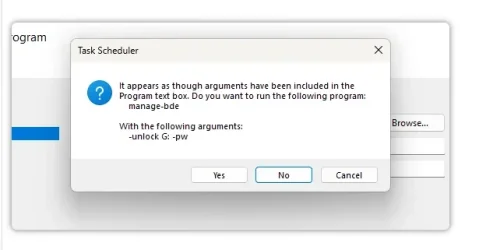
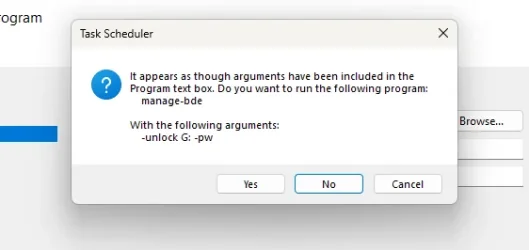
 This will trigger Windows to prompt for the password if G: is locked.
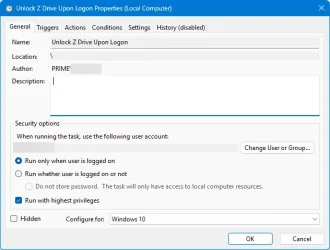
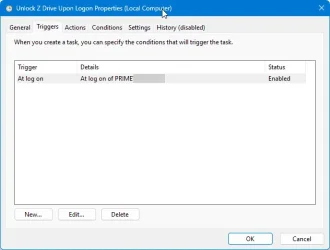
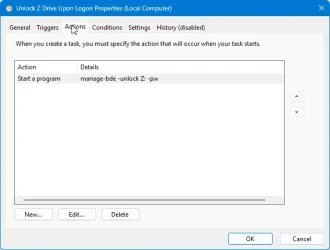
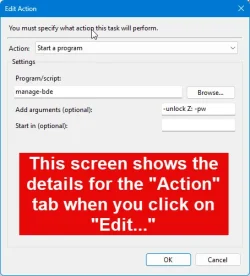
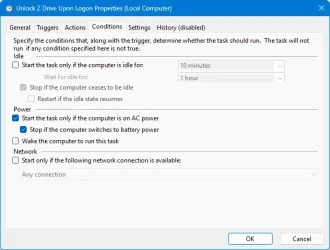
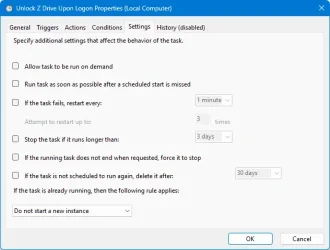
 Step 3: Create a Scheduled Task
 Result: