Trying to enable TPM 2.0


@shanay123


Get and install the latest chipset drivers...here...


In the drop down, choose: chipsets ...then choose AM4, ...then choose X570
Then click Submit and download the Windows 11 version

The version number should be: 7.06.02.123


The chipset drivers are a lot less dangerous. So do them first. :-)
 

My Computers

System One System Two

  • OS
    Win 11 Home ♦♦♦26200.8655 ♦♦♦♦♦♦♦25H2
    Computer type
    PC/Desktop
    Manufacturer/Model
    Built by Ghot® [May 2020]
    CPU
    AMD Ryzen 7 3700X
    Motherboard
    Asus Pro WS X570-ACE (BIOS 5302)
    Memory
    G.Skill (F4-3200C14D-16GTZKW)
    Graphics Card(s)
    EVGA RTX 2070 (08G-P4-2171-KR)
    Sound Card
    Realtek ALC1220P / ALC S1220A
    Monitor(s) Displays
    Dell U3011 30"
    Screen Resolution
    2560 x 1600
    Hard Drives
    2x Samsung 860 EVO 500GB,
    WD 4TB Black FZBX - SATA III,
    WD 8TB Black FZBX - SATA III,
    DRW-24B1ST CD/DVD Burner
    PSU
    PC Power & Cooling 750W Quad EPS12V
    Case
    Cooler Master ATCS 840 Tower
    Cooling
    CM Hyper 212 EVO (push/pull)
    Keyboard
    Ducky DK9008 Shine II Blue LED
    Mouse
    Logitech Optical M-100
    Internet Speed
    300/300
    Browser
    Firefox (latest)
    Antivirus
    Bitdefender Total Security
    Other Info
    Speakers: Klipsch Pro Media 2.1
  • Operating System
    Windows XP Pro 32bit w/SP3
    Computer type
    PC/Desktop
    Manufacturer/Model
    Built by Ghot® (not in use)
    CPU
    AMD Athlon 64 X2 5000+ (OC'd @ 3.2Ghz)
    Motherboard
    ASUS M2N32-SLI Deluxe Wireless Edition
    Memory
    TWIN2X2048-6400C4DHX (2 x 1GB, DDR2 800)
    Graphics card(s)
    EVGA 256-P2-N758-TR GeForce 8600GT SSC
    Sound Card
    Onboard
    Monitor(s) Displays
    ViewSonic G90FB Black 19" Professional (CRT)
    Screen Resolution
    up to 2048 x 1536
    Hard Drives
    WD 36GB 10,000rpm Raptor SATA
    Seagate 80GB 7200rpm SATA
    Lite-On LTR-52246S CD/RW
    Lite-On LH-18A1P CD/DVD Burner
    PSU
    PC Power & Cooling Silencer 750 Quad EPS12V
    Case
    Generic Beige case, 80mm fans
    Cooling
    ZALMAN 9500A 92mm CPU Cooler
    Keyboard
    Logitech Classic Keybooard 200
    Mouse
    Logitech Optical M-BT96a
    Internet Speed
    300/300
    Browser
    Firefox 3.x ??
    Antivirus
    Symantec (Norton)
    Other Info
    Still assembled, still runs. Haven't turned it on for 15 years?

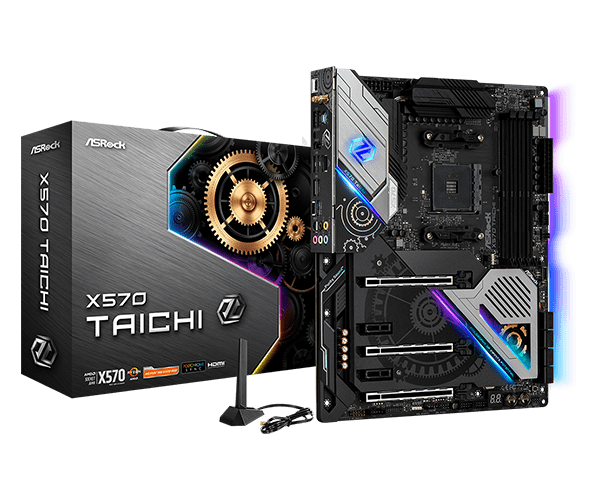
X570 Taichi​


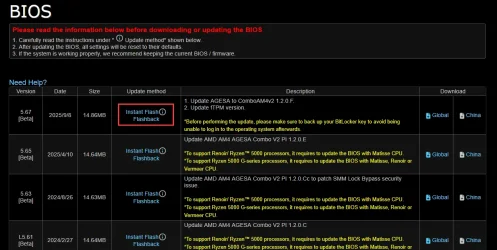
5.67
[Beta]
1. Update AGESA to ComboAM4v2 1.2.0.F.
2. Update fTPM version.

go with that
 

My Computers

System One System Two

  • OS
    Windows 11 Pro latest
    Computer type
    PC/Desktop
    CPU
    AMD Ryzen 5 5700x
    Motherboard
    Msi b550 gaming gen3
    Memory
    32 gb 3200 mhz xmp (4x8)
    Graphics Card(s)
    msi rtx3060 8gb
    Sound Card
    Audigy RX
    Monitor(s) Displays
    Philips 222V8LA/00
    Screen Resolution
    1980x1080
    Hard Drives
    MX500 Crucial
    PSU
    corsair cv 750
    Case
    q-tech
    Cooling
    amd wraith stealth
    Keyboard
    k81 gigabyte force
    Mouse
    zeroground daito
    Internet Speed
    100-10
    Browser
    Mozilla
    Antivirus
    Windows defender
  • Operating System
    windows 11 pro latest
    Computer type
    Laptop
    Manufacturer/Model
    Lenovo T420
    CPU
    i5-2520M
    Memory
    8Gb ddr3 1333 mhz
    Graphics card(s)
    hd3000
    Sound Card
    on board
    Screen Resolution
    1366x768
    Hard Drives
    Team group lite 3d 240gb
    Internet Speed
    100-10
    Antivirus
    defender

My Computer

System One

  • OS
    Windows 10 Pro
    Computer type
    PC/Desktop
    CPU
    AMD Ryzen 7 3700x 8-Core 3.6 GHz
    Motherboard
    ASRock X570 Taichi
    Memory
    G.SKILL TridentZ RGB 3200MHz (max speed) 16GB (2x8GB)
    Graphics Card(s)
    NVIDIA GeForce RTX 3070
    Monitor(s) Displays
    1
    Screen Resolution
    2560x1440p (32 bit) (144Hz)
    Hard Drives
    Seagate Firecuda 520 2.0 TB
    PSU
    Seasonic FOCUS GM-850W Gold
    Case
    NZXT H510 Elite (White)
    Cooling
    NZXT Kraken X63

X570 Taichi​


5.67
[Beta]
1. Update AGESA to ComboAM4v2 1.2.0.F.
2. Update fTPM version.

go with that
@Ghot should I do this?
 

My Computer

System One

  • OS
    Windows 10 Pro
    Computer type
    PC/Desktop
    CPU
    AMD Ryzen 7 3700x 8-Core 3.6 GHz
    Motherboard
    ASRock X570 Taichi
    Memory
    G.SKILL TridentZ RGB 3200MHz (max speed) 16GB (2x8GB)
    Graphics Card(s)
    NVIDIA GeForce RTX 3070
    Monitor(s) Displays
    1
    Screen Resolution
    2560x1440p (32 bit) (144Hz)
    Hard Drives
    Seagate Firecuda 520 2.0 TB
    PSU
    Seasonic FOCUS GM-850W Gold
    Case
    NZXT H510 Elite (White)
    Cooling
    NZXT Kraken X63
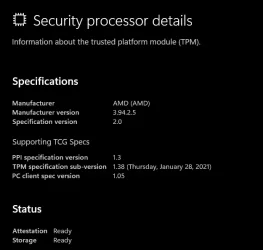
Tpm is not work well in am4 socket gigabyte asrock msi and asus released bios to fix this is the version with ftpm firmware 3.94.2.5

In windows security what version your tpm has?

If you not have this version you keep cycling without solution
 

My Computers

System One System Two

  • OS
    Windows 11 Pro latest
    Computer type
    PC/Desktop
    CPU
    AMD Ryzen 5 5700x
    Motherboard
    Msi b550 gaming gen3
    Memory
    32 gb 3200 mhz xmp (4x8)
    Graphics Card(s)
    msi rtx3060 8gb
    Sound Card
    Audigy RX
    Monitor(s) Displays
    Philips 222V8LA/00
    Screen Resolution
    1980x1080
    Hard Drives
    MX500 Crucial
    PSU
    corsair cv 750
    Case
    q-tech
    Cooling
    amd wraith stealth
    Keyboard
    k81 gigabyte force
    Mouse
    zeroground daito
    Internet Speed
    100-10
    Browser
    Mozilla
    Antivirus
    Windows defender
  • Operating System
    windows 11 pro latest
    Computer type
    Laptop
    Manufacturer/Model
    Lenovo T420
    CPU
    i5-2520M
    Memory
    8Gb ddr3 1333 mhz
    Graphics card(s)
    hd3000
    Sound Card
    on board
    Screen Resolution
    1366x768
    Hard Drives
    Team group lite 3d 240gb
    Internet Speed
    100-10
    Antivirus
    defender
@Ghot should I do this?

The 4.60 BIOS, turns on AMD fTPM by default.
But @boombastik is correct... AsRock updated the fTPM in the beta version 5.67


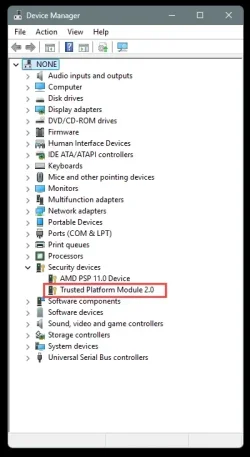
Check Device Manager again... if it still doen'st show AMD fTPM 2.0 then....

Go for it.
There's two ways to flash the BIOS... Instant Flash and Flashback.
Clicking on either of those words will download a PDF file with directions on how to flash the BIOS.
 

My Computers

System One System Two

  • OS
    Win 11 Home ♦♦♦26200.8655 ♦♦♦♦♦♦♦25H2
    Computer type
    PC/Desktop
    Manufacturer/Model
    Built by Ghot® [May 2020]
    CPU
    AMD Ryzen 7 3700X
    Motherboard
    Asus Pro WS X570-ACE (BIOS 5302)
    Memory
    G.Skill (F4-3200C14D-16GTZKW)
    Graphics Card(s)
    EVGA RTX 2070 (08G-P4-2171-KR)
    Sound Card
    Realtek ALC1220P / ALC S1220A
    Monitor(s) Displays
    Dell U3011 30"
    Screen Resolution
    2560 x 1600
    Hard Drives
    2x Samsung 860 EVO 500GB,
    WD 4TB Black FZBX - SATA III,
    WD 8TB Black FZBX - SATA III,
    DRW-24B1ST CD/DVD Burner
    PSU
    PC Power & Cooling 750W Quad EPS12V
    Case
    Cooler Master ATCS 840 Tower
    Cooling
    CM Hyper 212 EVO (push/pull)
    Keyboard
    Ducky DK9008 Shine II Blue LED
    Mouse
    Logitech Optical M-100
    Internet Speed
    300/300
    Browser
    Firefox (latest)
    Antivirus
    Bitdefender Total Security
    Other Info
    Speakers: Klipsch Pro Media 2.1
  • Operating System
    Windows XP Pro 32bit w/SP3
    Computer type
    PC/Desktop
    Manufacturer/Model
    Built by Ghot® (not in use)
    CPU
    AMD Athlon 64 X2 5000+ (OC'd @ 3.2Ghz)
    Motherboard
    ASUS M2N32-SLI Deluxe Wireless Edition
    Memory
    TWIN2X2048-6400C4DHX (2 x 1GB, DDR2 800)
    Graphics card(s)
    EVGA 256-P2-N758-TR GeForce 8600GT SSC
    Sound Card
    Onboard
    Monitor(s) Displays
    ViewSonic G90FB Black 19" Professional (CRT)
    Screen Resolution
    up to 2048 x 1536
    Hard Drives
    WD 36GB 10,000rpm Raptor SATA
    Seagate 80GB 7200rpm SATA
    Lite-On LTR-52246S CD/RW
    Lite-On LH-18A1P CD/DVD Burner
    PSU
    PC Power & Cooling Silencer 750 Quad EPS12V
    Case
    Generic Beige case, 80mm fans
    Cooling
    ZALMAN 9500A 92mm CPU Cooler
    Keyboard
    Logitech Classic Keybooard 200
    Mouse
    Logitech Optical M-BT96a
    Internet Speed
    300/300
    Browser
    Firefox 3.x ??
    Antivirus
    Symantec (Norton)
    Other Info
    Still assembled, still runs. Haven't turned it on for 15 years?
Tpm is not work well in am4 socket gigabyte asrock msi and asus released bios to fix this is the version with ftpm firmware 3.94.2.5

In windows security what version your tpm has?

If you not have this version you keep cycling without solution
AMD PSP 11.0 Device
 

My Computer

System One

  • OS
    Windows 10 Pro
    Computer type
    PC/Desktop
    CPU
    AMD Ryzen 7 3700x 8-Core 3.6 GHz
    Motherboard
    ASRock X570 Taichi
    Memory
    G.SKILL TridentZ RGB 3200MHz (max speed) 16GB (2x8GB)
    Graphics Card(s)
    NVIDIA GeForce RTX 3070
    Monitor(s) Displays
    1
    Screen Resolution
    2560x1440p (32 bit) (144Hz)
    Hard Drives
    Seagate Firecuda 520 2.0 TB
    PSU
    Seasonic FOCUS GM-850W Gold
    Case
    NZXT H510 Elite (White)
    Cooling
    NZXT Kraken X63
kjZmDbi.webp
 

My Computers

System One System Two

  • OS
    Windows 11 Pro latest
    Computer type
    PC/Desktop
    CPU
    AMD Ryzen 5 5700x
    Motherboard
    Msi b550 gaming gen3
    Memory
    32 gb 3200 mhz xmp (4x8)
    Graphics Card(s)
    msi rtx3060 8gb
    Sound Card
    Audigy RX
    Monitor(s) Displays
    Philips 222V8LA/00
    Screen Resolution
    1980x1080
    Hard Drives
    MX500 Crucial
    PSU
    corsair cv 750
    Case
    q-tech
    Cooling
    amd wraith stealth
    Keyboard
    k81 gigabyte force
    Mouse
    zeroground daito
    Internet Speed
    100-10
    Browser
    Mozilla
    Antivirus
    Windows defender
  • Operating System
    windows 11 pro latest
    Computer type
    Laptop
    Manufacturer/Model
    Lenovo T420
    CPU
    i5-2520M
    Memory
    8Gb ddr3 1333 mhz
    Graphics card(s)
    hd3000
    Sound Card
    on board
    Screen Resolution
    1366x768
    Hard Drives
    Team group lite 3d 240gb
    Internet Speed
    100-10
    Antivirus
    defender

My Computers

System One System Two

  • OS
    Win 11 Home ♦♦♦26200.8655 ♦♦♦♦♦♦♦25H2
    Computer type
    PC/Desktop
    Manufacturer/Model
    Built by Ghot® [May 2020]
    CPU
    AMD Ryzen 7 3700X
    Motherboard
    Asus Pro WS X570-ACE (BIOS 5302)
    Memory
    G.Skill (F4-3200C14D-16GTZKW)
    Graphics Card(s)
    EVGA RTX 2070 (08G-P4-2171-KR)
    Sound Card
    Realtek ALC1220P / ALC S1220A
    Monitor(s) Displays
    Dell U3011 30"
    Screen Resolution
    2560 x 1600
    Hard Drives
    2x Samsung 860 EVO 500GB,
    WD 4TB Black FZBX - SATA III,
    WD 8TB Black FZBX - SATA III,
    DRW-24B1ST CD/DVD Burner
    PSU
    PC Power & Cooling 750W Quad EPS12V
    Case
    Cooler Master ATCS 840 Tower
    Cooling
    CM Hyper 212 EVO (push/pull)
    Keyboard
    Ducky DK9008 Shine II Blue LED
    Mouse
    Logitech Optical M-100
    Internet Speed
    300/300
    Browser
    Firefox (latest)
    Antivirus
    Bitdefender Total Security
    Other Info
    Speakers: Klipsch Pro Media 2.1
  • Operating System
    Windows XP Pro 32bit w/SP3
    Computer type
    PC/Desktop
    Manufacturer/Model
    Built by Ghot® (not in use)
    CPU
    AMD Athlon 64 X2 5000+ (OC'd @ 3.2Ghz)
    Motherboard
    ASUS M2N32-SLI Deluxe Wireless Edition
    Memory
    TWIN2X2048-6400C4DHX (2 x 1GB, DDR2 800)
    Graphics card(s)
    EVGA 256-P2-N758-TR GeForce 8600GT SSC
    Sound Card
    Onboard
    Monitor(s) Displays
    ViewSonic G90FB Black 19" Professional (CRT)
    Screen Resolution
    up to 2048 x 1536
    Hard Drives
    WD 36GB 10,000rpm Raptor SATA
    Seagate 80GB 7200rpm SATA
    Lite-On LTR-52246S CD/RW
    Lite-On LH-18A1P CD/DVD Burner
    PSU
    PC Power & Cooling Silencer 750 Quad EPS12V
    Case
    Generic Beige case, 80mm fans
    Cooling
    ZALMAN 9500A 92mm CPU Cooler
    Keyboard
    Logitech Classic Keybooard 200
    Mouse
    Logitech Optical M-BT96a
    Internet Speed
    300/300
    Browser
    Firefox 3.x ??
    Antivirus
    Symantec (Norton)
    Other Info
    Still assembled, still runs. Haven't turned it on for 15 years?
My Computer

System One

  • OS
    Windows 10 Pro
    Computer type
    PC/Desktop
    CPU
    AMD Ryzen 7 3700x 8-Core 3.6 GHz
    Motherboard
    ASRock X570 Taichi
    Memory
    G.SKILL TridentZ RGB 3200MHz (max speed) 16GB (2x8GB)
    Graphics Card(s)
    NVIDIA GeForce RTX 3070
    Monitor(s) Displays
    1
    Screen Resolution
    2560x1440p (32 bit) (144Hz)
    Hard Drives
    Seagate Firecuda 520 2.0 TB
    PSU
    Seasonic FOCUS GM-850W Gold
    Case
    NZXT H510 Elite (White)
    Cooling
    NZXT Kraken X63
The 4.60 BIOS, turns on AMD fTPM by default.
But @boombastik is correct... AsRock updated the fTPM in the beta version 5.67


Check Device Manager again... if it still doen'st show AMD fTPM 2.0 then....

Go for it.
There's two ways to flash the BIOS... Instant Flash and Flashback.
Clicking on either of those words will download a PDF file with directions on how to flash the BIOS.
Gonna try this rn, I'll return shortly with an update!
 

My Computer

System One

  • OS
    Windows 10 Pro
    Computer type
    PC/Desktop
    CPU
    AMD Ryzen 7 3700x 8-Core 3.6 GHz
    Motherboard
    ASRock X570 Taichi
    Memory
    G.SKILL TridentZ RGB 3200MHz (max speed) 16GB (2x8GB)
    Graphics Card(s)
    NVIDIA GeForce RTX 3070
    Monitor(s) Displays
    1
    Screen Resolution
    2560x1440p (32 bit) (144Hz)
    Hard Drives
    Seagate Firecuda 520 2.0 TB
    PSU
    Seasonic FOCUS GM-850W Gold
    Case
    NZXT H510 Elite (White)
    Cooling
    NZXT Kraken X63

Attachments

  • BIOS BetaPNG.webp
    BIOS BetaPNG.webp
    2.4 KB · Views: 2

My Computer

System One

  • OS
    Windows 10 Pro
    Computer type
    PC/Desktop
    CPU
    AMD Ryzen 7 3700x 8-Core 3.6 GHz
    Motherboard
    ASRock X570 Taichi
    Memory
    G.SKILL TridentZ RGB 3200MHz (max speed) 16GB (2x8GB)
    Graphics Card(s)
    NVIDIA GeForce RTX 3070
    Monitor(s) Displays
    1
    Screen Resolution
    2560x1440p (32 bit) (144Hz)
    Hard Drives
    Seagate Firecuda 520 2.0 TB
    PSU
    Seasonic FOCUS GM-850W Gold
    Case
    NZXT H510 Elite (White)
    Cooling
    NZXT Kraken X63
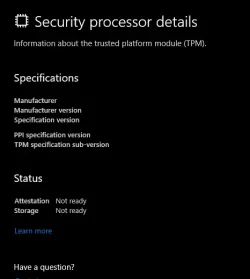
As @boombastik mentioned... you can also check under...

Settings > Privacy and Security > Windows Security > Device Security > Security processor details

Or just type: TPM in the Taskbar search box.
 

My Computers

System One System Two

  • OS
    Win 11 Home ♦♦♦26200.8655 ♦♦♦♦♦♦♦25H2
    Computer type
    PC/Desktop
    Manufacturer/Model
    Built by Ghot® [May 2020]
    CPU
    AMD Ryzen 7 3700X
    Motherboard
    Asus Pro WS X570-ACE (BIOS 5302)
    Memory
    G.Skill (F4-3200C14D-16GTZKW)
    Graphics Card(s)
    EVGA RTX 2070 (08G-P4-2171-KR)
    Sound Card
    Realtek ALC1220P / ALC S1220A
    Monitor(s) Displays
    Dell U3011 30"
    Screen Resolution
    2560 x 1600
    Hard Drives
    2x Samsung 860 EVO 500GB,
    WD 4TB Black FZBX - SATA III,
    WD 8TB Black FZBX - SATA III,
    DRW-24B1ST CD/DVD Burner
    PSU
    PC Power & Cooling 750W Quad EPS12V
    Case
    Cooler Master ATCS 840 Tower
    Cooling
    CM Hyper 212 EVO (push/pull)
    Keyboard
    Ducky DK9008 Shine II Blue LED
    Mouse
    Logitech Optical M-100
    Internet Speed
    300/300
    Browser
    Firefox (latest)
    Antivirus
    Bitdefender Total Security
    Other Info
    Speakers: Klipsch Pro Media 2.1
  • Operating System
    Windows XP Pro 32bit w/SP3
    Computer type
    PC/Desktop
    Manufacturer/Model
    Built by Ghot® (not in use)
    CPU
    AMD Athlon 64 X2 5000+ (OC'd @ 3.2Ghz)
    Motherboard
    ASUS M2N32-SLI Deluxe Wireless Edition
    Memory
    TWIN2X2048-6400C4DHX (2 x 1GB, DDR2 800)
    Graphics card(s)
    EVGA 256-P2-N758-TR GeForce 8600GT SSC
    Sound Card
    Onboard
    Monitor(s) Displays
    ViewSonic G90FB Black 19" Professional (CRT)
    Screen Resolution
    up to 2048 x 1536
    Hard Drives
    WD 36GB 10,000rpm Raptor SATA
    Seagate 80GB 7200rpm SATA
    Lite-On LTR-52246S CD/RW
    Lite-On LH-18A1P CD/DVD Burner
    PSU
    PC Power & Cooling Silencer 750 Quad EPS12V
    Case
    Generic Beige case, 80mm fans
    Cooling
    ZALMAN 9500A 92mm CPU Cooler
    Keyboard
    Logitech Classic Keybooard 200
    Mouse
    Logitech Optical M-BT96a
    Internet Speed
    300/300
    Browser
    Firefox 3.x ??
    Antivirus
    Symantec (Norton)
    Other Info
    Still assembled, still runs. Haven't turned it on for 15 years?
How do you update AGESA to ComboAM4v2 1.2.0.F.

This is what the file looks like upon unzipping the 5.67 beta file


Download the PDF file with the instructions, like in the bottom of post #46


You don't want to do any "guessing" when flashing the BIOS. ^^
 

My Computers

System One System Two

  • OS
    Win 11 Home ♦♦♦26200.8655 ♦♦♦♦♦♦♦25H2
    Computer type
    PC/Desktop
    Manufacturer/Model
    Built by Ghot® [May 2020]
    CPU
    AMD Ryzen 7 3700X
    Motherboard
    Asus Pro WS X570-ACE (BIOS 5302)
    Memory
    G.Skill (F4-3200C14D-16GTZKW)
    Graphics Card(s)
    EVGA RTX 2070 (08G-P4-2171-KR)
    Sound Card
    Realtek ALC1220P / ALC S1220A
    Monitor(s) Displays
    Dell U3011 30"
    Screen Resolution
    2560 x 1600
    Hard Drives
    2x Samsung 860 EVO 500GB,
    WD 4TB Black FZBX - SATA III,
    WD 8TB Black FZBX - SATA III,
    DRW-24B1ST CD/DVD Burner
    PSU
    PC Power & Cooling 750W Quad EPS12V
    Case
    Cooler Master ATCS 840 Tower
    Cooling
    CM Hyper 212 EVO (push/pull)
    Keyboard
    Ducky DK9008 Shine II Blue LED
    Mouse
    Logitech Optical M-100
    Internet Speed
    300/300
    Browser
    Firefox (latest)
    Antivirus
    Bitdefender Total Security
    Other Info
    Speakers: Klipsch Pro Media 2.1
  • Operating System
    Windows XP Pro 32bit w/SP3
    Computer type
    PC/Desktop
    Manufacturer/Model
    Built by Ghot® (not in use)
    CPU
    AMD Athlon 64 X2 5000+ (OC'd @ 3.2Ghz)
    Motherboard
    ASUS M2N32-SLI Deluxe Wireless Edition
    Memory
    TWIN2X2048-6400C4DHX (2 x 1GB, DDR2 800)
    Graphics card(s)
    EVGA 256-P2-N758-TR GeForce 8600GT SSC
    Sound Card
    Onboard
    Monitor(s) Displays
    ViewSonic G90FB Black 19" Professional (CRT)
    Screen Resolution
    up to 2048 x 1536
    Hard Drives
    WD 36GB 10,000rpm Raptor SATA
    Seagate 80GB 7200rpm SATA
    Lite-On LTR-52246S CD/RW
    Lite-On LH-18A1P CD/DVD Burner
    PSU
    PC Power & Cooling Silencer 750 Quad EPS12V
    Case
    Generic Beige case, 80mm fans
    Cooling
    ZALMAN 9500A 92mm CPU Cooler
    Keyboard
    Logitech Classic Keybooard 200
    Mouse
    Logitech Optical M-BT96a
    Internet Speed
    300/300
    Browser
    Firefox 3.x ??
    Antivirus
    Symantec (Norton)
    Other Info
    Still assembled, still runs. Haven't turned it on for 15 years?

Attachments

  • Security Processor.webp
    Security Processor.webp
    14.3 KB · Views: 3

My Computer

System One

  • OS
    Windows 10 Pro
    Computer type
    PC/Desktop
    CPU
    AMD Ryzen 7 3700x 8-Core 3.6 GHz
    Motherboard
    ASRock X570 Taichi
    Memory
    G.SKILL TridentZ RGB 3200MHz (max speed) 16GB (2x8GB)
    Graphics Card(s)
    NVIDIA GeForce RTX 3070
    Monitor(s) Displays
    1
    Screen Resolution
    2560x1440p (32 bit) (144Hz)
    Hard Drives
    Seagate Firecuda 520 2.0 TB
    PSU
    Seasonic FOCUS GM-850W Gold
    Case
    NZXT H510 Elite (White)
    Cooling
    NZXT Kraken X63
Download the PDF file with the instructions, like in the bottom of post #46


You don't want to do any "guessing" when flashing the BIOS. ^^
I was able to download but they still always come back as not a .ROM file. So not sure why this is happening
 

My Computer

System One

  • OS
    Windows 10 Pro
    Computer type
    PC/Desktop
    CPU
    AMD Ryzen 7 3700x 8-Core 3.6 GHz
    Motherboard
    ASRock X570 Taichi
    Memory
    G.SKILL TridentZ RGB 3200MHz (max speed) 16GB (2x8GB)
    Graphics Card(s)
    NVIDIA GeForce RTX 3070
    Monitor(s) Displays
    1
    Screen Resolution
    2560x1440p (32 bit) (144Hz)
    Hard Drives
    Seagate Firecuda 520 2.0 TB
    PSU
    Seasonic FOCUS GM-850W Gold
    Case
    NZXT H510 Elite (White)
    Cooling
    NZXT Kraken X63
.rom file was 20 year ago.
Read the instruction.
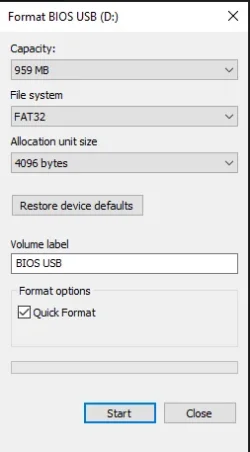
You need a usb fat32 format simply you put the file in and then you instant flash from bios.

After the bios update do a windows repair installation and it will work.
 

My Computers

System One System Two

  • OS
    Windows 11 Pro latest
    Computer type
    PC/Desktop
    CPU
    AMD Ryzen 5 5700x
    Motherboard
    Msi b550 gaming gen3
    Memory
    32 gb 3200 mhz xmp (4x8)
    Graphics Card(s)
    msi rtx3060 8gb
    Sound Card
    Audigy RX
    Monitor(s) Displays
    Philips 222V8LA/00
    Screen Resolution
    1980x1080
    Hard Drives
    MX500 Crucial
    PSU
    corsair cv 750
    Case
    q-tech
    Cooling
    amd wraith stealth
    Keyboard
    k81 gigabyte force
    Mouse
    zeroground daito
    Internet Speed
    100-10
    Browser
    Mozilla
    Antivirus
    Windows defender
  • Operating System
    windows 11 pro latest
    Computer type
    Laptop
    Manufacturer/Model
    Lenovo T420
    CPU
    i5-2520M
    Memory
    8Gb ddr3 1333 mhz
    Graphics card(s)
    hd3000
    Sound Card
    on board
    Screen Resolution
    1366x768
    Hard Drives
    Team group lite 3d 240gb
    Internet Speed
    100-10
    Antivirus
    defender
I was able to download but they still always come back as not a .ROM file. So not sure why this is happening


NO.

You want to click one of these words (in the RED box) to download the instructions (PDF).

It will tell you exactly how to flash the BIOS.


Image1.webp
 

My Computers

System One System Two

  • OS
    Win 11 Home ♦♦♦26200.8655 ♦♦♦♦♦♦♦25H2
    Computer type
    PC/Desktop
    Manufacturer/Model
    Built by Ghot® [May 2020]
    CPU
    AMD Ryzen 7 3700X
    Motherboard
    Asus Pro WS X570-ACE (BIOS 5302)
    Memory
    G.Skill (F4-3200C14D-16GTZKW)
    Graphics Card(s)
    EVGA RTX 2070 (08G-P4-2171-KR)
    Sound Card
    Realtek ALC1220P / ALC S1220A
    Monitor(s) Displays
    Dell U3011 30"
    Screen Resolution
    2560 x 1600
    Hard Drives
    2x Samsung 860 EVO 500GB,
    WD 4TB Black FZBX - SATA III,
    WD 8TB Black FZBX - SATA III,
    DRW-24B1ST CD/DVD Burner
    PSU
    PC Power & Cooling 750W Quad EPS12V
    Case
    Cooler Master ATCS 840 Tower
    Cooling
    CM Hyper 212 EVO (push/pull)
    Keyboard
    Ducky DK9008 Shine II Blue LED
    Mouse
    Logitech Optical M-100
    Internet Speed
    300/300
    Browser
    Firefox (latest)
    Antivirus
    Bitdefender Total Security
    Other Info
    Speakers: Klipsch Pro Media 2.1
  • Operating System
    Windows XP Pro 32bit w/SP3
    Computer type
    PC/Desktop
    Manufacturer/Model
    Built by Ghot® (not in use)
    CPU
    AMD Athlon 64 X2 5000+ (OC'd @ 3.2Ghz)
    Motherboard
    ASUS M2N32-SLI Deluxe Wireless Edition
    Memory
    TWIN2X2048-6400C4DHX (2 x 1GB, DDR2 800)
    Graphics card(s)
    EVGA 256-P2-N758-TR GeForce 8600GT SSC
    Sound Card
    Onboard
    Monitor(s) Displays
    ViewSonic G90FB Black 19" Professional (CRT)
    Screen Resolution
    up to 2048 x 1536
    Hard Drives
    WD 36GB 10,000rpm Raptor SATA
    Seagate 80GB 7200rpm SATA
    Lite-On LTR-52246S CD/RW
    Lite-On LH-18A1P CD/DVD Burner
    PSU
    PC Power & Cooling Silencer 750 Quad EPS12V
    Case
    Generic Beige case, 80mm fans
    Cooling
    ZALMAN 9500A 92mm CPU Cooler
    Keyboard
    Logitech Classic Keybooard 200
    Mouse
    Logitech Optical M-BT96a
    Internet Speed
    300/300
    Browser
    Firefox 3.x ??
    Antivirus
    Symantec (Norton)
    Other Info
    Still assembled, still runs. Haven't turned it on for 15 years?
.rom file was 20 year ago.
Read the instruction.
You need a usb fat32 format simply you put the file in and then you instant flash from bios.

After the bios update do a windows repair installation and it will work.
This is the format settings I'm using. It's weird because when I mistakenly downloading the wrong file earlier, this wasn't an issue I was running into. Now when downloading the correct motherboard files, this is happening.
 

Attachments

  • USBPNG.webp
    USBPNG.webp
    8.6 KB · Views: 2

My Computer

System One

  • OS
    Windows 10 Pro
    Computer type
    PC/Desktop
    CPU
    AMD Ryzen 7 3700x 8-Core 3.6 GHz
    Motherboard
    ASRock X570 Taichi
    Memory
    G.SKILL TridentZ RGB 3200MHz (max speed) 16GB (2x8GB)
    Graphics Card(s)
    NVIDIA GeForce RTX 3070
    Monitor(s) Displays
    1
    Screen Resolution
    2560x1440p (32 bit) (144Hz)
    Hard Drives
    Seagate Firecuda 520 2.0 TB
    PSU
    Seasonic FOCUS GM-850W Gold
    Case
    NZXT H510 Elite (White)
    Cooling
    NZXT Kraken X63
NO.

You want to click one of these words (in the RED box) to download the instructions (PDF).

It will tell you exactly how to flash the BIOS.


View attachment 147397
That's what I did, but I'm worried to take it to BIOS and see if it works if the file isn't even extracting as a ROM file. Doesn't it have to be a ROM file not some random number?
 

My Computer

System One

  • OS
    Windows 10 Pro
    Computer type
    PC/Desktop
    CPU
    AMD Ryzen 7 3700x 8-Core 3.6 GHz
    Motherboard
    ASRock X570 Taichi
    Memory
    G.SKILL TridentZ RGB 3200MHz (max speed) 16GB (2x8GB)
    Graphics Card(s)
    NVIDIA GeForce RTX 3070
    Monitor(s) Displays
    1
    Screen Resolution
    2560x1440p (32 bit) (144Hz)
    Hard Drives
    Seagate Firecuda 520 2.0 TB
    PSU
    Seasonic FOCUS GM-850W Gold
    Case
    NZXT H510 Elite (White)
    Cooling
    NZXT Kraken X63

Latest Support Threads

Back
Top Bottom