
Two identical Dropbox entries in QuickAccess


Baeolophus

Well-known member
Member
Local time
8:22 PM
Posts
162
OS
macOS Sequoia
How do I get rid of the second Dropbox in the QuickAccess sidebar? They point to the identical location on the user’s hard drive.
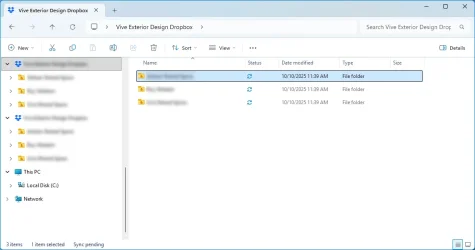
image.webp

Dropbox Support won’t help with that, because, “This issue is related to Microsoft, and not Dropbox, so we are not allowed to troubleshoot this as it's outside of our scope of expertise.”
 

My Computer

System One

  • OS
    macOS Sequoia
    Computer type
    Laptop
    Manufacturer/Model
    Apple
    CPU
    M1 Max Apple Silicon
    Memory
    32 GB
How do I get rid of the second Dropbox in the QuickAccess sidebar? They point to the identical location on the user’s hard drive.

Dropbox Support won’t help with that, because, “This issue is related to Microsoft, and not Dropbox, so we are not allowed to troubleshoot this as it's outside of our scope of expertise.”
open regedit
HKEY_CURRENT_USER\SOFTWARE\Classes\CLSID\{CLSID_HERE} < find the CLSID for both Dropbox entries - should be 2 separate ones
change one of them to value 0 for "System.IsPinnedToNamespaceTree" dword
 

My Computer

System One

  • OS
    Windows 11 Pro
open regedit
HKEY_CURRENT_USER\SOFTWARE\Classes\CLSID\{CLSID_HERE} < find the CLSID for both Dropbox entries - should be 2 separate ones
change one of them to value 0 for "System.IsPinnedToNamespaceTree" dword
Thank you, I have seven entries in HKEY_CURRENT_USER\SOFTWARE\Classes\CLSID\. They refer to “Bitmap Image,” “OneDrive - Personal,” “OneDrive,” “(value not set),” “Learn about this picture,” “Paintbrush Picture,” and “Microsoft.Teams.MeetingAddin.View.Controls.MeetingOptionsControl.” None of these remotely look like they are related to what I am looking for.
 

My Computer

System One

  • OS
    macOS Sequoia
    Computer type
    Laptop
    Manufacturer/Model
    Apple
    CPU
    M1 Max Apple Silicon
    Memory
    32 GB
Search your registry for

System.IsPinnedToNamespaceTree

Dropbox’s is somewhere
 

My Computer

System One

  • OS
    Windows 11 Pro
Back
Top Bottom


