UEFI BOOT TAKES 15 MINUTES


babar104

Member
Local time
1:26 PM
Posts
4
OS
Windows 11
Hi all,

As the title says, my boot takes 15 minutes. I have attached a boot log from a while back when I first tried to troubleshoot this myself. I'm not much of a
Windows guru, but I did build this system myself, and I have never had this problem building systems in the past. This is my first build using an
NVME M.2 as my HDD. That is where my windows install is and that drive is my boot drive.

I have read that there are issues with DDR5 in particular, even though I DO have fast boot turned on in the BIOS. I suspect that maybe the memory (DDR5 4800MHZ)
is perhaps entering a boot loop, as 4800mhz ram has been the subject of several articles I have read. HOWEVER, I do do not know how to read boot logs, so any help would
be greatly appreciated. I want to say this system initially booted lightning fast, then one day it just started taking forever. I rarely turn my systems off anyway, but it is super annoying
when you need to restart. Once booted the system runs smoothly and without problems. No virus, no bloatware, nothing that I can detect.

Disc management lists all of my drives as healthy etc.

Here is the Boot log

 
Windows Build/Version
Windows 11 Home 24h2 build 26100.2605

My Computer

System One

  • OS
    Windows 11
    Computer type
    PC/Desktop
    Manufacturer/Model
    ASUS Z690 PLUS WIFI
    CPU
    INTEL i7-12700k
    Motherboard
    ASUS Z690 PLUS WIFI
    Memory
    32gb Corsair Vengeance DDR5 4800mhz
    Graphics Card(s)
    NVIDIA RTX 3060 12gb
    Hard Drives
    SUMSUNG EVO 980 NVME M.2 1T
    PSU
    EVGA GOLD 1000W
Please post links that do not require logon:

Sign in​

Use your Microsoft account.


Run the V2 log collector > post a share link


drop box
google drive
 

My Computer

System One

  • OS
    Windows 10
    Computer type
    Laptop
    Manufacturer/Model
    HP
    CPU
    Intel(R) Core(TM) i7-4800MQ CPU @ 2.70GHz
    Motherboard
    Product : 190A Version : KBC Version 94.56
    Memory
    16 GB Total: Manufacturer : Samsung MemoryType : DDR3 FormFactor : SODIMM Capacity : 8GB Speed : 1600
    Graphics Card(s)
    NVIDIA Quadro K3100M; Intel(R) HD Graphics 4600
    Sound Card
    IDT High Definition Audio CODEC; PNP Device ID HDAUDIO\FUNC_01&VEN_111D&DEV_76E0
    Hard Drives
    Model Hitachi HTS727575A9E364
    Antivirus
    Microsoft Defender
    Other Info
    Mobile Workstation

My Computer

System One

  • OS
    Windows 11
    Computer type
    PC/Desktop
    Manufacturer/Model
    ASUS Z690 PLUS WIFI
    CPU
    INTEL i7-12700k
    Motherboard
    ASUS Z690 PLUS WIFI
    Memory
    32gb Corsair Vengeance DDR5 4800mhz
    Graphics Card(s)
    NVIDIA RTX 3060 12gb
    Hard Drives
    SUMSUNG EVO 980 NVME M.2 1T
    PSU
    EVGA GOLD 1000W
As the title says, my boot takes 15 minutes.

You and I have the same motherboard and very similar systems. What BIOS version are you on?
ASUS did finally give us a new BIOS last December.


Also, try turning off Fast Boot in the BIOS and see if that makes a difference.
 

My Computers

System One System Two

  • OS
    Win 11 Pro 25H2 26200.8655
    Computer type
    PC/Desktop
    Manufacturer/Model
    Self Built
    CPU
    Intel® Core™ i7-14700K
    Motherboard
    ASUS TUF Z690-PLUS WIFI BIOS 4505 11/29/25
    Memory
    G.SKILL Ripjaws S5 Series 64GB (2 x 32GB) DDR5
    Graphics Card(s)
    ASUS GeForce RTX 4070 Super 12GB
    Sound Card
    Sound Blaster AE-5 Plus
    Monitor(s) Displays
    ASUS TUF Gaming 27" 2K HDR Gaming
    Screen Resolution
    2560 x 1440
    Hard Drives
    Samsung 990 Pro 1TB NVMe (Win 11 25H2)
    SK hynix P41 500GB NVMe 25H2 DEV/Games
    SK hynix P41 2TB NVMe (x3)
    Crucial P3 Plus 4TB
    PSU
    Corsair RM850x Shift
    Case
    Antec Dark Phantom DP502 FLUX
    Cooling
    Corsair Nautilus 360 RS AIO
    Keyboard
    Logitech MK 320
    Mouse
    Razer Basilisk V3
    Internet Speed
    350Mbs
    Browser
    Firefox
    Antivirus
    Winows Security
    Other Info
    MR 8.1 Home

    System 3 Specs
    Win 11 Pro 25H2 26200.8655
    ASUS PRIME Z370-P II BIOS 3004 7/12/21
    Intel Core i7-8700 CPU @ 3.20GHz
    32GB DDR4 RAM (4x8)
    iGPU Intel UHD Graphics 630
  • Operating System
    Win 11 Pro 25H2 26200.8655
    Computer type
    PC/Desktop
    Manufacturer/Model
    Self Built
    CPU
    Intel Core i7-11700F
    Motherboard
    Asus TUF Gaming Z590 Plus WiFi (BIOS 2803)
    Memory
    64 GB DDR4
    Graphics card(s)
    MSI GeForce RTX 3060 Ventus 2X 12GB
    Sound Card
    SoundBlaster Audigy Fx V2
    Monitor(s) Displays
    Samsung F27T350
    Screen Resolution
    1920x1080
    Hard Drives
    Samsung 980 Pro 1TB
    Samsung 970 EVO Plus 2TB
    Samsung 870 EVO 500GB SSD
    PSU
    Corsair HX750
    Case
    Cougar MX330-G Window
    Cooling
    Thermalright Frozen Edge 240 Black AIO
    Internet Speed
    350Mbps
    Browser
    Firefox
    Antivirus
    Windows Security
You and I have the same motherboard and very similar systems. What BIOS version are you on?
ASUS did finally give us a new BIOS last December.


Also, try turning off Fast Boot in the BIOS and see if that makes a difference.
Weird, I could have sworn I updated the BIOS fairly recently. I am running 4301. I see though that the current version is 4505. I will update it and see
what happens. I will turn off fast boot as well.
 

My Computer

System One

  • OS
    Windows 11
    Computer type
    PC/Desktop
    Manufacturer/Model
    ASUS Z690 PLUS WIFI
    CPU
    INTEL i7-12700k
    Motherboard
    ASUS Z690 PLUS WIFI
    Memory
    32gb Corsair Vengeance DDR5 4800mhz
    Graphics Card(s)
    NVIDIA RTX 3060 12gb
    Hard Drives
    SUMSUNG EVO 980 NVME M.2 1T
    PSU
    EVGA GOLD 1000W
Are you sure it's not Windows 11 that boots time takes long time how long does the BIOS screen displays?

Also disconnect all attached devices and try again.

In this video, we delve into the common issue of slow boot times in Windows and how to effectively troubleshoot it using Process Monitor.
 

My Computer

System One

  • OS
    Windows 11
    Computer type
    PC/Desktop
    Manufacturer/Model
    HP Pavilion
    CPU
    AMD Ryzen 7 5700G
    Motherboard
    Erica6
    Memory
    Micron Technology DDR4-3200 16GB
    Graphics Card(s)
    NVIDIA GeForce RTX 3060
    Sound Card
    Realtek ALC671
    Monitor(s) Displays
    Samsung SyncMaster U28E590
    Screen Resolution
    3840 x 2160
    Hard Drives
    SAMSUNG MZVLQ1T0HALB-000H1
Are you sure it's not Windows 11 that boots time takes long time how long does the BIOS screen displays?

Also disconnect all attached devices and try again.

In this video, we delve into the common issue of slow boot times in Windows and how to effectively troubleshoot it using Process Monitor.

No, I am not entirely sure either way. I was hoping someone could spot a problem in the boot log I posted. The ASUS TUF logo displays
for about 30 seconds and then disappears. The screen then goes while windows is booting so if I had to GUESS I would say it
is windows. However, I DID detach all peripherals and external drives after updating the BIOS, and turned off fast boot before the restart.
No change. My windows startup is fairly slim. I have selective startup enabled in msconfig with only a few of my applications allowed to start with Windows, so windows does not have to load a bunch of stuff on startup.
 

My Computer

System One

  • OS
    Windows 11
    Computer type
    PC/Desktop
    Manufacturer/Model
    ASUS Z690 PLUS WIFI
    CPU
    INTEL i7-12700k
    Motherboard
    ASUS Z690 PLUS WIFI
    Memory
    32gb Corsair Vengeance DDR5 4800mhz
    Graphics Card(s)
    NVIDIA RTX 3060 12gb
    Hard Drives
    SUMSUNG EVO 980 NVME M.2 1T
    PSU
    EVGA GOLD 1000W
Please run > post share links


1) Add WMIC:

DISM /Online /Add-Capability /CapabilityName:WMIC~~~~


2) Run Tuneup plus > post a share link


3) Create a new restore point:


4) Run the V2 log collector > post a share link into the newest post


My Computer

System One

  • OS
    Windows 10
    Computer type
    Laptop
    Manufacturer/Model
    HP
    CPU
    Intel(R) Core(TM) i7-4800MQ CPU @ 2.70GHz
    Motherboard
    Product : 190A Version : KBC Version 94.56
    Memory
    16 GB Total: Manufacturer : Samsung MemoryType : DDR3 FormFactor : SODIMM Capacity : 8GB Speed : 1600
    Graphics Card(s)
    NVIDIA Quadro K3100M; Intel(R) HD Graphics 4600
    Sound Card
    IDT High Definition Audio CODEC; PNP Device ID HDAUDIO\FUNC_01&VEN_111D&DEV_76E0
    Hard Drives
    Model Hitachi HTS727575A9E364
    Antivirus
    Microsoft Defender
    Other Info
    Mobile Workstation
No, I am not entirely sure either way. I was hoping someone could spot a problem in the boot log I posted. The ASUS TUF logo displays
for about 30 seconds and then disappears. The screen then goes while windows is booting so if I had to GUESS I would say it
is windows. However, I DID detach all peripherals and external drives after updating the BIOS, and turned off fast boot before the restart.
No change. My windows startup is fairly slim. I have selective startup enabled in msconfig with only a few of my applications allowed to start with Windows, so windows does not have to load a bunch of stuff on startup.
Looks like its Windows 11 boot problem, i suggest you capture boot trace with Process Monitor to see it will help.
 

My Computer

System One

  • OS
    Windows 11
    Computer type
    PC/Desktop
    Manufacturer/Model
    HP Pavilion
    CPU
    AMD Ryzen 7 5700G
    Motherboard
    Erica6
    Memory
    Micron Technology DDR4-3200 16GB
    Graphics Card(s)
    NVIDIA GeForce RTX 3060
    Sound Card
    Realtek ALC671
    Monitor(s) Displays
    Samsung SyncMaster U28E590
    Screen Resolution
    3840 x 2160
    Hard Drives
    SAMSUNG MZVLQ1T0HALB-000H1
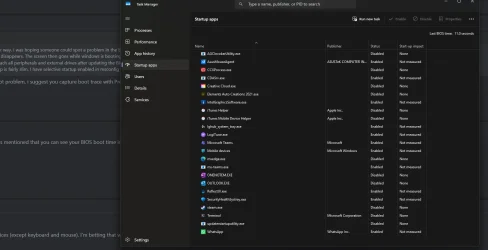
I don't see where anybody has mentioned that you can see your BIOS boot time in task manager. It's on the start up apps screen.
 

My Computer

System One

  • OS
    Windows 11 25H2
    Computer type
    PC/Desktop
    Manufacturer/Model
    Dell
    CPU
    12th Gen i9 -12900K
    Memory
    64GB
    Graphics Card(s)
    Intel UHD Graphics
    Monitor(s) Displays
    Dual Dell U2717D
    Screen Resolution
    2560x1440
    Hard Drives
    2TB Lexar SSD, 2TB Crucial SSD, 2TB Kingston SSD
Welcome to ASUS :eyeroll::crys::steam:

Try disconnecting all USB devices (except keyboard and mouse). I'm betting that will make the issue magically disappear. I'm also betting that there is lag/stuttering when editing BIOS settings: Same issue; same solution.
 

My Computer

System One

  • OS
    Windows 11 Pro, Version 25H2, Build 26200.7840
    Computer type
    PC/Desktop
    Manufacturer/Model
    My Own Custom Build
    CPU
    Intel Core i9-14900KF 3.2 GHz 24-Core
    Motherboard
    Asus TUF GAMING Z790-PRO WIFI ATX LGA1700 (BIOS Version: 1825)
    Memory
    G.Skill Ripjaws S5 64 GB (2 x 32 GB) DDR5-6400 CL32
    Graphics Card(s)
    MSI GAMING X SLIM GeForce RTX 4060 Ti 16 GB
    Sound Card
    On-Board
    Monitor(s) Displays
    Gigabyte AORUS FV43U 43.0" 3840 x 2160 144 Hz; Asus VG289Q1A 28.0" 3840 x 2160 60 Hz
    Screen Resolution
    3840 x 2160
    Hard Drives
    (1) Samsung SSD 990 Pro 4 TB M.2-2280 PCIe 4.0 X4 NVME
    (2) Samsung SSD 980 Pro 1 TB M.2-2280 PCIe 4.0 X4 NVME
    (3) Samsung SSD 860 EVO 500GB 2.5"
    (4) Samsung SSD 860 EVO 500GB 2.5"
    (5) Mushkin Chronos 240 GB 2.5"
    PSU
    EVGA SuperNOVA 1300 G2 1300 W 80+ Gold Certified Fully Modular ATX
    Case
    NZXT Source 530 ATX Full Tower
    Cooling
    Corsair H100 47.73 CFM Liquid CPU Cooler; ARCTIC MX-6 4 g Thermal Paste; Noctua A14 industrialPPC-3000 PWM 158.5 CFM 140mm Fans
    Keyboard
    Logitech G510s Wired Gaming
    Mouse
    Logitech G502 Proteus Spectrum Wired Optical
    Internet Speed
    Light
    Browser
    FF
    Antivirus
    WinDef+Umatrix+Common_Sense
    Other Info
    Asus DRW-24B3ST/BLK/G/AS DVD/CD Writer
    Creative Labs Inspire T6300 57 W 5.1-Channel Speakers
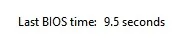
I have similar spec to yours, my boot time is 11.00 secs.

Screenshot 2026-02-21 105943.webp
 

My Computer

System One

  • OS
    Windows 11 Pro 25H2
    Computer type
    PC/Desktop
    Manufacturer/Model
    My Self
    CPU
    Intel Alder lake i7 12700K
    Motherboard
    Asus z690 Gaming WiFi D4, Bios Ver 4505
    Memory
    32 Gb Corsair Vengeance LPX DDR4 3200 XMP2
    Graphics Card(s)
    EVGA 3070ti FTW3 Ultra Gaming & Intel Arc
    Sound Card
    Via Display port
    Monitor(s) Displays
    Dell AW2723DF
    Screen Resolution
    2560 x 1440 @ 280Hz G-Sync mode
    Hard Drives
    WD Black SN850 1Tb NVME (Boot Drive)
    WD BLACK SN850X + Heatsink 1Tb NVME
    Samsung 870 Qvo 1Tb SSD,
    Pioneer DVD-RW DVR-219L
    WD Black SN850x NVME 2Tb x3
    PSU
    Corsair RM850
    Case
    Phanteks Enthoo Pro M Tempered Glass
    Cooling
    Be Quiet Shadow Rock 3
    Keyboard
    Logitech G Pro
    Mouse
    Logitech G903, Lightspeed + Powerplay Mat
    Internet Speed
    900Mb/900Mb Fritz!Box 7590ax v2
    Browser
    Firefox
    Antivirus
    MS Defender
    Other Info
    Logitech C930e webcam
    Synology DS218 play 2 x 4Tb Synology HAT3300-4T
11.00 secs.......??
You mean 11 hundred seconds ?
Thats 18 minutes !
Mine old ASUS takes 40 seconds ( I find it too much time still )............ :wink:
 

My Computer

System One

  • OS
    Windows11 Pro 25H2
    Computer type
    PC/Desktop
    Manufacturer/Model
    Asus
    CPU
    i7
    Motherboard
    z97k
    Memory
    32GB
    Graphics Card(s)
    nVidia
    Sound Card
    Realtek
    Hard Drives
    3
    Cooling
    air
    Browser
    Edge
    Antivirus
    ESET
Total boot time about 15 secs!
 

My Computer

System One

  • OS
    Windows 11 Pro 25H2
    Computer type
    PC/Desktop
    Manufacturer/Model
    My Self
    CPU
    Intel Alder lake i7 12700K
    Motherboard
    Asus z690 Gaming WiFi D4, Bios Ver 4505
    Memory
    32 Gb Corsair Vengeance LPX DDR4 3200 XMP2
    Graphics Card(s)
    EVGA 3070ti FTW3 Ultra Gaming & Intel Arc
    Sound Card
    Via Display port
    Monitor(s) Displays
    Dell AW2723DF
    Screen Resolution
    2560 x 1440 @ 280Hz G-Sync mode
    Hard Drives
    WD Black SN850 1Tb NVME (Boot Drive)
    WD BLACK SN850X + Heatsink 1Tb NVME
    Samsung 870 Qvo 1Tb SSD,
    Pioneer DVD-RW DVR-219L
    WD Black SN850x NVME 2Tb x3
    PSU
    Corsair RM850
    Case
    Phanteks Enthoo Pro M Tempered Glass
    Cooling
    Be Quiet Shadow Rock 3
    Keyboard
    Logitech G Pro
    Mouse
    Logitech G903, Lightspeed + Powerplay Mat
    Internet Speed
    900Mb/900Mb Fritz!Box 7590ax v2
    Browser
    Firefox
    Antivirus
    MS Defender
    Other Info
    Logitech C930e webcam
    Synology DS218 play 2 x 4Tb Synology HAT3300-4T
11.00 secs.......??
You mean 11 hundred seconds ?
Thats 18 minutes !
Mine old ASUS takes 40 seconds ( I find it too much time still )............ :wink:
There is a decimal point. 11 seconds exactly!
 

My Computer

System One

  • OS
    Windows 11 Pro + Win11 Canary VM.
    Computer type
    Laptop
    Manufacturer/Model
    ASUS Zenbook 14
    CPU
    I9 13th gen i9-13900H 2.60 GHZ
    Motherboard
    Yep, Laptop has one.
    Memory
    16 GB soldered
    Graphics Card(s)
    Integrated Intel Iris XE
    Sound Card
    Realtek built in
    Monitor(s) Displays
    laptop OLED screen
    Screen Resolution
    2880x1800 touchscreen
    Hard Drives
    1 TB NVME SSD (only weakness is only one slot)
    PSU
    Internal + 65W thunderbolt USB4 charger
    Case
    Yep, got one
    Cooling
    Stella Artois (UK pint cans - 568 ml) - extra cost.
    Keyboard
    Built in UK keybd
    Mouse
    Bluetooth , wireless dongled, wired
    Internet Speed
    900 mbs (ethernet), wifi 6 typical 350-450 mb/s both up and down
    Browser
    Edge
    Antivirus
    Defender
    Other Info
    TPM 2.0, 2xUSB4 thunderbolt, 1xUsb3 (usb a), 1xUsb-c, hdmi out, 3.5 mm audio out/in combo, ASUS backlit trackpad (inc. switchable number pad)

    Macrium Reflect Home V8
    Office 365 Family (6 users each 1TB onedrive space)
    Hyper-V (a vm runs almost as fast as my older laptop)
Also posted this in another thread.

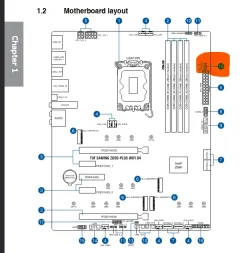
Check boot leds. Mine would stop at VGA... (Exchanged faulty EVGA 3070ti fixed it)

Screenshot 2026-02-21 164703.webp

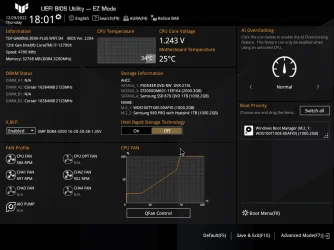
In the Bios, check how many "boot priority" devices you have? mine has only 1 !

Bios screen.webp

Check Windows has flagged this as a corrupt EFI system partition (Been there had that:censored:) in the above screen I had 2 Windows Boot Manager entries, one was corrupted.
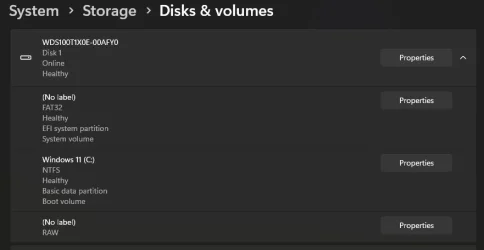
Screenshot 2026-02-21 165236.webp
 

My Computer

System One

  • OS
    Windows 11 Pro 25H2
    Computer type
    PC/Desktop
    Manufacturer/Model
    My Self
    CPU
    Intel Alder lake i7 12700K
    Motherboard
    Asus z690 Gaming WiFi D4, Bios Ver 4505
    Memory
    32 Gb Corsair Vengeance LPX DDR4 3200 XMP2
    Graphics Card(s)
    EVGA 3070ti FTW3 Ultra Gaming & Intel Arc
    Sound Card
    Via Display port
    Monitor(s) Displays
    Dell AW2723DF
    Screen Resolution
    2560 x 1440 @ 280Hz G-Sync mode
    Hard Drives
    WD Black SN850 1Tb NVME (Boot Drive)
    WD BLACK SN850X + Heatsink 1Tb NVME
    Samsung 870 Qvo 1Tb SSD,
    Pioneer DVD-RW DVR-219L
    WD Black SN850x NVME 2Tb x3
    PSU
    Corsair RM850
    Case
    Phanteks Enthoo Pro M Tempered Glass
    Cooling
    Be Quiet Shadow Rock 3
    Keyboard
    Logitech G Pro
    Mouse
    Logitech G903, Lightspeed + Powerplay Mat
    Internet Speed
    900Mb/900Mb Fritz!Box 7590ax v2
    Browser
    Firefox
    Antivirus
    MS Defender
    Other Info
    Logitech C930e webcam
    Synology DS218 play 2 x 4Tb Synology HAT3300-4T
@babar104

Well, while you're troubleshooting, here's ten points just for filling out your computer specs. :-)
 

My Computers

System One System Two

  • OS
    Win 11 Home ♦♦♦26200.8655 ♦♦♦♦♦♦♦25H2
    Computer type
    PC/Desktop
    Manufacturer/Model
    Built by Ghot® [May 2020]
    CPU
    AMD Ryzen 7 3700X
    Motherboard
    Asus Pro WS X570-ACE (BIOS 5302)
    Memory
    G.Skill (F4-3200C14D-16GTZKW)
    Graphics Card(s)
    EVGA RTX 2070 (08G-P4-2171-KR)
    Sound Card
    Realtek ALC1220P / ALC S1220A
    Monitor(s) Displays
    Dell U3011 30"
    Screen Resolution
    2560 x 1600
    Hard Drives
    2x Samsung 860 EVO 500GB,
    WD 4TB Black FZBX - SATA III,
    WD 8TB Black FZBX - SATA III,
    DRW-24B1ST CD/DVD Burner
    PSU
    PC Power & Cooling 750W Quad EPS12V
    Case
    Cooler Master ATCS 840 Tower
    Cooling
    CM Hyper 212 EVO (push/pull)
    Keyboard
    Ducky DK9008 Shine II Blue LED
    Mouse
    Logitech Optical M-100
    Internet Speed
    300/300
    Browser
    Firefox (latest)
    Antivirus
    Bitdefender Total Security
    Other Info
    Speakers: Klipsch Pro Media 2.1
  • Operating System
    Windows XP Pro 32bit w/SP3
    Computer type
    PC/Desktop
    Manufacturer/Model
    Built by Ghot® (not in use)
    CPU
    AMD Athlon 64 X2 5000+ (OC'd @ 3.2Ghz)
    Motherboard
    ASUS M2N32-SLI Deluxe Wireless Edition
    Memory
    TWIN2X2048-6400C4DHX (2 x 1GB, DDR2 800)
    Graphics card(s)
    EVGA 256-P2-N758-TR GeForce 8600GT SSC
    Sound Card
    Onboard
    Monitor(s) Displays
    ViewSonic G90FB Black 19" Professional (CRT)
    Screen Resolution
    up to 2048 x 1536
    Hard Drives
    WD 36GB 10,000rpm Raptor SATA
    Seagate 80GB 7200rpm SATA
    Lite-On LTR-52246S CD/RW
    Lite-On LH-18A1P CD/DVD Burner
    PSU
    PC Power & Cooling Silencer 750 Quad EPS12V
    Case
    Generic Beige case, 80mm fans
    Cooling
    ZALMAN 9500A 92mm CPU Cooler
    Keyboard
    Logitech Classic Keybooard 200
    Mouse
    Logitech Optical M-BT96a
    Internet Speed
    300/300
    Browser
    Firefox 3.x ??
    Antivirus
    Symantec (Norton)
    Other Info
    Still assembled, still runs. Haven't turned it on for 15 years?
11.00 secs.......??
You mean 11 hundred seconds ?
Thats 18 minutes !
Mine old ASUS takes 40 seconds ( I find it too much time still )............ :wink:
I'm new on this thread, but. I have also been having a problem (problems) with a very, very slow boot process. My BIOS boot time was 1209 seconds.
 

My Computer

System One

  • OS
    Windows 11 2H25
    Computer type
    PC/Desktop
    Manufacturer/Model
    DIY
    CPU
    AMD 9900X
    Motherboard
    MSI X870E Carbon
    Memory
    64 GB
    Graphics Card(s)
    AMD 9070 XT
    Sound Card
    built-in
    Monitor(s) Displays
    Dell 24"
    Hard Drives
    Sabrent 1 TB NVMe, 4 x SSD (need to check models), 4 x 3.5" HDD, 8-16 TB, all WD
    PSU
    Seasonic 850
    Case
    Fractal Design North XL (which I likw)
    Cooling
    Corsair AIO for CPU, fans for case
    Keyboard
    Das Keyboard 4
    Mouse
    Corsair M65 (white)
    Internet Speed
    1 TB download
    Browser
    Firefox
    Antivirus
    Bitdefender
    Other Info
    Also have Lenovo T14S laptop (me) and Lenovo Slim 71 (wife)
AM5 no EXPO (Extended Profiles for Overclocking) of the ram.

Screenshot 2026-02-22 202311.webp
 

My Computer

System One

  • OS
    Windows 11 Pro
After latest Win11-update and latest ESET Internet Security-update , my boottime went from 40 seconds to 20 seconds ............!!! :giggle:
No idea , ESET or WU ...........?
 

My Computer

System One

  • OS
    Windows11 Pro 25H2
    Computer type
    PC/Desktop
    Manufacturer/Model
    Asus
    CPU
    i7
    Motherboard
    z97k
    Memory
    32GB
    Graphics Card(s)
    nVidia
    Sound Card
    Realtek
    Hard Drives
    3
    Cooling
    air
    Browser
    Edge
    Antivirus
    ESET
Back
Top Bottom