UEFI KEK Certs not updated.


While you're waiting for a response, check the BIOS menus for Secure Boot. Is there an option for manual KEK Key Enrollment?
Your BIOS is probably updated, and will need some manual help.
The problem with this bios is that it don't have an advanced settings mode, so I can only switch secureboot on and of, I try some key combinations but this bios is locked to basic settings. What I now going to do is ask Huawei how I can unlock this InsideH20 bios to advanced I try a lot of key combinations.
The other question is can I use this laptop in the futere with the KEK certificate not updated or will it get boot problems ? The other certificates are updated.
 

My Computer My Computer

At a glance

Windows 11 Pro 25H2 26200.7019Intel Core i7-8700KCorsair 32GB 4x DDR4-2998 / PC4-23900 DDR4 SD...AMD RX570
OS
Windows 11 Pro 25H2 26200.7019
Computer type
PC/Desktop
Manufacturer/Model
Self built midi tower
CPU
Intel Core i7-8700K
Motherboard
Gigabyte Z390GX
Memory
Corsair 32GB 4x DDR4-2998 / PC4-23900 DDR4 SDRAM UDIMM
Graphics Card(s)
AMD RX570
Sound Card
Sound Blaster Z
Monitor(s) Displays
2x IIyama Prolite X2380HS
Screen Resolution
1920x1080
Hard Drives
Samsung SSD 970 EVO Plus NVMe 1TB
Samsung SSD 970 EVO Plus NVMe 500GB
PSU
Seasonic 550W
Cooling
Noctua fans
Keyboard
Logitech G213
Mouse
Logitech Marble Mouse
Browser
Chrome
Antivirus
Norton
Other Info
Video/Audio editting machine
Without the KEK CA 2023 installed, the other CA 2023 certs aren't actually validated. The UEFI security model is based on a chain of trust, KEK CA 2023 isn't an optional feature. You can have other certs loaded, but they will not be respected.

Huawei PK -> validates KEK CA 2023 -> validates Windows UEFI CA 2023 -> validates CA 2023 boot manager

On some BIOS'es, you must create an Admin password as a security measure to unlock advanced Secure Boot settings.
 

My Computer My Computer

At a glance

Windows 7
OS
Windows 7
Without the KEK CA 2023 installed, the other CA 2023 certs aren't actually validated. The UEFI security model is based on a chain of trust, KEK CA 2023 isn't an optional feature. You can have other certs loaded, but they will not be respected.

Huawei PK -> validates KEK CA 2023 -> validates Windows UEFI CA 2023 -> validates CA 2023 boot manager

On some BIOS'es, you must create an Admin password as a security measure to unlock advanced Secure Boot settings.
Thanks for the information, yes I need all the certificates I understand, I wait what Huawei do with this, I still love this very fast compact notebook I don't want replace it yet.
 

My Computer My Computer

At a glance

Windows 11 Pro 25H2 26200.7019Intel Core i7-8700KCorsair 32GB 4x DDR4-2998 / PC4-23900 DDR4 SD...AMD RX570
OS
Windows 11 Pro 25H2 26200.7019
Computer type
PC/Desktop
Manufacturer/Model
Self built midi tower
CPU
Intel Core i7-8700K
Motherboard
Gigabyte Z390GX
Memory
Corsair 32GB 4x DDR4-2998 / PC4-23900 DDR4 SDRAM UDIMM
Graphics Card(s)
AMD RX570
Sound Card
Sound Blaster Z
Monitor(s) Displays
2x IIyama Prolite X2380HS
Screen Resolution
1920x1080
Hard Drives
Samsung SSD 970 EVO Plus NVMe 1TB
Samsung SSD 970 EVO Plus NVMe 500GB
PSU
Seasonic 550W
Cooling
Noctua fans
Keyboard
Logitech G213
Mouse
Logitech Marble Mouse
Browser
Chrome
Antivirus
Norton
Other Info
Video/Audio editting machine
It’s very annoying and I hope they reply to you. I think some people just turn secure boot off - not ideal I know. I have a couple of old ones that don’t even have secure boot. I suppose they are not used regularly so not particularly at risk. Microsoft released something a couple of weeks ago saying a machine will still boot - it just means they don’t get updates against various boot viruses. It could be that with sensible use and maybe avoiding using usb sticks that have been in other machines - you never have an issue. So your machine wouldn’t be useless if it didn’t get the secure boot certificates - but it’s just a bugbear when you’re in this position.

Presumably installing Linux instead of Windows means not vulnerable to the same issues.

Anyway please let us know what Huswei say - I’d be interested to know.
 

My Computers My Computers

  • At a glance

    Windows 11 Home 25H2Core i5-1035G132gb
    OS
    Windows 11 Home 25H2
    Computer type
    Laptop
    Manufacturer/Model
    HP Pavilion 14-ce3606sa
    CPU
    Core i5-1035G1
    Memory
    32gb
    Hard Drives
    Samsung 870 evo sata ssd
    Cooling
    Could be better
    Internet Speed
    50 mbps Starlink
    Browser
    Firefox
    Other Info
    Originally came installed with a 500gb H10 Optane ssd
  • At a glance

    Windows 11 HomeIntel Core i5-1035G116gb
    Operating System
    Windows 11 Home
    Computer type
    Laptop
    Manufacturer/Model
    HP Pavilion ce3606sa
    CPU
    Intel Core i5-1035G1
    Memory
    16gb
    Hard Drives
    Hynix Gold P31 2TB
    Internet Speed
    200mbps Starlink
    Browser
    Firefox
    Antivirus
    Defender
It’s very annoying and I hope they reply to you. I think some people just turn secure boot off - not ideal I know. I have a couple of old ones that don’t even have secure boot. I suppose they are not used regularly so not particularly at risk. Microsoft released something a couple of weeks ago saying a machine will still boot - it just means they don’t get updates against various boot viruses. It could be that with sensible use and maybe avoiding using usb sticks that have been in other machines - you never have an issue. So your machine wouldn’t be useless if it didn’t get the secure boot certificates - but it’s just a bugbear when you’re in this position.

Presumably installing Linux instead of Windows means not vulnerable to the same issues.

Anyway please let us know what Huswei say - I’d be interested to know.
Yes I hope the respond, there are a lot users with a D series Matebook with that bios in it.
 

My Computer My Computer

At a glance

Windows 11 Pro 25H2 26200.7019Intel Core i7-8700KCorsair 32GB 4x DDR4-2998 / PC4-23900 DDR4 SD...AMD RX570
OS
Windows 11 Pro 25H2 26200.7019
Computer type
PC/Desktop
Manufacturer/Model
Self built midi tower
CPU
Intel Core i7-8700K
Motherboard
Gigabyte Z390GX
Memory
Corsair 32GB 4x DDR4-2998 / PC4-23900 DDR4 SDRAM UDIMM
Graphics Card(s)
AMD RX570
Sound Card
Sound Blaster Z
Monitor(s) Displays
2x IIyama Prolite X2380HS
Screen Resolution
1920x1080
Hard Drives
Samsung SSD 970 EVO Plus NVMe 1TB
Samsung SSD 970 EVO Plus NVMe 500GB
PSU
Seasonic 550W
Cooling
Noctua fans
Keyboard
Logitech G213
Mouse
Logitech Marble Mouse
Browser
Chrome
Antivirus
Norton
Other Info
Video/Audio editting machine
Yes I hope the respond, there are a lot users with a D series Matebook with that bios in it.

Have you tried running the update script, who knows it might just work? You've got nothing to lose, either it works or it doesn't.
 

My Computer My Computer

At a glance

Windows 11
OS
Windows 11
The update script by itself will only work if you have a supported PC (either by BIOS update or submitted KEK to MS). When none exists, the user has to figure out how to access the BIOS menus to enable manual KEK enrollment or deleting all keys. That's the hardest part, not running the script.

Sometimes you need someone who's familiar with this BIOS to explain the proper way to find those settings.
 

My Computer My Computer

At a glance

Windows 7
OS
Windows 7
Ok I got am email back from Huawei, the built I have can not be upgraded to KEK 2023 only the later versions of the D14 , the bios upgrade can only with the PC Manager software, but I have the bios 1.19 from 2023 ! So I had an discussion over the mail but don't get any further, the question if I can unlock the bios to advanced mode has not been answered. So now I am looking for other options to update. Otherwise, I'll just have to live with this and leave it.
The good thing is my big desktop computer have all the new certificates.
 

My Computer My Computer

At a glance

Windows 11 Pro 25H2 26200.7019Intel Core i7-8700KCorsair 32GB 4x DDR4-2998 / PC4-23900 DDR4 SD...AMD RX570
OS
Windows 11 Pro 25H2 26200.7019
Computer type
PC/Desktop
Manufacturer/Model
Self built midi tower
CPU
Intel Core i7-8700K
Motherboard
Gigabyte Z390GX
Memory
Corsair 32GB 4x DDR4-2998 / PC4-23900 DDR4 SDRAM UDIMM
Graphics Card(s)
AMD RX570
Sound Card
Sound Blaster Z
Monitor(s) Displays
2x IIyama Prolite X2380HS
Screen Resolution
1920x1080
Hard Drives
Samsung SSD 970 EVO Plus NVMe 1TB
Samsung SSD 970 EVO Plus NVMe 500GB
PSU
Seasonic 550W
Cooling
Noctua fans
Keyboard
Logitech G213
Mouse
Logitech Marble Mouse
Browser
Chrome
Antivirus
Norton
Other Info
Video/Audio editting machine
Ok I got am email back from Huawei, the built I have can not be upgraded to KEK 2023 only the later versions of the D14 , the bios upgrade can only with the PC Manager software, but I have the bios 1.19 from 2023 ! So I had an discussion over the mail but don't get any further, the question if I can unlock the bios to advanced mode has not been answered. So now I am looking for other options to update. Otherwise, I'll just have to live with this and leave it.
The good thing is my big desktop computer have all the new certificates.

Mosby secure boot cert updater

this looks like the only option left
others have used this with great success

this is the Mosby How To which may help

best of luck Steve ..
 

My Computers My Computers

  • At a glance

    Debian 13 KDE .. Windows 11 HomeRyzen 7 5825u64GB DDR4 3200Ryzen 7 5825u
    OS
    Debian 13 KDE .. Windows 11 Home
    Computer type
    PC/Desktop
    Manufacturer/Model
    HP 24" AiO
    CPU
    Ryzen 7 5825u
    Motherboard
    HP
    Memory
    64GB DDR4 3200
    Graphics Card(s)
    Ryzen 7 5825u
    Sound Card
    RealTek
    Monitor(s) Displays
    24" HP AiO
    Screen Resolution
    1920 x 1080 @60 Hz
    Hard Drives
    1TB WD Blue SN580 M2 SSD Partitioned.
    2x 1TB USB HDD External Backup/Storage.
    PSU
    90W external power brick
    Case
    24" All in One
    Cooling
    Default Air Cooling
    Keyboard
    HP WiFi UK extended
    Mouse
    HP WiFi 3 Button
    Internet Speed
    1GB full fibre
    Browser
    Edge & Firefox
    Antivirus
    AVG Internet Security/Windows Defender
    Other Info
    Mainly Open Source Software
  • At a glance

    Ubuntu 22.04.5 LTSi5 7200u16GB DDR4Intel
    Operating System
    Ubuntu 22.04.5 LTS
    Computer type
    Laptop
    Manufacturer/Model
    Dell 13" Latitude 2017
    CPU
    i5 7200u
    Motherboard
    Dell
    Memory
    16GB DDR4
    Graphics card(s)
    Intel
    Sound Card
    Intel
    Monitor(s) Displays
    13" Dell Laptop
    Hard Drives
    250GB Crucial 2.5" SSD
    Mouse
    Generic WiFi 3 button
    Internet Speed
    WiFi only
    Browser
    Firefox
    Antivirus
    ClamAV TK
    Other Info
    Mainly Open Source Software
Mosby secure boot cert updater

this looks like the only option left
others have used this with great success

this is the Mosby How To which may help

best of luck Steve ..
Thank's I am going to read this maybe I can use this.
 

My Computer My Computer

At a glance

Windows 11 Pro 25H2 26200.7019Intel Core i7-8700KCorsair 32GB 4x DDR4-2998 / PC4-23900 DDR4 SD...AMD RX570
OS
Windows 11 Pro 25H2 26200.7019
Computer type
PC/Desktop
Manufacturer/Model
Self built midi tower
CPU
Intel Core i7-8700K
Motherboard
Gigabyte Z390GX
Memory
Corsair 32GB 4x DDR4-2998 / PC4-23900 DDR4 SDRAM UDIMM
Graphics Card(s)
AMD RX570
Sound Card
Sound Blaster Z
Monitor(s) Displays
2x IIyama Prolite X2380HS
Screen Resolution
1920x1080
Hard Drives
Samsung SSD 970 EVO Plus NVMe 1TB
Samsung SSD 970 EVO Plus NVMe 500GB
PSU
Seasonic 550W
Cooling
Noctua fans
Keyboard
Logitech G213
Mouse
Logitech Marble Mouse
Browser
Chrome
Antivirus
Norton
Other Info
Video/Audio editting machine
Regardless of the chosen update method, in order for self-signing to work you must first delete the PK or delete all keys. Which means you still need support to inform you how to access the advanced BIOS menus.
 

My Computer My Computer

At a glance

Windows 7
OS
Windows 7
Regardless of the chosen update method, in order for self-signing to work you must first delete the PK or delete all keys. Which means you still need support to inform you how to access the advanced BIOS menus.
Yes that's why I am searching how to go into the advanced mode of this bios.
 

My Computer My Computer

At a glance

Windows 11 Pro 25H2 26200.7019Intel Core i7-8700KCorsair 32GB 4x DDR4-2998 / PC4-23900 DDR4 SD...AMD RX570
OS
Windows 11 Pro 25H2 26200.7019
Computer type
PC/Desktop
Manufacturer/Model
Self built midi tower
CPU
Intel Core i7-8700K
Motherboard
Gigabyte Z390GX
Memory
Corsair 32GB 4x DDR4-2998 / PC4-23900 DDR4 SDRAM UDIMM
Graphics Card(s)
AMD RX570
Sound Card
Sound Blaster Z
Monitor(s) Displays
2x IIyama Prolite X2380HS
Screen Resolution
1920x1080
Hard Drives
Samsung SSD 970 EVO Plus NVMe 1TB
Samsung SSD 970 EVO Plus NVMe 500GB
PSU
Seasonic 550W
Cooling
Noctua fans
Keyboard
Logitech G213
Mouse
Logitech Marble Mouse
Browser
Chrome
Antivirus
Norton
Other Info
Video/Audio editting machine
Yes I did
Have you tried disabling secure boot to see if it will give you additional options in the BIOS?
Yes I did give no extra menu's I need to remove the olsd certificates.
 

My Computer My Computer

At a glance

Windows 11 Pro 25H2 26200.7019Intel Core i7-8700KCorsair 32GB 4x DDR4-2998 / PC4-23900 DDR4 SD...AMD RX570
OS
Windows 11 Pro 25H2 26200.7019
Computer type
PC/Desktop
Manufacturer/Model
Self built midi tower
CPU
Intel Core i7-8700K
Motherboard
Gigabyte Z390GX
Memory
Corsair 32GB 4x DDR4-2998 / PC4-23900 DDR4 SDRAM UDIMM
Graphics Card(s)
AMD RX570
Sound Card
Sound Blaster Z
Monitor(s) Displays
2x IIyama Prolite X2380HS
Screen Resolution
1920x1080
Hard Drives
Samsung SSD 970 EVO Plus NVMe 1TB
Samsung SSD 970 EVO Plus NVMe 500GB
PSU
Seasonic 550W
Cooling
Noctua fans
Keyboard
Logitech G213
Mouse
Logitech Marble Mouse
Browser
Chrome
Antivirus
Norton
Other Info
Video/Audio editting machine
Ok I got am email back from Huawei, the built I have can not be upgraded to KEK 2023 only the later versions of the D14 , the bios upgrade can only with the PC Manager software, but I have the bios 1.19 from 2023 ! So I had an discussion over the mail but don't get any further, the question if I can unlock the bios to advanced mode has not been answered. So now I am looking for other options to update. Otherwise, I'll just have to live with this and leave it.
The good thing is my big desktop computer have all the new certificates.
I'd email again specifically asking them to let you know how to unlock the bios to advanced mode saying that question wasn't answered before and you need to know. Worth a try.
 

My Computers My Computers

  • At a glance

    Windows 11 Home 25H2Core i5-1035G132gb
    OS
    Windows 11 Home 25H2
    Computer type
    Laptop
    Manufacturer/Model
    HP Pavilion 14-ce3606sa
    CPU
    Core i5-1035G1
    Memory
    32gb
    Hard Drives
    Samsung 870 evo sata ssd
    Cooling
    Could be better
    Internet Speed
    50 mbps Starlink
    Browser
    Firefox
    Other Info
    Originally came installed with a 500gb H10 Optane ssd
  • At a glance

    Windows 11 HomeIntel Core i5-1035G116gb
    Operating System
    Windows 11 Home
    Computer type
    Laptop
    Manufacturer/Model
    HP Pavilion ce3606sa
    CPU
    Intel Core i5-1035G1
    Memory
    16gb
    Hard Drives
    Hynix Gold P31 2TB
    Internet Speed
    200mbps Starlink
    Browser
    Firefox
    Antivirus
    Defender
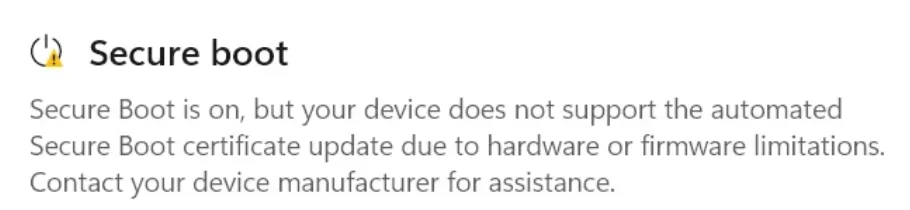
Just out of interest, what does it say in Device Security under secure boot? ie what message is there?
 

My Computers My Computers

  • At a glance

    Windows 11 Home 25H2Core i5-1035G132gb
    OS
    Windows 11 Home 25H2
    Computer type
    Laptop
    Manufacturer/Model
    HP Pavilion 14-ce3606sa
    CPU
    Core i5-1035G1
    Memory
    32gb
    Hard Drives
    Samsung 870 evo sata ssd
    Cooling
    Could be better
    Internet Speed
    50 mbps Starlink
    Browser
    Firefox
    Other Info
    Originally came installed with a 500gb H10 Optane ssd
  • At a glance

    Windows 11 HomeIntel Core i5-1035G116gb
    Operating System
    Windows 11 Home
    Computer type
    Laptop
    Manufacturer/Model
    HP Pavilion ce3606sa
    CPU
    Intel Core i5-1035G1
    Memory
    16gb
    Hard Drives
    Hynix Gold P31 2TB
    Internet Speed
    200mbps Starlink
    Browser
    Firefox
    Antivirus
    Defender
With the June 2026 update, non-compliant PC's now get a warning which directs you to check with your PC manufacturer for help.
 

My Computer My Computer

At a glance

Windows 7
OS
Windows 7
With the June 2026 update, non-compliant PC's now get a warning which directs you to check with your PC manufacturer for help.
That seems useless in his case, he's already done that! 😏
 

My Computers My Computers

  • At a glance

    Win 11 Pro 25H2, Build 26200.8655Intel Core i5 1450064GB DDR4GeForce RTX 4060
    OS
    Win 11 Pro 25H2, Build 26200.8655
    Computer type
    PC/Desktop
    Manufacturer/Model
    Home Brew
    CPU
    Intel Core i5 14500
    Motherboard
    Gigabyte B760M G P WIFI
    Memory
    64GB DDR4
    Graphics Card(s)
    GeForce RTX 4060
    Sound Card
    Chipset Realtek
    Monitor(s) Displays
    LG 45" Ultragear, Acer 24" 1080p
    Screen Resolution
    5120x1440, 1920x1080
    Hard Drives
    Crucial P310 2TB 2280 PCIe Gen4 3D NAND NVMe M.2 SSD (O/S)
    Silicon Power 2TB US75 NVMe PCIe Gen4 M.2 2280 SSD (backup)
    Crucial BX500 2TB 3D NAND (2nd backup)
    Seagate 4TB Ironwolf, rotating HDD archive files
    External off-line backup Drives: 2 NVMe 4TB drives in external enclosures
    PSU
    Thermaltake Toughpower GF3 750W
    Case
    LIAN LI LANCOOL 216 E-ATX PC Case
    Cooling
    Lots of fans!
    Keyboard
    Microsoft Comfort Curve 2000
    Mouse
    Logitech G305
    Internet Speed
    Verizon FiOS 1GB
    Browser
    Firefox
    Antivirus
    Malware Bytes & Windows Defender Security
  • At a glance

    Win 11 Pro 25H2, Build 26200.8524Intel Core i5 1440032GB DDR5Intel 700 Embedded GPU
    Operating System
    Win 11 Pro 25H2, Build 26200.8524
    Computer type
    PC/Desktop
    Manufacturer/Model
    Home Brew
    CPU
    Intel Core i5 14400
    Motherboard
    Gigabyte B760M DS3H AX
    Memory
    32GB DDR5
    Graphics card(s)
    Intel 700 Embedded GPU
    Sound Card
    Realtek Embedded
    Monitor(s) Displays
    27" HP 1080p
    Screen Resolution
    1920x1080
    Hard Drives
    Crucial P310 2TB 2280 PCIe Gen4 eD NAND PCIe SSD
    Samsung EVO 990 2TB NVMe Gen4 SSD
    Samsung 2TB SATA SSD
    PSU
    Thermaltake Smart BM3 650W
    Case
    Okinos Micro ATX Case
    Cooling
    Fans
    Keyboard
    Microsoft Comfort Curve 2000
    Mouse
    Logitech G305
    Internet Speed
    Verizon FiOS 1GB
    Browser
    Firefox
    Antivirus
    Malware Bytes & Windows Defender Security
I was just thinking about what kind of risk users face with laptops that still have the old KEK 2011 certificate; if well-known brands stop updating the firmware of 4 or 5-year-old laptops, surely a problem arises. Laptops that run Windows 11 perfectly fine and still function very well aren't replaced quickly. Another question is how you can properly protect yourself against root and bootkits on these laptops. Anyway, we'll keep looking for a good solution, or otherwise I have to get a new laptop :-(

This is what many users are seeing with older firmware, I'm curious how many people on the forum are experiencing this message as well.
1781679362042.webp
 
Last edited:

My Computer My Computer

At a glance

Windows 11 Pro 25H2 26200.7019Intel Core i7-8700KCorsair 32GB 4x DDR4-2998 / PC4-23900 DDR4 SD...AMD RX570
OS
Windows 11 Pro 25H2 26200.7019
Computer type
PC/Desktop
Manufacturer/Model
Self built midi tower
CPU
Intel Core i7-8700K
Motherboard
Gigabyte Z390GX
Memory
Corsair 32GB 4x DDR4-2998 / PC4-23900 DDR4 SDRAM UDIMM
Graphics Card(s)
AMD RX570
Sound Card
Sound Blaster Z
Monitor(s) Displays
2x IIyama Prolite X2380HS
Screen Resolution
1920x1080
Hard Drives
Samsung SSD 970 EVO Plus NVMe 1TB
Samsung SSD 970 EVO Plus NVMe 500GB
PSU
Seasonic 550W
Cooling
Noctua fans
Keyboard
Logitech G213
Mouse
Logitech Marble Mouse
Browser
Chrome
Antivirus
Norton
Other Info
Video/Audio editting machine
According to AI (which is unreliable), Huawei laptops don't have any kind of method of unlocking advanced bios, other than setting a supervisor password to unlock various things. Shut down, boot into bios with F2 key, go to "Security" tab, select "Set Supervisor password" (or set Administrator password), and hit enter. Create a memorable password (and write it down), press F10 to save changes. Restart and do F2 to go into bios again and enter the password if requested, go back to the Security or Boot tab. The hidden Secure Boot key Management, Custom mode, or restore factory keys options should be visible and selectable.

Maybe? :-) Could be worth a try. I had to do that on a laptop once and it did unlock various things.

I'm also wondering if clearing the CMOS battery might reset the bios or bring up new options. It was something that was needed to clear bios passwords on older laptops - in those days you could use two points of a paperclip on a couple of contacts next to the cmos battery. Not sure how you'd do it now, other than maybe a hard reset.

There's also this for restoring default bios generally - but you probably already know this


Another question is how you can properly protect yourself against root and bootkits on these laptops.

You could just turn secure boot off, use any highly rated antivirus program plus Malwarebytes Premium which detects rootkits and bootkits. Or just use Malwarebytes premium. And occasionally run the Kaspersky offline rescue disk (to check everything is clean - it detects rootkits or bootkits before windows loads). Once you have the Kaspersky rescue disk burned to usb it's fairly simple and quick to use on occasion - except it seems to need an ethernet connection to be able to update each time.

With sensible internet use and an adblocker you'd maybe never have an issue - and don't use usb sticks that have been in another machine. And maybe encrypt your drive and use strong WPA3 passwords on router. All of which are sensible anyway. I would think phishing emails would be a risk so care to avoid clicking on links in emails (sensible anyway) and some AV's actually protect from phishing emails now and alert you also.

And set a bios password.
 
Last edited:

My Computers My Computers

  • At a glance

    Windows 11 Home 25H2Core i5-1035G132gb
    OS
    Windows 11 Home 25H2
    Computer type
    Laptop
    Manufacturer/Model
    HP Pavilion 14-ce3606sa
    CPU
    Core i5-1035G1
    Memory
    32gb
    Hard Drives
    Samsung 870 evo sata ssd
    Cooling
    Could be better
    Internet Speed
    50 mbps Starlink
    Browser
    Firefox
    Other Info
    Originally came installed with a 500gb H10 Optane ssd
  • At a glance

    Windows 11 HomeIntel Core i5-1035G116gb
    Operating System
    Windows 11 Home
    Computer type
    Laptop
    Manufacturer/Model
    HP Pavilion ce3606sa
    CPU
    Intel Core i5-1035G1
    Memory
    16gb
    Hard Drives
    Hynix Gold P31 2TB
    Internet Speed
    200mbps Starlink
    Browser
    Firefox
    Antivirus
    Defender
Back
Top Bottom