Solved Un-Hiding Icons in Task Bar


SightUp

Well-known member
Member
Local time
4:25 AM
Posts
182
OS
Windows
How do I get back to the menu that was in Windows 10 where I could click always show?
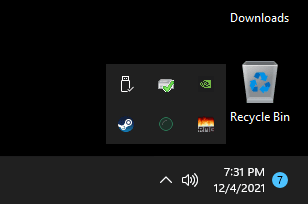
1638667974277.png

I tried shell:::{05d7b0f4-2121-4eff-bf6b-ed3f69b894d9} in the Run window and that did not work. Nothing popped up.
 

My Computer My Computer

At a glance

WindowsIntel 8086kEVGA 3080 Ti FTW3 Ultra
OS
Windows
CPU
Intel 8086k
Motherboard
Asus z370-F
Graphics Card(s)
EVGA 3080 Ti FTW3 Ultra
Sound Card
ADI-2 DAC fs
Just drag them out of that box onto the Taskbar.
 

My Computers My Computers

  • At a glance

    Windows 11 Pro
    OS
    Windows 11 Pro
    Computer type
    PC/Desktop
    Manufacturer/Model
    ASUS ROG Strix
  • At a glance

    Windows 11 Pro
    Operating System
    Windows 11 Pro
    Computer type
    Laptop
    Manufacturer/Model
    ASUS VivoBook
  • ASUS VivoBook 'Lite' ~ Windows 11 Home
There HAS to be a way to check a box.... right?
 

My Computer My Computer

At a glance

WindowsIntel 8086kEVGA 3080 Ti FTW3 Ultra
OS
Windows
CPU
Intel 8086k
Motherboard
Asus z370-F
Graphics Card(s)
EVGA 3080 Ti FTW3 Ultra
Sound Card
ADI-2 DAC fs
There HAS to be a way to check a box.... right?
Yes there is. Right click on taskbar. Select taskbar settings. Toward the bottom click on taskbar behaviors. From there you can hide or unhide the taskbar by toggleing it on or off. Also that is where you can hide or unhide certain icons that the OS automatically pins to taskbar (ie teams, widgets,chat) You can also change what icons always appear in the bottom right system tray.
 

My Computers My Computers

  • At a glance

    Windows 11 Pro 25H2 26200.9457i9-10900 10 core 20 threads32 gbnone-Intel UHD Graphics 630
    OS
    Windows 11 Pro 25H2 26200.9457
    Computer type
    PC/Desktop
    Manufacturer/Model
    Dell Optiplex 7080
    CPU
    i9-10900 10 core 20 threads
    Motherboard
    DELL 0J37VM
    Memory
    32 gb
    Graphics Card(s)
    none-Intel UHD Graphics 630
    Sound Card
    Integrated Realtek
    Monitor(s) Displays
    Benq 27
    Screen Resolution
    2560x1440
    Hard Drives
    2x1tb Solidigm m.2 nvme /External drives 512gb Samsung m.2 sata+2tb Kingston m2.nvme
    PSU
    500w
    Case
    MT
    Cooling
    Dell Premium
    Keyboard
    Logitech wired
    Mouse
    Logitech wireless
    Internet Speed
    so slow I'm too embarrassed to tell
    Browser
    #1 Edge #2 Firefox
    Antivirus
    Defender+MWB Premium
  • At a glance

    Windows 11 Pro 24H2 26200.9457AMD Ryzen 7 6800U32 gbintegrated
    Operating System
    Windows 11 Pro 24H2 26200.9457
    Computer type
    PC/Desktop
    Manufacturer/Model
    Beelink Mini PC SER5
    CPU
    AMD Ryzen 7 6800U
    Memory
    32 gb
    Graphics card(s)
    integrated
    Sound Card
    integrated
    Monitor(s) Displays
    Benq 27
    Screen Resolution
    2560x1440
    Hard Drives
    1TB Crucial nvme
    Keyboard
    Logitech wired
    Mouse
    Logitech wireless
    Internet Speed
    still too embarrassed to tell
    Browser
    Firefox
    Antivirus
    Defender
  • System 3 is non compliant Dell 9020 i7-4770/24gb ram Win11 PRO 26200.9457

My Computers My Computers

  • At a glance

    Windows 11 Pro
    OS
    Windows 11 Pro
    Computer type
    PC/Desktop
    Manufacturer/Model
    ASUS ROG Strix
  • At a glance

    Windows 11 Pro
    Operating System
    Windows 11 Pro
    Computer type
    Laptop
    Manufacturer/Model
    ASUS VivoBook
  • ASUS VivoBook 'Lite' ~ Windows 11 Home
explorer shell:::{05d7b0f4-2121-4eff-bf6b-ed3f69b894d9}

I was missing the explorer bit.
 

My Computer My Computer

At a glance

WindowsIntel 8086kEVGA 3080 Ti FTW3 Ultra
OS
Windows
CPU
Intel 8086k
Motherboard
Asus z370-F
Graphics Card(s)
EVGA 3080 Ti FTW3 Ultra
Sound Card
ADI-2 DAC fs

My Computers My Computers

  • At a glance

    Windows 11 Pro
    OS
    Windows 11 Pro
    Computer type
    PC/Desktop
    Manufacturer/Model
    ASUS ROG Strix
  • At a glance

    Windows 11 Pro
    Operating System
    Windows 11 Pro
    Computer type
    Laptop
    Manufacturer/Model
    ASUS VivoBook
  • ASUS VivoBook 'Lite' ~ Windows 11 Home
So, I was wrong. This problem has not resolved.

Restarting my PC undoes the explorer shell:::{05d7b0f4-2121-4eff-bf6b-ed3f69b894d9} fix.

Anyone know why or how to make it perm?
 

My Computer My Computer

At a glance

WindowsIntel 8086kEVGA 3080 Ti FTW3 Ultra
OS
Windows
CPU
Intel 8086k
Motherboard
Asus z370-F
Graphics Card(s)
EVGA 3080 Ti FTW3 Ultra
Sound Card
ADI-2 DAC fs

Latest Support Threads

Back
Top Bottom