
Unable to download Dev Build ISO's from Microsoft... this was self inflicted. How do I resolve this?


Mooly

Well-known member
Member
VIP
Local time
9:56 PM
Posts
755
OS
W11 Pro x64 ongoing Canary 29500 latest builds
Yesterday I went to download an ISO of the Dev Build (26100.1150) from the MS Dev Build page. You have to be an Insider and sign in with your MS account to access these.

All would have been OK (but now the self inflicted part). Unfortunately I had to cancel the download and when I tried again I got an error code at the last step saying to 'try again later'. Long story short and I put the question to Copilot which informs me the original link has 24 hour validity and I might have to wait although I could try using 'In Private' and delete temp internet files/browser history etc. No good. Different PC and still no good. Copilot also suggested there could now be an IP block (temporary?) to stop misuse of the server.

I wait over 24 hours and try again. Same result.

Anyone any experience of this? and whether or how long this takes to resolve?

(I know I can use UUPDUMP but wondered over this current issue)
 

My Computer

System One

  • OS
    W11 Pro x64 ongoing Canary 29500 latest builds
    Computer type
    Laptop
    Manufacturer/Model
    Dell 7760 Mobile Precision 17"
    CPU
    Intel i5
    Motherboard
    Unknown
    Memory
    8Gb
    Graphics Card(s)
    Intel HD Graphics
    Sound Card
    Realtek
    Monitor(s) Displays
    Internal
    Hard Drives
    2 x 256Gb SSD
    PSU
    Dell 240 watt
    Mouse
    Dell Premier Bluetooth
    Internet Speed
    50Mbps
    Browser
    Edge
    Antivirus
    Default Microsoft Security

My Computers

System One System Two

  • OS
    Windows 11 Pro 25H2
    Computer type
    Laptop
    Manufacturer/Model
    Huawei MateBook D15
    CPU
    Ryzen 5 3500U
    Memory
    8GB
    Graphics Card(s)
    Vega 8
    Screen Resolution
    FHD
    Hard Drives
    256GB Samsung SSD + 1TB HDD
    Browser
    Microsoft Edge
    Antivirus
    ESET Smart Security Premium
  • Operating System
    Windows 10 Enterprise LTSC 21H2
    Computer type
    Laptop
    Manufacturer/Model
    MSI GS73 6RF Stealth Pro
    CPU
    intel core i7 6700HQ
    Memory
    16GB
    Graphics card(s)
    Nvidia Geforce GTX1060 (6GB)
    Screen Resolution
    FHD
    Hard Drives
    128GB SSD + 1TB HDD
    Browser
    Microsoft Edge
    Antivirus
    Windows Defender
Yesterday I went to download an ISO of the Dev Build (26100.1150) from the MS Dev Build page. You have to be an Insider and sign in with your MS account to access these.

All would have been OK (but now the self inflicted part). Unfortunately I had to cancel the download and when I tried again I got an error code at the last step saying to 'try again later'. Long story short and I put the question to Copilot which informs me the original link has 24 hour validity and I might have to wait although I could try using 'In Private' and delete temp internet files/browser history etc. No good. Different PC and still no good. Copilot also suggested there could now be an IP block (temporary?) to stop misuse of the server.

I wait over 24 hours and try again. Same result.

Anyone any experience of this? and whether or how long this takes to resolve?

(I know I can use UUPDUMP but wondered over this current issue)
I can put it on my OneDrive for you if you want. (english US).

Windows11_InsiderPreview_Client_x64_en-us_26100.1150.iso
 

My Computers

System One System Two

  • OS
    All Branches but Release
    Computer type
    Laptop
    Manufacturer/Model
    Acer Nitro ANV15-51
    CPU
    AMD Ryzen 7 7735HS 3200-4500 Mhz 8 cores x 2
    Motherboard
    Sportage_RBH
    Memory
    32 GB DDR5
    Graphics Card(s)
    Radeon Graphic / NVIDIA GeForce RTX 4060 8 GB GDDR6
    Sound Card
    AMD/Realtek(R) Audio
    Monitor(s) Displays
    Integrated Monitor (15.3"vis)
    Screen Resolution
    FHD 1920X1080 16:9 144Hz
    Hard Drives
    KINGSTON OM8SEP4512Q-AA 1TB
    Western Digital 256GB
    PSU
    19V DC 6.32 A 120 W
    Cooling
    Dual Fans
    Mouse
    MS Bluetooth
    Internet Speed
    Fiber 1GB Cox -us & 1GB Orange-fr
    Browser
    Edge Canary- Firefox Nightly-Chrome Dev-Chrome Dev
    Antivirus
    Windows Defender
  • Operating System
    Windows 11 Beta
    Computer type
    Laptop
    Manufacturer/Model
    Asus X751BP
    CPU
    AMD A9-9420
    Memory
    8 GB of DDR4
    Graphics card(s)
    AMD Radeon R5
    Screen Resolution
    1600x900
    Hard Drives
    Seagate 1 TB
I can put it on my OneDrive for you if you want. (english US).
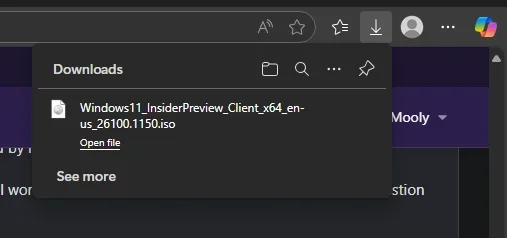
Thank you so much. Much appreciated :-) Getting it now, looks like it will take around 30 minutes.
 

My Computer

System One

  • OS
    W11 Pro x64 ongoing Canary 29500 latest builds
    Computer type
    Laptop
    Manufacturer/Model
    Dell 7760 Mobile Precision 17"
    CPU
    Intel i5
    Motherboard
    Unknown
    Memory
    8Gb
    Graphics Card(s)
    Intel HD Graphics
    Sound Card
    Realtek
    Monitor(s) Displays
    Internal
    Hard Drives
    2 x 256Gb SSD
    PSU
    Dell 240 watt
    Mouse
    Dell Premier Bluetooth
    Internet Speed
    50Mbps
    Browser
    Edge
    Antivirus
    Default Microsoft Security
  • Like
Reactions: OAT
All done (y)

Screenshot 2025-09-01 170222.webp
 

My Computer

System One

  • OS
    W11 Pro x64 ongoing Canary 29500 latest builds
    Computer type
    Laptop
    Manufacturer/Model
    Dell 7760 Mobile Precision 17"
    CPU
    Intel i5
    Motherboard
    Unknown
    Memory
    8Gb
    Graphics Card(s)
    Intel HD Graphics
    Sound Card
    Realtek
    Monitor(s) Displays
    Internal
    Hard Drives
    2 x 256Gb SSD
    PSU
    Dell 240 watt
    Mouse
    Dell Premier Bluetooth
    Internet Speed
    50Mbps
    Browser
    Edge
    Antivirus
    Default Microsoft Security
  • Like
Reactions: OAT
Back
Top Bottom


