Unable to download PDFs


Involute

Member
Member
Local time
12:57 PM
Posts
28
OS
WIndows 11
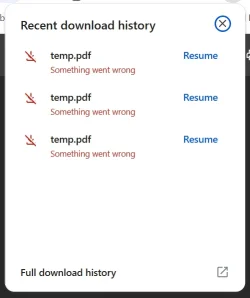
I've just tried to download two PDFs, one from Wells Fargo and the other from Verizon. I'm able to view the PDFs in my browser, but when I click the download button in the upper-right of the browser window I get the following error. I have no problem downloading JPEGs. This happens in both Chrome and Edge, suggesting it's neither a problem with the site nor the browser, but I've never seen this behavior before, so, who knows? Any tips greatly appreciated.
Download error.webp
 

My Computer

System One

  • OS
    WIndows 11
    Computer type
    PC/Desktop
    Manufacturer/Model
    Puget Systems
    CPU
    Intel Core Ultra 9 285K 3.7GHz 24 Core 36MB 125WASUS Pr
    Motherboard
    ASUS ProArt Z890-Creator WiFi
    Memory
    64GB
    Graphics Card(s)
    Asus GeForce RTX 4080 SUPER ProArt 16GB
    Hard Drives
    1 x Kingston KC3000 2TB Gen4 M.2 SSD (internal)
    1 x PNY CS3140 8TB Gen4 PCIe NVME M.2 SSD (internal)
    1 x Kingston KC3000 1TB Gen4 M.2 SSD (internal)
    2 x Samsung 870 QVO 8TB SSD (external)
    PSU
    Super Flower LEADEX VII Gold ATX 3.0 1300W
    Case
    Fractal Design Define 7
    Cooling
    Asetek 624S-M2 240mm CPU Cooler
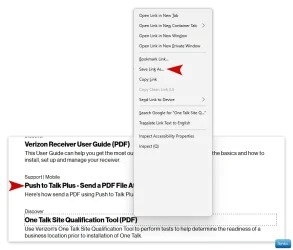
Did you try right clicking the PDF and choosing “Save as” Or “Save link as”?
 

My Computers

System One System Two

  • OS
    Windows 11 Pro 25H2 Build 26200.8524
    Computer type
    PC/Desktop
    Manufacturer/Model
    Sin-built 2013
    CPU
    Intel(R) Core(TM) i7-4770K CPU @ 3.50GHz
    Motherboard
    ASUS ROG Maximus VI Formula
    Memory
    32.0 GB of I forget and the box is in storage.
    Graphics Card(s)
    Gigabyte nVidia GeForce GTX 1660 Super OC 6GB
    Sound Card
    Onboard thingy
    Monitor(s) Displays
    5 x LG 25MS500-B - 1 x 24MK430H-B - 1 x Wacom Pro 22" Touch Screen Tablet
    Screen Resolution
    All over the place
    Hard Drives
    Too many to list.
    OS on Samsung 1TB 870 QVO SATA
    PSU
    Silverstone 1500
    Case
    NZXT Phantom 820 Full-Tower Case
    Cooling
    Noctua NH-D15 Elite Class Dual Tower CPU Cooler / 6 x EziDIY 120mm / 2 x Corsair 140mm somethings / 1 x 140mm Thermaltake something / 2 x 200mm Corsair.
    Keyboard
    Corsair K95 / Logitech diNovo Edge Wireless
    Mouse
    Logitech: G402 / G502 / Mx Masters / Mx Air Cordless
    Internet Speed
    2000/500Mbps
    Browser
    All sorts
    Antivirus
    Kaspersky Premium
    Other Info
    ㅤㅤㅤㅤㅤㅤㅤㅤㅤㅤㅤㅤㅤㅤㅤㅤㅤㅤㅤㅤㅤㅤㅤㅤㅤㅤㅤㅤㅤㅤㅤㅤㅤㅤㅤㅤㅤㅤㅤㅤ⠀⠀⠀⠀⠀⠀⠀⠀⠀⠀
    TP-Link BE9300 WiFi 7 Bluetooth 5.4 (Archer TBE550E)
    TP-Link TX201 V1 2.5GB Lan

    Grandstream HT812 - VoIP
    ASUS DSL-AX82U - Mesh
    ASUS RT-AC68U - Mesh
    ASUS RT-BE88U Router

    Brother MFC-L2880DW Printer

    I’m on a horse.
  • Operating System
    Windows 11 Pro 25H2 Build 26200.8524
    Computer type
    Laptop
    Manufacturer/Model
    LENOVO Yoga 7 14IRL8 - 7i EVO OLED 14" Touchscreen i5 12 Core 16GB/512GB
    CPU
    Intel Core 12th Gen i5-1240P Processor (1.7 - 4.4GHz)
    Memory
    16GB LPDDR5 RAM
    Graphics card(s)
    Intel Iris Xe Graphics Processor
    Sound Card
    Optimized with Dolby Atmos®
    Screen Resolution
    QHD 2880 x 1800 OLED
    Hard Drives
    M.2 512GB
    Antivirus
    Defender / Malwarebytes
    Other Info
    …still on a horse.
Can you supply a link to a page that houses any of these PDF’s, please? (Page with the PDF links)
 

My Computers

System One System Two

  • OS
    Windows 11 Pro 25H2 Build 26200.8524
    Computer type
    PC/Desktop
    Manufacturer/Model
    Sin-built 2013
    CPU
    Intel(R) Core(TM) i7-4770K CPU @ 3.50GHz
    Motherboard
    ASUS ROG Maximus VI Formula
    Memory
    32.0 GB of I forget and the box is in storage.
    Graphics Card(s)
    Gigabyte nVidia GeForce GTX 1660 Super OC 6GB
    Sound Card
    Onboard thingy
    Monitor(s) Displays
    5 x LG 25MS500-B - 1 x 24MK430H-B - 1 x Wacom Pro 22" Touch Screen Tablet
    Screen Resolution
    All over the place
    Hard Drives
    Too many to list.
    OS on Samsung 1TB 870 QVO SATA
    PSU
    Silverstone 1500
    Case
    NZXT Phantom 820 Full-Tower Case
    Cooling
    Noctua NH-D15 Elite Class Dual Tower CPU Cooler / 6 x EziDIY 120mm / 2 x Corsair 140mm somethings / 1 x 140mm Thermaltake something / 2 x 200mm Corsair.
    Keyboard
    Corsair K95 / Logitech diNovo Edge Wireless
    Mouse
    Logitech: G402 / G502 / Mx Masters / Mx Air Cordless
    Internet Speed
    2000/500Mbps
    Browser
    All sorts
    Antivirus
    Kaspersky Premium
    Other Info
    ㅤㅤㅤㅤㅤㅤㅤㅤㅤㅤㅤㅤㅤㅤㅤㅤㅤㅤㅤㅤㅤㅤㅤㅤㅤㅤㅤㅤㅤㅤㅤㅤㅤㅤㅤㅤㅤㅤㅤㅤ⠀⠀⠀⠀⠀⠀⠀⠀⠀⠀
    TP-Link BE9300 WiFi 7 Bluetooth 5.4 (Archer TBE550E)
    TP-Link TX201 V1 2.5GB Lan

    Grandstream HT812 - VoIP
    ASUS DSL-AX82U - Mesh
    ASUS RT-AC68U - Mesh
    ASUS RT-BE88U Router

    Brother MFC-L2880DW Printer

    I’m on a horse.
  • Operating System
    Windows 11 Pro 25H2 Build 26200.8524
    Computer type
    Laptop
    Manufacturer/Model
    LENOVO Yoga 7 14IRL8 - 7i EVO OLED 14" Touchscreen i5 12 Core 16GB/512GB
    CPU
    Intel Core 12th Gen i5-1240P Processor (1.7 - 4.4GHz)
    Memory
    16GB LPDDR5 RAM
    Graphics card(s)
    Intel Iris Xe Graphics Processor
    Sound Card
    Optimized with Dolby Atmos®
    Screen Resolution
    QHD 2880 x 1800 OLED
    Hard Drives
    M.2 512GB
    Antivirus
    Defender / Malwarebytes
    Other Info
    …still on a horse.
Click Resume, one at a time.
 

My Computers

System One System Two

  • OS
    Windows 11 Pro
    Computer type
    PC/Desktop
    Manufacturer/Model
    ASUS ROG Strix
  • Operating System
    Windows 11 Pro
    Computer type
    Laptop
    Manufacturer/Model
    ASUS VivoBook
I don't seem to have an issue clicking a PDF at Verizon, but it also works if I right click and "Save Link As"

Win-1787.webp
 

My Computers

System One System Two

  • OS
    Windows 11 Pro 25H2 Build 26200.8524
    Computer type
    PC/Desktop
    Manufacturer/Model
    Sin-built 2013
    CPU
    Intel(R) Core(TM) i7-4770K CPU @ 3.50GHz
    Motherboard
    ASUS ROG Maximus VI Formula
    Memory
    32.0 GB of I forget and the box is in storage.
    Graphics Card(s)
    Gigabyte nVidia GeForce GTX 1660 Super OC 6GB
    Sound Card
    Onboard thingy
    Monitor(s) Displays
    5 x LG 25MS500-B - 1 x 24MK430H-B - 1 x Wacom Pro 22" Touch Screen Tablet
    Screen Resolution
    All over the place
    Hard Drives
    Too many to list.
    OS on Samsung 1TB 870 QVO SATA
    PSU
    Silverstone 1500
    Case
    NZXT Phantom 820 Full-Tower Case
    Cooling
    Noctua NH-D15 Elite Class Dual Tower CPU Cooler / 6 x EziDIY 120mm / 2 x Corsair 140mm somethings / 1 x 140mm Thermaltake something / 2 x 200mm Corsair.
    Keyboard
    Corsair K95 / Logitech diNovo Edge Wireless
    Mouse
    Logitech: G402 / G502 / Mx Masters / Mx Air Cordless
    Internet Speed
    2000/500Mbps
    Browser
    All sorts
    Antivirus
    Kaspersky Premium
    Other Info
    ㅤㅤㅤㅤㅤㅤㅤㅤㅤㅤㅤㅤㅤㅤㅤㅤㅤㅤㅤㅤㅤㅤㅤㅤㅤㅤㅤㅤㅤㅤㅤㅤㅤㅤㅤㅤㅤㅤㅤㅤ⠀⠀⠀⠀⠀⠀⠀⠀⠀⠀
    TP-Link BE9300 WiFi 7 Bluetooth 5.4 (Archer TBE550E)
    TP-Link TX201 V1 2.5GB Lan

    Grandstream HT812 - VoIP
    ASUS DSL-AX82U - Mesh
    ASUS RT-AC68U - Mesh
    ASUS RT-BE88U Router

    Brother MFC-L2880DW Printer

    I’m on a horse.
  • Operating System
    Windows 11 Pro 25H2 Build 26200.8524
    Computer type
    Laptop
    Manufacturer/Model
    LENOVO Yoga 7 14IRL8 - 7i EVO OLED 14" Touchscreen i5 12 Core 16GB/512GB
    CPU
    Intel Core 12th Gen i5-1240P Processor (1.7 - 4.4GHz)
    Memory
    16GB LPDDR5 RAM
    Graphics card(s)
    Intel Iris Xe Graphics Processor
    Sound Card
    Optimized with Dolby Atmos®
    Screen Resolution
    QHD 2880 x 1800 OLED
    Hard Drives
    M.2 512GB
    Antivirus
    Defender / Malwarebytes
    Other Info
    …still on a horse.
Did you try right clicking the PDF and choosing “Save as” Or “Save link as”?
I tried “Save as,” not “Save link as.” Same problem.
 

My Computer

System One

  • OS
    WIndows 11
    Computer type
    PC/Desktop
    Manufacturer/Model
    Puget Systems
    CPU
    Intel Core Ultra 9 285K 3.7GHz 24 Core 36MB 125WASUS Pr
    Motherboard
    ASUS ProArt Z890-Creator WiFi
    Memory
    64GB
    Graphics Card(s)
    Asus GeForce RTX 4080 SUPER ProArt 16GB
    Hard Drives
    1 x Kingston KC3000 2TB Gen4 M.2 SSD (internal)
    1 x PNY CS3140 8TB Gen4 PCIe NVME M.2 SSD (internal)
    1 x Kingston KC3000 1TB Gen4 M.2 SSD (internal)
    2 x Samsung 870 QVO 8TB SSD (external)
    PSU
    Super Flower LEADEX VII Gold ATX 3.0 1300W
    Case
    Fractal Design Define 7
    Cooling
    Asetek 624S-M2 240mm CPU Cooler

My Computer

System One

  • OS
    WIndows 11
    Computer type
    PC/Desktop
    Manufacturer/Model
    Puget Systems
    CPU
    Intel Core Ultra 9 285K 3.7GHz 24 Core 36MB 125WASUS Pr
    Motherboard
    ASUS ProArt Z890-Creator WiFi
    Memory
    64GB
    Graphics Card(s)
    Asus GeForce RTX 4080 SUPER ProArt 16GB
    Hard Drives
    1 x Kingston KC3000 2TB Gen4 M.2 SSD (internal)
    1 x PNY CS3140 8TB Gen4 PCIe NVME M.2 SSD (internal)
    1 x Kingston KC3000 1TB Gen4 M.2 SSD (internal)
    2 x Samsung 870 QVO 8TB SSD (external)
    PSU
    Super Flower LEADEX VII Gold ATX 3.0 1300W
    Case
    Fractal Design Define 7
    Cooling
    Asetek 624S-M2 240mm CPU Cooler
Can you supply a link to a page that houses any of these PDF’s, please? (Page with the PDF links)
Unfortunately no. They’re my account summaries, so password-protected.
 

My Computer

System One

  • OS
    WIndows 11
    Computer type
    PC/Desktop
    Manufacturer/Model
    Puget Systems
    CPU
    Intel Core Ultra 9 285K 3.7GHz 24 Core 36MB 125WASUS Pr
    Motherboard
    ASUS ProArt Z890-Creator WiFi
    Memory
    64GB
    Graphics Card(s)
    Asus GeForce RTX 4080 SUPER ProArt 16GB
    Hard Drives
    1 x Kingston KC3000 2TB Gen4 M.2 SSD (internal)
    1 x PNY CS3140 8TB Gen4 PCIe NVME M.2 SSD (internal)
    1 x Kingston KC3000 1TB Gen4 M.2 SSD (internal)
    2 x Samsung 870 QVO 8TB SSD (external)
    PSU
    Super Flower LEADEX VII Gold ATX 3.0 1300W
    Case
    Fractal Design Define 7
    Cooling
    Asetek 624S-M2 240mm CPU Cooler
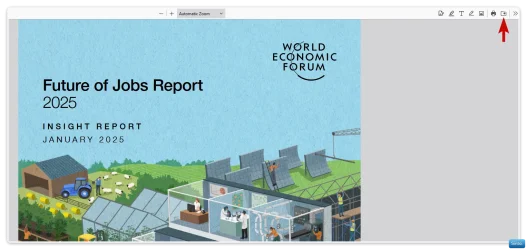
In my browser of choice (Firefox), when a PDF opens in a new tab, I get the option to download.

Clip-1789.webp

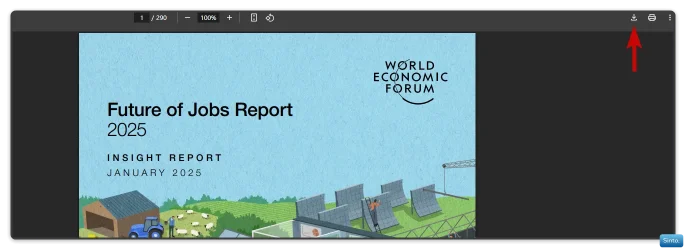
In Chrome, I get the same option if the PDF opens in a new tab

Win-1790.webp

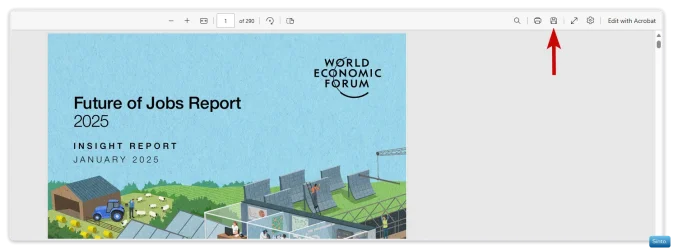
And the same for Edge

Win-1791.webp
 

My Computers

System One System Two

  • OS
    Windows 11 Pro 25H2 Build 26200.8524
    Computer type
    PC/Desktop
    Manufacturer/Model
    Sin-built 2013
    CPU
    Intel(R) Core(TM) i7-4770K CPU @ 3.50GHz
    Motherboard
    ASUS ROG Maximus VI Formula
    Memory
    32.0 GB of I forget and the box is in storage.
    Graphics Card(s)
    Gigabyte nVidia GeForce GTX 1660 Super OC 6GB
    Sound Card
    Onboard thingy
    Monitor(s) Displays
    5 x LG 25MS500-B - 1 x 24MK430H-B - 1 x Wacom Pro 22" Touch Screen Tablet
    Screen Resolution
    All over the place
    Hard Drives
    Too many to list.
    OS on Samsung 1TB 870 QVO SATA
    PSU
    Silverstone 1500
    Case
    NZXT Phantom 820 Full-Tower Case
    Cooling
    Noctua NH-D15 Elite Class Dual Tower CPU Cooler / 6 x EziDIY 120mm / 2 x Corsair 140mm somethings / 1 x 140mm Thermaltake something / 2 x 200mm Corsair.
    Keyboard
    Corsair K95 / Logitech diNovo Edge Wireless
    Mouse
    Logitech: G402 / G502 / Mx Masters / Mx Air Cordless
    Internet Speed
    2000/500Mbps
    Browser
    All sorts
    Antivirus
    Kaspersky Premium
    Other Info
    ㅤㅤㅤㅤㅤㅤㅤㅤㅤㅤㅤㅤㅤㅤㅤㅤㅤㅤㅤㅤㅤㅤㅤㅤㅤㅤㅤㅤㅤㅤㅤㅤㅤㅤㅤㅤㅤㅤㅤㅤ⠀⠀⠀⠀⠀⠀⠀⠀⠀⠀
    TP-Link BE9300 WiFi 7 Bluetooth 5.4 (Archer TBE550E)
    TP-Link TX201 V1 2.5GB Lan

    Grandstream HT812 - VoIP
    ASUS DSL-AX82U - Mesh
    ASUS RT-AC68U - Mesh
    ASUS RT-BE88U Router

    Brother MFC-L2880DW Printer

    I’m on a horse.
  • Operating System
    Windows 11 Pro 25H2 Build 26200.8524
    Computer type
    Laptop
    Manufacturer/Model
    LENOVO Yoga 7 14IRL8 - 7i EVO OLED 14" Touchscreen i5 12 Core 16GB/512GB
    CPU
    Intel Core 12th Gen i5-1240P Processor (1.7 - 4.4GHz)
    Memory
    16GB LPDDR5 RAM
    Graphics card(s)
    Intel Iris Xe Graphics Processor
    Sound Card
    Optimized with Dolby Atmos®
    Screen Resolution
    QHD 2880 x 1800 OLED
    Hard Drives
    M.2 512GB
    Antivirus
    Defender / Malwarebytes
    Other Info
    …still on a horse.
My banking app does not allow screenshots, could this be something like this ?
I am just guessing, could be there some other way your account statements can be downloaded ?
 

My Computer

System One

  • OS
    Windows 11 23H2
    Computer type
    PC/Desktop
    Manufacturer/Model
    Assembled
    CPU
    Intel i7-7700k
    Motherboard
    Asrock Z270 Taichi
    Memory
    16 GB
    Graphics Card(s)
    Intel 630 onboard
    Sound Card
    Onboard
    Monitor(s) Displays
    Benq 1080p
    Screen Resolution
    1920*1080
    Hard Drives
    NVMe, SSD and HDD
    Case
    Cooler Master
    Keyboard
    Asus wireless
    Mouse
    Asus Wireless
    Internet Speed
    75 Mbps
    Browser
    Chrome, Edge, Arc
    Antivirus
    Windows Defender

My Computer

System One

  • OS
    WIndows 11
    Computer type
    PC/Desktop
    Manufacturer/Model
    Puget Systems
    CPU
    Intel Core Ultra 9 285K 3.7GHz 24 Core 36MB 125WASUS Pr
    Motherboard
    ASUS ProArt Z890-Creator WiFi
    Memory
    64GB
    Graphics Card(s)
    Asus GeForce RTX 4080 SUPER ProArt 16GB
    Hard Drives
    1 x Kingston KC3000 2TB Gen4 M.2 SSD (internal)
    1 x PNY CS3140 8TB Gen4 PCIe NVME M.2 SSD (internal)
    1 x Kingston KC3000 1TB Gen4 M.2 SSD (internal)
    2 x Samsung 870 QVO 8TB SSD (external)
    PSU
    Super Flower LEADEX VII Gold ATX 3.0 1300W
    Case
    Fractal Design Define 7
    Cooling
    Asetek 624S-M2 240mm CPU Cooler

<sigh> I solved the problem. When I download these statements, I save each to a file called "temp," so each month I get a dialog asking if I want to overwrite the existing "temp." I just click "Yes" without reading it. What it was actually saying this time, though, was the disk was write-protected, and was pointing to another disk than the one it should have. So, when it tried to download the files to that write-protected disk, it barfed. I'm still not sure why the download dialog was pointing to that disk after I told it where to put the files (on my non-write-protected disk), but I recreated the correct path and everything is back to normal. Thanks for trying to help, and I'm sorry for wasting everybody's time.
 

My Computer

System One

  • OS
    WIndows 11
    Computer type
    PC/Desktop
    Manufacturer/Model
    Puget Systems
    CPU
    Intel Core Ultra 9 285K 3.7GHz 24 Core 36MB 125WASUS Pr
    Motherboard
    ASUS ProArt Z890-Creator WiFi
    Memory
    64GB
    Graphics Card(s)
    Asus GeForce RTX 4080 SUPER ProArt 16GB
    Hard Drives
    1 x Kingston KC3000 2TB Gen4 M.2 SSD (internal)
    1 x PNY CS3140 8TB Gen4 PCIe NVME M.2 SSD (internal)
    1 x Kingston KC3000 1TB Gen4 M.2 SSD (internal)
    2 x Samsung 870 QVO 8TB SSD (external)
    PSU
    Super Flower LEADEX VII Gold ATX 3.0 1300W
    Case
    Fractal Design Define 7
    Cooling
    Asetek 624S-M2 240mm CPU Cooler

My Computers

System One System Two

  • OS
    Windows 11 Pro 25H2 Build 26200.8524
    Computer type
    PC/Desktop
    Manufacturer/Model
    Sin-built 2013
    CPU
    Intel(R) Core(TM) i7-4770K CPU @ 3.50GHz
    Motherboard
    ASUS ROG Maximus VI Formula
    Memory
    32.0 GB of I forget and the box is in storage.
    Graphics Card(s)
    Gigabyte nVidia GeForce GTX 1660 Super OC 6GB
    Sound Card
    Onboard thingy
    Monitor(s) Displays
    5 x LG 25MS500-B - 1 x 24MK430H-B - 1 x Wacom Pro 22" Touch Screen Tablet
    Screen Resolution
    All over the place
    Hard Drives
    Too many to list.
    OS on Samsung 1TB 870 QVO SATA
    PSU
    Silverstone 1500
    Case
    NZXT Phantom 820 Full-Tower Case
    Cooling
    Noctua NH-D15 Elite Class Dual Tower CPU Cooler / 6 x EziDIY 120mm / 2 x Corsair 140mm somethings / 1 x 140mm Thermaltake something / 2 x 200mm Corsair.
    Keyboard
    Corsair K95 / Logitech diNovo Edge Wireless
    Mouse
    Logitech: G402 / G502 / Mx Masters / Mx Air Cordless
    Internet Speed
    2000/500Mbps
    Browser
    All sorts
    Antivirus
    Kaspersky Premium
    Other Info
    ㅤㅤㅤㅤㅤㅤㅤㅤㅤㅤㅤㅤㅤㅤㅤㅤㅤㅤㅤㅤㅤㅤㅤㅤㅤㅤㅤㅤㅤㅤㅤㅤㅤㅤㅤㅤㅤㅤㅤㅤ⠀⠀⠀⠀⠀⠀⠀⠀⠀⠀
    TP-Link BE9300 WiFi 7 Bluetooth 5.4 (Archer TBE550E)
    TP-Link TX201 V1 2.5GB Lan

    Grandstream HT812 - VoIP
    ASUS DSL-AX82U - Mesh
    ASUS RT-AC68U - Mesh
    ASUS RT-BE88U Router

    Brother MFC-L2880DW Printer

    I’m on a horse.
  • Operating System
    Windows 11 Pro 25H2 Build 26200.8524
    Computer type
    Laptop
    Manufacturer/Model
    LENOVO Yoga 7 14IRL8 - 7i EVO OLED 14" Touchscreen i5 12 Core 16GB/512GB
    CPU
    Intel Core 12th Gen i5-1240P Processor (1.7 - 4.4GHz)
    Memory
    16GB LPDDR5 RAM
    Graphics card(s)
    Intel Iris Xe Graphics Processor
    Sound Card
    Optimized with Dolby Atmos®
    Screen Resolution
    QHD 2880 x 1800 OLED
    Hard Drives
    M.2 512GB
    Antivirus
    Defender / Malwarebytes
    Other Info
    …still on a horse.
I do not let browsers just open a PDF as that can be a security issue.
Any PDF I click on I get an option to open in my PDF program or save.

Screenshot 2025-07-20 193252.webp
 

My Computer

System One

  • OS
    Windows 11 Pro
Back
Top Bottom