I have tried to prepare my Gigabyte B360M DS3H Motherboard for Windows 11 several times. each time the process fails and I'm left with a Clean Windows 10 installation. Today I tried again.I checked I have TPM on the PC . I converted the disc file system from MBR to GPT, using Easeus Partition Master. The PC refused to boot and diplayed the attached message telling me a device was not attached. I restared the PC and entered the BIOS setting but am unable to locate any sign of a Secure Boot setting. So, I am now left with a PC that will not allow me to install Windows 11 and am faced with having to reformat the disc to MBR format , and reinstll my applications, again. The Gigabyte website states that the motherboard is Windowss 11 compatable. how can i change to Windows 11. please?
5 x LG 25MS500-B - 1 x 24MK430H-B - 1 x Wacom Pro 22" Touch Screen Tablet
Screen Resolution
All over the place
Hard Drives
Too many to list.
OS on Samsung 1TB 870 QVO SATA
PSU
Silverstone 1500
Case
NZXT Phantom 820 Full-Tower Case
Cooling
Noctua NH-D15 Elite Class Dual Tower CPU Cooler / 6 x EziDIY 120mm / 2 x Corsair 140mm somethings / 1 x 140mm Thermaltake something / 2 x 200mm Corsair.
5 x LG 25MS500-B - 1 x 24MK430H-B - 1 x Wacom Pro 22" Touch Screen Tablet
Screen Resolution
All over the place
Hard Drives
Too many to list.
OS on Samsung 1TB 870 QVO SATA
PSU
Silverstone 1500
Case
NZXT Phantom 820 Full-Tower Case
Cooling
Noctua NH-D15 Elite Class Dual Tower CPU Cooler / 6 x EziDIY 120mm / 2 x Corsair 140mm somethings / 1 x 140mm Thermaltake something / 2 x 200mm Corsair.
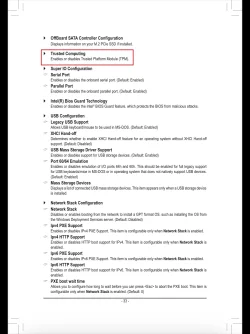
I actually don’t see Secure Boot on your Motherboard BIOS Settings. I believe you would need to add a TPM module. I believe the Intel firmware TPM is PTT.
Create the ISO using RUFUS, bypass the need for TPM.
hi i have a gigabyte motherboard model B360M H and i am trying to enable TPM 2 in the bios and after i enable it the computer refuses to reboot Is there something else i should be changing please Latest version of windows 10
5 x LG 25MS500-B - 1 x 24MK430H-B - 1 x Wacom Pro 22" Touch Screen Tablet
Screen Resolution
All over the place
Hard Drives
Too many to list.
OS on Samsung 1TB 870 QVO SATA
PSU
Silverstone 1500
Case
NZXT Phantom 820 Full-Tower Case
Cooling
Noctua NH-D15 Elite Class Dual Tower CPU Cooler / 6 x EziDIY 120mm / 2 x Corsair 140mm somethings / 1 x 140mm Thermaltake something / 2 x 200mm Corsair.
I actually don’t see Secure Boot on your Motherboard BIOS Settings. I believe you would need to add a TPM module. I believe the Intel firmware TPM is PTT.
Create the ISO using RUFUS, bypass the need for TPM.
That motherboard supports 8th gen and 9th gen Intel processors. They included TPM 2.0 capability on the chip.
I installed Win11 without Secure Boot enabled. Truthfully, I just didn't think of it, and I did absolutely nothing to bypass any requirements, I went right from the Microsoft playbook. However, I see in the Event Viewer that Secure Boot fails, so I need to enable that one of these days.
The MB must be able to set secure boot but isn't required to be enabled to install Win 10 & 11.
When you converted the disc file system from MBR to GPT using Easeus Partition Master did it created the EFI partition with the boot manager on it?
The main problem is that those applications just convert the drive from MBR to GPT but don't create the EFI partition with the boot manager on it.
If it is the case you must convert the old System partition to a EFI partition. Easy task.
Boot from a Win 10 or Win 11 installation drive and at the Windows Setup screen, press Shift+F10 simultaneously to open a command line prompt and type:
diskpart
list disk <- note the disk number of the drive containing your Windows partition
select disk # <- replace # with the drive identified above
list par
Exit
With a cel phone tate a picture and attach here so we can understand your drive
(1) -1 SM951 – 128GB M.2 AHCI PCIe SSD drive for Win 11
(2) -1 WD SATA 3 - 1T for Data
(3) -1 WD SATA 3 - 1T for backup
(4) -1 BX500 SSD - 256G for Windows 7 and Lubuntu
PSU
Thermaltake 450W TR2 gold
Keyboard
Old and good Chicony mechanical keyboard
Mouse
Logitech mX performance - 9 buttons (had to disable some)
Internet Speed
500 Mb/s
Browser
Firefox 64
Operating System
Windows 11 Pro
Computer type
Laptop
Manufacturer/Model
Asus Q550LF
CPU
i7-4500U 800- 3000MHz
Motherboard
Asus Q550LF
Memory
(4+4)G DDR3 1600
Graphics card(s)
IG intel 4400 + NVIDIA GeForce GT 745M
Sound Card
Realtek
Monitor(s) Displays
LG Display LP156WF4-SPH1
Screen Resolution
1920 x 1080
Hard Drives
BX500 120G SSD for Windows and programs
& 1T HDD for data
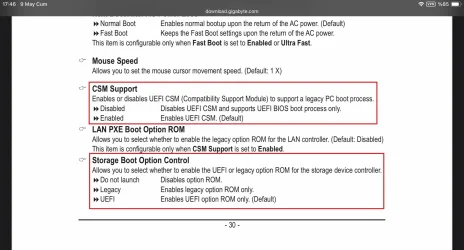
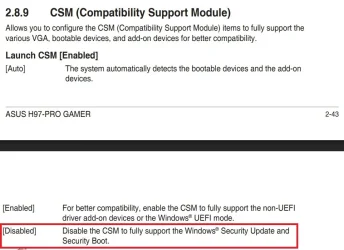
Boot into your BIOS and set "CSM Support" to disabled and "Storage Boot Option Control" to UEFI. This will enable your PC to boot to UEFI installation of Windows 11. Now you should be able to boot to UEFI Window 11 bootable media.
(1) -1 SM951 – 128GB M.2 AHCI PCIe SSD drive for Win 11
(2) -1 WD SATA 3 - 1T for Data
(3) -1 WD SATA 3 - 1T for backup
(4) -1 BX500 SSD - 256G for Windows 7 and Lubuntu
PSU
Thermaltake 450W TR2 gold
Keyboard
Old and good Chicony mechanical keyboard
Mouse
Logitech mX performance - 9 buttons (had to disable some)
Internet Speed
500 Mb/s
Browser
Firefox 64
Operating System
Windows 11 Pro
Computer type
Laptop
Manufacturer/Model
Asus Q550LF
CPU
i7-4500U 800- 3000MHz
Motherboard
Asus Q550LF
Memory
(4+4)G DDR3 1600
Graphics card(s)
IG intel 4400 + NVIDIA GeForce GT 745M
Sound Card
Realtek
Monitor(s) Displays
LG Display LP156WF4-SPH1
Screen Resolution
1920 x 1080
Hard Drives
BX500 120G SSD for Windows and programs
& 1T HDD for data
(1) -1 SM951 – 128GB M.2 AHCI PCIe SSD drive for Win 11
(2) -1 WD SATA 3 - 1T for Data
(3) -1 WD SATA 3 - 1T for backup
(4) -1 BX500 SSD - 256G for Windows 7 and Lubuntu
PSU
Thermaltake 450W TR2 gold
Keyboard
Old and good Chicony mechanical keyboard
Mouse
Logitech mX performance - 9 buttons (had to disable some)
Internet Speed
500 Mb/s
Browser
Firefox 64
Operating System
Windows 11 Pro
Computer type
Laptop
Manufacturer/Model
Asus Q550LF
CPU
i7-4500U 800- 3000MHz
Motherboard
Asus Q550LF
Memory
(4+4)G DDR3 1600
Graphics card(s)
IG intel 4400 + NVIDIA GeForce GT 745M
Sound Card
Realtek
Monitor(s) Displays
LG Display LP156WF4-SPH1
Screen Resolution
1920 x 1080
Hard Drives
BX500 120G SSD for Windows and programs
& 1T HDD for data
I miss read your post #7. I'm sorry. You're correct
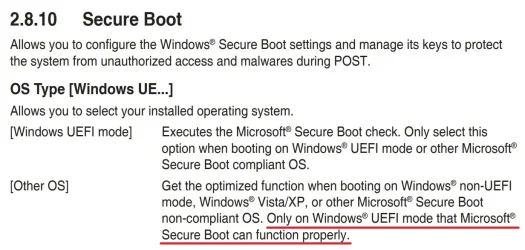
The correct is CSM must be disabled to enable Secure Boot
But the main reason the OP can't boot is because he converted the drive with the wrong tool and now he can't boot. Secure boot doesn't need be enabled to boot Win 10 or Win 11.
(1) -1 SM951 – 128GB M.2 AHCI PCIe SSD drive for Win 11
(2) -1 WD SATA 3 - 1T for Data
(3) -1 WD SATA 3 - 1T for backup
(4) -1 BX500 SSD - 256G for Windows 7 and Lubuntu
PSU
Thermaltake 450W TR2 gold
Keyboard
Old and good Chicony mechanical keyboard
Mouse
Logitech mX performance - 9 buttons (had to disable some)
Internet Speed
500 Mb/s
Browser
Firefox 64
Operating System
Windows 11 Pro
Computer type
Laptop
Manufacturer/Model
Asus Q550LF
CPU
i7-4500U 800- 3000MHz
Motherboard
Asus Q550LF
Memory
(4+4)G DDR3 1600
Graphics card(s)
IG intel 4400 + NVIDIA GeForce GT 745M
Sound Card
Realtek
Monitor(s) Displays
LG Display LP156WF4-SPH1
Screen Resolution
1920 x 1080
Hard Drives
BX500 120G SSD for Windows and programs
& 1T HDD for data