Unable to remove Xbox app from start menu in Windows 11 22H2


ijalabs

Active member
Local time
1:16 PM
Posts
24
OS
Windows 11
Hi Experts,

I am creating image for Windows 11 22 H2 in that one of the requirement is to remove Xbox shortcut from the start menu. I was using the PowerShell commands to remove the shortcut given below.
get-appxpackage -allusers *xboxapp* | Remove-AppxPackage
get-appxprovisionedpackage –online | where-object {$_.packagename –like “*xboxapp*”} | remove-appxprovisionedpackage –online
Get-AppxPackage -allusers Microsoft.Xbox.TCUI | Remove-AppxPackage
Get-AppxPackage -allusers Microsoft.XboxGameOverlay | Remove-AppxPackage
Get-AppxPackage -allusers Microsoft.XboxGamingOverlay | Remove-AppxPackage
Get-AppxPackage -allusers Microsoft.XboxIdentityProvider | Remove-AppxPackage
Get-AppxPackage -allusers Microsoft.XboxSpeechToTextOverlay | Remove-AppxPackage
get-appxprovisionedpackage –online | where-object {$_.packagename –like “*xbox*”} | remove-appxprovisionedpackage –online

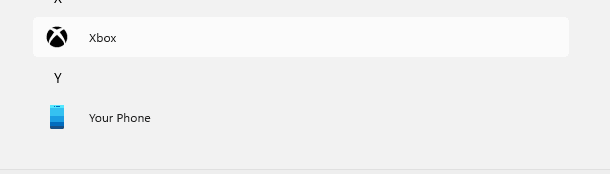
these same commands did the job in Win11 21H2 as well but in Win1122H2 the shortcut still remains in the start menu as per the attached.

I have tried to uninstall from start menu and under apps in settings, after capturing and applying the image using sysprep the shortcut still shows up again.

Kindly suggest on how to get this removed from the start menu for all users.

Thanks
Bala
 
Windows Build/Version
Windows 11 22H2

Attachments

  • xbox screenshot.png
    xbox screenshot.png
    1.1 KB · Views: 5

My Computer

System One

  • OS
    Windows 11
    Computer type
    PC/Desktop
    Manufacturer/Model
    HP Z2 SFF G9
I don't see Microsoft.GamingApp* stated anywhere.
 

My Computers

System One System Two

  • OS
    All Branches but Release
    Computer type
    Laptop
    Manufacturer/Model
    Acer Nitro ANV15-51
    CPU
    AMD Ryzen 7 7735HS 3200-4500 Mhz 8 cores x 2
    Motherboard
    Sportage_RBH
    Memory
    32 GB DDR5
    Graphics Card(s)
    Radeon Graphic / NVIDIA GeForce RTX 4060 8 GB GDDR6
    Sound Card
    AMD/Realtek(R) Audio
    Monitor(s) Displays
    Integrated Monitor (15.3"vis)
    Screen Resolution
    FHD 1920X1080 16:9 144Hz
    Hard Drives
    KINGSTON OM8SEP4512Q-AA 1TB
    Western Digital 256GB
    PSU
    19V DC 6.32 A 120 W
    Cooling
    Dual Fans
    Mouse
    MS Bluetooth
    Internet Speed
    Fiber 1GB Cox -us & 1GB Orange-fr
    Browser
    Edge Canary- Firefox Nightly-Chrome Dev-Chrome Dev
    Antivirus
    Windows Defender
  • Operating System
    Windows 11 Beta
    Computer type
    Laptop
    Manufacturer/Model
    Asus X751BP
    CPU
    AMD A9-9420
    Memory
    8 GB of DDR4
    Graphics card(s)
    AMD Radeon R5
    Screen Resolution
    1600x900
    Hard Drives
    Seagate 1 TB
Hi OAT,

Thanks for the reply i wanted to remove only the xbox app so i use the PowerShell command to get that that's why i have included "microsoft.gamingapp"

what i want is to remove the shortcut from the start menu.

Thanks
Bala
 

My Computer

System One

  • OS
    Windows 11
    Computer type
    PC/Desktop
    Manufacturer/Model
    HP Z2 SFF G9
All the icons for Xbox are located in Microsoft.GamingApp_version_x64__8wekyb3d8bbwe in Assets folder.
Short of modifying the manifest.xml and the <uap:VisualElements> tag within that file, I don't see how else to do it.
This is not ideal as one would have to modify rights, at least temporarily.
I have not checked the Group Policies, there might be one to prevent its display.
I am sure someone else will chime in.
 

My Computers

System One System Two

  • OS
    All Branches but Release
    Computer type
    Laptop
    Manufacturer/Model
    Acer Nitro ANV15-51
    CPU
    AMD Ryzen 7 7735HS 3200-4500 Mhz 8 cores x 2
    Motherboard
    Sportage_RBH
    Memory
    32 GB DDR5
    Graphics Card(s)
    Radeon Graphic / NVIDIA GeForce RTX 4060 8 GB GDDR6
    Sound Card
    AMD/Realtek(R) Audio
    Monitor(s) Displays
    Integrated Monitor (15.3"vis)
    Screen Resolution
    FHD 1920X1080 16:9 144Hz
    Hard Drives
    KINGSTON OM8SEP4512Q-AA 1TB
    Western Digital 256GB
    PSU
    19V DC 6.32 A 120 W
    Cooling
    Dual Fans
    Mouse
    MS Bluetooth
    Internet Speed
    Fiber 1GB Cox -us & 1GB Orange-fr
    Browser
    Edge Canary- Firefox Nightly-Chrome Dev-Chrome Dev
    Antivirus
    Windows Defender
  • Operating System
    Windows 11 Beta
    Computer type
    Laptop
    Manufacturer/Model
    Asus X751BP
    CPU
    AMD A9-9420
    Memory
    8 GB of DDR4
    Graphics card(s)
    AMD Radeon R5
    Screen Resolution
    1600x900
    Hard Drives
    Seagate 1 TB
You can remove all Xbox features except for XboxGameCallableUI, because it's a protected inbox app.

Code:
> Get-AppxPackage * | Where-Object { $_.Name -match 'xbox|gam' -and $_.Name -notmatch 'Callable' } | Select Name

Name                            
----                            
Microsoft.XboxSpeechToTextOverlay
Microsoft.XboxGameOverlay       
Microsoft.Xbox.TCUI             
Microsoft.XboxIdentityProvider  
Microsoft.XboxGamingOverlay     
Microsoft.GamingApp             

> Get-AppxPackage * | Where-Object { $_.Name -match 'xbox|gam' -and $_.Name -notmatch 'Callable' } | Remove-AppPackage -AllUsers

> Get-AppxPackage * | Where-Object { $_.Name -match 'xbox|gam' } | Remove-AppxPackage
Remove-AppxPackage : Deployment failed with HRESULT: 0x80073CFA, Removal failed. Please contact your software vendor. (Exception from HRESULT: 0x80073CFA)
error 0x80070032: AppX Deployment Remove operation on package Microsoft.XboxGameCallableUI_1000.22621.1.0_neutral_neutral_cw5n1h2txyewy from: C:\Windows\SystemApps\Microsoft.XboxGameCallableUI_cw5n1h2txyewy failed. This app is part of Windows and cannot be uninstalled on a per-user basis. An administrator can attempt to remove the app from the computer using Turn Windows Features on or off. However, it may not
be possible to uninstall the app.

But your Xbox shortcut is gone.

1694055440073.png
 

My Computer

System One

  • OS
    Windows 7
Back
Top Bottom