Hi, everyone!
While I'm far from being a tech wiz, I've dealt with Windows for quite some time so I know a thing or two, but I've been dealing with this issue that I can't resolve for a while.
I have an ASUS laptop (VivoBook Pro K6500ZC) and what I usually do is download the Media Creation Tool, create a bootable flash drive, then go to ''Recovery->Advanced Startup->choose the flash drive and I get to the part where I'm able to format and delete partitions (I format and delete them all) so it's a very clean install of Windows. For some reason, 25H2 doesn't seem to have the step where it says the drivers are being downloaded, but that was never an issue as it still pulls all the drivers and the device manager shows everything right.
I had performed a clean install of Windows the way I described above around mid-October and the system was stable - everything was working well. I had pretty much everything up-to-date and for like 3 weeks everything was running smoothly. No issues whatsoever.
Then, on November 4th, without tweaking any settings, installing anything, no system errors, nothing, I was unable to safely remove external drives. I plugged in an external SSD via type-C and when I tried to eject it it gave the ''This device is currently in use...'' error. I thought it had something to do with the external itself but then I plugged in another one (SSD via Type-C) and I got the same error. Then tried other externals (HDD via USB) and the same outcome. Windows gives me that error and doesn't power down the externals. Maybe once or twice it doesn't. 45 times out of 50, so to speak, it does.
Only flash drives are unaffected by this behavior.
It's odd as this happened a week before the November cumulative update came out, so there were no major changes to the system (I can't rule out silent micro updates that I don't know they're happening) but I'm certain of the timeline since the day before (November 3rd) I recall plugging in an external and I was able to eject and power it down safely.
I then tried to perform a clean install and no cigar. Then tried installing the preview of the November cumulative update and nothing. Then performed another clean install with the MCT already including the November update and nothing. Then the preview of the December update and nothing. Then today, the December update and...yup, you guessed it.
Thought this could be some hardware issue so I even tried the power cycle trick where you unplug the charger and all peripherals and hold down the power button for like 60s and nope. Had lengthily conversations with AI to try to troubleshoot this and nothing has worked. I always close the file explorer and make sure I wait a few seconds before clicking ''eject''. I even tried disabling Defender but it's a system thing.
Then it occurred to me to reset the laptop to factory settings through MyASUS in WinRE and 23H2 was automatically installed and the externals ejected properly. So this must be an issue pertaining to some changes in 25H2 and even so some sneaky update that messed things up for me. I have an older laptop running 25H2 (Windows installed in the same fashion and same build) and the externals work fine. I used the Feedback Hub to report the issue 3 weeks ago or so and nothing has been done regarding this.
Could this have been caused by some changes Windows silently made? Will the system start working well again after some monthly updates? Will Windows silently fix this?
I'd really appreciate your feedback and guidance. Thanks for reading.
While I'm far from being a tech wiz, I've dealt with Windows for quite some time so I know a thing or two, but I've been dealing with this issue that I can't resolve for a while.
I have an ASUS laptop (VivoBook Pro K6500ZC) and what I usually do is download the Media Creation Tool, create a bootable flash drive, then go to ''Recovery->Advanced Startup->choose the flash drive and I get to the part where I'm able to format and delete partitions (I format and delete them all) so it's a very clean install of Windows. For some reason, 25H2 doesn't seem to have the step where it says the drivers are being downloaded, but that was never an issue as it still pulls all the drivers and the device manager shows everything right.
I had performed a clean install of Windows the way I described above around mid-October and the system was stable - everything was working well. I had pretty much everything up-to-date and for like 3 weeks everything was running smoothly. No issues whatsoever.
Then, on November 4th, without tweaking any settings, installing anything, no system errors, nothing, I was unable to safely remove external drives. I plugged in an external SSD via type-C and when I tried to eject it it gave the ''This device is currently in use...'' error. I thought it had something to do with the external itself but then I plugged in another one (SSD via Type-C) and I got the same error. Then tried other externals (HDD via USB) and the same outcome. Windows gives me that error and doesn't power down the externals. Maybe once or twice it doesn't. 45 times out of 50, so to speak, it does.
Only flash drives are unaffected by this behavior.
It's odd as this happened a week before the November cumulative update came out, so there were no major changes to the system (I can't rule out silent micro updates that I don't know they're happening) but I'm certain of the timeline since the day before (November 3rd) I recall plugging in an external and I was able to eject and power it down safely.
I then tried to perform a clean install and no cigar. Then tried installing the preview of the November cumulative update and nothing. Then performed another clean install with the MCT already including the November update and nothing. Then the preview of the December update and nothing. Then today, the December update and...yup, you guessed it.
Thought this could be some hardware issue so I even tried the power cycle trick where you unplug the charger and all peripherals and hold down the power button for like 60s and nope. Had lengthily conversations with AI to try to troubleshoot this and nothing has worked. I always close the file explorer and make sure I wait a few seconds before clicking ''eject''. I even tried disabling Defender but it's a system thing.
Then it occurred to me to reset the laptop to factory settings through MyASUS in WinRE and 23H2 was automatically installed and the externals ejected properly. So this must be an issue pertaining to some changes in 25H2 and even so some sneaky update that messed things up for me. I have an older laptop running 25H2 (Windows installed in the same fashion and same build) and the externals work fine. I used the Feedback Hub to report the issue 3 weeks ago or so and nothing has been done regarding this.
Could this have been caused by some changes Windows silently made? Will the system start working well again after some monthly updates? Will Windows silently fix this?
I'd really appreciate your feedback and guidance. Thanks for reading.
- Windows Build/Version
- Windows 11 (25H2)
My Computer
At a glance
Windows 11
- OS
- Windows 11
- Computer type
- Laptop
- Manufacturer/Model
- ASUS


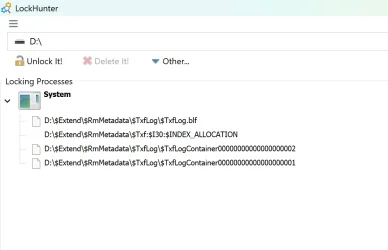
 Step 2: Go to the CPU Tab
 Step 3: Search for Your Drive
 Step 5: Close or End the Process
 Step 6: Retry Safe Eject
 Tip: If you consistently see explorer.exe or system processes holding the drive, that’s a strong indicator of a Windows 11 25H2 bug