Unable to Set-Up Pin for Windows 11.


Chris_S

Member
Local time
11:27 AM
Posts
9
OS
Windows 11
Hi All,

I purchased a brand new Asus Tuf A15 laptop last week, I cannot set-up the sign-in PIN. When I wish to use the laptop I have to sign-in to my Microsoft Account first at the sign-in screen, then request for a code to be sent out (via phone) for that to be entered before gaining access every time. I realise the later is due to the two-factor authentication I set up years ago.

I have had a good look at the excellent Tutorials here (thanks Shawn) and have also been searching the net for an answer, but so far no luck, hence why I'm here.

I have tried the following:

(1) Command Prompt: Clean up Image/Restore health/ then ran SFC.

(2) Renamed the Ngc folder so a new one was created, even though the original folder was empty.

(3) I carried out a System Restore (retaining the files etc).

All of those have not helped. When trying to Set-Up a PIN (whether it's at the sign-in screen or from the desktop all I get is "Something went wrong" retry! (see screenshot)
Something went wrong.png
I didn't really want to do a System Retore, surely this shouldn't be necessary with a brand new machine. Due to not being able to get into Safe Mode (either with or without Network) I was hoping it would have helped, however it made no difference I still can't access Safe Mode (see added screenshot) I get as far as the Sign-In page.
Safe mode response..jpg

Any suggestions of help would be very much appreciated.

Thanks in advance,

Chris.
 
Windows Build/Version
Windows 11 Home. Ver.22621.963 Build 22H2

My Computer My Computer

At a glance

Windows 11AMD Ryzen 7 6800H16GB DDR5 4800MHz RAM (2X8)Nvidia GeForce RTX 3060 6GB
OS
Windows 11
Computer type
Laptop
Manufacturer/Model
ASUS TUF A15
CPU
AMD Ryzen 7 6800H
Memory
16GB DDR5 4800MHz RAM (2X8)
Graphics Card(s)
Nvidia GeForce RTX 3060 6GB
Monitor(s) Displays
15.6" WQHD IPS Screen
Screen Resolution
2560x1440 QHD 165Hz
Hard Drives
Samsung 1TB M.2 NVMe SSD
Keyboard
RGB Backlit Keyboard
Mouse
M210
Internet Speed
68Mbps D/Load, 18Mbps U/Load
Browser
Opera
Antivirus
Windows Defender

I think it may be at the Microsoft end. I did a clean instal on a Windows 10 PC with a new motherboard today, and I'm having the same problem.
 

My Computer My Computer

At a glance

Windows 11Ryzen 9 5900X16GB DDR4RTX 3070
OS
Windows 11
Computer type
PC/Desktop
Manufacturer/Model
Stormforce Prism RTX 3070
CPU
Ryzen 9 5900X
Motherboard
Asus AMD TUF Gaming X570-Plus ATX Motherboard – Aura Sync RGB
Memory
16GB DDR4
Graphics Card(s)
RTX 3070
Monitor(s) Displays
2 x Samsung U32H850UMU 32 inch 4K
Screen Resolution
3840x2160
Hard Drives
1 x M2.2
1x M2.1
5 x HDD
Cooling
Cooler Master 120L AIO Watercooler
Keyboard
Rii wireless
Mouse
Generic cable
Internet Speed
320Mbps
Browser
Firefox & Chrome
Antivirus
Norton

I realise the later is due to the two-factor authentication I set up years ago.


Have you tried turning off the 2FA ? And then turn back on. Did not realize 2FA auto carried from device to device.

Would also contact ASUS Customer Service.
 

My Computer My Computer

At a glance

Win11 Ver 25H2 26200.6899Intel i58gb
OS
Win11 Ver 25H2 26200.6899
Computer type
Laptop
Manufacturer/Model
Dell
CPU
Intel i5
Memory
8gb
Screen Resolution
1920x1080
Hard Drives
256gb
Browser
Firefox
Antivirus
Windows Defender

I just bought a new ASUS Tuf A15 laptop a couple months ago. The first thing I did was set it to log in with a local account. I have Microsoft account but I don't use it to log in. I have a password for my local account but use a PIN instead.
 

My Computers My Computers

  • At a glance

    Windows 11 Pro 25H2 (26200.6901)AMD Ryzen 7 6800H with Radeon 680M GPU (486MB...Crucial DDR5-4800 (2400MHz) 32GB (2 x 16GB)NVIDIA RTX 3060 Laptop (6GB RAM)
    OS
    Windows 11 Pro 25H2 (26200.6901)
    Computer type
    Laptop
    Manufacturer/Model
    ASUS TUF Gaming A15 (2022)
    CPU
    AMD Ryzen 7 6800H with Radeon 680M GPU (486MB RAM)
    Memory
    Crucial DDR5-4800 (2400MHz) 32GB (2 x 16GB)
    Graphics Card(s)
    NVIDIA RTX 3060 Laptop (6GB RAM)
    Sound Card
    n/a
    Monitor(s) Displays
    15.6-inch
    Screen Resolution
    1920x1080 300Hz
    Hard Drives
    2 x Samsung 990 Evo Plus (2TB M.2 NVME SSD)
    PSU
    n/a
    Mouse
    Wireless Mouse M510
    Internet Speed
    2100Mbps/300Mbps
    Browser
    Firefox
    Antivirus
    Malwarebytes
  • At a glance

    Windows 11 Pro 25H2 (26200.8246)AMD Ryzen 7 5700X3DG.SKILL Flare X 32GB (2x16GB) DDR4ASUS ROG-STRIX-RTX3060TI-08G-V2-GAMING (RTX 3...
    Operating System
    Windows 11 Pro 25H2 (26200.8246)
    Computer type
    PC/Desktop
    Manufacturer/Model
    Custom build
    CPU
    AMD Ryzen 7 5700X3D
    Motherboard
    ASUS ROG Strix B550-F Gaming WiFi II
    Memory
    G.SKILL Flare X 32GB (2x16GB) DDR4
    Graphics card(s)
    ASUS ROG-STRIX-RTX3060TI-08G-V2-GAMING (RTX 3060-Ti, 8GB RAM)
    Monitor(s) Displays
    Samsung G50D IPS 27"
    Screen Resolution
    1440p/180Hz
    Hard Drives
    SAMSUNG 990 EVO Plus (2TB] M.2 NVME SSD
    SAMSUNG 990 EVO Plus (4TB) M.2 NVME SSD
    PSU
    Corsair RM750x (750 watts)
    Case
    Cooler Master MasterCase 5
    Cooling
    Scythe Mugen 6
    Keyboard
    Logitech K520 (MK540 keyboard/mouse combo)
    Mouse
    Logitech M310 (MK540 keyboard/mouse combo)
    Internet Speed
    2100 Mbps down / 300 Mbps up
    Browser
    Firefox, Edge, Chrome
    Antivirus
    Malwarebytes (Premium)
    Other Info
    ASUS Blu-ray Burner BW-16D1HT (SATA) || Western Digital Easystore 20TB USB 3.0 external hard drive used with Acronis True Image 2025 backup software || HP OfficeJet Pro 6975 Printer/Scanner
I think it may be at the Microsoft end. I did a clean instal on a Windows 10 PC with a new motherboard today, and I'm having the same problem.
I also think it's something to do with the O/S, may be an update from Microsoft that's not 100% compatible with everything else, who know's?.
If I could access Safe-Mode I feel I may be able to set-up the PIN there.

Sorry to hear you are also having problems.
Oddly enough I set-up a sign-in PIN on a new Dell Inspiron laptop (Windows 11 Home) only 3mths ago, no problem with that.

Thanks for your reply.
 
Last edited:

My Computer My Computer

At a glance

Windows 11AMD Ryzen 7 6800H16GB DDR5 4800MHz RAM (2X8)Nvidia GeForce RTX 3060 6GB
OS
Windows 11
Computer type
Laptop
Manufacturer/Model
ASUS TUF A15
CPU
AMD Ryzen 7 6800H
Memory
16GB DDR5 4800MHz RAM (2X8)
Graphics Card(s)
Nvidia GeForce RTX 3060 6GB
Monitor(s) Displays
15.6" WQHD IPS Screen
Screen Resolution
2560x1440 QHD 165Hz
Hard Drives
Samsung 1TB M.2 NVMe SSD
Keyboard
RGB Backlit Keyboard
Mouse
M210
Internet Speed
68Mbps D/Load, 18Mbps U/Load
Browser
Opera
Antivirus
Windows Defender

I realise the later is due to the two-factor authentication I set up years ago.


Have you tried turning off the 2FA ? And then turn back on. Did not realize 2FA auto carried from device to device.

Would also contact ASUS Customer Service.
That was very good thinking, one thing I hadn't thought about.

I have now tried that, it didn't cure the problem of unable to set-up a PIN, but it's removed the bit where I have to enter a code via my phone which makes it much easier to gain access, I only have to log-in to my Microsoft Account now.

Thank you very much for that suggestion.

I will contact ASUS Customer Services.
 

My Computer My Computer

At a glance

Windows 11AMD Ryzen 7 6800H16GB DDR5 4800MHz RAM (2X8)Nvidia GeForce RTX 3060 6GB
OS
Windows 11
Computer type
Laptop
Manufacturer/Model
ASUS TUF A15
CPU
AMD Ryzen 7 6800H
Memory
16GB DDR5 4800MHz RAM (2X8)
Graphics Card(s)
Nvidia GeForce RTX 3060 6GB
Monitor(s) Displays
15.6" WQHD IPS Screen
Screen Resolution
2560x1440 QHD 165Hz
Hard Drives
Samsung 1TB M.2 NVMe SSD
Keyboard
RGB Backlit Keyboard
Mouse
M210
Internet Speed
68Mbps D/Load, 18Mbps U/Load
Browser
Opera
Antivirus
Windows Defender
I just bought a new ASUS Tuf A15 laptop a couple months ago. The first thing I did was set it to log in with a local account. I have Microsoft account but I don't use it to log in. I have a password for my local account but use a PIN instead.
I have no choice but to use the Microsoft Account to log-in, that's the problem. I tried setting up a Local Account from the Desktop, but it won't let me create that either. As soon as I have signed into the M/S Account up pops the Set-Up for setting up a PIN. I enter my PIN number in both boxes, all I get is Something Went Wrong, and Retry, also you then have the option to skip that.
 

My Computer My Computer

At a glance

Windows 11AMD Ryzen 7 6800H16GB DDR5 4800MHz RAM (2X8)Nvidia GeForce RTX 3060 6GB
OS
Windows 11
Computer type
Laptop
Manufacturer/Model
ASUS TUF A15
CPU
AMD Ryzen 7 6800H
Memory
16GB DDR5 4800MHz RAM (2X8)
Graphics Card(s)
Nvidia GeForce RTX 3060 6GB
Monitor(s) Displays
15.6" WQHD IPS Screen
Screen Resolution
2560x1440 QHD 165Hz
Hard Drives
Samsung 1TB M.2 NVMe SSD
Keyboard
RGB Backlit Keyboard
Mouse
M210
Internet Speed
68Mbps D/Load, 18Mbps U/Load
Browser
Opera
Antivirus
Windows Defender
Hey Chris,
Do you have that reg key by any chance?
HKEY_LOCAL_MACHINE\SOFTWARE\Microsoft\PolicyManager\default\Settings\AllowSignInOptions
If not create with DWORD value =1.
 

My Computers My Computers

  • At a glance

    All Branches but ReleaseAMD Ryzen 7 7735HS 3200-4500 Mhz 8 cores x 232 GB DDR5Radeon Graphic / NVIDIA GeForce RTX 4060 8 GB...
    OS
    All Branches but Release
    Computer type
    Laptop
    Manufacturer/Model
    Acer Nitro ANV15-51
    CPU
    AMD Ryzen 7 7735HS 3200-4500 Mhz 8 cores x 2
    Motherboard
    Sportage_RBH
    Memory
    32 GB DDR5
    Graphics Card(s)
    Radeon Graphic / NVIDIA GeForce RTX 4060 8 GB GDDR6
    Sound Card
    AMD/Realtek(R) Audio
    Monitor(s) Displays
    Integrated Monitor (15.3"vis)
    Screen Resolution
    FHD 1920X1080 16:9 144Hz
    Hard Drives
    KINGSTON OM8SEP4512Q-AA 1TB
    Western Digital 256GB
    PSU
    19V DC 6.32 A 120 W
    Cooling
    Dual Fans
    Mouse
    MS Bluetooth
    Internet Speed
    Fiber 1GB Cox -us & 1GB Orange-fr
    Browser
    Edge Canary- Firefox Nightly-Chrome Dev-Chrome Dev
    Antivirus
    Windows Defender
  • At a glance

    Windows 11 BetaAMD A9-94208 GB of DDR4AMD Radeon R5
    Operating System
    Windows 11 Beta
    Computer type
    Laptop
    Manufacturer/Model
    Asus X751BP
    CPU
    AMD A9-9420
    Memory
    8 GB of DDR4
    Graphics card(s)
    AMD Radeon R5
    Screen Resolution
    1600x900
    Hard Drives
    Seagate 1 TB
I don't know why the OP is having a problem creating a PIN. All I know I have the same laptop and didn't have a problem.

BTW, I checked the registry key @OAT mentions. I do have the registry key AllowSignInOptions but its value is not set.

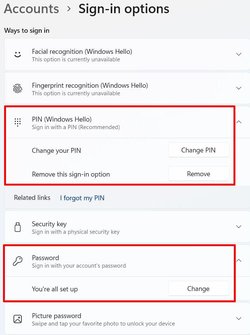
Other than my desktop that is now back to Windows 10 the Asus TUF A15 laptop is my only computer with Windows 11. However, I had a lot of practice with Windows 11 both Home and Pro using virtual machines on my main desktop. Through a lot of reading and trial and error I figured out how to get around Windows 11's insistence that I start with a Microsoft account. During the initial setup of the Asus TUF A15 laptop I used what I learned to set it up with a local account. I later added a PIN.

PIN1.jpg

PIN2.jpg
 

My Computers My Computers

  • At a glance

    Windows 11 Pro 25H2 (26200.6901)AMD Ryzen 7 6800H with Radeon 680M GPU (486MB...Crucial DDR5-4800 (2400MHz) 32GB (2 x 16GB)NVIDIA RTX 3060 Laptop (6GB RAM)
    OS
    Windows 11 Pro 25H2 (26200.6901)
    Computer type
    Laptop
    Manufacturer/Model
    ASUS TUF Gaming A15 (2022)
    CPU
    AMD Ryzen 7 6800H with Radeon 680M GPU (486MB RAM)
    Memory
    Crucial DDR5-4800 (2400MHz) 32GB (2 x 16GB)
    Graphics Card(s)
    NVIDIA RTX 3060 Laptop (6GB RAM)
    Sound Card
    n/a
    Monitor(s) Displays
    15.6-inch
    Screen Resolution
    1920x1080 300Hz
    Hard Drives
    2 x Samsung 990 Evo Plus (2TB M.2 NVME SSD)
    PSU
    n/a
    Mouse
    Wireless Mouse M510
    Internet Speed
    2100Mbps/300Mbps
    Browser
    Firefox
    Antivirus
    Malwarebytes
  • At a glance

    Windows 11 Pro 25H2 (26200.8246)AMD Ryzen 7 5700X3DG.SKILL Flare X 32GB (2x16GB) DDR4ASUS ROG-STRIX-RTX3060TI-08G-V2-GAMING (RTX 3...
    Operating System
    Windows 11 Pro 25H2 (26200.8246)
    Computer type
    PC/Desktop
    Manufacturer/Model
    Custom build
    CPU
    AMD Ryzen 7 5700X3D
    Motherboard
    ASUS ROG Strix B550-F Gaming WiFi II
    Memory
    G.SKILL Flare X 32GB (2x16GB) DDR4
    Graphics card(s)
    ASUS ROG-STRIX-RTX3060TI-08G-V2-GAMING (RTX 3060-Ti, 8GB RAM)
    Monitor(s) Displays
    Samsung G50D IPS 27"
    Screen Resolution
    1440p/180Hz
    Hard Drives
    SAMSUNG 990 EVO Plus (2TB] M.2 NVME SSD
    SAMSUNG 990 EVO Plus (4TB) M.2 NVME SSD
    PSU
    Corsair RM750x (750 watts)
    Case
    Cooler Master MasterCase 5
    Cooling
    Scythe Mugen 6
    Keyboard
    Logitech K520 (MK540 keyboard/mouse combo)
    Mouse
    Logitech M310 (MK540 keyboard/mouse combo)
    Internet Speed
    2100 Mbps down / 300 Mbps up
    Browser
    Firefox, Edge, Chrome
    Antivirus
    Malwarebytes (Premium)
    Other Info
    ASUS Blu-ray Burner BW-16D1HT (SATA) || Western Digital Easystore 20TB USB 3.0 external hard drive used with Acronis True Image 2025 backup software || HP OfficeJet Pro 6975 Printer/Scanner
@MisterEd Do you have 2 factor authentication ? Seems to be the issue with the OP.
 

My Computer My Computer

At a glance

Win11 Ver 25H2 26200.6899Intel i58gb
OS
Win11 Ver 25H2 26200.6899
Computer type
Laptop
Manufacturer/Model
Dell
CPU
Intel i5
Memory
8gb
Screen Resolution
1920x1080
Hard Drives
256gb
Browser
Firefox
Antivirus
Windows Defender
@MisterEd Do you have 2 factor authentication ? Seems to be the issue with the OP.
No. What if the OP logged into his Microsoft account using his browser and turned off 2FA? Would that help with his problem with Windows? If he wanted he could always turn 2FA back on later if he wanted.
 

My Computers My Computers

  • At a glance

    Windows 11 Pro 25H2 (26200.6901)AMD Ryzen 7 6800H with Radeon 680M GPU (486MB...Crucial DDR5-4800 (2400MHz) 32GB (2 x 16GB)NVIDIA RTX 3060 Laptop (6GB RAM)
    OS
    Windows 11 Pro 25H2 (26200.6901)
    Computer type
    Laptop
    Manufacturer/Model
    ASUS TUF Gaming A15 (2022)
    CPU
    AMD Ryzen 7 6800H with Radeon 680M GPU (486MB RAM)
    Memory
    Crucial DDR5-4800 (2400MHz) 32GB (2 x 16GB)
    Graphics Card(s)
    NVIDIA RTX 3060 Laptop (6GB RAM)
    Sound Card
    n/a
    Monitor(s) Displays
    15.6-inch
    Screen Resolution
    1920x1080 300Hz
    Hard Drives
    2 x Samsung 990 Evo Plus (2TB M.2 NVME SSD)
    PSU
    n/a
    Mouse
    Wireless Mouse M510
    Internet Speed
    2100Mbps/300Mbps
    Browser
    Firefox
    Antivirus
    Malwarebytes
  • At a glance

    Windows 11 Pro 25H2 (26200.8246)AMD Ryzen 7 5700X3DG.SKILL Flare X 32GB (2x16GB) DDR4ASUS ROG-STRIX-RTX3060TI-08G-V2-GAMING (RTX 3...
    Operating System
    Windows 11 Pro 25H2 (26200.8246)
    Computer type
    PC/Desktop
    Manufacturer/Model
    Custom build
    CPU
    AMD Ryzen 7 5700X3D
    Motherboard
    ASUS ROG Strix B550-F Gaming WiFi II
    Memory
    G.SKILL Flare X 32GB (2x16GB) DDR4
    Graphics card(s)
    ASUS ROG-STRIX-RTX3060TI-08G-V2-GAMING (RTX 3060-Ti, 8GB RAM)
    Monitor(s) Displays
    Samsung G50D IPS 27"
    Screen Resolution
    1440p/180Hz
    Hard Drives
    SAMSUNG 990 EVO Plus (2TB] M.2 NVME SSD
    SAMSUNG 990 EVO Plus (4TB) M.2 NVME SSD
    PSU
    Corsair RM750x (750 watts)
    Case
    Cooler Master MasterCase 5
    Cooling
    Scythe Mugen 6
    Keyboard
    Logitech K520 (MK540 keyboard/mouse combo)
    Mouse
    Logitech M310 (MK540 keyboard/mouse combo)
    Internet Speed
    2100 Mbps down / 300 Mbps up
    Browser
    Firefox, Edge, Chrome
    Antivirus
    Malwarebytes (Premium)
    Other Info
    ASUS Blu-ray Burner BW-16D1HT (SATA) || Western Digital Easystore 20TB USB 3.0 external hard drive used with Acronis True Image 2025 backup software || HP OfficeJet Pro 6975 Printer/Scanner
No. What if the OP logged into his Microsoft account using his browser and turned off 2FA? Would that help with his problem with Windows? If he wanted he could always turn 2FA back on later if he wanted.

Check post #6.
 

My Computer My Computer

At a glance

Win11 Ver 25H2 26200.6899Intel i58gb
OS
Win11 Ver 25H2 26200.6899
Computer type
Laptop
Manufacturer/Model
Dell
CPU
Intel i5
Memory
8gb
Screen Resolution
1920x1080
Hard Drives
256gb
Browser
Firefox
Antivirus
Windows Defender
Check post #6.
Sorry I missed that. Still I don't think I was ever required to create a PIN. At first I only had a local account with a username and password. I later added a PIN only because I wanted to.
 

My Computers My Computers

  • At a glance

    Windows 11 Pro 25H2 (26200.6901)AMD Ryzen 7 6800H with Radeon 680M GPU (486MB...Crucial DDR5-4800 (2400MHz) 32GB (2 x 16GB)NVIDIA RTX 3060 Laptop (6GB RAM)
    OS
    Windows 11 Pro 25H2 (26200.6901)
    Computer type
    Laptop
    Manufacturer/Model
    ASUS TUF Gaming A15 (2022)
    CPU
    AMD Ryzen 7 6800H with Radeon 680M GPU (486MB RAM)
    Memory
    Crucial DDR5-4800 (2400MHz) 32GB (2 x 16GB)
    Graphics Card(s)
    NVIDIA RTX 3060 Laptop (6GB RAM)
    Sound Card
    n/a
    Monitor(s) Displays
    15.6-inch
    Screen Resolution
    1920x1080 300Hz
    Hard Drives
    2 x Samsung 990 Evo Plus (2TB M.2 NVME SSD)
    PSU
    n/a
    Mouse
    Wireless Mouse M510
    Internet Speed
    2100Mbps/300Mbps
    Browser
    Firefox
    Antivirus
    Malwarebytes
  • At a glance

    Windows 11 Pro 25H2 (26200.8246)AMD Ryzen 7 5700X3DG.SKILL Flare X 32GB (2x16GB) DDR4ASUS ROG-STRIX-RTX3060TI-08G-V2-GAMING (RTX 3...
    Operating System
    Windows 11 Pro 25H2 (26200.8246)
    Computer type
    PC/Desktop
    Manufacturer/Model
    Custom build
    CPU
    AMD Ryzen 7 5700X3D
    Motherboard
    ASUS ROG Strix B550-F Gaming WiFi II
    Memory
    G.SKILL Flare X 32GB (2x16GB) DDR4
    Graphics card(s)
    ASUS ROG-STRIX-RTX3060TI-08G-V2-GAMING (RTX 3060-Ti, 8GB RAM)
    Monitor(s) Displays
    Samsung G50D IPS 27"
    Screen Resolution
    1440p/180Hz
    Hard Drives
    SAMSUNG 990 EVO Plus (2TB] M.2 NVME SSD
    SAMSUNG 990 EVO Plus (4TB) M.2 NVME SSD
    PSU
    Corsair RM750x (750 watts)
    Case
    Cooler Master MasterCase 5
    Cooling
    Scythe Mugen 6
    Keyboard
    Logitech K520 (MK540 keyboard/mouse combo)
    Mouse
    Logitech M310 (MK540 keyboard/mouse combo)
    Internet Speed
    2100 Mbps down / 300 Mbps up
    Browser
    Firefox, Edge, Chrome
    Antivirus
    Malwarebytes (Premium)
    Other Info
    ASUS Blu-ray Burner BW-16D1HT (SATA) || Western Digital Easystore 20TB USB 3.0 external hard drive used with Acronis True Image 2025 backup software || HP OfficeJet Pro 6975 Printer/Scanner
On my Windows 10 machine that kept refusing to set a PIN, I finally reinstalled Windows using a Gmail address instead of my Microsoft Hotmail one. Very odd, but it worked.
 

My Computer My Computer

At a glance

Windows 11Ryzen 9 5900X16GB DDR4RTX 3070
OS
Windows 11
Computer type
PC/Desktop
Manufacturer/Model
Stormforce Prism RTX 3070
CPU
Ryzen 9 5900X
Motherboard
Asus AMD TUF Gaming X570-Plus ATX Motherboard – Aura Sync RGB
Memory
16GB DDR4
Graphics Card(s)
RTX 3070
Monitor(s) Displays
2 x Samsung U32H850UMU 32 inch 4K
Screen Resolution
3840x2160
Hard Drives
1 x M2.2
1x M2.1
5 x HDD
Cooling
Cooler Master 120L AIO Watercooler
Keyboard
Rii wireless
Mouse
Generic cable
Internet Speed
320Mbps
Browser
Firefox & Chrome
Antivirus
Norton
Hey Chris,
Do you have that reg key by any chance?
HKEY_LOCAL_MACHINE\SOFTWARE\Microsoft\PolicyManager\default\Settings\AllowSignInOptions
If not create with DWORD value =1.
It looks like I do have this key?

AllowSignOptions.jpg
 

My Computer My Computer

At a glance

Windows 11AMD Ryzen 7 6800H16GB DDR5 4800MHz RAM (2X8)Nvidia GeForce RTX 3060 6GB
OS
Windows 11
Computer type
Laptop
Manufacturer/Model
ASUS TUF A15
CPU
AMD Ryzen 7 6800H
Memory
16GB DDR5 4800MHz RAM (2X8)
Graphics Card(s)
Nvidia GeForce RTX 3060 6GB
Monitor(s) Displays
15.6" WQHD IPS Screen
Screen Resolution
2560x1440 QHD 165Hz
Hard Drives
Samsung 1TB M.2 NVMe SSD
Keyboard
RGB Backlit Keyboard
Mouse
M210
Internet Speed
68Mbps D/Load, 18Mbps U/Load
Browser
Opera
Antivirus
Windows Defender
On my Windows 10 machine that kept refusing to set a PIN, I finally reinstalled Windows using a Gmail address instead of my Microsoft Hotmail one. Very odd, but it worked.
Many thanks for the update on your issue, as you say very odd, but glad you have fixed the problem.

Out of interest have you set the PIN up on your Administrator Account? or created a Local Account and set the PIN on that?
 
Last edited:

My Computer My Computer

At a glance

Windows 11AMD Ryzen 7 6800H16GB DDR5 4800MHz RAM (2X8)Nvidia GeForce RTX 3060 6GB
OS
Windows 11
Computer type
Laptop
Manufacturer/Model
ASUS TUF A15
CPU
AMD Ryzen 7 6800H
Memory
16GB DDR5 4800MHz RAM (2X8)
Graphics Card(s)
Nvidia GeForce RTX 3060 6GB
Monitor(s) Displays
15.6" WQHD IPS Screen
Screen Resolution
2560x1440 QHD 165Hz
Hard Drives
Samsung 1TB M.2 NVMe SSD
Keyboard
RGB Backlit Keyboard
Mouse
M210
Internet Speed
68Mbps D/Load, 18Mbps U/Load
Browser
Opera
Antivirus
Windows Defender
Many thanks for the update on your issue, as you say very odd, but glad you have fixed the problem.

Out of interest have you set the PIN up on your Administrator Account? or created a Local Account and set the PIN on that?
Admin account.
 

My Computer My Computer

At a glance

Windows 11Ryzen 9 5900X16GB DDR4RTX 3070
OS
Windows 11
Computer type
PC/Desktop
Manufacturer/Model
Stormforce Prism RTX 3070
CPU
Ryzen 9 5900X
Motherboard
Asus AMD TUF Gaming X570-Plus ATX Motherboard – Aura Sync RGB
Memory
16GB DDR4
Graphics Card(s)
RTX 3070
Monitor(s) Displays
2 x Samsung U32H850UMU 32 inch 4K
Screen Resolution
3840x2160
Hard Drives
1 x M2.2
1x M2.1
5 x HDD
Cooling
Cooler Master 120L AIO Watercooler
Keyboard
Rii wireless
Mouse
Generic cable
Internet Speed
320Mbps
Browser
Firefox & Chrome
Antivirus
Norton

My Computer My Computer

At a glance

Windows 11AMD Ryzen 7 6800H16GB DDR5 4800MHz RAM (2X8)Nvidia GeForce RTX 3060 6GB
OS
Windows 11
Computer type
Laptop
Manufacturer/Model
ASUS TUF A15
CPU
AMD Ryzen 7 6800H
Memory
16GB DDR5 4800MHz RAM (2X8)
Graphics Card(s)
Nvidia GeForce RTX 3060 6GB
Monitor(s) Displays
15.6" WQHD IPS Screen
Screen Resolution
2560x1440 QHD 165Hz
Hard Drives
Samsung 1TB M.2 NVMe SSD
Keyboard
RGB Backlit Keyboard
Mouse
M210
Internet Speed
68Mbps D/Load, 18Mbps U/Load
Browser
Opera
Antivirus
Windows Defender
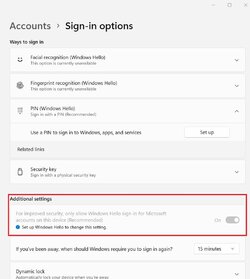
After a lot of head scratching and reading I now have a working sign-in PIN on my Administrator Acc.

I followed this which is taken from this link 6 posts down: Redirecting
What I did in the end.jpg

The problem was I didn't have access to turn this off as it was greyed out "For improved security, only allow Windows Hello sign-in for Microsoft accounts on this device
(Recommended)
"
Sign in set up (1).jpg

Thanks to all who tried to help me,

Chris.
 

My Computer My Computer

At a glance

Windows 11AMD Ryzen 7 6800H16GB DDR5 4800MHz RAM (2X8)Nvidia GeForce RTX 3060 6GB
OS
Windows 11
Computer type
Laptop
Manufacturer/Model
ASUS TUF A15
CPU
AMD Ryzen 7 6800H
Memory
16GB DDR5 4800MHz RAM (2X8)
Graphics Card(s)
Nvidia GeForce RTX 3060 6GB
Monitor(s) Displays
15.6" WQHD IPS Screen
Screen Resolution
2560x1440 QHD 165Hz
Hard Drives
Samsung 1TB M.2 NVMe SSD
Keyboard
RGB Backlit Keyboard
Mouse
M210
Internet Speed
68Mbps D/Load, 18Mbps U/Load
Browser
Opera
Antivirus
Windows Defender
Back
Top Bottom