Unable to unpin app from taskbar after inplace upgrade


x7007

Well-known member
Member
Local time
11:07 AM
Posts
83
OS
Windows 11
I had windows 11 newest and I did inplace upgrade to see if it will fix some issues. but after the inplace upgrade the unpin to taskbar doesn't work, when I try to unpin it still there and it says the program has been moved or doesn't exist. if I do Explorer.exe restart it disappear, but it doesn't update instantly as I do the command. Pin a new app works fine, it just the unpin issues. anyone knows how to fix this thing?
 

My Computer My Computer

At a glance

Windows 117800x3DKINGSTONE DDR5ZOTAC 4090 AMP EXTREME
OS
Windows 11
Computer type
PC/Desktop
Manufacturer/Model
Intel
CPU
7800x3D
Motherboard
MSI X690E TOMHAWK
Memory
KINGSTONE DDR5
Graphics Card(s)
ZOTAC 4090 AMP EXTREME
Sound Card
Creative SXFI AMP
Monitor(s) Displays
Samsung S90C
Screen Resolution
3840x2160
Hard Drives
Nmve WD850N 1TB
SanDisk SDSSDXPS480G
Samsung SSD 840 PRO Series 256Gb
WDC Enterprise Gold 16TB 512MB
WDC Enterprise Gold 6TB 256MB
PSU
ThermalTake ToughPower 1650
Case
Obsidian Series™ 750D Airflow Edition Full Tower ATX Case
Cooling
Arctic Liquid Freezer II 360
Keyboard
SteelSeries APEX PRO
Mouse
SwitPoint Z2
Internet Speed
5000/500
Browser
CHROME
Antivirus
ESET Internet Security

Hello, :alien:

You can use the method in the tutorial below to reset and clear all your pinned items on the taskbar. You will have to manually pin anything you want back to the taskbar afterwards though.


My Computers My Computers

  • At a glance

    Windows 11 Pro for WorkstationsIntel i7-8700K 5 GHz64 GB (4x16GB) G.SKILL TridentZ RGB DDR4 3600...ASUS ROG-STRIX-GTX1080TI-O11G-GAMING (11GB GD...
    OS
    Windows 11 Pro for Workstations
    Computer type
    PC/Desktop
    Manufacturer/Model
    Custom self build
    CPU
    Intel i7-8700K 5 GHz
    Motherboard
    ASUS ROG Maximus XI Formula Z390
    Memory
    64 GB (4x16GB) G.SKILL TridentZ RGB DDR4 3600 MHz (F4-3600C18D-32GTZR)
    Graphics Card(s)
    ASUS ROG-STRIX-GTX1080TI-O11G-GAMING (11GB GDDR5X)
    Sound Card
    Integrated Digital Audio (S/PDIF)
    Monitor(s) Displays
    2 x Samsung Odyssey G75 27"
    Screen Resolution
    2560x1440
    Hard Drives
    1TB Samsung 990 PRO M.2,
    4TB Samsung 990 PRO M.2,
    TerraMaster F8 SSD Plus NAS
    PSU
    Seasonic Prime Titanium 850W
    Case
    Thermaltake Core P3 wall mounted
    Cooling
    Corsair Hydro H115i
    Keyboard
    Amazon Basics Wired Full Keyboard MD005
    Mouse
    Logitech MX Master 4
    Internet Speed
    2 Gbps Download and 100 Mbps Upload
    Browser
    Chrome and Edge
    Antivirus
    Microsoft Defender
    Other Info
    Logitech Z625 speaker system,
    Logitech BRIO 4K Pro webcam,
    HP Color LaserJet Pro MFP M477fdn,
    CyberPower CP1500PFCLCD
    Galaxy S23 Plus phone
  • At a glance

    Windows 11 ProSnapdragon X Elite (12 core) 3.42 GHz16 GB LPDDR5x-7467 MHz
    Operating System
    Windows 11 Pro
    Computer type
    Laptop
    Manufacturer/Model
    Surface Laptop 7 Copilot+ PC
    CPU
    Snapdragon X Elite (12 core) 3.42 GHz
    Memory
    16 GB LPDDR5x-7467 MHz
    Monitor(s) Displays
    15" HDR
    Screen Resolution
    2496 x 1664
    Hard Drives
    1 TB SSD
    Internet Speed
    Wi-Fi 7 and Bluetooth 5.4
    Browser
    Chrome and Edge
    Antivirus
    Microsoft Defender
Hello, :alien:

You can use the method in the tutorial below to reset and clear all your pinned items on the taskbar. You will have to manually pin anything you want back to the taskbar afterwards though.

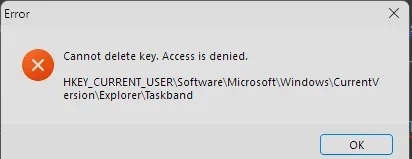
for some reason after the inplace upgrade it wiped clean all my pinned taskbar. it never does that ..

it doesn't let me delete
HKEY_CURRENT_USER\Software\Microsoft\Windows\CurrentVersion\Explorer\Taskband
 

Attachments

  • 1753996258385.webp
    1753996258385.webp
    6.5 KB · Views: 1

My Computer My Computer

At a glance

Windows 117800x3DKINGSTONE DDR5ZOTAC 4090 AMP EXTREME
OS
Windows 11
Computer type
PC/Desktop
Manufacturer/Model
Intel
CPU
7800x3D
Motherboard
MSI X690E TOMHAWK
Memory
KINGSTONE DDR5
Graphics Card(s)
ZOTAC 4090 AMP EXTREME
Sound Card
Creative SXFI AMP
Monitor(s) Displays
Samsung S90C
Screen Resolution
3840x2160
Hard Drives
Nmve WD850N 1TB
SanDisk SDSSDXPS480G
Samsung SSD 840 PRO Series 256Gb
WDC Enterprise Gold 16TB 512MB
WDC Enterprise Gold 6TB 256MB
PSU
ThermalTake ToughPower 1650
Case
Obsidian Series™ 750D Airflow Edition Full Tower ATX Case
Cooling
Arctic Liquid Freezer II 360
Keyboard
SteelSeries APEX PRO
Mouse
SwitPoint Z2
Internet Speed
5000/500
Browser
CHROME
Antivirus
ESET Internet Security

Try using another account to test with. I suspect your user account may be corrupted.
 

My Computers My Computers

  • At a glance

    Windows 11 Pro 25H2 26200.9445i9-10900 10 core 20 threads32 gbnone-Intel UHD Graphics 630
    OS
    Windows 11 Pro 25H2 26200.9445
    Computer type
    PC/Desktop
    Manufacturer/Model
    Dell Optiplex 7080
    CPU
    i9-10900 10 core 20 threads
    Motherboard
    DELL 0J37VM
    Memory
    32 gb
    Graphics Card(s)
    none-Intel UHD Graphics 630
    Sound Card
    Integrated Realtek
    Monitor(s) Displays
    Benq 27
    Screen Resolution
    2560x1440
    Hard Drives
    2x1tb Solidigm m.2 nvme /External drives 512gb Samsung m.2 sata+2tb Kingston m2.nvme
    PSU
    500w
    Case
    MT
    Cooling
    Dell Premium
    Keyboard
    Logitech wired
    Mouse
    Logitech wireless
    Internet Speed
    so slow I'm too embarrassed to tell
    Browser
    #1 Edge #2 Firefox
    Antivirus
    Defender+MWB Premium
  • At a glance

    Windows 11 Pro 24H2 26200.9445AMD Ryzen 7 6800U32 gbintegrated
    Operating System
    Windows 11 Pro 24H2 26200.9445
    Computer type
    PC/Desktop
    Manufacturer/Model
    Beelink Mini PC SER5
    CPU
    AMD Ryzen 7 6800U
    Memory
    32 gb
    Graphics card(s)
    integrated
    Sound Card
    integrated
    Monitor(s) Displays
    Benq 27
    Screen Resolution
    2560x1440
    Hard Drives
    1TB Crucial nvme
    Keyboard
    Logitech wired
    Mouse
    Logitech wireless
    Internet Speed
    still too embarrassed to tell
    Browser
    Firefox
    Antivirus
    Defender
  • System 3 is non compliant Dell 9020 i7-4770/24gb ram Win11 PRO 26200.9445
Try using another account to test with. I suspect your user account may be corrupted.
how can I fix my profile? I can't remove it, I have everything here
Why would inplace upgrade cause that......... that's weird
 

My Computer My Computer

At a glance

Windows 117800x3DKINGSTONE DDR5ZOTAC 4090 AMP EXTREME
OS
Windows 11
Computer type
PC/Desktop
Manufacturer/Model
Intel
CPU
7800x3D
Motherboard
MSI X690E TOMHAWK
Memory
KINGSTONE DDR5
Graphics Card(s)
ZOTAC 4090 AMP EXTREME
Sound Card
Creative SXFI AMP
Monitor(s) Displays
Samsung S90C
Screen Resolution
3840x2160
Hard Drives
Nmve WD850N 1TB
SanDisk SDSSDXPS480G
Samsung SSD 840 PRO Series 256Gb
WDC Enterprise Gold 16TB 512MB
WDC Enterprise Gold 6TB 256MB
PSU
ThermalTake ToughPower 1650
Case
Obsidian Series™ 750D Airflow Edition Full Tower ATX Case
Cooling
Arctic Liquid Freezer II 360
Keyboard
SteelSeries APEX PRO
Mouse
SwitPoint Z2
Internet Speed
5000/500
Browser
CHROME
Antivirus
ESET Internet Security
for some reason after the inplace upgrade it wiped clean all my pinned taskbar. it never does that ..

it doesn't let me delete
HKEY_CURRENT_USER\Software\Microsoft\Windows\CurrentVersion\Explorer\Taskband

That's unusual for that key.

You can check and change the owner of the Taskband key to make sure your account is the owner and has "Full Control" permission. Then try to delete it.

Change Owner of File, Folder, Drive, or Registry Key in Windows 10


My Computers My Computers

  • At a glance

    Windows 11 Pro for WorkstationsIntel i7-8700K 5 GHz64 GB (4x16GB) G.SKILL TridentZ RGB DDR4 3600...ASUS ROG-STRIX-GTX1080TI-O11G-GAMING (11GB GD...
    OS
    Windows 11 Pro for Workstations
    Computer type
    PC/Desktop
    Manufacturer/Model
    Custom self build
    CPU
    Intel i7-8700K 5 GHz
    Motherboard
    ASUS ROG Maximus XI Formula Z390
    Memory
    64 GB (4x16GB) G.SKILL TridentZ RGB DDR4 3600 MHz (F4-3600C18D-32GTZR)
    Graphics Card(s)
    ASUS ROG-STRIX-GTX1080TI-O11G-GAMING (11GB GDDR5X)
    Sound Card
    Integrated Digital Audio (S/PDIF)
    Monitor(s) Displays
    2 x Samsung Odyssey G75 27"
    Screen Resolution
    2560x1440
    Hard Drives
    1TB Samsung 990 PRO M.2,
    4TB Samsung 990 PRO M.2,
    TerraMaster F8 SSD Plus NAS
    PSU
    Seasonic Prime Titanium 850W
    Case
    Thermaltake Core P3 wall mounted
    Cooling
    Corsair Hydro H115i
    Keyboard
    Amazon Basics Wired Full Keyboard MD005
    Mouse
    Logitech MX Master 4
    Internet Speed
    2 Gbps Download and 100 Mbps Upload
    Browser
    Chrome and Edge
    Antivirus
    Microsoft Defender
    Other Info
    Logitech Z625 speaker system,
    Logitech BRIO 4K Pro webcam,
    HP Color LaserJet Pro MFP M477fdn,
    CyberPower CP1500PFCLCD
    Galaxy S23 Plus phone
  • At a glance

    Windows 11 ProSnapdragon X Elite (12 core) 3.42 GHz16 GB LPDDR5x-7467 MHz
    Operating System
    Windows 11 Pro
    Computer type
    Laptop
    Manufacturer/Model
    Surface Laptop 7 Copilot+ PC
    CPU
    Snapdragon X Elite (12 core) 3.42 GHz
    Memory
    16 GB LPDDR5x-7467 MHz
    Monitor(s) Displays
    15" HDR
    Screen Resolution
    2496 x 1664
    Hard Drives
    1 TB SSD
    Internet Speed
    Wi-Fi 7 and Bluetooth 5.4
    Browser
    Chrome and Edge
    Antivirus
    Microsoft Defender
That's unusual for that key.

You can check and change the owner of the Taskband key to make sure your account is the owner and has "Full Control" permission. Then try to delete it.

Change Owner of File, Folder, Drive, or Registry Key in Windows 10

Even new profile has the same issue exactly. so it's windows issue? It was inplace upgrade, it supposed to fix all issue, not cause new issue.... I never had that issue before. I have a backup I can return to it
 

My Computer My Computer

At a glance

Windows 117800x3DKINGSTONE DDR5ZOTAC 4090 AMP EXTREME
OS
Windows 11
Computer type
PC/Desktop
Manufacturer/Model
Intel
CPU
7800x3D
Motherboard
MSI X690E TOMHAWK
Memory
KINGSTONE DDR5
Graphics Card(s)
ZOTAC 4090 AMP EXTREME
Sound Card
Creative SXFI AMP
Monitor(s) Displays
Samsung S90C
Screen Resolution
3840x2160
Hard Drives
Nmve WD850N 1TB
SanDisk SDSSDXPS480G
Samsung SSD 840 PRO Series 256Gb
WDC Enterprise Gold 16TB 512MB
WDC Enterprise Gold 6TB 256MB
PSU
ThermalTake ToughPower 1650
Case
Obsidian Series™ 750D Airflow Edition Full Tower ATX Case
Cooling
Arctic Liquid Freezer II 360
Keyboard
SteelSeries APEX PRO
Mouse
SwitPoint Z2
Internet Speed
5000/500
Browser
CHROME
Antivirus
ESET Internet Security
it doesn't let me delete
HKEY_CURRENT_USER\Software\Microsoft\Windows\CurrentVersion\Explorer\Taskband


  • You may need to run Regedit with elevated privileges. To do so, download Power Run (Download at the bottom of the PowerRun page)
  • Download PowerRun Extract the archive
  • Right click on and run PowerRun_x64.exe as administrator (it’s a portable app, nothing installs)
  • Open Regedit
  • Go to "System Tools" "Registry Editor"

Win-1801.webp
 

My Computers My Computers

  • At a glance

    Windows 11 Pro 25H2 Build 26200.9168Intel(R) Core(TM) i7-4770K CPU @ 3.50GHz32.0 GB of I forget and the box is in storage.Gigabyte nVidia GeForce GTX 1660 Super OC 6GB
    OS
    Windows 11 Pro 25H2 Build 26200.9168
    Computer type
    PC/Desktop
    Manufacturer/Model
    Sin-built 2013
    CPU
    Intel(R) Core(TM) i7-4770K CPU @ 3.50GHz
    Motherboard
    ASUS ROG Maximus VI Formula
    Memory
    32.0 GB of I forget and the box is in storage.
    Graphics Card(s)
    Gigabyte nVidia GeForce GTX 1660 Super OC 6GB
    Sound Card
    ROG SupremeFX Formula 8-Channel High Definition Audio
    Monitor(s) Displays
    5 x LG 25MS500-B - 1 x 24MK430H-B - 1 x Wacom Pro 22" Touch Screen Tablet
    Screen Resolution
    All over the place
    Hard Drives
    Too many to list. OS on Samsung 1TB 870 QVO SATA
    PSU
    Silverstone 1500
    Case
    NZXT Phantom 820 Full-Tower Case
    Cooling
    Noctua NH-D15 Elite Class Dual Tower CPU Cooler / 6 x EziDIY 120mm / 2 x Corsair 140mm somethings / 1 x 140mm Thermaltake something / 2 x 200mm Corsair.
    Keyboard
    Corsair K95 / Logitech diNovo Edge Wireless
    Mouse
    Logitech: G402 / G502 / Mx Masters / Mx Air Cordless
    Internet Speed
    2000/500Mbps
    Browser
    All sorts
    Antivirus
    Kaspersky Premium
    Other Info
    ㅤㅤㅤㅤㅤㅤㅤㅤㅤㅤㅤㅤㅤㅤㅤㅤㅤㅤㅤㅤㅤㅤㅤㅤㅤㅤㅤㅤㅤㅤㅤㅤㅤㅤㅤㅤㅤㅤㅤㅤ⠀⠀⠀⠀⠀⠀⠀⠀⠀⠀
    TP-Link BE9300 WiFi 7 Bluetooth 5.4 (Archer TBE550E)
    TP-Link TX201 V1 2.5GB Lan

    Grandstream HT812 - VoIP
    ASUS DSL-AX82U - Mesh
    ASUS RT-AC68U - Mesh
    ASUS RT-BE88U Router

    Brother MFC-L2880DW Printer

    I’m on a horse.
  • At a glance

    Windows 11 Pro 25H2 Build 26200.9168 (Wifes)13th Generation Intel® Core™ i5-1340P Process...16GB LPDDR5-52001x Intel® Iris® Xe Graphics
    Operating System
    Windows 11 Pro 25H2 Build 26200.9168 (Wifes)
    Computer type
    Laptop
    Manufacturer/Model
    LENOVO Yoga 7 14IRL8 - Type 82YL
    CPU
    13th Generation Intel® Core™ i5-1340P Processor(Core™ i5-1340P)
    Memory
    16GB LPDDR5-5200
    Graphics card(s)
    1x Intel® Iris® Xe Graphics
    Sound Card
    Optimized with Dolby Atmos®
    Screen Resolution
    QHD 2880 x 1800 OLED
    Hard Drives
    M.2 512 GB SSD PCIe
    Mouse
    Logiteck MX Master 3S
    Internet Speed
    2000/500
    Antivirus
    Defender / Malwarebytes
    Other Info
    …still on a horse.


    Wireless Network: Wi-Fi 6E 2x2 AX; Bluetooth® 5.1 or above
    Ports: 1x 1 Novo button; 2 in 1 Audio Combo jack; Micro SD Card Reader; HDMI 1.4b; 2 x USB Type-C (TBT4)
    USB 3.2 Gen 2 DP 1.4a
    PD 3.0); 1 x USB 3.2 Gen1 Type A
    Camera
    1x 1080P FHD IR/RGB Hybrid with Privacy Shutter and Dual Array Microphone
    Graphics
    1x Intel® Iris® Xe Graphics
    Monitor
    14" WUXGA
    Form Factor
    Convertible Notebook
  • Windows 11 Pro 25H2 Build 26200.9168 (Wifes)

    Yoga 7 2-in-1 14IML9 - Type 83DJ

    Processor: Intel® Core™ Ultra 7 155H Processor(Core™ Ultra 7 155H)

    Memory: 32GB LPD5X-7467

    Hard Drive: 1 TB SSD PCIe

    Wireless Network: 1x Wi-Fi 6E 2x2 AX; Bluetooth® 5.1 or above

    Ports: 1 x HDMI 2.1 TMDS; 1 x Novo Button; 1 x Combo Audio Jack
    2 x USB-C (USB 4.0)
    1 x USB-A 3.2 Gen 1

    Camera: 1080P FHD IR Hybrid with Dual Microphone

    Graphics: Intel® Arc™ Graphics

    Monitor: 14" 2.8K

    ...Where's my horse?
  • You may need to run Regedit with elevated privileges. To do so, download Power Run (Download at the bottom of the page)
  • Download PowerRun Extract the archive
  • Right click on and run PowerRun_x64.exe as administrator (it’s a portable app, nothing installs)
  • Open Regedit
  • Go to "System Tools" "Registry Editor"

Win-1801.webp
yes too much problems I'll just go back to my backup.
I did inplace upgrade for another issue I will open a thread about it
 

My Computer My Computer

At a glance

Windows 117800x3DKINGSTONE DDR5ZOTAC 4090 AMP EXTREME
OS
Windows 11
Computer type
PC/Desktop
Manufacturer/Model
Intel
CPU
7800x3D
Motherboard
MSI X690E TOMHAWK
Memory
KINGSTONE DDR5
Graphics Card(s)
ZOTAC 4090 AMP EXTREME
Sound Card
Creative SXFI AMP
Monitor(s) Displays
Samsung S90C
Screen Resolution
3840x2160
Hard Drives
Nmve WD850N 1TB
SanDisk SDSSDXPS480G
Samsung SSD 840 PRO Series 256Gb
WDC Enterprise Gold 16TB 512MB
WDC Enterprise Gold 6TB 256MB
PSU
ThermalTake ToughPower 1650
Case
Obsidian Series™ 750D Airflow Edition Full Tower ATX Case
Cooling
Arctic Liquid Freezer II 360
Keyboard
SteelSeries APEX PRO
Mouse
SwitPoint Z2
Internet Speed
5000/500
Browser
CHROME
Antivirus
ESET Internet Security
It’s up to you.

PowerRun is a portable app, so no real hassle.
Strange bug you’ve found there.
 

My Computers My Computers

  • At a glance

    Windows 11 Pro 25H2 Build 26200.9168Intel(R) Core(TM) i7-4770K CPU @ 3.50GHz32.0 GB of I forget and the box is in storage.Gigabyte nVidia GeForce GTX 1660 Super OC 6GB
    OS
    Windows 11 Pro 25H2 Build 26200.9168
    Computer type
    PC/Desktop
    Manufacturer/Model
    Sin-built 2013
    CPU
    Intel(R) Core(TM) i7-4770K CPU @ 3.50GHz
    Motherboard
    ASUS ROG Maximus VI Formula
    Memory
    32.0 GB of I forget and the box is in storage.
    Graphics Card(s)
    Gigabyte nVidia GeForce GTX 1660 Super OC 6GB
    Sound Card
    ROG SupremeFX Formula 8-Channel High Definition Audio
    Monitor(s) Displays
    5 x LG 25MS500-B - 1 x 24MK430H-B - 1 x Wacom Pro 22" Touch Screen Tablet
    Screen Resolution
    All over the place
    Hard Drives
    Too many to list. OS on Samsung 1TB 870 QVO SATA
    PSU
    Silverstone 1500
    Case
    NZXT Phantom 820 Full-Tower Case
    Cooling
    Noctua NH-D15 Elite Class Dual Tower CPU Cooler / 6 x EziDIY 120mm / 2 x Corsair 140mm somethings / 1 x 140mm Thermaltake something / 2 x 200mm Corsair.
    Keyboard
    Corsair K95 / Logitech diNovo Edge Wireless
    Mouse
    Logitech: G402 / G502 / Mx Masters / Mx Air Cordless
    Internet Speed
    2000/500Mbps
    Browser
    All sorts
    Antivirus
    Kaspersky Premium
    Other Info
    ㅤㅤㅤㅤㅤㅤㅤㅤㅤㅤㅤㅤㅤㅤㅤㅤㅤㅤㅤㅤㅤㅤㅤㅤㅤㅤㅤㅤㅤㅤㅤㅤㅤㅤㅤㅤㅤㅤㅤㅤ⠀⠀⠀⠀⠀⠀⠀⠀⠀⠀
    TP-Link BE9300 WiFi 7 Bluetooth 5.4 (Archer TBE550E)
    TP-Link TX201 V1 2.5GB Lan

    Grandstream HT812 - VoIP
    ASUS DSL-AX82U - Mesh
    ASUS RT-AC68U - Mesh
    ASUS RT-BE88U Router

    Brother MFC-L2880DW Printer

    I’m on a horse.
  • At a glance

    Windows 11 Pro 25H2 Build 26200.9168 (Wifes)13th Generation Intel® Core™ i5-1340P Process...16GB LPDDR5-52001x Intel® Iris® Xe Graphics
    Operating System
    Windows 11 Pro 25H2 Build 26200.9168 (Wifes)
    Computer type
    Laptop
    Manufacturer/Model
    LENOVO Yoga 7 14IRL8 - Type 82YL
    CPU
    13th Generation Intel® Core™ i5-1340P Processor(Core™ i5-1340P)
    Memory
    16GB LPDDR5-5200
    Graphics card(s)
    1x Intel® Iris® Xe Graphics
    Sound Card
    Optimized with Dolby Atmos®
    Screen Resolution
    QHD 2880 x 1800 OLED
    Hard Drives
    M.2 512 GB SSD PCIe
    Mouse
    Logiteck MX Master 3S
    Internet Speed
    2000/500
    Antivirus
    Defender / Malwarebytes
    Other Info
    …still on a horse.


    Wireless Network: Wi-Fi 6E 2x2 AX; Bluetooth® 5.1 or above
    Ports: 1x 1 Novo button; 2 in 1 Audio Combo jack; Micro SD Card Reader; HDMI 1.4b; 2 x USB Type-C (TBT4)
    USB 3.2 Gen 2 DP 1.4a
    PD 3.0); 1 x USB 3.2 Gen1 Type A
    Camera
    1x 1080P FHD IR/RGB Hybrid with Privacy Shutter and Dual Array Microphone
    Graphics
    1x Intel® Iris® Xe Graphics
    Monitor
    14" WUXGA
    Form Factor
    Convertible Notebook
  • Windows 11 Pro 25H2 Build 26200.9168 (Wifes)

    Yoga 7 2-in-1 14IML9 - Type 83DJ

    Processor: Intel® Core™ Ultra 7 155H Processor(Core™ Ultra 7 155H)

    Memory: 32GB LPD5X-7467

    Hard Drive: 1 TB SSD PCIe

    Wireless Network: 1x Wi-Fi 6E 2x2 AX; Bluetooth® 5.1 or above

    Ports: 1 x HDMI 2.1 TMDS; 1 x Novo Button; 1 x Combo Audio Jack
    2 x USB-C (USB 4.0)
    1 x USB-A 3.2 Gen 1

    Camera: 1080P FHD IR Hybrid with Dual Microphone

    Graphics: Intel® Arc™ Graphics

    Monitor: 14" 2.8K

    ...Where's my horse?

My Computer My Computer

At a glance

Windows 7
OS
Windows 7

Latest Support Threads

Back
Top Bottom