Understanding bitlocker conversion status


hershey4

Active member
Local time
10:02 PM
Posts
27
OS
Windows 11
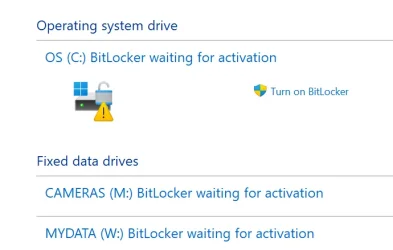
Got a new computer and was thinking backing up encryption key would be a good idea, but a little investigation, I guess the default is that the drive is not encrypted. But what does conversion status mean below? Control panel status shows "waiting for activation" with an option to turn on bitlocker. But that status is a little contradictory, isn't it?

Also, is it true that if it is turned on, that's when a key is generated? Does it present a key at that time to save? My PC runs only on a Local Account so it won't end up in my MS account. (unless it requires MS sign in... I wouldn't think so though).

Volume C: [OS]
[OS Volume]

Size: 364.60 GB
BitLocker Version: 2.0
Conversion Status: Used Space Only Encrypted
Percentage Encrypted: 100.0%
Encryption Method: XTS-AES 128
Protection Status: Protection Off
Lock Status: Unlocked
Identification Field: Unknown
Key Protectors:
Numerical Password

Volume W: [MYDATA]
[Data Volume]

Size: 439.45 GB
BitLocker Version: 2.0
Conversion Status: Used Space Only Encrypted
Percentage Encrypted: 100.0%
Encryption Method: XTS-AES 128
Protection Status: Protection Off
Lock Status: Unlocked
Identification Field: Unknown
Automatic Unlock: Disabled
Key Protectors: None Found

 
Windows Build/Version
Windows 11 Pro Version 25H2 OS build 26200.8655 Experience Pack 1000.26100.315.0

My Computers My Computers

  • At a glance

    Windows 11Intel Ultra 516GB
    OS
    Windows 11
    Computer type
    PC/Desktop
    Manufacturer/Model
    Dell Pro Slim QCS1250
    CPU
    Intel Ultra 5
    Memory
    16GB
  • At a glance

    Windows 7I78GB
    Operating System
    Windows 7
    Computer type
    PC/Desktop
    Manufacturer/Model
    Dell XPS Studio
    CPU
    I7
    Memory
    8GB
  • Windows 10 Dell Inspiron laptop
But what does conversion status mean below?
It means all the space with the data is already encrypted. But since the Protection is "Off", Bitlocker stores the decryption key openly on the drive. You just need to turn the protection on (and back up the key).
 

My Computer My Computer

At a glance

Windows 11 Pro 25H2
OS
Windows 11 Pro 25H2
Computer type
PC/Desktop
It means all the space with the data is already encrypted. But since the Protection is "Off", Bitlocker stores the decryption key openly on the drive. You just need to turn the protection on (and back up the key).
So if you get a nasty OS failure or malware or a disk failure that sabotage the OS so you losing system folders/files.. the data is then unreachable as its encrypted if the key was on that space that got destroyed.... In theory :-)

So if you dont want bitlocker, it sounds as you need to first enable it and then disable it again so it decrypt the data.
 

My Computers My Computers

  • At a glance

    Linux: Debian, Kali-linux, Alma, Win:7,10IoT,...i3, i5 and i7 From 2gen to 9th gen... Server ...
    OS
    Linux: Debian, Kali-linux, Alma, Win:7,10IoT,2012R
    Manufacturer/Model
    HP Elitebook 840, AsusX53, Aspire E1-572. AsusUX32A, HP Pro3130mt+3010mt, HP Proliant ML150, 3xCustom-PC, i3, i5, i7
    CPU
    i3, i5 and i7 From 2gen to 9th gen... Server dual Xenon
    Hard Drives
    Sata, M.2, SAS
  • At a glance

    Retro: 2003server.XPpro, Win2000, Win98SE, Wi...Oldest intel 8088 up to P4 dual core
    Operating System
    Retro: 2003server.XPpro, Win2000, Win98SE, Win95, Win3.11, MS-DOS, IBM-DOS
    Manufacturer/Model
    Commodore, AST, Fujitsu, Compaq, etc etc. etc Around 15 desktops and 20 laptops in the collection
    CPU
    Oldest intel 8088 up to P4 dual core
    Hard Drives
    MFM, IDE, SCSI
The "BitLocker waiting for activation" status means your drive is partially encrypted by Windows, but no recovery key or key protector has been backed up. To fix it, either fully complete the encryption process or disable it completely to remove the warning.

If one uses Windows Home, automatic Device Encryption requires a Microsoft account to back up the recovery key.

ISince you have Windows Pro you can manually enable standard BitLocker and save the recovery key locally to a USB flash drive or a text file without linking a Microsoft account. If one does not use a Microsoft account, I strongly recommend keeping record of the key in multiple places because if it is lost, you're out of luck. Your only alternative would be a clean install.
 

My Computers My Computers

  • At a glance

    Windows 11 Pro 25H2 26200.8655i9-10900 10 core 20 threads32 gbnone-Intel UHD Graphics 630
    OS
    Windows 11 Pro 25H2 26200.8655
    Computer type
    PC/Desktop
    Manufacturer/Model
    Dell Optiplex 7080
    CPU
    i9-10900 10 core 20 threads
    Motherboard
    DELL 0J37VM
    Memory
    32 gb
    Graphics Card(s)
    none-Intel UHD Graphics 630
    Sound Card
    Integrated Realtek
    Monitor(s) Displays
    Benq 27
    Screen Resolution
    2560x1440
    Hard Drives
    2x1tb Solidigm m.2 nvme /External drives 512gb Samsung m.2 sata+2tb Kingston m2.nvme
    PSU
    500w
    Case
    MT
    Cooling
    Dell Premium
    Keyboard
    Logitech wired
    Mouse
    Logitech wireless
    Internet Speed
    so slow I'm too embarrassed to tell
    Browser
    #1 Edge #2 Firefox
    Antivirus
    Defender+MWB Premium
  • At a glance

    Windows 11 Pro 24H2 26200.8457AMD Ryzen 7 6800U32 gbintegrated
    Operating System
    Windows 11 Pro 24H2 26200.8457
    Computer type
    PC/Desktop
    Manufacturer/Model
    Beelink Mini PC SER5
    CPU
    AMD Ryzen 7 6800U
    Memory
    32 gb
    Graphics card(s)
    integrated
    Sound Card
    integrated
    Monitor(s) Displays
    Benq 27
    Screen Resolution
    2560x1440
    Hard Drives
    1TB Crucial nvme
    Keyboard
    Logitech wired
    Mouse
    Logitech wireless
    Internet Speed
    still too embarrassed to tell
    Browser
    Firefox
    Antivirus
    Defender
    Other Info
    System 3 is non compliant Dell 9020 i7-4770/24gb ram Win11 PRO 26200.8457

Latest Support Threads

Back
Top Bottom