Understanding bitlocker conversion status


hershey4

Active member
Local time
1:54 PM
Posts
40
OS
Windows 11 Pro
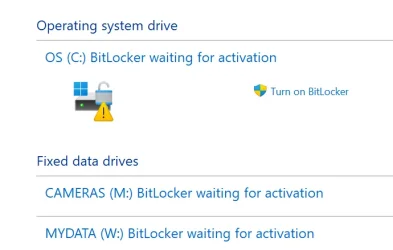
Got a new computer and was thinking backing up encryption key would be a good idea, but a little investigation, I guess the default is that the drive is not encrypted. But what does conversion status mean below? Control panel status shows "waiting for activation" with an option to turn on bitlocker. But that status is a little contradictory, isn't it?

Also, is it true that if it is turned on, that's when a key is generated? Does it present a key at that time to save? My PC runs only on a Local Account so it won't end up in my MS account. (unless it requires MS sign in... I wouldn't think so though).

Volume C: [OS]
[OS Volume]

Size: 364.60 GB
BitLocker Version: 2.0
Conversion Status: Used Space Only Encrypted
Percentage Encrypted: 100.0%
Encryption Method: XTS-AES 128
Protection Status: Protection Off
Lock Status: Unlocked
Identification Field: Unknown
Key Protectors:
Numerical Password

Volume W: [MYDATA]
[Data Volume]

Size: 439.45 GB
BitLocker Version: 2.0
Conversion Status: Used Space Only Encrypted
Percentage Encrypted: 100.0%
Encryption Method: XTS-AES 128
Protection Status: Protection Off
Lock Status: Unlocked
Identification Field: Unknown
Automatic Unlock: Disabled
Key Protectors: None Found

 
Windows Build/Version
Windows 11 Pro Version 25H2 OS build 26200.8655 Experience Pack 1000.26100.315.0

My Computers My Computers

  • At a glance

    Windows 11 ProIntel Ultra 516GB
    OS
    Windows 11 Pro
    Computer type
    PC/Desktop
    Manufacturer/Model
    Dell Pro Slim QCS1250
    CPU
    Intel Ultra 5
    Memory
    16GB
  • At a glance

    Windows 7I78GB
    Operating System
    Windows 7
    Computer type
    PC/Desktop
    Manufacturer/Model
    Dell XPS Studio
    CPU
    I7
    Memory
    8GB
  • Windows 10 Dell Inspiron laptop
But what does conversion status mean below?
It means all the space with the data is already encrypted. But since the Protection is "Off", Bitlocker stores the decryption key openly on the drive. You just need to turn the protection on (and back up the key).
 

My Computer My Computer

At a glance

Windows 11 Pro 25H2
OS
Windows 11 Pro 25H2
Computer type
PC/Desktop
It means all the space with the data is already encrypted. But since the Protection is "Off", Bitlocker stores the decryption key openly on the drive. You just need to turn the protection on (and back up the key).
So if you get a nasty OS failure or malware or a disk failure that sabotage the OS so you losing system folders/files.. the data is then unreachable as its encrypted if the key was on that space that got destroyed.... In theory :-)

So if you dont want bitlocker, it sounds as you need to first enable it and then disable it again so it decrypt the data.
 

My Computers My Computers

  • At a glance

    Linux: Debian, Kali-linux, Alma, Win:7,10IoT,...i3, i5 and i7 From 2gen to 9th gen... Server ...
    OS
    Linux: Debian, Kali-linux, Alma, Win:7,10IoT,2012R
    Manufacturer/Model
    HP Elitebook 840, AsusX53, Aspire E1-572. AsusUX32A, HP Pro3130mt+3010mt, HP Proliant ML150, 3xCustom-PC, i3, i5, i7
    CPU
    i3, i5 and i7 From 2gen to 9th gen... Server dual Xenon
    Hard Drives
    Sata, M.2, SAS
  • At a glance

    Retro: 2003server.XPpro, Win2000, Win98SE, Wi...Oldest intel 8088 up to P4 dual core
    Operating System
    Retro: 2003server.XPpro, Win2000, Win98SE, Win95, Win3.11, MS-DOS, IBM-DOS
    Manufacturer/Model
    Commodore, AST, Fujitsu, Compaq, etc etc. etc Around 15 desktops and 20 laptops in the collection
    CPU
    Oldest intel 8088 up to P4 dual core
    Hard Drives
    MFM, IDE, SCSI
The "BitLocker waiting for activation" status means your drive is partially encrypted by Windows, but no recovery key or key protector has been backed up. To fix it, either fully complete the encryption process or disable it completely to remove the warning.

If one uses Windows Home, automatic Device Encryption requires a Microsoft account to back up the recovery key.

ISince you have Windows Pro you can manually enable standard BitLocker and save the recovery key locally to a USB flash drive or a text file without linking a Microsoft account. If one does not use a Microsoft account, I strongly recommend keeping record of the key in multiple places because if it is lost, you're out of luck. Your only alternative would be a clean install.
 

My Computers My Computers

  • At a glance

    Windows 11 Pro 25H2 26200.8875i9-10900 10 core 20 threads32 gbnone-Intel UHD Graphics 630
    OS
    Windows 11 Pro 25H2 26200.8875
    Computer type
    PC/Desktop
    Manufacturer/Model
    Dell Optiplex 7080
    CPU
    i9-10900 10 core 20 threads
    Motherboard
    DELL 0J37VM
    Memory
    32 gb
    Graphics Card(s)
    none-Intel UHD Graphics 630
    Sound Card
    Integrated Realtek
    Monitor(s) Displays
    Benq 27
    Screen Resolution
    2560x1440
    Hard Drives
    2x1tb Solidigm m.2 nvme /External drives 512gb Samsung m.2 sata+2tb Kingston m2.nvme
    PSU
    500w
    Case
    MT
    Cooling
    Dell Premium
    Keyboard
    Logitech wired
    Mouse
    Logitech wireless
    Internet Speed
    so slow I'm too embarrassed to tell
    Browser
    #1 Edge #2 Firefox
    Antivirus
    Defender+MWB Premium
  • At a glance

    Windows 11 Pro 24H2 26200.8875AMD Ryzen 7 6800U32 gbintegrated
    Operating System
    Windows 11 Pro 24H2 26200.8875
    Computer type
    PC/Desktop
    Manufacturer/Model
    Beelink Mini PC SER5
    CPU
    AMD Ryzen 7 6800U
    Memory
    32 gb
    Graphics card(s)
    integrated
    Sound Card
    integrated
    Monitor(s) Displays
    Benq 27
    Screen Resolution
    2560x1440
    Hard Drives
    1TB Crucial nvme
    Keyboard
    Logitech wired
    Mouse
    Logitech wireless
    Internet Speed
    still too embarrassed to tell
    Browser
    Firefox
    Antivirus
    Defender
    Other Info
    System 3 is non compliant Dell 9020 i7-4770/24gb ram Win11 PRO 26200.8875
Before you start messing with anything, be sure you have implemented a sound backup strategy. Data security must always come first.
 

My Computers My Computers

  • At a glance

    Windows 11 ProIntel Series 3 Core Ultra X9 388H64GB LPDDR5x 9600 MT/sIntel Arc graphics B390 Panther Lake
    OS
    Windows 11 Pro
    Computer type
    Laptop
    Manufacturer/Model
    Dell XPS 16 DA16260
    CPU
    Intel Series 3 Core Ultra X9 388H
    Memory
    64GB LPDDR5x 9600 MT/s
    Graphics Card(s)
    Intel Arc graphics B390 Panther Lake
    Monitor(s) Displays
    16" 3.2K Tandem OLED Infinity Edge
    Screen Resolution
    3200 x 2000 16:10 236 PPI
    Hard Drives
    1 Terabyte M.2 PCIe NVMe SSD
    Case
    Black Anodized Aluminum
    Cooling
    Vapor Chamber Cooling
    Mouse
    None
    Internet Speed
    942 Mbps Netgear Mesh + 2 Satellites
    Browser
    Microsoft Edge (Chromium)
    Antivirus
    Windows Security (Defender)
    Other Info
    NPU delivering 67 TOPS
    Microsoft 365 subscription
    Microsoft Office 365
    Microsoft OneDrive 1TB Cloud
    Microsoft Visual Studio
    Microsoft Visual Studio Code
    Microsoft Sysinternals Suite
    Microsoft BitLocker
    Microsoft Copilot
    Dell Support Assist
    Dell Command | Update
    Macrium Reflect X subscription
    1Password Password Manager
    Amazon Kindle for PC
    Lightroom/Photoshop subscription
    Interactive Brokers Trader Workstation
  • At a glance

    Windows 11 ProSnapdragon® X Elite (12 Core) with Hexagon NP...32GB LPDDR5x 8448 MT/sIntegrated Adreno GPU
    Operating System
    Windows 11 Pro
    Computer type
    Laptop
    Manufacturer/Model
    Microsoft Surface Laptop 7
    CPU
    Snapdragon® X Elite (12 Core) with Hexagon NPU delivering 45 TOPS
    Memory
    32GB LPDDR5x 8448 MT/s
    Graphics card(s)
    Integrated Adreno GPU
    Sound Card
    Omnisonic speakers with Dolby Atmos spatial sound
    Monitor(s) Displays
    13.8″ PixelSense Flow touchscreen 120 Hz 600 NIT
    Screen Resolution
    2304 × 1536 (201 PPI), 3:2 aspect ratio
    Hard Drives
    1 TB PCIe NVMe Gen 4 SSD
    Case
    Black Anodized Aluminum
    Cooling
    Vapor Chamber Cooling
    Mouse
    None
    Internet Speed
    942 Mbps Netgear Mesh + 2 Satellites
    Browser
    Microsoft Edge (Chromium)
    Antivirus
    Windows Security (Defender)
    Other Info
    Microsoft 365 subscription (Office)
    Microsoft Office 365
    Microsoft OneDrive 1TB Cloud
    Microsoft Visual Studio 2026
    Microsoft Visual Studio Code
    Interactive Brokers Trader Workstation
    Lightroom/Photoshop subscription
    1Password Password Manager
    Microsoft Sysinternals
    Amazon Kindle for PC
    Microsoft BitLocker
    Microsoft Copilot
"Used space only" denotes the method used to encrypt the drive. In other words, when the drive was encrypted, the option to encrypt only used space was used rather than encrypting every byte of the drive whether there was data there or not. When the drive is encrypted, you can choose to encrypt only the data in the drive (the used space in the drive) or to encrypt the whole drive. When would you use each option?

Say you have a brand-new drive that never had any data on it. In that case, it's a no-brainer. Encrypting the unused areas of the disk buys you nothing, so used space only encryption is the choice to make.

However, if you have a drive that previously had data on it that was not encrypted and you want to make absolutely sure that even the deleted data is not recoverable, then you would encrypt the entire drive to ensure that previously deleted data is now encrypted and not recoverable. If you had data on the drive previously that does not need to be safeguarded, then you can simply encrypt the used space only.

Naturally, encrypting used space only will be a lot faster than encrypting the whole drive.

Note that other than making sure that all previously present data was encrypted, there is zero advantage to encrypting the whole drive.
 

My Computers My Computers

  • At a glance

    Win11 Pro 25H2 (RTM+)Intel i7-14650HX32 GBNo GPU - Built-in Intel Graphics
    OS
    Win11 Pro 25H2 (RTM+)
    Computer type
    PC/Desktop
    Manufacturer/Model
    Acemagic
    CPU
    Intel i7-14650HX
    Memory
    32 GB
    Graphics Card(s)
    No GPU - Built-in Intel Graphics
    Sound Card
    Integrated
    Monitor(s) Displays
    Varies as machine will often be moved to locations with different monitors
    Screen Resolution
    Varies
    Hard Drives
    1 x 1TB Gen 4 NVMe SSD
    PSU
    120W Power Brick
    Keyboard
    Corsair K70 Max RGB Magnetic Keyboard
    Mouse
    Logitech MX Master 3
    Internet Speed
    1Gb Up / 1 Gb Down
    Browser
    Edge
    Antivirus
    Windows Defender
  • At a glance

    Win11 Pro 25H2 (RTM+)Intel i7-1255U16 GBIntel Iris Xe Graphics
    Operating System
    Win11 Pro 25H2 (RTM+)
    Computer type
    Laptop
    Manufacturer/Model
    Lenovo ThinkBook 13x Gen 2
    CPU
    Intel i7-1255U
    Memory
    16 GB
    Graphics card(s)
    Intel Iris Xe Graphics
    Sound Card
    Realtek® ALC3306-CG codec
    Monitor(s) Displays
    13.3-inch IPS Display
    Screen Resolution
    WQXGA (2560 x 1600)
    Hard Drives
    2 TB 4 x 4 NVMe SSD
    PSU
    USB-C / Thunderbolt 4 Power / Charging
    Keyboard
    Backlit, spill resistant keyboard
    Mouse
    Buttonless Glass Precision Touchpad
    Internet Speed
    1Gb Up / 1Gb Down
    Browser
    Edge
    Antivirus
    Windows Defender
    Other Info
    WiFi 6e / Bluetooth 5.1 / Facial Recognition / Fingerprint Sensor / ToF (Time of Flight) Human Presence Sensor
Thanks for the info. There's a lot more to it than I thought.

So I take it that the performance hits (if any) of encryption are the same turning bitlocker on or off because the same encryption/decryption is happening regardless. Is that a fair conclusion?

What is the difference between Volume C and Volume W in Key Protectors and Automatic Unlock?

I don't think I will activate bitlocker. Reasons/Excuses: I have been using Macrium to do regular backups for years of my old computer (files and folders on W: to an external drive). WIll probably just do the same here. Photos are in the cloud. Its definitely not a mission critical system. I've never had a virus or malware in 20+ years. I access the internet carefully (adblockers, cynicism, awareness). I have a technical (legacy) background which seems to help at some instinctual level - although as time goes on and technology advances, that may prove to be useless.
 

My Computers My Computers

  • At a glance

    Windows 11 ProIntel Ultra 516GB
    OS
    Windows 11 Pro
    Computer type
    PC/Desktop
    Manufacturer/Model
    Dell Pro Slim QCS1250
    CPU
    Intel Ultra 5
    Memory
    16GB
  • At a glance

    Windows 7I78GB
    Operating System
    Windows 7
    Computer type
    PC/Desktop
    Manufacturer/Model
    Dell XPS Studio
    CPU
    I7
    Memory
    8GB
  • Windows 10 Dell Inspiron laptop
Thanks for the info. There's a lot more to it than I thought.

So I take it that the performance hits (if any) of encryption are the same turning bitlocker on or off because the same encryption/decryption is happening regardless. Is that a fair conclusion?

What is the difference between Volume C and Volume W in Key Protectors and Automatic Unlock?

I don't think I will activate bitlocker. Reasons/Excuses: I have been using Macrium to do regular backups for years of my old computer (files and folders on W: to an external drive). WIll probably just do the same here. Photos are in the cloud. Its definitely not a mission critical system. I've never had a virus or malware in 20+ years. I access the internet carefully (adblockers, cynicism, awareness). I have a technical (legacy) background which seems to help at some instinctual level - although as time goes on and technology advances, that may prove to be useless.

Automatic unlock is for drives other than the operating system drive. For example, let's say you have a second drive in your system. Or just another partition that you have Bitlocker protected. And your operating system drive is also Bitlocker protected. If your operating system drive is Bitlocker protected, then you can set other drives to automatically unlock. That way when you log on to the system you don't have to unlock those drives, they will just be automatically unlocked.. They rely upon the fact that the operating system drive is locked and that you must have signed on successfully in order to unlock the operating system drive. Once it is unlocked it takes that as authorization to go ahead and unlock the other drives. But again, you can only automatically unlock a drive if the operating system drive. Is already Bitlocker. Protected.

As for viruses and malware, BitLocker is not there to protect against those. In fact, it pretty much can do nothing against those. Its purpose for living is to ensure that if someone has physical access to your system (think stolen laptop as an example) that the person who got their hands on your equipment cannot get at the data.

For example, without BitLocker, I could simply plug your drive into another computer, take ownership of all the data, and have access to everything.
 

My Computers My Computers

  • At a glance

    Win11 Pro 25H2 (RTM+)Intel i7-14650HX32 GBNo GPU - Built-in Intel Graphics
    OS
    Win11 Pro 25H2 (RTM+)
    Computer type
    PC/Desktop
    Manufacturer/Model
    Acemagic
    CPU
    Intel i7-14650HX
    Memory
    32 GB
    Graphics Card(s)
    No GPU - Built-in Intel Graphics
    Sound Card
    Integrated
    Monitor(s) Displays
    Varies as machine will often be moved to locations with different monitors
    Screen Resolution
    Varies
    Hard Drives
    1 x 1TB Gen 4 NVMe SSD
    PSU
    120W Power Brick
    Keyboard
    Corsair K70 Max RGB Magnetic Keyboard
    Mouse
    Logitech MX Master 3
    Internet Speed
    1Gb Up / 1 Gb Down
    Browser
    Edge
    Antivirus
    Windows Defender
  • At a glance

    Win11 Pro 25H2 (RTM+)Intel i7-1255U16 GBIntel Iris Xe Graphics
    Operating System
    Win11 Pro 25H2 (RTM+)
    Computer type
    Laptop
    Manufacturer/Model
    Lenovo ThinkBook 13x Gen 2
    CPU
    Intel i7-1255U
    Memory
    16 GB
    Graphics card(s)
    Intel Iris Xe Graphics
    Sound Card
    Realtek® ALC3306-CG codec
    Monitor(s) Displays
    13.3-inch IPS Display
    Screen Resolution
    WQXGA (2560 x 1600)
    Hard Drives
    2 TB 4 x 4 NVMe SSD
    PSU
    USB-C / Thunderbolt 4 Power / Charging
    Keyboard
    Backlit, spill resistant keyboard
    Mouse
    Buttonless Glass Precision Touchpad
    Internet Speed
    1Gb Up / 1Gb Down
    Browser
    Edge
    Antivirus
    Windows Defender
    Other Info
    WiFi 6e / Bluetooth 5.1 / Facial Recognition / Fingerprint Sensor / ToF (Time of Flight) Human Presence Sensor
As for viruses and malware, BitLocker is not there to protect against those.
didn't realize that. for some reason I was thinking ransomware protection
For example, without BitLocker, I could simply plug your drive into another computer, take ownership of all the data, and have access to everything.
so for a desktop, just lock my doors at night. got it.

thinking back to a former encrypted work laptop that I never logged out of, if laptop was stolen, encryption would be useless???
 

My Computers My Computers

  • At a glance

    Windows 11 ProIntel Ultra 516GB
    OS
    Windows 11 Pro
    Computer type
    PC/Desktop
    Manufacturer/Model
    Dell Pro Slim QCS1250
    CPU
    Intel Ultra 5
    Memory
    16GB
  • At a glance

    Windows 7I78GB
    Operating System
    Windows 7
    Computer type
    PC/Desktop
    Manufacturer/Model
    Dell XPS Studio
    CPU
    I7
    Memory
    8GB
  • Windows 10 Dell Inspiron laptop

My Computers My Computers

  • At a glance

    Windows 11 ProAMD Ryzen 9 9950X3DKingston FURY Beast 64GB (2x32GB) DDR5 6000MT/sASUS TUF Gaming Radeon RX 9070 OC Edition 16G...
    OS
    Windows 11 Pro
    Computer type
    PC/Desktop
    CPU
    AMD Ryzen 9 9950X3D
    Motherboard
    ASRock B650E Taichi Lite
    Memory
    Kingston FURY Beast 64GB (2x32GB) DDR5 6000MT/s
    Graphics Card(s)
    ASUS TUF Gaming Radeon RX 9070 OC Edition 16GB GDDR6
    Hard Drives
    Solidigm P44 Pro 2TB M.2 NVMe SSD
  • At a glance

    Windows 11 HomeIntel Core Ultra 9 275HX64GB (2x 32GB) DDR5-6400NVIDIA GeForce RTX 5080 16GB GDDR7 Laptop GPU
    Operating System
    Windows 11 Home
    Computer type
    Laptop
    Manufacturer/Model
    Lenovo Legion Pro 7i Gen 10 16"
    CPU
    Intel Core Ultra 9 275HX
    Memory
    64GB (2x 32GB) DDR5-6400
    Graphics card(s)
    NVIDIA GeForce RTX 5080 16GB GDDR7 Laptop GPU
    Hard Drives
    2x 1TB M.2 NVMe SSD (SK Hynix)
If you don't want encryption, go to:

Settings > Privacy & security > Device encryption

Turn it Off.
It's already off.

1783515543760.webp
But on another topic, I am surprised at your screenshot showing that Msoft needed to encrypt. It was my understanding that I could store the key on a flashdrive or whatever when using a Local Account and WPro.
 

My Computers My Computers

  • At a glance

    Windows 11 ProIntel Ultra 516GB
    OS
    Windows 11 Pro
    Computer type
    PC/Desktop
    Manufacturer/Model
    Dell Pro Slim QCS1250
    CPU
    Intel Ultra 5
    Memory
    16GB
  • At a glance

    Windows 7I78GB
    Operating System
    Windows 7
    Computer type
    PC/Desktop
    Manufacturer/Model
    Dell XPS Studio
    CPU
    I7
    Memory
    8GB
  • Windows 10 Dell Inspiron laptop
So I take it that the performance hits (if any) of encryption are the same turning bitlocker on or off because the same encryption/decryption is happening regardless. Is that a fair conclusion?

I've never had a virus or malware in 20+ years.
didn't realize that. for some reason I was thinking ransomware protection

With today's SSD/NVMe disk speeds, a normal user dont notice the performance loss.
The only time you notice it is when you do stuff that is working a lot with heavy disk read/write.
With HDD 5400rpm then you do notice it on boot and when starting big programs.

That is both good.. and a bit odd you dont have heard about malware for 20+years :cool:

Nope Bitlocker dont protect from ransomware... actually there is malware that uses(abuses) windows bitlocker function to encrypt the user data for the ransom.
 

My Computers My Computers

  • At a glance

    Linux: Debian, Kali-linux, Alma, Win:7,10IoT,...i3, i5 and i7 From 2gen to 9th gen... Server ...
    OS
    Linux: Debian, Kali-linux, Alma, Win:7,10IoT,2012R
    Manufacturer/Model
    HP Elitebook 840, AsusX53, Aspire E1-572. AsusUX32A, HP Pro3130mt+3010mt, HP Proliant ML150, 3xCustom-PC, i3, i5, i7
    CPU
    i3, i5 and i7 From 2gen to 9th gen... Server dual Xenon
    Hard Drives
    Sata, M.2, SAS
  • At a glance

    Retro: 2003server.XPpro, Win2000, Win98SE, Wi...Oldest intel 8088 up to P4 dual core
    Operating System
    Retro: 2003server.XPpro, Win2000, Win98SE, Win95, Win3.11, MS-DOS, IBM-DOS
    Manufacturer/Model
    Commodore, AST, Fujitsu, Compaq, etc etc. etc Around 15 desktops and 20 laptops in the collection
    CPU
    Oldest intel 8088 up to P4 dual core
    Hard Drives
    MFM, IDE, SCSI
...
The only time you notice it is when you do stuff that is working a lot with heavy disk read/write.
Like backups? it's already slow because I am going over the network. Restoring my data backups to the new PC over the network took days!!
 

My Computers My Computers

  • At a glance

    Windows 11 ProIntel Ultra 516GB
    OS
    Windows 11 Pro
    Computer type
    PC/Desktop
    Manufacturer/Model
    Dell Pro Slim QCS1250
    CPU
    Intel Ultra 5
    Memory
    16GB
  • At a glance

    Windows 7I78GB
    Operating System
    Windows 7
    Computer type
    PC/Desktop
    Manufacturer/Model
    Dell XPS Studio
    CPU
    I7
    Memory
    8GB
  • Windows 10 Dell Inspiron laptop
Like backups? it's already slow because I am going over the network. Restoring my data backups to the new PC over the network took days!!
no not really.. unless you backing up 10TB of data, then it can take a bit longer.. But everything under 1TB is not really noticeable.. you can measure it with a clock.. but you wont feel-feel it.
If you have around 10%ish performance loss. So a lot of data is noticeable.. and on old slow disks.. But not really on normal usage.

Edit
over the network.. Then you wont notice a thing, as the bottle neck is the Lan(probibly 1Gbit i guess), so not the disk-speed.. unless you have an old HDD 5400rpm and a 2.5Gbit Lan.. then the disk is the bottle neck.


Edit 2.
I never do full disk encryption, as you almost never need to encrypt that much data. I use VeraCrypt and containers for sensitive files. I try to keep them at 4.3GB so i easy can copy them to DVD-r disks for archiving and still have the data encrypted.
There is no point of encrypt my TV-shows, movies and music.. also i dont encrypt my system disks as i never keep sensitive data on them.. I dont think anyone would have interest of my browsers bookmarks or if i have saved a few memes for forum usage. *lol* 😅
 
Last edited:

My Computers My Computers

  • At a glance

    Linux: Debian, Kali-linux, Alma, Win:7,10IoT,...i3, i5 and i7 From 2gen to 9th gen... Server ...
    OS
    Linux: Debian, Kali-linux, Alma, Win:7,10IoT,2012R
    Manufacturer/Model
    HP Elitebook 840, AsusX53, Aspire E1-572. AsusUX32A, HP Pro3130mt+3010mt, HP Proliant ML150, 3xCustom-PC, i3, i5, i7
    CPU
    i3, i5 and i7 From 2gen to 9th gen... Server dual Xenon
    Hard Drives
    Sata, M.2, SAS
  • At a glance

    Retro: 2003server.XPpro, Win2000, Win98SE, Wi...Oldest intel 8088 up to P4 dual core
    Operating System
    Retro: 2003server.XPpro, Win2000, Win98SE, Win95, Win3.11, MS-DOS, IBM-DOS
    Manufacturer/Model
    Commodore, AST, Fujitsu, Compaq, etc etc. etc Around 15 desktops and 20 laptops in the collection
    CPU
    Oldest intel 8088 up to P4 dual core
    Hard Drives
    MFM, IDE, SCSI
I never do full disk encryption, as you almost never need to encrypt that much data. I use VeraCrypt and containers for sensitive files. I try to keep them at 4.3GB so i easy can copy them to DVD-r disks for archiving and still have the data encrypted.
There is no point of encrypt my TV-shows, movies and music.. also i dont encrypt my system disks as i never keep sensitive data on them.. I dont think anyone would have interest of my browsers bookmarks or if i have saved a few memes for forum usage. *lol* 😅
Full disk encryption (FDE) is the only way to go, especially for the system drive. When you pick and choose what to encrypt, you miss all kinds of potential data leakage, from data stored behind the scenes in hidden folders like AppData (e.g.Outlook .pst files) and ProgramData, to the contents of TEMP folders (e.g. WinRAR won't delete files it extracted to it for viewing unless configured to "Wipe temporary files"), to pagefile/hibernation file contents, to your own carelessness.
 

My Computer My Computer

At a glance

Windows 11
OS
Windows 11
Good to put all the pieces in perspective. I suspected the LAN was probably a big part. I'm supposed to be 800mbs but I think comcast downgrades me cuz I have own equipment. By the time it reaches my PC, speed is 50-60. Maybe more late at night. My neighbor on shared wall has 1gbs. At my PC, its 200-250mbs in peak times. I shoulda used her network when I did those restores. (we're friends, she knows).
And that external drive (4TB) is probably over 5 years old now (boy time flies), so that's likely a bottleneck too. And looking at it now, I see it's using an A->C cable. that's probably no good either.
 

My Computers My Computers

  • At a glance

    Windows 11 ProIntel Ultra 516GB
    OS
    Windows 11 Pro
    Computer type
    PC/Desktop
    Manufacturer/Model
    Dell Pro Slim QCS1250
    CPU
    Intel Ultra 5
    Memory
    16GB
  • At a glance

    Windows 7I78GB
    Operating System
    Windows 7
    Computer type
    PC/Desktop
    Manufacturer/Model
    Dell XPS Studio
    CPU
    I7
    Memory
    8GB
  • Windows 10 Dell Inspiron laptop
Full disk encryption (FDE) is the only way to go, especially for the system drive. When you pick and choose what to encrypt, you miss all kinds of potential data leakage, from data stored behind the scenes in hidden folders like AppData (e.g.Outlook .pst files) and ProgramData, to the contents of TEMP folders (e.g. WinRAR won't delete files it extracted to it for viewing unless configured to "Wipe temporary files"), to pagefile/hibernation file contents, to your own carelessness.
Everything depends on your own use case..:-)
For me, i dont have browser disk cache, so i dont have to worry about that. cookies is erased on shutdown. I dont use a local email client.. only web-interface.. and my emails is not sensitive as its like sending a postcard over the internet.. email is sent in clear text unless you encrypt the email and the receiver has the decryption key.
Then i also have several computers so i do device isolation, so i never use this computer for banking or other sensitive things on that level.
and that computer is the same.. i never have disk cache enabled, and i never stay logged in on important sites if i leave the computer.. so RAM and swap isn't a risk... for me zip/rar etc.. is never important data.. that is usually if i download drivers or a program for install or something like that.
 

My Computers My Computers

  • At a glance

    Linux: Debian, Kali-linux, Alma, Win:7,10IoT,...i3, i5 and i7 From 2gen to 9th gen... Server ...
    OS
    Linux: Debian, Kali-linux, Alma, Win:7,10IoT,2012R
    Manufacturer/Model
    HP Elitebook 840, AsusX53, Aspire E1-572. AsusUX32A, HP Pro3130mt+3010mt, HP Proliant ML150, 3xCustom-PC, i3, i5, i7
    CPU
    i3, i5 and i7 From 2gen to 9th gen... Server dual Xenon
    Hard Drives
    Sata, M.2, SAS
  • At a glance

    Retro: 2003server.XPpro, Win2000, Win98SE, Wi...Oldest intel 8088 up to P4 dual core
    Operating System
    Retro: 2003server.XPpro, Win2000, Win98SE, Win95, Win3.11, MS-DOS, IBM-DOS
    Manufacturer/Model
    Commodore, AST, Fujitsu, Compaq, etc etc. etc Around 15 desktops and 20 laptops in the collection
    CPU
    Oldest intel 8088 up to P4 dual core
    Hard Drives
    MFM, IDE, SCSI
thinking back to a former encrypted work laptop that I never logged out of, if laptop was stolen, encryption would be useless???
If you lock your desktop, then you are fine if it has BitLocker. Of course, if you don't logoff AND leave it sitting on the desktop without locking it, sure, anyone could simply walk up to that machine and use it then.
 

My Computers My Computers

  • At a glance

    Win11 Pro 25H2 (RTM+)Intel i7-14650HX32 GBNo GPU - Built-in Intel Graphics
    OS
    Win11 Pro 25H2 (RTM+)
    Computer type
    PC/Desktop
    Manufacturer/Model
    Acemagic
    CPU
    Intel i7-14650HX
    Memory
    32 GB
    Graphics Card(s)
    No GPU - Built-in Intel Graphics
    Sound Card
    Integrated
    Monitor(s) Displays
    Varies as machine will often be moved to locations with different monitors
    Screen Resolution
    Varies
    Hard Drives
    1 x 1TB Gen 4 NVMe SSD
    PSU
    120W Power Brick
    Keyboard
    Corsair K70 Max RGB Magnetic Keyboard
    Mouse
    Logitech MX Master 3
    Internet Speed
    1Gb Up / 1 Gb Down
    Browser
    Edge
    Antivirus
    Windows Defender
  • At a glance

    Win11 Pro 25H2 (RTM+)Intel i7-1255U16 GBIntel Iris Xe Graphics
    Operating System
    Win11 Pro 25H2 (RTM+)
    Computer type
    Laptop
    Manufacturer/Model
    Lenovo ThinkBook 13x Gen 2
    CPU
    Intel i7-1255U
    Memory
    16 GB
    Graphics card(s)
    Intel Iris Xe Graphics
    Sound Card
    Realtek® ALC3306-CG codec
    Monitor(s) Displays
    13.3-inch IPS Display
    Screen Resolution
    WQXGA (2560 x 1600)
    Hard Drives
    2 TB 4 x 4 NVMe SSD
    PSU
    USB-C / Thunderbolt 4 Power / Charging
    Keyboard
    Backlit, spill resistant keyboard
    Mouse
    Buttonless Glass Precision Touchpad
    Internet Speed
    1Gb Up / 1Gb Down
    Browser
    Edge
    Antivirus
    Windows Defender
    Other Info
    WiFi 6e / Bluetooth 5.1 / Facial Recognition / Fingerprint Sensor / ToF (Time of Flight) Human Presence Sensor
Back
Top Bottom