Unexpected Shutdown Caused by Windows Update, but there's been no Updates?


pacificSurf

Well-known member
Member
Local time
3:20 PM
Posts
168
OS
windwos 11 pro
I don't have any issue just trying to learn from the event viewer exactly what happened and if i am interpreting this correctly.

I put my computer to sleep yesterday around 4:28pm, and just a few minutes later it appears at 4:30pm it shut off? If Im reading that right. It appears it was caused by windows update client, but i have no recent updates installed.

Did the shutdown happen yesterday after I put it to sleep, or did it happen today when I tried to wake it from sleep?

8G9fMd97m1.webp

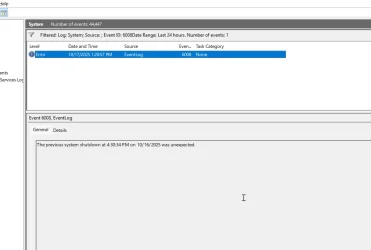
When I turned computer on today at 1:20PM, it logged the shut down as today, but im guessing that it actually means yesterday, it is just because it can not log it until the next boot up, because it was an unexpected shutdown:

U3AbzBhi6B.webp
f
uA68IgkuEk.webp
 

My Computer

System One

  • OS
    windwos 11 pro
The system shut down when you put the computer to sleep.

I don't think Event 43 was the cause of the shutdown event 41. It was a result of it. I would be looking at event error 6008 to see if it gives more info. I think 6008 was the cause of the shutdown. Event 6008 indicates sudden power loss. It could be a driver, ram. overheating, PSU; any hardware or driver really, as well as even a piece of software..

Put your computer to sleep and wake it up a few times. Is everything normal?

If you are not experiencing numerous shutdowns, I think you are spinning your wheels trying to get to the bottom of just this one. Windows does have blips occasionally . However, if you get abnormal shutdowns repeatedly, that's a different story.
 

My Computers

System One System Two

  • OS
    Windows 11 Pro 25H2 26200.8655
    Computer type
    PC/Desktop
    Manufacturer/Model
    Dell Optiplex 7080
    CPU
    i9-10900 10 core 20 threads
    Motherboard
    DELL 0J37VM
    Memory
    32 gb
    Graphics Card(s)
    none-Intel UHD Graphics 630
    Sound Card
    Integrated Realtek
    Monitor(s) Displays
    Benq 27
    Screen Resolution
    2560x1440
    Hard Drives
    2x1tb Solidigm m.2 nvme /External drives 512gb Samsung m.2 sata+2tb Kingston m2.nvme
    PSU
    500w
    Case
    MT
    Cooling
    Dell Premium
    Keyboard
    Logitech wired
    Mouse
    Logitech wireless
    Internet Speed
    so slow I'm too embarrassed to tell
    Browser
    #1 Edge #2 Firefox
    Antivirus
    Defender+MWB Premium
  • Operating System
    Windows 11 Pro 24H2 26200.8457
    Computer type
    PC/Desktop
    Manufacturer/Model
    Beelink Mini PC SER5
    CPU
    AMD Ryzen 7 6800U
    Memory
    32 gb
    Graphics card(s)
    integrated
    Sound Card
    integrated
    Monitor(s) Displays
    Benq 27
    Screen Resolution
    2560x1440
    Hard Drives
    1TB Crucial nvme
    Keyboard
    Logitech wired
    Mouse
    Logitech wireless
    Internet Speed
    still too embarrassed to tell
    Browser
    Firefox
    Antivirus
    Defender
    Other Info
    System 3 is non compliant Dell 9020 i7-4770/24gb ram Win11 PRO 26200.8457
The system shut down when you put the computer to sleep.

I don't think Event 43 was the cause of the shutdown event 41. It was a result of it. I would be looking at event error 6008 to see if it gives more info. I think 6008 was the cause of the shutdown. Event 6008 indicates sudden power loss. It could be a driver, ram. overheating, PSU; any hardware or driver really, as well as even a piece of software..

Put your computer to sleep and wake it up a few times. Is everything normal?

If you are not experiencing numerous shutdowns, I think you are spinning your wheels trying to get to the bottom of just this one. Windows does have blips occasionally . However, if you get abnormal shutdowns repeatedly, that's a different story.
okay yeah it was a 1 time thing i think its been fine since then with sleep. Your right its pointless to chase the exact cause of it.
I guess now i was more so just trying to determine when it happened.

so it happened when I put the computer to sleep yesterday, ......but if 6008 is the cause of it, that occurred today at 1:20 when i woke it up, not yesterday when i put it to sleep. I assume that is just a logging error, as in the most recent chance it had to log the issue, today?

6068 log:
 

Attachments

  • 0Wklc5ljJ9.webp
    0Wklc5ljJ9.webp
    28.1 KB · Views: 1

My Computer

System One

  • OS
    windwos 11 pro

Latest Support Threads

Back
Top Bottom