I'm excited to share a new tool I've developed to simplify Intel wireless driver updates.
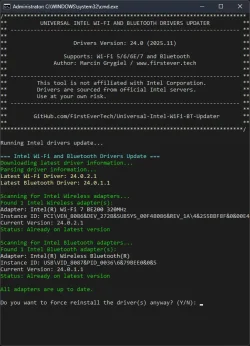
Intel Wi-Fi & Bluetooth Driver Updater 24.0
An automated tool that downloads and installs the latest Intel Wi-Fi and Bluetooth drivers directly from Windows Update servers.

If you're wondering why this solution is better than others, the answer is simple - drivers are downloaded directly from the Windows Update servers, even when Windows Update itself doesn't show them yet. In other words, you get drivers from a trusted source that are 2 versions newer than what's available on Intel's official website.
Why this matters:
If you still have doubts and don't want to check out my code, here's the VirusTotal scan result - 0/98!
I welcome your feedback, bug reports, and suggestions for improvement on the GitHub repository!
Intel Wi-Fi & Bluetooth Driver Updater 24.0
An automated tool that downloads and installs the latest Intel Wi-Fi and Bluetooth drivers directly from Windows Update servers.
- Key Features:
- Automatic Hardware Detection - Identifies Intel WiFi and Bluetooth adapters
- Direct Windows Update Integration - Downloads drivers from official Microsoft servers
- Version Comparison - Checks current vs latest available driver versions
- Safe Installation - Uses Windows pnputil for reliable driver deployment
- Clean Operation - Automatically removes temporary files
- Debug Mode - Detailed logging for troubleshooting
- Supported Devices Include:
- WiFi 7 Series:
- Intel® Wi-Fi 7 BE201, BE202, BE200
- WiFi 6E Series:
- Intel® Wi-Fi 6E AX411, AX211, AX210 (Gig+)
- WiFi 6 Series:
- Intel® Wi-Fi 6 AX203, AX200, AX201, AX101
- Intel® Wi-Fi 6 (Gig+) Desktop Kit
- Wireless-AC Series:
- Intel® Wireless-AC 9560, 9462, 9461
- Intel® Dual Band Wireless-AC 9260 Embedded/Industrial IoT Kits
- Bluetooth Adapters:
- All Intel Bluetooth USB (VID_8087), PCI, and UART devices
- Intel Killer Bluetooth adapters
- WiFi 7 Series:
- ️ How to Use:
- Option 1 - SFX Archive (Recommended):
- Download
https://github.com/FirstEver-eu/Intel-WiFi-BT-Updater/releases/download/v24.0/WiFi-BT-24.x-Driver64-Win10-Win11.exefrom GitHub Releases - Run as Administrator
- Follow the prompts
- Download
- Option 2 - Manual Scripts:
- Download
https://github.com/FirstEver-eu/Intel-WiFi-BT-Updater/blob/main/Update-Intel-WiFi-BT.batand Update-Intel-WiFi-BT.ps1 - Run the BAT file as Administrator
- For troubleshooting, use the Debug versions
- Download
- Option 1 - SFX Archive (Recommended):
- Download & Source:
- GitHub Repository (Online Installer):
https://github.com/FirstEver-eu/Intel-WiFi-BT-Updater/releases/download/v24.0/WiFi-BT-24.x-Driver64-Win10-Win11.exe(0.6MB)
- GitHub Repository (Online Installer):
- Important Notes:
- This tool is not affiliated with Intel Corporation
- Drivers are sourced from official Windows Update servers
- Always backup your system before driver updates
- Use at your own risk
- Credits:
Special thanks to the Station Drivers community, particularly @atplsx and other contributors who share driver information that makes tools like this possible.
If you're wondering why this solution is better than others, the answer is simple - drivers are downloaded directly from the Windows Update servers, even when Windows Update itself doesn't show them yet. In other words, you get drivers from a trusted source that are 2 versions newer than what's available on Intel's official website.
Why this matters:
- Direct from Microsoft - No third-party sources or modified drivers
- Newer versions - Often 1-2 versions ahead of Intel's official releases
- Verified authenticity - Drivers are digitally signed by Microsoft
- Early access - Get updates before they're widely available via Windows Update
- Safety guaranteed - No risk of malware or compromised drivers
- Community-driven - Anyone can review, improve, or customize the updater code
If you still have doubts and don't want to check out my code, here's the VirusTotal scan result - 0/98!
I welcome your feedback, bug reports, and suggestions for improvement on the GitHub repository!
Last edited:
My Computer
At a glance
Windows 11 Pro Insider PreviewIntel Xeon E5-1680 v2 OC @ 4.4GHzCorsair Quad DDR3-2400MHz CL10ASUS TUF Gaming GeForce RTX 4070 Ti OC
- OS
- Windows 11 Pro Insider Preview
- Computer type
- PC/Desktop
- Manufacturer/Model
- ASUS-ish Build
- CPU
- Intel Xeon E5-1680 v2 OC @ 4.4GHz
- Motherboard
- ASUS P9X79 Pro (Modded Bios)
- Memory
- Corsair Quad DDR3-2400MHz CL10
- Graphics Card(s)
- ASUS TUF Gaming GeForce RTX 4070 Ti OC
- Sound Card
- Realtek ALC898
- Monitor(s) Displays
- ASUS ROG Swift OLED PG48UQ OC @ 138Hz
- Screen Resolution
- 3840 x 2160 (4K)
- Hard Drives
- Samsung SSD 990 Pro 4TB (NVMe)
Samsung SSD 870 QVO 8TB (SATA)
- PSU
- Cooler Master Silent Pro M2 1500W
- Case
- Cooler Master MasterCase SL600M Black
- Cooling
- ARCTIC Liquid Freezer II 240
- Keyboard
- Logitech G915 LIGHTSPEED
- Mouse
- Logitech G900 Chaos Spectrum
- Internet Speed
- Download: 930 Mbps / Upload: 105 Mbps
- Other Info
- Added PCIe cards: Intel WiFi 7 BE200 (with BT 5.4) and USB 3.2 Gen 2 10Gbps