Universal Intel Chipset Device Updater


First Ever

Active member
Member
Local time
3:15 PM
Posts
26
Location
London
OS
Windows 11 Pro Insider Preview
I'm excited to share a new tool I've developed to simplify Intel wireless driver updates.

Intel Wi-Fi & Bluetooth Driver Updater 24.0
An automated tool that downloads and installs the latest Intel Wi-Fi and Bluetooth drivers directly from Windows Update servers.

Intel WiFi & BT Driver Updater.png

  1. Key Features:
    • Automatic Hardware Detection - Identifies Intel WiFi and Bluetooth adapters
    • Direct Windows Update Integration - Downloads drivers from official Microsoft servers
    • Version Comparison - Checks current vs latest available driver versions
    • Safe Installation - Uses Windows pnputil for reliable driver deployment
    • Clean Operation - Automatically removes temporary files
    • Debug Mode - Detailed logging for troubleshooting
  2. Supported Devices Include:
    • WiFi 7 Series:
      • Intel® Wi-Fi 7 BE201, BE202, BE200
    • WiFi 6E Series:
      • Intel® Wi-Fi 6E AX411, AX211, AX210 (Gig+)
    • WiFi 6 Series:
      • Intel® Wi-Fi 6 AX203, AX200, AX201, AX101
      • Intel® Wi-Fi 6 (Gig+) Desktop Kit
    • Wireless-AC Series:
      • Intel® Wireless-AC 9560, 9462, 9461
      • Intel® Dual Band Wireless-AC 9260 Embedded/Industrial IoT Kits
    • Bluetooth Adapters:
      • All Intel Bluetooth USB (VID_8087), PCI, and UART devices
      • Intel Killer Bluetooth adapters
  3. ️ How to Use:
    • Option 1 - SFX Archive (Recommended):
      • Download https://github.com/FirstEver-eu/Intel-WiFi-BT-Updater/releases/download/v24.0/WiFi-BT-24.x-Driver64-Win10-Win11.exe from GitHub Releases
      • Run as Administrator
      • Follow the prompts
    • Option 2 - Manual Scripts:
      • Download https://github.com/FirstEver-eu/Intel-WiFi-BT-Updater/blob/main/Update-Intel-WiFi-BT.bat and Update-Intel-WiFi-BT.ps1
      • Run the BAT file as Administrator
      • For troubleshooting, use the Debug versions
  4. Download & Source:
    • GitHub Repository (Online Installer): https://github.com/FirstEver-eu/Intel-WiFi-BT-Updater/releases/download/v24.0/WiFi-BT-24.x-Driver64-Win10-Win11.exe (0.6MB)
  5. Important Notes:
    • This tool is not affiliated with Intel Corporation
    • Drivers are sourced from official Windows Update servers
    • Always backup your system before driver updates
    • Use at your own risk
  6. Credits:

    Special thanks to the Station Drivers community, particularly @atplsx and other contributors who share driver information that makes tools like this possible.

If you're wondering why this solution is better than others, the answer is simple - drivers are downloaded directly from the Windows Update servers, even when Windows Update itself doesn't show them yet. In other words, you get drivers from a trusted source that are 2 versions newer than what's available on Intel's official website.

Why this matters:
  • Direct from Microsoft - No third-party sources or modified drivers
  • Newer versions - Often 1-2 versions ahead of Intel's official releases
  • Verified authenticity - Drivers are digitally signed by Microsoft
  • Early access - Get updates before they're widely available via Windows Update
  • Safety guaranteed - No risk of malware or compromised drivers
  • Community-driven - Anyone can review, improve, or customize the updater code
This approach gives you the best of both worlds: the latest driver versions with the security and trust of official Microsoft sources.
If you still have doubts and don't want to check out my code, here's the VirusTotal scan result - 0/98!

I welcome your feedback, bug reports, and suggestions for improvement on the GitHub repository!
 
Last edited:

My Computer

System One

  • OS
    Windows 11 Pro Insider Preview
    Computer type
    PC/Desktop
    Manufacturer/Model
    ASUS-ish Build
    CPU
    Intel Xeon E5-1680 v2 OC @ 4.4GHz
    Motherboard
    ASUS P9X79 Pro (Modded Bios)
    Memory
    Corsair Quad DDR3-2400MHz CL10
    Graphics Card(s)
    ASUS TUF Gaming GeForce RTX 4070 Ti OC
    Sound Card
    Realtek ALC898
    Monitor(s) Displays
    ASUS ROG Swift OLED PG48UQ OC @ 138Hz
    Screen Resolution
    3840 x 2160 (4K)
    Hard Drives
    Samsung SSD 990 Pro 4TB (NVMe)
    Samsung SSD 870 QVO 8TB (SATA)
    PSU
    Cooler Master Silent Pro M2 1500W
    Case
    Cooler Master MasterCase SL600M Black
    Cooling
    ARCTIC Liquid Freezer II 240
    Keyboard
    Logitech G915 LIGHTSPEED
    Mouse
    Logitech G900 Chaos Spectrum
    Internet Speed
    Download: 930 Mbps / Upload: 105 Mbps
    Other Info
    Added PCIe cards: Intel WiFi 7 BE200 (with BT 5.4) and USB 3.2 Gen 2 10Gbps
This approach gives you the best of both worlds: the latest driver versions with the security and trust of official Microsoft sources.


Hi.

What’s the difference with needing to run this as apposed to just letting Windows Update update the drivers.
Or going to Windows Update > Advanced Options > Optional Updates and checking if a newer driver is available?
 

My Computers

System One System Two

  • OS
    Windows 11 Pro 25H2 Build 26200.8524
    Computer type
    PC/Desktop
    Manufacturer/Model
    Sin-built 2013
    CPU
    Intel(R) Core(TM) i7-4770K CPU @ 3.50GHz
    Motherboard
    ASUS ROG Maximus VI Formula
    Memory
    32.0 GB of I forget and the box is in storage.
    Graphics Card(s)
    Gigabyte nVidia GeForce GTX 1660 Super OC 6GB
    Sound Card
    Onboard thingy
    Monitor(s) Displays
    5 x LG 25MS500-B - 1 x 24MK430H-B - 1 x Wacom Pro 22" Touch Screen Tablet
    Screen Resolution
    All over the place
    Hard Drives
    Too many to list.
    OS on Samsung 1TB 870 QVO SATA
    PSU
    Silverstone 1500
    Case
    NZXT Phantom 820 Full-Tower Case
    Cooling
    Noctua NH-D15 Elite Class Dual Tower CPU Cooler / 6 x EziDIY 120mm / 2 x Corsair 140mm somethings / 1 x 140mm Thermaltake something / 2 x 200mm Corsair.
    Keyboard
    Corsair K95 / Logitech diNovo Edge Wireless
    Mouse
    Logitech: G402 / G502 / Mx Masters / Mx Air Cordless
    Internet Speed
    2000/500Mbps
    Browser
    All sorts
    Antivirus
    Kaspersky Premium
    Other Info
    ㅤㅤㅤㅤㅤㅤㅤㅤㅤㅤㅤㅤㅤㅤㅤㅤㅤㅤㅤㅤㅤㅤㅤㅤㅤㅤㅤㅤㅤㅤㅤㅤㅤㅤㅤㅤㅤㅤㅤㅤ⠀⠀⠀⠀⠀⠀⠀⠀⠀⠀
    TP-Link BE9300 WiFi 7 Bluetooth 5.4 (Archer TBE550E)
    TP-Link TX201 V1 2.5GB Lan

    Grandstream HT812 - VoIP
    ASUS DSL-AX82U - Mesh
    ASUS RT-AC68U - Mesh
    ASUS RT-BE88U Router

    Brother MFC-L2880DW Printer

    I’m on a horse.
  • Operating System
    Windows 11 Pro 25H2 Build 26200.8524
    Computer type
    Laptop
    Manufacturer/Model
    LENOVO Yoga 7 14IRL8 - 7i EVO OLED 14" Touchscreen i5 12 Core 16GB/512GB
    CPU
    Intel Core 12th Gen i5-1240P Processor (1.7 - 4.4GHz)
    Memory
    16GB LPDDR5 RAM
    Graphics card(s)
    Intel Iris Xe Graphics Processor
    Sound Card
    Optimized with Dolby Atmos®
    Screen Resolution
    QHD 2880 x 1800 OLED
    Hard Drives
    M.2 512GB
    Antivirus
    Defender / Malwarebytes
    Other Info
    …still on a horse.
Hi.

What’s the difference with needing to run this as apposed to just letting Windows Update update the drivers.
Or going to Windows Update > Advanced Options > Optional Updates and checking if a newer driver is available?
Hi,

That's an excellent question! Here's the key difference:

While Windows Update eventually delivers driver updates to all users, there's often a significant delay in their rollout process. The drivers my tool installs are already on Microsoft's servers and have passed their certification process, but they're not yet being offered through the standard Windows Update channels or even the Optional Updates section.

There's typically a business prioritization at play - enterprise and OEM partners often get early access to ensure stability before wider consumer release. This creates a gap where newer, certified drivers exist on Microsoft's servers but aren't yet accessible through normal Windows Update mechanisms.

My tool bridges this gap by:
  • Detecting these "available but not yet distributed" drivers
  • Bypassing the delayed rollout schedule
  • Giving you access to drivers that may be 1-2 versions newer than what Windows Update currently offers
  • All while maintaining the safety of Microsoft-certified drivers
It's essentially getting early access to updates that have passed quality assurance but are still in the queue for broader distribution.
The best part is that these are the exact same drivers you'd eventually get through Windows Update - just available to you much sooner!
 

My Computer

System One

  • OS
    Windows 11 Pro Insider Preview
    Computer type
    PC/Desktop
    Manufacturer/Model
    ASUS-ish Build
    CPU
    Intel Xeon E5-1680 v2 OC @ 4.4GHz
    Motherboard
    ASUS P9X79 Pro (Modded Bios)
    Memory
    Corsair Quad DDR3-2400MHz CL10
    Graphics Card(s)
    ASUS TUF Gaming GeForce RTX 4070 Ti OC
    Sound Card
    Realtek ALC898
    Monitor(s) Displays
    ASUS ROG Swift OLED PG48UQ OC @ 138Hz
    Screen Resolution
    3840 x 2160 (4K)
    Hard Drives
    Samsung SSD 990 Pro 4TB (NVMe)
    Samsung SSD 870 QVO 8TB (SATA)
    PSU
    Cooler Master Silent Pro M2 1500W
    Case
    Cooler Master MasterCase SL600M Black
    Cooling
    ARCTIC Liquid Freezer II 240
    Keyboard
    Logitech G915 LIGHTSPEED
    Mouse
    Logitech G900 Chaos Spectrum
    Internet Speed
    Download: 930 Mbps / Upload: 105 Mbps
    Other Info
    Added PCIe cards: Intel WiFi 7 BE200 (with BT 5.4) and USB 3.2 Gen 2 10Gbps
Well, it’s certainly a pretty decent effort on your behalf, I am sure there are members/people who will appreciate this.

Well done. 🙏
 

My Computers

System One System Two

  • OS
    Windows 11 Pro 25H2 Build 26200.8524
    Computer type
    PC/Desktop
    Manufacturer/Model
    Sin-built 2013
    CPU
    Intel(R) Core(TM) i7-4770K CPU @ 3.50GHz
    Motherboard
    ASUS ROG Maximus VI Formula
    Memory
    32.0 GB of I forget and the box is in storage.
    Graphics Card(s)
    Gigabyte nVidia GeForce GTX 1660 Super OC 6GB
    Sound Card
    Onboard thingy
    Monitor(s) Displays
    5 x LG 25MS500-B - 1 x 24MK430H-B - 1 x Wacom Pro 22" Touch Screen Tablet
    Screen Resolution
    All over the place
    Hard Drives
    Too many to list.
    OS on Samsung 1TB 870 QVO SATA
    PSU
    Silverstone 1500
    Case
    NZXT Phantom 820 Full-Tower Case
    Cooling
    Noctua NH-D15 Elite Class Dual Tower CPU Cooler / 6 x EziDIY 120mm / 2 x Corsair 140mm somethings / 1 x 140mm Thermaltake something / 2 x 200mm Corsair.
    Keyboard
    Corsair K95 / Logitech diNovo Edge Wireless
    Mouse
    Logitech: G402 / G502 / Mx Masters / Mx Air Cordless
    Internet Speed
    2000/500Mbps
    Browser
    All sorts
    Antivirus
    Kaspersky Premium
    Other Info
    ㅤㅤㅤㅤㅤㅤㅤㅤㅤㅤㅤㅤㅤㅤㅤㅤㅤㅤㅤㅤㅤㅤㅤㅤㅤㅤㅤㅤㅤㅤㅤㅤㅤㅤㅤㅤㅤㅤㅤㅤ⠀⠀⠀⠀⠀⠀⠀⠀⠀⠀
    TP-Link BE9300 WiFi 7 Bluetooth 5.4 (Archer TBE550E)
    TP-Link TX201 V1 2.5GB Lan

    Grandstream HT812 - VoIP
    ASUS DSL-AX82U - Mesh
    ASUS RT-AC68U - Mesh
    ASUS RT-BE88U Router

    Brother MFC-L2880DW Printer

    I’m on a horse.
  • Operating System
    Windows 11 Pro 25H2 Build 26200.8524
    Computer type
    Laptop
    Manufacturer/Model
    LENOVO Yoga 7 14IRL8 - 7i EVO OLED 14" Touchscreen i5 12 Core 16GB/512GB
    CPU
    Intel Core 12th Gen i5-1240P Processor (1.7 - 4.4GHz)
    Memory
    16GB LPDDR5 RAM
    Graphics card(s)
    Intel Iris Xe Graphics Processor
    Sound Card
    Optimized with Dolby Atmos®
    Screen Resolution
    QHD 2880 x 1800 OLED
    Hard Drives
    M.2 512GB
    Antivirus
    Defender / Malwarebytes
    Other Info
    …still on a horse.
I'm excited to share a new tool I've developed to simplify Intel wireless driver updates.

Intel Wi-Fi & Bluetooth Driver Updater 24.0
An automated tool that downloads and installs the latest Intel Wi-Fi and Bluetooth drivers directly from Windows Update servers.

Intel WiFi & BT Driver Updater.png

  1. Key Features:
    • Automatic Hardware Detection - Identifies Intel WiFi and Bluetooth adapters
    • Direct Windows Update Integration - Downloads drivers from official Microsoft servers
    • Version Comparison - Checks current vs latest available driver versions
    • Safe Installation - Uses Windows pnputil for reliable driver deployment
    • Clean Operation - Automatically removes temporary files
    • Debug Mode - Detailed logging for troubleshooting
  2. Supported Devices Include:
    • WiFi 7 Series:
      • Intel® Wi-Fi 7 BE201, BE202, BE200
    • WiFi 6E Series:
      • Intel® Wi-Fi 6E AX411, AX211, AX210 (Gig+)
    • WiFi 6 Series:
      • Intel® Wi-Fi 6 AX203, AX200, AX201, AX101
      • Intel® Wi-Fi 6 (Gig+) Desktop Kit
    • Wireless-AC Series:
      • Intel® Wireless-AC 9560, 9462, 9461
      • Intel® Dual Band Wireless-AC 9260 Embedded/Industrial IoT Kits
    • Bluetooth Adapters:
      • All Intel Bluetooth USB (VID_8087), PCI, and UART devices
      • Intel Killer Bluetooth adapters
  3. ️ How to Use:
    • Option 1 - SFX Archive (Recommended):
      • Download https://github.com/FirstEver-eu/Intel-WiFi-BT-Updater/releases/download/v24.0/WiFi-BT-24.x-Driver64-Win10-Win11.exe from GitHub Releases
      • Run as Administrator
      • Follow the prompts
    • Option 2 - Manual Scripts:
      • Download https://github.com/FirstEver-eu/Intel-WiFi-BT-Updater/blob/main/Update-Intel-WiFi-BT.bat and Update-Intel-WiFi-BT.ps1
      • Run the BAT file as Administrator
      • For troubleshooting, use the Debug versions
  4. Download & Source:
    • GitHub Repository (Online Installer): https://github.com/FirstEver-eu/Intel-WiFi-BT-Updater/releases/download/v24.0/WiFi-BT-24.x-Driver64-Win10-Win11.exe (0.6MB)
  5. Important Notes:
    • This tool is not affiliated with Intel Corporation
    • Drivers are sourced from official Windows Update servers
    • Always backup your system before driver updates
    • Use at your own risk
  6. Credits:

    Special thanks to the Station Drivers community, particularly @atplsx and other contributors who share driver information that makes tools like this possible.

If you're wondering why this solution is better than others, the answer is simple - drivers are downloaded directly from the Windows Update servers, even when Windows Update itself doesn't show them yet. In other words, you get drivers from a trusted source that are 2 versions newer than what's available on Intel's official website.

Why this matters:
  • Direct from Microsoft - No third-party sources or modified drivers
  • Newer versions - Often 1-2 versions ahead of Intel's official releases
  • Verified authenticity - Drivers are digitally signed by Microsoft
  • Early access - Get updates before they're widely available via Windows Update
  • Safety guaranteed - No risk of malware or compromised drivers
  • Community-driven - Anyone can review, improve, or customize the updater code
This approach gives you the best of both worlds: the latest driver versions with the security and trust of official Microsoft sources.
If you still have doubts and don't want to check out my code, here's the VirusTotal scan result - 0/98!

I welcome your feedback, bug reports, and suggestions for improvement on the GitHub repository!
@First Ever Thank you for a great Intel Wifi & Bluetooth updater. I downloaded it, ran it, and even though my drivers were updated and current, your updated found NEWER drivers that were installed and GREAT! My AX210 WIFI & Bluetooth card drivers were updated and connected FASTER!
THANK YOU! 🙏 (y);-)

ONE THING OF MAJOR IMPORTANCE, YOUR URL WAS WRONG AND I GOT 404 ERRORS FOR THE LINK>


HERE IS A WORKING LINK FOR EVERYONE!

github.com/FirstEverTech/Universal-Intel-WiFi-BT-Updater
 

My Computers

System One System Two

  • OS
    Windows 11 Pro 25H2 (OS Build 26200.8246)
    Computer type
    Laptop
    Manufacturer/Model
    Dell Precision Mobile Workstation
    CPU
    Intel(R) Xeon(R) CPU E3-1535M v5 @ 2.90 Max Turbo 3.80
    Motherboard
    00V5FJ
    Memory
    64GB DDR4 ECC (Error-Correcting Code memory)
    Graphics Card(s)
    NVIDIA Quadro M2000M 4GB GDDR5 & Intel(R) HD Graphics P530
    Sound Card
    Realtek Audio
    Monitor(s) Displays
    15.6" 4K UltraHD
    Screen Resolution
    4K UHD 3840x2160
    Hard Drives
    2TB Crucial NVMe & 2TB Seagate SATA
    PSU
    Dell 180W 19.5V-9.23A
    Keyboard
    Backlit
    Mouse
    Logitech G703 & Logitech G305
    Internet Speed
    WIFI: Intel(R) Wi-Fi 6E AX210NGW(Gig+) 160MHz Bands 2.4GHz(574Mbps), 5GHz 2.4Gbps, 6 GHz (160MHz) 2.4Gbps
    Browser
    Mozilla Firefox
    Antivirus
    Windows Defender/Microsoft Security + additional Anti Spyware, Anti Malware, etc.
    Other Info
    Thunderbolt 3
  • Operating System
    Windows 11 Pro 24H2 (OS Build 26100.6725)
    Computer type
    PC/Desktop
    Manufacturer/Model
    Dell Precision Workstation T5610
    CPU
    Dual (X2) Intel(R) Xeon(R) CPU E5-2690 0 @ 2.90GHz Max Turbo 3.80
    Motherboard
    0WN7Y6
    Memory
    64GB DDR3 ECC (Error-Correcting Code memory)
    Graphics card(s)
    NVIDIA GeForce GTX 970 4GB of GDDR5
    Sound Card
    Realtek Audio & NVIDIA High Definition Audio
    Monitor(s) Displays
    3 Acer Monitors
    Screen Resolution
    1920x1080
    Hard Drives
    2 Seagate Barracuda ST2000DM008-2UB102 (RAID)
    Mouse
    Logitech G305
Connecting even faster with this newer driver. Thanks again! (y) ;-) 🙏


Protocol: Wi-Fi 6 (802.11ax)
Security type: WPA3-Personal
Manufacturer: Intel Corporation
Description: Intel(R) Wi-Fi 6E AX210 160MHz
Driver version: 24.0.2.1

Network band (channel): 5 GHz (100)
Aggregated link speed (Receive/Transmit): 2162/1729 (Mbps)
 

My Computers

System One System Two

  • OS
    Windows 11 Pro 25H2 (OS Build 26200.8246)
    Computer type
    Laptop
    Manufacturer/Model
    Dell Precision Mobile Workstation
    CPU
    Intel(R) Xeon(R) CPU E3-1535M v5 @ 2.90 Max Turbo 3.80
    Motherboard
    00V5FJ
    Memory
    64GB DDR4 ECC (Error-Correcting Code memory)
    Graphics Card(s)
    NVIDIA Quadro M2000M 4GB GDDR5 & Intel(R) HD Graphics P530
    Sound Card
    Realtek Audio
    Monitor(s) Displays
    15.6" 4K UltraHD
    Screen Resolution
    4K UHD 3840x2160
    Hard Drives
    2TB Crucial NVMe & 2TB Seagate SATA
    PSU
    Dell 180W 19.5V-9.23A
    Keyboard
    Backlit
    Mouse
    Logitech G703 & Logitech G305
    Internet Speed
    WIFI: Intel(R) Wi-Fi 6E AX210NGW(Gig+) 160MHz Bands 2.4GHz(574Mbps), 5GHz 2.4Gbps, 6 GHz (160MHz) 2.4Gbps
    Browser
    Mozilla Firefox
    Antivirus
    Windows Defender/Microsoft Security + additional Anti Spyware, Anti Malware, etc.
    Other Info
    Thunderbolt 3
  • Operating System
    Windows 11 Pro 24H2 (OS Build 26100.6725)
    Computer type
    PC/Desktop
    Manufacturer/Model
    Dell Precision Workstation T5610
    CPU
    Dual (X2) Intel(R) Xeon(R) CPU E5-2690 0 @ 2.90GHz Max Turbo 3.80
    Motherboard
    0WN7Y6
    Memory
    64GB DDR3 ECC (Error-Correcting Code memory)
    Graphics card(s)
    NVIDIA GeForce GTX 970 4GB of GDDR5
    Sound Card
    Realtek Audio & NVIDIA High Definition Audio
    Monitor(s) Displays
    3 Acer Monitors
    Screen Resolution
    1920x1080
    Hard Drives
    2 Seagate Barracuda ST2000DM008-2UB102 (RAID)
    Mouse
    Logitech G305
Guessing these have been pulled as all I get is 404 page not found.
 

My Computers

System One System Two

  • OS
    Windows 11 build 26200.7296 / WSL 2 running Ubuntu
    Computer type
    Laptop
    Manufacturer/Model
    Dell Inspiron 14 5430
    CPU
    Intel i7-1355U
    Motherboard
    Dell 0GMW80
    Memory
    16GB
    Graphics Card(s)
    Intel Iris XE
    Sound Card
    Realtek
    Monitor(s) Displays
    Dell 14", LG 32" Curved Wide screen monitor and LG Ultrawide 26"
    Screen Resolution
    1920 x 1200 @ 60Hz, 1920 x 1080 @ 100Hz and 2560 x 1080 @ 60Hz
    Hard Drives
    Samsung 990 Pro 1TB NVME Gen 4 M.2 SSD
    PSU
    Dell
    Case
    Dell
    Cooling
    Dell
    Keyboard
    Dell KM3322W
    Mouse
    Dell Trackpad or Dell KM3322W
    Internet Speed
    900mb down / 400mb up FTTP
    Browser
    Edge 142.0.3595.90
    Antivirus
    Windows Defender
    Other Info
    Windows 365
    1TB OneDrive
    Outlook Classic
    Visual Studio Code running in WSL
    Python 3.14
    Samsung Magician
    Garmin Express
    Dell TB16 Thunderbolt dock
    WSL
    WEI Score: 8.3
  • Operating System
    Windows 11
    Computer type
    Tablet
    Manufacturer/Model
    Microsoft Surface Pro 7
    CPU
    Core i5 - 1035G4
    Motherboard
    Microsoft
    Memory
    8GB
    Graphics card(s)
    Intel Iris Plus
    Monitor(s) Displays
    Surface touch
    Screen Resolution
    2736 x 1824
    Hard Drives
    128GB
    PSU
    Microsoft
    Case
    Microsoft Keyboard
    Cooling
    None
    Keyboard
    Microsoft Surface Keyboard
    Mouse
    Microsoft Arc Intellimouse
    Internet Speed
    900mb / 400mb FTTP
    Browser
    Edge
    Antivirus
    Windows Defender
UPDATE – I HAVE RENAMED THE TOOLS AND UPDATED THE GITHUB LINKS!
I’m presenting my new tools that simplify updating Intel Chipset and Intel Wi-Fi/Bluetooth drivers.

Universal Intel Chipset Drivers Updater
Project: GitHub - FirstEverTech/Universal-Intel-Chipset-Updater: Automated tool that downloads and installs the latest Intel chipset drivers.
Download: ChipsetUpdater-10.1-2025.11-Driver64-Win10-Win11.exe
Version: 10.1-2025.11
  • A universal updater for all Intel chipsets — from the Sandy Bridge era (2nd-gen Core) all the way up to the newest platforms.
  • It automatically detects your hardware and installs the latest drivers (unlike Intel’s Driver & Support Assistant).
1763488155434.webp

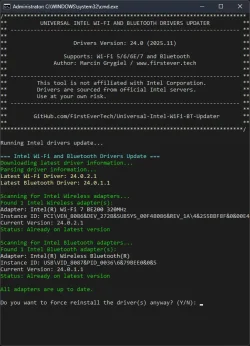
Universal Intel WiFi & Bluetooth Drivers Updater
Project: GitHub - FirstEverTech/Universal-Intel-WiFi-BT-Updater: Automated tool that downloads and installs the latest Intel Wi-Fi and Bluetooth drivers directly from Windows Update servers.
Download: WiFi-BT-Updater-24.0-2025.11-Driver64-Win10-Win11.exe
Version: 24.0-2025.11
  • An updater for all Intel Wireless/Bluetooth devices — installing WHQL-certified drivers directly from Windows Update.
  • It can install driver versions newer than those currently available publicly (already on Windows Update servers but not yet released to users).

1763488158415.webp

Both tools were scanned using VirusTotal and received 0/98, confirming they are completely safe.
I’d be happy to hear your feedback, bug reports, and improvement suggestions on the GitHub repositories!
 

My Computer

System One

  • OS
    Windows 11 Pro Insider Preview
    Computer type
    PC/Desktop
    Manufacturer/Model
    ASUS-ish Build
    CPU
    Intel Xeon E5-1680 v2 OC @ 4.4GHz
    Motherboard
    ASUS P9X79 Pro (Modded Bios)
    Memory
    Corsair Quad DDR3-2400MHz CL10
    Graphics Card(s)
    ASUS TUF Gaming GeForce RTX 4070 Ti OC
    Sound Card
    Realtek ALC898
    Monitor(s) Displays
    ASUS ROG Swift OLED PG48UQ OC @ 138Hz
    Screen Resolution
    3840 x 2160 (4K)
    Hard Drives
    Samsung SSD 990 Pro 4TB (NVMe)
    Samsung SSD 870 QVO 8TB (SATA)
    PSU
    Cooler Master Silent Pro M2 1500W
    Case
    Cooler Master MasterCase SL600M Black
    Cooling
    ARCTIC Liquid Freezer II 240
    Keyboard
    Logitech G915 LIGHTSPEED
    Mouse
    Logitech G900 Chaos Spectrum
    Internet Speed
    Download: 930 Mbps / Upload: 105 Mbps
    Other Info
    Added PCIe cards: Intel WiFi 7 BE200 (with BT 5.4) and USB 3.2 Gen 2 10Gbps
Guessing these have been pulled as all I get is 404 page not found.
@markw51

github.com/FirstEverTech/Universal-Intel-Chipset-Updater

github.com/FirstEverTech/Universal-Intel-Chipset-Updater/releases


🌟🌟🌟🌟🌟

github.com/FirstEverTech/Universal-Intel-Chipset-Updater/releases/download/v10.1-2025.11/ChipsetUpdater-10.1-2025.11-Driver64-Win10-Win11.exe
 

My Computers

System One System Two

  • OS
    Windows 11 Pro 25H2 (OS Build 26200.8246)
    Computer type
    Laptop
    Manufacturer/Model
    Dell Precision Mobile Workstation
    CPU
    Intel(R) Xeon(R) CPU E3-1535M v5 @ 2.90 Max Turbo 3.80
    Motherboard
    00V5FJ
    Memory
    64GB DDR4 ECC (Error-Correcting Code memory)
    Graphics Card(s)
    NVIDIA Quadro M2000M 4GB GDDR5 & Intel(R) HD Graphics P530
    Sound Card
    Realtek Audio
    Monitor(s) Displays
    15.6" 4K UltraHD
    Screen Resolution
    4K UHD 3840x2160
    Hard Drives
    2TB Crucial NVMe & 2TB Seagate SATA
    PSU
    Dell 180W 19.5V-9.23A
    Keyboard
    Backlit
    Mouse
    Logitech G703 & Logitech G305
    Internet Speed
    WIFI: Intel(R) Wi-Fi 6E AX210NGW(Gig+) 160MHz Bands 2.4GHz(574Mbps), 5GHz 2.4Gbps, 6 GHz (160MHz) 2.4Gbps
    Browser
    Mozilla Firefox
    Antivirus
    Windows Defender/Microsoft Security + additional Anti Spyware, Anti Malware, etc.
    Other Info
    Thunderbolt 3
  • Operating System
    Windows 11 Pro 24H2 (OS Build 26100.6725)
    Computer type
    PC/Desktop
    Manufacturer/Model
    Dell Precision Workstation T5610
    CPU
    Dual (X2) Intel(R) Xeon(R) CPU E5-2690 0 @ 2.90GHz Max Turbo 3.80
    Motherboard
    0WN7Y6
    Memory
    64GB DDR3 ECC (Error-Correcting Code memory)
    Graphics card(s)
    NVIDIA GeForce GTX 970 4GB of GDDR5
    Sound Card
    Realtek Audio & NVIDIA High Definition Audio
    Monitor(s) Displays
    3 Acer Monitors
    Screen Resolution
    1920x1080
    Hard Drives
    2 Seagate Barracuda ST2000DM008-2UB102 (RAID)
    Mouse
    Logitech G305
This might be interesting to some of you…

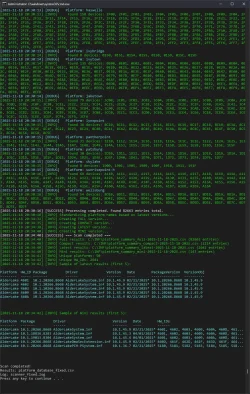
The Intel Chipset Device Software package has been with us for about a quarter of a century. Early versions were released in the early 2000s — for example, version 3.20.1008 has a release date of June 9, 2001. Over time, Intel kept adding support for new devices and removing older, legacy ones as they reached end-of-life. Because of that constant churn, it’s extremely difficult to determine the last driver version for every single device… unless you collect all installer packages and check manually — which is exactly what I did. 🙃

I downloaded every Intel installer I could find from various corners of the internet — 88 packages in total, starting from 10.0.13.0 and ending at 10.1.20314.8688. I then extracted all of them, giving me access to 4,832 individual driver files. Each driver package contains multiple Hardware Identifiers (HWIDs) referencing specific devices — in my dataset that resulted in 2,641 unique HWIDs. Based on that, I built a database containing 82,663 relations, and after filtering and deduplication I generated a complete list of all supported devices along with their newest driver version and the package in which it appears.

Here’s the list: https://github.com/FirstEverTech/Universal-Intel-Chipset-Updater/blob/main/Intel_Chipset_Drivers_Lat...

After that, I created an updater tool that uses the data from this list — you can download it from the repository above.
;-)


1763498633208.webp
 

My Computer

System One

  • OS
    Windows 11 Pro Insider Preview
    Computer type
    PC/Desktop
    Manufacturer/Model
    ASUS-ish Build
    CPU
    Intel Xeon E5-1680 v2 OC @ 4.4GHz
    Motherboard
    ASUS P9X79 Pro (Modded Bios)
    Memory
    Corsair Quad DDR3-2400MHz CL10
    Graphics Card(s)
    ASUS TUF Gaming GeForce RTX 4070 Ti OC
    Sound Card
    Realtek ALC898
    Monitor(s) Displays
    ASUS ROG Swift OLED PG48UQ OC @ 138Hz
    Screen Resolution
    3840 x 2160 (4K)
    Hard Drives
    Samsung SSD 990 Pro 4TB (NVMe)
    Samsung SSD 870 QVO 8TB (SATA)
    PSU
    Cooler Master Silent Pro M2 1500W
    Case
    Cooler Master MasterCase SL600M Black
    Cooling
    ARCTIC Liquid Freezer II 240
    Keyboard
    Logitech G915 LIGHTSPEED
    Mouse
    Logitech G900 Chaos Spectrum
    Internet Speed
    Download: 930 Mbps / Upload: 105 Mbps
    Other Info
    Added PCIe cards: Intel WiFi 7 BE200 (with BT 5.4) and USB 3.2 Gen 2 10Gbps
Hi I get the following error

/*************************************************************************
** UNIVERSAL INTEL CHIPSET UPDATER **
** --------------------------------------------------------------------- **
** **
** Drivers Version: 10.1 (2025.11) **
** **
** Author: Marcin Grygiel / www.firstever.tech **
** **
** --------------------------------------------------------------------- **
** This tool is not affiliated with Intel Corporation. **
** Drivers are sourced from official Intel servers. **
** Use at your own risk. **
** --------------------------------------------------------------------- **
** **
** GitHub.com/FirstEverTech/Intel-Chipset-Driver-Updater **
** **
*************************************************************************/

Running Universal Intel Chipset Updater...

File C:\Windows\Temp\Universal-Intel-Chipset-Updater.ps1 cannot be loaded
because running scripts is disabled on this system. For more information,
see about_Execution_Policies at
https:/go.microsoft.com/fwlink/?LinkID=135170.
+ CategoryInfo : SecurityError: (:) [], ParentContainsErrorR
ecordException
+ FullyQualifiedErrorId : UnauthorizedAccess

Press any key to continue . . .

Regards
Mike
 

My Computer

System One

  • OS
    windows 11
Hi I get the following error

If you're getting this error:
File C:\Windows\Temp\Universal-Intel-Chipset-Updater.ps1 cannot be loaded because running scripts is disabled on this system.

Quick fix: Run PowerShell as Administrator and execute this command:
Code:
Set-ExecutionPolicy -ExecutionPolicy RemoteSigned -Scope CurrentUser

Then try running the tool again.

Alternative one-time solution: Run the script with bypass policy:
Code:
powershell -ExecutionPolicy Bypass -File "C:\Windows\Temp\Universal-Intel-Chipset-Updater.ps1"

Why this happens: Windows blocks PowerShell scripts by default for security reasons. The commands above temporarily lift this restriction.
 

My Computer

System One

  • OS
    Windows 11 Pro Insider Preview
    Computer type
    PC/Desktop
    Manufacturer/Model
    ASUS-ish Build
    CPU
    Intel Xeon E5-1680 v2 OC @ 4.4GHz
    Motherboard
    ASUS P9X79 Pro (Modded Bios)
    Memory
    Corsair Quad DDR3-2400MHz CL10
    Graphics Card(s)
    ASUS TUF Gaming GeForce RTX 4070 Ti OC
    Sound Card
    Realtek ALC898
    Monitor(s) Displays
    ASUS ROG Swift OLED PG48UQ OC @ 138Hz
    Screen Resolution
    3840 x 2160 (4K)
    Hard Drives
    Samsung SSD 990 Pro 4TB (NVMe)
    Samsung SSD 870 QVO 8TB (SATA)
    PSU
    Cooler Master Silent Pro M2 1500W
    Case
    Cooler Master MasterCase SL600M Black
    Cooling
    ARCTIC Liquid Freezer II 240
    Keyboard
    Logitech G915 LIGHTSPEED
    Mouse
    Logitech G900 Chaos Spectrum
    Internet Speed
    Download: 930 Mbps / Upload: 105 Mbps
    Other Info
    Added PCIe cards: Intel WiFi 7 BE200 (with BT 5.4) and USB 3.2 Gen 2 10Gbps

My Computer

System One

  • OS
    Windows 11 Pro Insider Preview
    Computer type
    PC/Desktop
    Manufacturer/Model
    ASUS-ish Build
    CPU
    Intel Xeon E5-1680 v2 OC @ 4.4GHz
    Motherboard
    ASUS P9X79 Pro (Modded Bios)
    Memory
    Corsair Quad DDR3-2400MHz CL10
    Graphics Card(s)
    ASUS TUF Gaming GeForce RTX 4070 Ti OC
    Sound Card
    Realtek ALC898
    Monitor(s) Displays
    ASUS ROG Swift OLED PG48UQ OC @ 138Hz
    Screen Resolution
    3840 x 2160 (4K)
    Hard Drives
    Samsung SSD 990 Pro 4TB (NVMe)
    Samsung SSD 870 QVO 8TB (SATA)
    PSU
    Cooler Master Silent Pro M2 1500W
    Case
    Cooler Master MasterCase SL600M Black
    Cooling
    ARCTIC Liquid Freezer II 240
    Keyboard
    Logitech G915 LIGHTSPEED
    Mouse
    Logitech G900 Chaos Spectrum
    Internet Speed
    Download: 930 Mbps / Upload: 105 Mbps
    Other Info
    Added PCIe cards: Intel WiFi 7 BE200 (with BT 5.4) and USB 3.2 Gen 2 10Gbps

My Computers

System One System Two

  • OS
    Windows 11 Pro 25H2 (OS Build 26200.8246)
    Computer type
    Laptop
    Manufacturer/Model
    Dell Precision Mobile Workstation
    CPU
    Intel(R) Xeon(R) CPU E3-1535M v5 @ 2.90 Max Turbo 3.80
    Motherboard
    00V5FJ
    Memory
    64GB DDR4 ECC (Error-Correcting Code memory)
    Graphics Card(s)
    NVIDIA Quadro M2000M 4GB GDDR5 & Intel(R) HD Graphics P530
    Sound Card
    Realtek Audio
    Monitor(s) Displays
    15.6" 4K UltraHD
    Screen Resolution
    4K UHD 3840x2160
    Hard Drives
    2TB Crucial NVMe & 2TB Seagate SATA
    PSU
    Dell 180W 19.5V-9.23A
    Keyboard
    Backlit
    Mouse
    Logitech G703 & Logitech G305
    Internet Speed
    WIFI: Intel(R) Wi-Fi 6E AX210NGW(Gig+) 160MHz Bands 2.4GHz(574Mbps), 5GHz 2.4Gbps, 6 GHz (160MHz) 2.4Gbps
    Browser
    Mozilla Firefox
    Antivirus
    Windows Defender/Microsoft Security + additional Anti Spyware, Anti Malware, etc.
    Other Info
    Thunderbolt 3
  • Operating System
    Windows 11 Pro 24H2 (OS Build 26100.6725)
    Computer type
    PC/Desktop
    Manufacturer/Model
    Dell Precision Workstation T5610
    CPU
    Dual (X2) Intel(R) Xeon(R) CPU E5-2690 0 @ 2.90GHz Max Turbo 3.80
    Motherboard
    0WN7Y6
    Memory
    64GB DDR3 ECC (Error-Correcting Code memory)
    Graphics card(s)
    NVIDIA GeForce GTX 970 4GB of GDDR5
    Sound Card
    Realtek Audio & NVIDIA High Definition Audio
    Monitor(s) Displays
    3 Acer Monitors
    Screen Resolution
    1920x1080
    Hard Drives
    2 Seagate Barracuda ST2000DM008-2UB102 (RAID)
    Mouse
    Logitech G305
Universal Intel Chipset Device Updater

Version: 10.1-2025.11.5
Link: ChipsetUpdater-10.1-2025.11.5-Win10-Win11.exe
Release Notes: Link
Project / GitHub: Link

This project has undergone comprehensive analysis by multiple AI security experts to ensure code quality and reliability. The tool achieved an average security score of 9.1/10 across all independent assessments.

Grok9.7/10"Highest score ever given to a community driver utility - Safe for corporate deployment"
ChatGPT9.4/10"Safest, most stable, and most professionally engineered version"
Gemini9.0/10"Exceeds standards expected of community-developed tools"
Copilot8.6/10"Strong project with excellent transparency and security improvements"
DeepSeek8.5/10"Automated tool with verification mechanisms for Intel driver updates"
Claude8.3/10"Best open-source tool in its category with leadership position"
 

My Computer

System One

  • OS
    Windows 11 Pro Insider Preview
    Computer type
    PC/Desktop
    Manufacturer/Model
    ASUS-ish Build
    CPU
    Intel Xeon E5-1680 v2 OC @ 4.4GHz
    Motherboard
    ASUS P9X79 Pro (Modded Bios)
    Memory
    Corsair Quad DDR3-2400MHz CL10
    Graphics Card(s)
    ASUS TUF Gaming GeForce RTX 4070 Ti OC
    Sound Card
    Realtek ALC898
    Monitor(s) Displays
    ASUS ROG Swift OLED PG48UQ OC @ 138Hz
    Screen Resolution
    3840 x 2160 (4K)
    Hard Drives
    Samsung SSD 990 Pro 4TB (NVMe)
    Samsung SSD 870 QVO 8TB (SATA)
    PSU
    Cooler Master Silent Pro M2 1500W
    Case
    Cooler Master MasterCase SL600M Black
    Cooling
    ARCTIC Liquid Freezer II 240
    Keyboard
    Logitech G915 LIGHTSPEED
    Mouse
    Logitech G900 Chaos Spectrum
    Internet Speed
    Download: 930 Mbps / Upload: 105 Mbps
    Other Info
    Added PCIe cards: Intel WiFi 7 BE200 (with BT 5.4) and USB 3.2 Gen 2 10Gbps
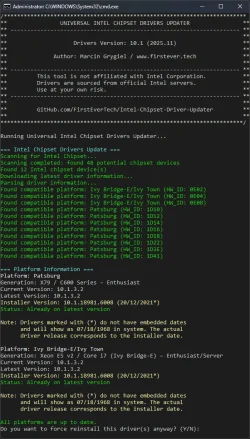
v10.1-2025.11.8 - Release Notes​

New Features & Improvements​

  • Enhanced platform detection: Added automatic detection for Intel platforms that use Windows 11 24H2 inbox drivers (e.g., Meteor Lake)
  • Improved user communication: Clear informational messages when Windows inbox drivers are detected
  • Smart exclusion system: Platforms with Package = None in the database are automatically excluded from updates
  • Better date handling: Windows inbox driver dates now use digital signature dates from corresponding .cat files

Technical Updates​

  • Updated parsing logic: Script now identifies Windows inbox-only platforms during hardware detection
  • Enhanced error handling: Improved debug messages and logging for platform detection
  • Streamlined user experience: Separate section for Windows inbox platforms in the output

Notes​

  • No INF database changes: This update only improves the detection and handling logic
  • Backward compatible: Fully compatible with existing INF database format
  • Future-proof: Automatically handles new platforms marked with Package = None

Bug Fixes​

  • Fixed potential false positives for unsupported platforms
  • Improved handling of platforms without separate Intel Chipset Device Software packages
Direct Link: ChipsetUpdater-10.1-2025.11.8-Win10-Win11.exe
 

My Computer

System One

  • OS
    Windows 11 Pro Insider Preview
    Computer type
    PC/Desktop
    Manufacturer/Model
    ASUS-ish Build
    CPU
    Intel Xeon E5-1680 v2 OC @ 4.4GHz
    Motherboard
    ASUS P9X79 Pro (Modded Bios)
    Memory
    Corsair Quad DDR3-2400MHz CL10
    Graphics Card(s)
    ASUS TUF Gaming GeForce RTX 4070 Ti OC
    Sound Card
    Realtek ALC898
    Monitor(s) Displays
    ASUS ROG Swift OLED PG48UQ OC @ 138Hz
    Screen Resolution
    3840 x 2160 (4K)
    Hard Drives
    Samsung SSD 990 Pro 4TB (NVMe)
    Samsung SSD 870 QVO 8TB (SATA)
    PSU
    Cooler Master Silent Pro M2 1500W
    Case
    Cooler Master MasterCase SL600M Black
    Cooling
    ARCTIC Liquid Freezer II 240
    Keyboard
    Logitech G915 LIGHTSPEED
    Mouse
    Logitech G900 Chaos Spectrum
    Internet Speed
    Download: 930 Mbps / Upload: 105 Mbps
    Other Info
    Added PCIe cards: Intel WiFi 7 BE200 (with BT 5.4) and USB 3.2 Gen 2 10Gbps
Update v2026.02.0009 - Release Notes​

GitHub: github.com/FirstEverTech/Universal-Intel-Chipset-Updater
Download: ChipsetUpdater-2026.02.0009-Win10-Win11.exe
Version: 2026.02.0009
Release Date: February 17, 2026

Highlights
  • Database Scanner Fix: 300 Series – Cannon Lake PCH:
    • Fixed missing 300 Series chipsets (Cannon Lake-H/LP) in generated INF database
    • All 141 HWIDs (73+68) now appear correctly in intel-chipset-infs-latest.md
    • Updated PCH Family legend now includes - 300 Series - Cannon Lake PCH (Mobile)
  • Cosmetic Message Formatting:
    • Improved console output alignment and readability
    • Refined status messages in platform display
Technical Updates
  • Intel Platform Scanner: Added missing platforms to Xeon E5 v1 - Jaketown$pchFamilyListXeon E5 v1 - Jaketown and corrected key casing in Xeon E5 v1 - Jaketown$archNameOverrideXeon E5 v1 - Jaketown
  • Markdown Generation: Embedded legend now includes 300 Series entry
  • Message Functions: Enhanced Xeon E5 v1 - JaketownWrite-LogXeon E5 v1 - Jaketown and Xeon E5 v1 - JaketownShow-Screen2Xeon E5 v1 - Jaketown formatting
Bug Fixes
  • Resolved complete absence of 300 Series (Cannon Lake PCH) from Markdown output
  • Fixed case-sensitivity issue preventing correct platform categorization
  • Added missing line in PCH Family legend
Included Files
  • universal-intel-chipset-updater.ps1 – Main updater script (with enhanced Windows Inbox detection)
  • universal-intel-chipset-updater.bat – Simplified launcher
  • ChipsetUpdater-2026.02.0009-Win10-Win11.exe – Self-extracting package
Requirements & Notes
  • Minimum Requirements: Windows 10 LTSC 2019 (build 17763) or newer, .NET Framework 4.7.2+
  • Database rebuild: Run the scanner after updating to regenerate Xeon E5 v1 - Jaketownintel-chipset-infs-latest.mdXeon E5 v1 - Jaketown
  • Core updater logic (Windows Inbox detection, version comparison) unchanged from v2026.02.0008
Summary:

v2026.02.0009 fixes a critical database issue where 300 Series (Cannon Lake PCH) was missing from the generated INF list.

All HWIDs are now correctly displayed, and console output formatting has been polished. The updater retains all previous enhancements, including Windows Inbox INF detection.
 

My Computer

System One

  • OS
    Windows 11 Pro Insider Preview
    Computer type
    PC/Desktop
    Manufacturer/Model
    ASUS-ish Build
    CPU
    Intel Xeon E5-1680 v2 OC @ 4.4GHz
    Motherboard
    ASUS P9X79 Pro (Modded Bios)
    Memory
    Corsair Quad DDR3-2400MHz CL10
    Graphics Card(s)
    ASUS TUF Gaming GeForce RTX 4070 Ti OC
    Sound Card
    Realtek ALC898
    Monitor(s) Displays
    ASUS ROG Swift OLED PG48UQ OC @ 138Hz
    Screen Resolution
    3840 x 2160 (4K)
    Hard Drives
    Samsung SSD 990 Pro 4TB (NVMe)
    Samsung SSD 870 QVO 8TB (SATA)
    PSU
    Cooler Master Silent Pro M2 1500W
    Case
    Cooler Master MasterCase SL600M Black
    Cooling
    ARCTIC Liquid Freezer II 240
    Keyboard
    Logitech G915 LIGHTSPEED
    Mouse
    Logitech G900 Chaos Spectrum
    Internet Speed
    Download: 930 Mbps / Upload: 105 Mbps
    Other Info
    Added PCIe cards: Intel WiFi 7 BE200 (with BT 5.4) and USB 3.2 Gen 2 10Gbps
This is very cool I wonder is it possible to make one for AMD or maybe add AMD to it??
 

My Computer

System One

  • OS
    windows 11
    Computer type
    PC/Desktop
    CPU
    AMD Ryzen 7 9800X3D
    Motherboard
    PRIME B650M-A AX6
    Memory
    64 GB
    Graphics Card(s)
    Asus TUF-RTX4090-O24G
This is very cool I wonder is it possible to have one for AMD?


We have one for AMD. :-)


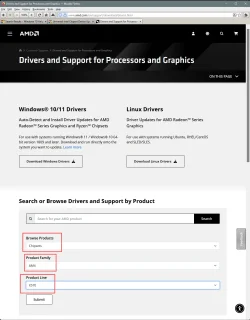
Getting the chipset drivers for AMD is much simpler.


For example... this would be my AMD chipset driver...

Image1.webp


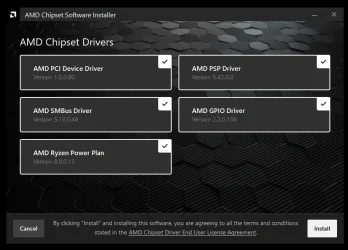
Even the installer is easy...

Image1.webp
 

My Computers

System One System Two

  • OS
    Win 11 Home ♦♦♦26200.8457 ♦♦♦♦♦♦♦25H2
    Computer type
    PC/Desktop
    Manufacturer/Model
    Built by Ghot® [May 2020]
    CPU
    AMD Ryzen 7 3700X
    Motherboard
    Asus Pro WS X570-ACE (BIOS 5302)
    Memory
    G.Skill (F4-3200C14D-16GTZKW)
    Graphics Card(s)
    EVGA RTX 2070 (08G-P4-2171-KR)
    Sound Card
    Realtek ALC1220P / ALC S1220A
    Monitor(s) Displays
    Dell U3011 30"
    Screen Resolution
    2560 x 1600
    Hard Drives
    2x Samsung 860 EVO 500GB,
    WD 4TB Black FZBX - SATA III,
    WD 8TB Black FZBX - SATA III,
    DRW-24B1ST CD/DVD Burner
    PSU
    PC Power & Cooling 750W Quad EPS12V
    Case
    Cooler Master ATCS 840 Tower
    Cooling
    CM Hyper 212 EVO (push/pull)
    Keyboard
    Ducky DK9008 Shine II Blue LED
    Mouse
    Logitech Optical M-100
    Internet Speed
    300/300
    Browser
    Firefox (latest)
    Antivirus
    Bitdefender Total Security
    Other Info
    Speakers: Klipsch Pro Media 2.1
  • Operating System
    Windows XP Pro 32bit w/SP3
    Computer type
    PC/Desktop
    Manufacturer/Model
    Built by Ghot® (not in use)
    CPU
    AMD Athlon 64 X2 5000+ (OC'd @ 3.2Ghz)
    Motherboard
    ASUS M2N32-SLI Deluxe Wireless Edition
    Memory
    TWIN2X2048-6400C4DHX (2 x 1GB, DDR2 800)
    Graphics card(s)
    EVGA 256-P2-N758-TR GeForce 8600GT SSC
    Sound Card
    Onboard
    Monitor(s) Displays
    ViewSonic G90FB Black 19" Professional (CRT)
    Screen Resolution
    up to 2048 x 1536
    Hard Drives
    WD 36GB 10,000rpm Raptor SATA
    Seagate 80GB 7200rpm SATA
    Lite-On LTR-52246S CD/RW
    Lite-On LH-18A1P CD/DVD Burner
    PSU
    PC Power & Cooling Silencer 750 Quad EPS12V
    Case
    Generic Beige case, 80mm fans
    Cooling
    ZALMAN 9500A 92mm CPU Cooler
    Keyboard
    Logitech Classic Keybooard 200
    Mouse
    Logitech Optical M-BT96a
    Internet Speed
    300/300
    Browser
    Firefox 3.x ??
    Antivirus
    Symantec (Norton)
    Other Info
    Still assembled, still runs. Haven't turned it on for 15 years?
This is very cool I wonder is it possible to make one for AMD or maybe add AMD to it??

The owner of the MajorGeeks website asked me the same question, this was my answer:

Regarding an AMD version: to be honest, AMD’s support for their chipsets is already pretty exemplary. First and foremost, they offer a unified installer that covers virtually all products dating back to the AM4 launch (2016). On top of that, even their older legacy platforms still have drivers available directly on their website, with support ranging all the way from Windows XP up to Windows 8.1.

For example AMD 690G chipset from 2007:
https://www.amd.com/en/support/downloads/drivers.html/chipsets/amd-6-series-chipsets/690g.html
For comparison, my updater offers support for Intel platforms from SandyBridge from 2011.

The only feature I personally find missing (from AMD) is an auto-update function—a tool that could check if the latest chipset drivers are installed and notify the user. That would be a nice addition.

Good job AMD and NVIDIA! (regarding driver availability)

P.S.
I'm pleasantly surprised—after a few months, my tool already has 25K downloads and has been almost bug-free. There was a small issue with the INF file database generated by my another tool (but it was quickly fixed). The Updater itself works very well considering it supports all possible platforms from SandyBridge onward, and during development, I could only test it on one.

Cheers,
Marcin
 
Last edited:

My Computer

System One

  • OS
    Windows 11 Pro Insider Preview
    Computer type
    PC/Desktop
    Manufacturer/Model
    ASUS-ish Build
    CPU
    Intel Xeon E5-1680 v2 OC @ 4.4GHz
    Motherboard
    ASUS P9X79 Pro (Modded Bios)
    Memory
    Corsair Quad DDR3-2400MHz CL10
    Graphics Card(s)
    ASUS TUF Gaming GeForce RTX 4070 Ti OC
    Sound Card
    Realtek ALC898
    Monitor(s) Displays
    ASUS ROG Swift OLED PG48UQ OC @ 138Hz
    Screen Resolution
    3840 x 2160 (4K)
    Hard Drives
    Samsung SSD 990 Pro 4TB (NVMe)
    Samsung SSD 870 QVO 8TB (SATA)
    PSU
    Cooler Master Silent Pro M2 1500W
    Case
    Cooler Master MasterCase SL600M Black
    Cooling
    ARCTIC Liquid Freezer II 240
    Keyboard
    Logitech G915 LIGHTSPEED
    Mouse
    Logitech G900 Chaos Spectrum
    Internet Speed
    Download: 930 Mbps / Upload: 105 Mbps
    Other Info
    Added PCIe cards: Intel WiFi 7 BE200 (with BT 5.4) and USB 3.2 Gen 2 10Gbps
Back
Top Bottom