Unstable PC


Maldark

Member
Local time
10:27 AM
Posts
5
OS
Windows 11
Hi,

I got a new PC about a month ago, and it's been a bit unstable throughout. I generally haven't noticed it while using the PC; but when stepping away from it for an extended period of time it would sometimes not return to functioning properly from the "sleepish" state. I say sleepish because it's not set to sleep, but only set to turn off the monitors after an hour. As such, it isn't BSOD, but I still figure this is the correct section.

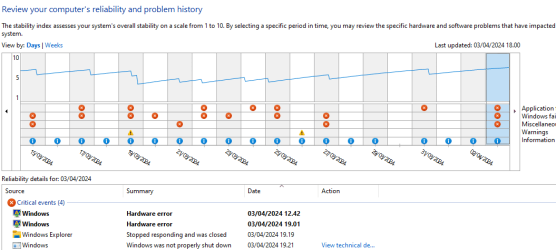
I have attached the logs, and here's an overview of the reliability history (although I suspect it's also included in the logs).
For reference, the error that happened at 12.42 today went unnoticed. The monitor probably turned off as I was working on another computer, but it seemed to wake up just fine when I eventually switched to it. The error at 19.01, however, didn't recover gracefully and I had to hold down the power button to restart.
1712165956791.png

Please let me know if I can provide any more information.

Thanks!
 
Windows Build/Version
23H2 (22631.3374)

Attachments

My Computer My Computer

At a glance

Windows 11AMD Ryzen 7 7800X3D64GB Corsair VengeanceASUS RTX 4090 STRIX OC
OS
Windows 11
Computer type
PC/Desktop
CPU
AMD Ryzen 7 7800X3D
Motherboard
TUF GAMING X670E-PLUS
Memory
64GB Corsair Vengeance
Graphics Card(s)
ASUS RTX 4090 STRIX OC
Screen Resolution
2560x1440
PSU
Corsair RM1000e
Cooling
be quiet! Silent Loop 2 360mm
I don't see reason to check the log files as you only report one problem if you have more problems list them here.
 

My Computer My Computer

At a glance

Windows 11AMD Ryzen 7 5700GMicron Technology DDR4-3200 16GBNVIDIA GeForce RTX 3060
OS
Windows 11
Computer type
PC/Desktop
Manufacturer/Model
HP Pavilion
CPU
AMD Ryzen 7 5700G
Motherboard
Erica6
Memory
Micron Technology DDR4-3200 16GB
Graphics Card(s)
NVIDIA GeForce RTX 3060
Sound Card
Realtek ALC671
Monitor(s) Displays
Samsung SyncMaster U28E590
Screen Resolution
3840 x 2160
Hard Drives
SAMSUNG MZVLQ1T0HALB-000H1
Just now I my discord disconnected, and was unable to reconnect. I tried to screenshot it for my friends but win+shift+s failed. I then tried opening settings and that didn't work either:
1712170336177.png

Restart restored functionality. Let me know if I should upload logs anew.
 

My Computer My Computer

At a glance

Windows 11AMD Ryzen 7 7800X3D64GB Corsair VengeanceASUS RTX 4090 STRIX OC
OS
Windows 11
Computer type
PC/Desktop
CPU
AMD Ryzen 7 7800X3D
Motherboard
TUF GAMING X670E-PLUS
Memory
64GB Corsair Vengeance
Graphics Card(s)
ASUS RTX 4090 STRIX OC
Screen Resolution
2560x1440
PSU
Corsair RM1000e
Cooling
be quiet! Silent Loop 2 360mm
We can't go over each one of those errors, that is an endless task.
 

My Computer My Computer

At a glance

Windows 11AMD Ryzen 7 5700GMicron Technology DDR4-3200 16GBNVIDIA GeForce RTX 3060
OS
Windows 11
Computer type
PC/Desktop
Manufacturer/Model
HP Pavilion
CPU
AMD Ryzen 7 5700G
Motherboard
Erica6
Memory
Micron Technology DDR4-3200 16GB
Graphics Card(s)
NVIDIA GeForce RTX 3060
Sound Card
Realtek ALC671
Monitor(s) Displays
Samsung SyncMaster U28E590
Screen Resolution
3840 x 2160
Hard Drives
SAMSUNG MZVLQ1T0HALB-000H1
That's fair, but I thought you wanted me to provide more problems than the one I had described in the original post? How do you suggest I proceed?
 

My Computer My Computer

At a glance

Windows 11AMD Ryzen 7 7800X3D64GB Corsair VengeanceASUS RTX 4090 STRIX OC
OS
Windows 11
Computer type
PC/Desktop
CPU
AMD Ryzen 7 7800X3D
Motherboard
TUF GAMING X670E-PLUS
Memory
64GB Corsair Vengeance
Graphics Card(s)
ASUS RTX 4090 STRIX OC
Screen Resolution
2560x1440
PSU
Corsair RM1000e
Cooling
be quiet! Silent Loop 2 360mm
You can also perform in-place upgrade of Windows 11. In-place upgrade is to use to replace the current operating system files on your computer. Unlike a clean installation of Windows, you can start a Windows in-place upgrade when your OS is still running. And an in-place upgrade can keep your files, settings, & apps during the upgrade process. You can perform a Windows 11 in-place upgrade is to use the Windows 11 Media Creation Tool. Make sure to select Upgrade this PC now and click Next. Follow the on-screen guide to perform a Windows 11 in-place upgrade.


My Computer My Computer

At a glance

Windows 11AMD Ryzen 7 5700GMicron Technology DDR4-3200 16GBNVIDIA GeForce RTX 3060
OS
Windows 11
Computer type
PC/Desktop
Manufacturer/Model
HP Pavilion
CPU
AMD Ryzen 7 5700G
Motherboard
Erica6
Memory
Micron Technology DDR4-3200 16GB
Graphics Card(s)
NVIDIA GeForce RTX 3060
Sound Card
Realtek ALC671
Monitor(s) Displays
Samsung SyncMaster U28E590
Screen Resolution
3840 x 2160
Hard Drives
SAMSUNG MZVLQ1T0HALB-000H1
it's been a bit unstable throughout. I generally haven't noticed it while using the PC; but when stepping away from it for an extended period of time it would sometimes not return to functioning properly from the "sleepish" state. I say sleepish because it's not set to sleep, but only set to turn off the monitors after an hour. As such, it isn't BSOD, but I still figure this is the correct section.
Hello, and welcome to the forum. You say it's not set to sleep but to just turn the monitor off. Just to verify, you have Sleep as NEVER. Right?
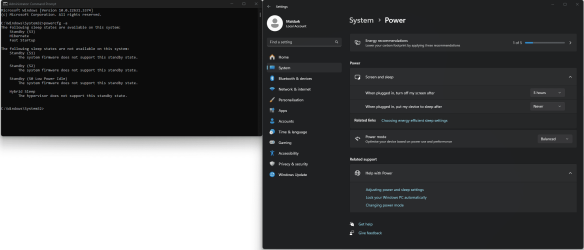
Go to command prompt as admin and type powerconfg -a and post a screenshot. I see you seem to be having trouble with the snipping tool, whether that be an actual fault or you may have been unsure how to use it

I'm not the best one to read your logs but from what I can tell there's little in them. Just to be sure @zbook will take a look and get back to you. IMO a computer that's not a month old should not be having a hardware error.
 

My Computers My Computers

  • At a glance

    Windows 11 Pro 25H2 26200.9457i9-10900 10 core 20 threads32 gbnone-Intel UHD Graphics 630
    OS
    Windows 11 Pro 25H2 26200.9457
    Computer type
    PC/Desktop
    Manufacturer/Model
    Dell Optiplex 7080
    CPU
    i9-10900 10 core 20 threads
    Motherboard
    DELL 0J37VM
    Memory
    32 gb
    Graphics Card(s)
    none-Intel UHD Graphics 630
    Sound Card
    Integrated Realtek
    Monitor(s) Displays
    Benq 27
    Screen Resolution
    2560x1440
    Hard Drives
    2x1tb Solidigm m.2 nvme /External drives 512gb Samsung m.2 sata+2tb Kingston m2.nvme
    PSU
    500w
    Case
    MT
    Cooling
    Dell Premium
    Keyboard
    Logitech wired
    Mouse
    Logitech wireless
    Internet Speed
    so slow I'm too embarrassed to tell
    Browser
    #1 Edge #2 Firefox
    Antivirus
    Defender+MWB Premium
  • At a glance

    Windows 11 Pro 24H2 26200.9457AMD Ryzen 7 6800U32 gbintegrated
    Operating System
    Windows 11 Pro 24H2 26200.9457
    Computer type
    PC/Desktop
    Manufacturer/Model
    Beelink Mini PC SER5
    CPU
    AMD Ryzen 7 6800U
    Memory
    32 gb
    Graphics card(s)
    integrated
    Sound Card
    integrated
    Monitor(s) Displays
    Benq 27
    Screen Resolution
    2560x1440
    Hard Drives
    1TB Crucial nvme
    Keyboard
    Logitech wired
    Mouse
    Logitech wireless
    Internet Speed
    still too embarrassed to tell
    Browser
    Firefox
    Antivirus
    Defender
  • System 3 is non compliant Dell 9020 i7-4770/24gb ram Win11 PRO 26200.9457
You can also perform in-place upgrade of Windows 11. In-place upgrade is to use to replace the current operating system files on your computer. Unlike a clean installation of Windows, you can start a Windows in-place upgrade when your OS is still running. And an in-place upgrade can keep your files, settings, & apps during the upgrade process. You can perform a Windows 11 in-place upgrade is to use the Windows 11 Media Creation Tool. Make sure to select Upgrade this PC now and click Next. Follow the on-screen guide to perform a Windows 11 in-place upgrade.

Ill give tha a try thank you.

Hello, and welcome to the forum. You say it's not set to sleep but to just turn the monitor off. Just to verify, you have Sleep as NEVER. Right?
Go to command prompt as admin and type powerconfg -a and post a screenshot. I see you seem to be having trouble with the snipping tool, whether that be an actual fault or you may have been unsure how to use it

I'm not the best one to read your logs but from what I can tell there's little in them. Just to be sure @zbook will take a look and get back to you. IMO a computer that's not a month old should not be having a hardware error.
Hi there.

Here are the screenshot as requested (as well as where I set it to never sleep). Note that the top option was set to 1 hour before I made this post.
1712183884519.png

As for the snipping tool, I'm quite familiar with it and have used it many times. For whatever reason everything on the PC just stopped working properly until I restarted it. Discord disconnected and wouldn't reconnect, when I tried to screenshot it that then failed. When I opened settings that wouldn't open either, and task manager too. That's why you see all of these errors all around the same time. What caused it I don't know unfortunately.
 

My Computer My Computer

At a glance

Windows 11AMD Ryzen 7 7800X3D64GB Corsair VengeanceASUS RTX 4090 STRIX OC
OS
Windows 11
Computer type
PC/Desktop
CPU
AMD Ryzen 7 7800X3D
Motherboard
TUF GAMING X670E-PLUS
Memory
64GB Corsair Vengeance
Graphics Card(s)
ASUS RTX 4090 STRIX OC
Screen Resolution
2560x1440
PSU
Corsair RM1000e
Cooling
be quiet! Silent Loop 2 360mm
During the last 30 days there were 6 unexpected shutdowns and restarts without BSOD seen in the collected log files.


1) Indicate whether these were:
a) manual power offs due to hangs and or freezes
b) spontaneous unexpected shutdown and restarts


2) List all hardware attached to the computer via USB ports / bluetooth / wireless, etc.


3) Run Tuneup plus > post a share link


4) Uninstall and reinstall the Nvidia GPU driver using DDU > reinstall from the Nvidia website
Current Driver Version 31.0.15.5186

Try older versions as needed.

If unexpected shutdowns and restarts with or without hangs / freezes continue on this new installation with various Nvidia driver versions then temporarily turn off the Nvidia dGPU > use only the AMD iGPU > report findings


Last edited:

My Computer My Computer

At a glance

Windows 10Intel(R) Core(TM) i7-4800MQ CPU @ 2.70GHz16 GB Total: Manufacturer : Samsung MemoryTyp...NVIDIA Quadro K3100M; Intel(R) HD Graphics 4600
OS
Windows 10
Computer type
Laptop
Manufacturer/Model
HP
CPU
Intel(R) Core(TM) i7-4800MQ CPU @ 2.70GHz
Motherboard
Product : 190A Version : KBC Version 94.56
Memory
16 GB Total: Manufacturer : Samsung MemoryType : DDR3 FormFactor : SODIMM Capacity : 8GB Speed : 1600
Graphics Card(s)
NVIDIA Quadro K3100M; Intel(R) HD Graphics 4600
Sound Card
IDT High Definition Audio CODEC; PNP Device ID HDAUDIO\FUNC_01&VEN_111D&DEV_76E0
Hard Drives
Model Hitachi HTS727575A9E364
Antivirus
Microsoft Defender
Other Info
Mobile Workstation
Thank you for the detailed list of steps to try out @zbook. Would you recommend I try out the Windows 11 in-place upgrade as @FreeBooter suggested first or should I start with yours?
 

My Computer My Computer

At a glance

Windows 11AMD Ryzen 7 7800X3D64GB Corsair VengeanceASUS RTX 4090 STRIX OC
OS
Windows 11
Computer type
PC/Desktop
CPU
AMD Ryzen 7 7800X3D
Motherboard
TUF GAMING X670E-PLUS
Memory
64GB Corsair Vengeance
Graphics Card(s)
ASUS RTX 4090 STRIX OC
Screen Resolution
2560x1440
PSU
Corsair RM1000e
Cooling
be quiet! Silent Loop 2 360mm
When available post results for the above steps.

The log files reported live kernel events without BSOD.

The live kernel events are typically reported as a hardware event.


If the computer continues to have problems you can perform an in place upgrade and or a backup image followed by a clean install.

If there are problems after a clean install then look for a hardware problem.

At this time see if there is or is not improvement with replacing the GPU drivers.
 

My Computer My Computer

At a glance

Windows 10Intel(R) Core(TM) i7-4800MQ CPU @ 2.70GHz16 GB Total: Manufacturer : Samsung MemoryTyp...NVIDIA Quadro K3100M; Intel(R) HD Graphics 4600
OS
Windows 10
Computer type
Laptop
Manufacturer/Model
HP
CPU
Intel(R) Core(TM) i7-4800MQ CPU @ 2.70GHz
Motherboard
Product : 190A Version : KBC Version 94.56
Memory
16 GB Total: Manufacturer : Samsung MemoryType : DDR3 FormFactor : SODIMM Capacity : 8GB Speed : 1600
Graphics Card(s)
NVIDIA Quadro K3100M; Intel(R) HD Graphics 4600
Sound Card
IDT High Definition Audio CODEC; PNP Device ID HDAUDIO\FUNC_01&VEN_111D&DEV_76E0
Hard Drives
Model Hitachi HTS727575A9E364
Antivirus
Microsoft Defender
Other Info
Mobile Workstation

Latest Support Threads

Back
Top Bottom